How to check for a Google Play system update (October 2026)
To check for a Google Play system update on a Pixel, open Settings > Security & privacy > System & updates > Google Play system update. On a Samsung Galaxy, go to Settings > Security and privacy > Updates > Google Play system update. If an update is waiting, tap Download & install and restart when asked.
Google posted its latest round of October 2026 system update notes on October 19. The Google Play services release in it adds in-call scam protections for phones running Android 15 and earlier. This guide shows where to find each type of update on Pixel, Samsung and other phones, what the October releases change, and why one phone can show “up to date” while missing the newest features.
Before you start
- You’ll need: your Android phone, a Wi-Fi connection and at least 75% battery (Google’s recommendation for updates).
- Time: about 5 minutes, plus a restart if a system update installs.
- Applies to: phones and tablets with Google Play. Menu names differ slightly by manufacturer.
Four kinds of Android update
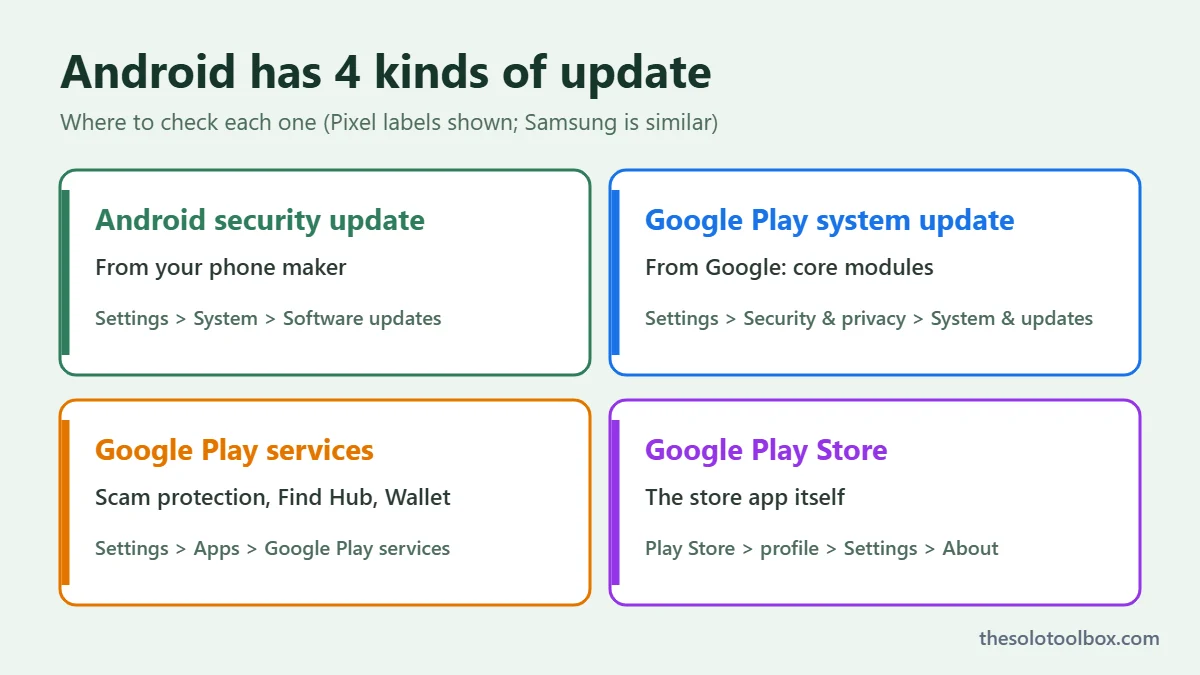
Android phones get updates through four separate channels. Each has its own version number and its own place in Settings, which is why “check for updates” can mean different things.
| Update | What it does | Who sends it | Where to check |
|---|---|---|---|
| Android security update | Monthly OS security patches | Your phone maker or carrier | Settings > System > Software updates (varies) |
| Google Play system update | Patches core Android modules without a full OS update | Settings > Security & privacy > System & updates | |
| Google Play services | Background app behind Find Hub, Wallet, sign-in and scam protections | Google, through the Play Store | Settings > Apps > Google Play services |
| Google Play Store | The store app itself | Play Store > profile picture > Settings > About |
How to check for a Google Play system update
Google Pixel
- Open Settings.
- Tap Security & privacy, then System & updates.
- Tap Google Play system update.
- If an update is available, tap Download & install, then restart when prompted.
Samsung Galaxy
- Open Settings.
- Tap Security and privacy, then Updates.
- Tap Google Play system update. If an update appears, tap Download and install.
Other Android phones
Open Settings > About phone > Android version. Google’s help page says this screen lists your Android version, security update, Google Play system update and build number. The date next to Google Play system update tells you how current it is. To install one, search Settings for “Google Play system update”. On Motorola, OnePlus, Xiaomi and others, it’s usually under a Security or Updates menu.
What’s new in the October 2026 updates
Google publishes monthly notes for its system components. The October 19 entries, reported by 9to5Google and SammyFans, include:
- Google Play services v26.41 (October 19): new in-call scam protections for devices on Android 15 and earlier, including checks on apps that ask for accessibility permissions during a call. Scammers often use that request to take control of a phone while talking the victim through it. The release also adds Left-Behind Reminders in Find Hub, automatic owner pairing for supported Find Hub tags, and smoother Fast Pair firmware updates.
- Google Play Store v53.7 (October 19): downloads now show time remaining or remaining size instead of a percentage, and device offers appear at the top of Apps Home.
- Google Play services v26.40 (October 12): receipt scanning in Google Wallet and an in-app message center.
- Android WebView v156 (October 7): security, privacy and bug fixes.
Google rolls these out in stages over several weeks, so your phone may not get v26.41 the day the notes go live. Some features in the notes are also limited to certain devices or regions.
Why your phone says “up to date” but lacks a new feature
The Google Play system update screen covers only the core modules. Most of the October features listed above ship in Google Play services, which updates silently through the Play Store. To see which version you have:
- Go to Settings > Apps (on some phones, See all apps).
- Tap Google Play services. The version number is at the bottom of the App info screen.
- To update the Play Store app itself, open Google Play, tap your profile picture, then go to Settings > About and tap Update Play Store. Google says any available update downloads and installs within a few minutes.
If your Play services version is lower than 26.41, the in-call scam checks haven’t reached you yet. You can’t force a staged rollout. Keep the phone on Wi-Fi and check again in a few days.
Keep the rest of your phone protected
System updates close holes in Android itself. They can’t stop you from installing a malicious app. Before you install anything new, read our checklist for spotting a fake app on Google Play. If you use Google Calendar on your phone, also turn on the settings in our guide to stopping fake calendar invites, which scammers use to push phishing links straight into your schedule.
FAQ
Is a Google Play system update the same as an Android update?
No. An Android update (for example, Android 16 to 17) comes from your phone maker and replaces the whole OS. A Google Play system update comes from Google and patches individual components, such as media handling and network security, on phones that support it.
Why does my Google Play system update date look months old?
Google doesn’t release a new system update every month for every device, and manufacturers decide how quickly to accept them. An older date doesn’t always mean something is broken. If it’s more than a few months old, check that your phone still gets security updates from its maker.
Can I turn off Google Play services updates?
Not in a supported way, and you shouldn’t. Find Hub, Google Wallet, account sign-in and the new scam protections depend on it.
Does the in-call scam protection work on Android 16 and 17?
Google’s October notes describe the Play services protection as an extra layer for Android 15 and earlier. Google built similar in-call protections into Android 16 itself, so newer phones get them from the OS.
How we checked: steps come from Google’s Android and Google Play help pages, AT&T’s Pixel guide and SammyFans’ Samsung instructions. The October changes come from the release notes as summarized by 9to5Google and SammyFans on October 19 and 20, 2026. Labels on your phone can differ by manufacturer and Android version.
Related guides
Sources
- Google Android Help: Check & update your Android version
- Google Play Help: Update the Google Play app
- AT&T Device Support: Checking for and installing Google Play system updates (Pixel 9a)
- 9to5Google: What’s new in Android’s October 2026 Google System Updates (Oct 19, 2026)
- SammyFans: October 2026 Google Play system update: Here’s what’s new (Oct 20, 2026)
Next step: open the Google Play system update screen now, install anything waiting, then check that Google Play services shows version 26.41 or later over the next week.