Rank Math PRO 3.0.123 malware: how to check and clean your site
If your WordPress site runs Rank Math PRO and the plugin was updated or installed to version 3.0.123 between October 15, 2026 at 20:02 UTC and October 16, 2026 at 07:12 UTC, treat the site as compromised. That build was shipped from Rank Math’s own servers with a backdoor, and Rank Math says deactivating or updating the plugin does not remove it. The clean release is 3.0.124. This guide shows how to check your version, what the malware leaves behind, and the cleanup order Rank Math recommends.
Before you start
- You’ll need: a WordPress administrator login, plus access to your hosting file manager or SFTP and phpMyAdmin (or WP-CLI if your host offers it).
- Applies to: Rank Math PRO only. Rank Math says the free Rank Math SEO plugin from WordPress.org was not affected.
- Time: 2 minutes to check your version; 1–3 hours for a manual cleanup.
- Heads-up: take a full backup of the current (possibly infected) site before deleting anything, so you or a cleanup service can examine it later.
What happened to Rank Math PRO 3.0.123
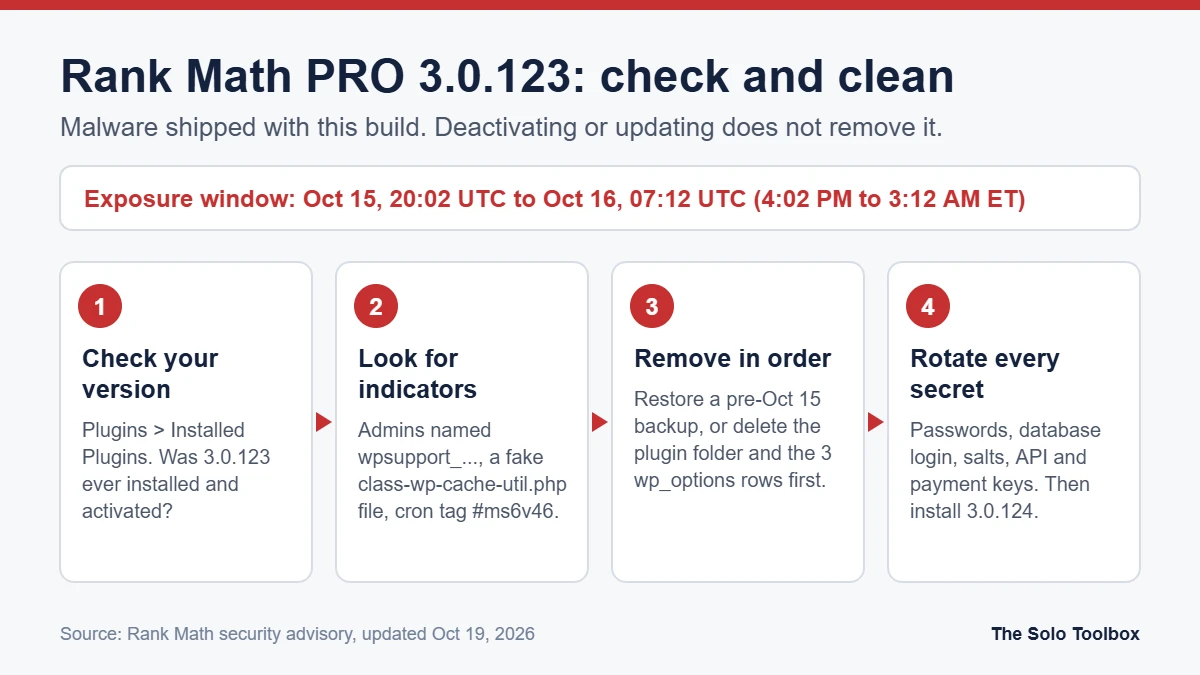
Rank Math published a security advisory on October 16, 2026 and last updated it on October 19. It says PRO version 3.0.123 was distributed with malware for about 11 hours: from 20:02 UTC on October 15 to 07:12 UTC on October 16. In US Eastern time, that is 4:02 PM on October 15 to 3:12 AM on October 16. Rank Math removed the files and released 3.0.124. It has not said how the attackers got into its distribution system, and BleepingComputer reported on October 19 that the company had not answered its questions about the entry point.
According to the advisory, once the plugin is activated the malware:
- keeps persistent access to the site and talks to the domain rank1cdn.com;
- re-creates hidden backdoors when someone visits the site, which is why simply deleting one file is not enough;
- can expose database credentials, API keys and other secrets stored on the server.
BleepingComputer also found a related PHP sample that drops a fake core file at wp-includes/class-wp-cache-util.php and can steal cloud credentials (AWS, Cloudflare, Google Cloud, Azure) and SSH keys. It could not confirm that this exact sample came through the plugin, so treat that part as likely rather than proven.
Step 1: Check which version you have
- Sign in to WordPress and open Plugins > Installed Plugins.
- Find Rank Math SEO PRO and read the version number under its description.
- If it shows 3.0.124 or later, check whether it was 3.0.123 at any point during the window. Your host’s backups, an activity-log plugin, or the modified date of the Rank Math PRO folder inside
wp-content/plugins/can help.
Rank Math’s advisory doesn’t say whether automatic updates pulled 3.0.123 onto sites. If you had auto-updates turned on for Rank Math PRO, assume an update during the window was possible and check the evidence below.
Which situation are you in?
| Your situation | Rank Math’s verdict | What to do |
|---|---|---|
| Downloaded 3.0.123 but never installed it | No sign of compromise from this incident | Delete the ZIP, download 3.0.124 |
| Installed 3.0.123 but never activated it | Precaution needed | Delete the plugin folder, install 3.0.124, run a security scan |
| Installed and activated 3.0.123 during the window | Treat the site as compromised | Restore from a clean backup or follow the full manual cleanup below |
| Never had 3.0.123 (updated straight from 3.0.122 or older to 3.0.124) | Not affected by this incident | Update to 3.0.124 and carry on |
Step 2: Look for signs of the backdoor
These indicators come from Rank Math’s advisory and BleepingComputer’s analysis. Any one of them means you should do the full cleanup.
- Rogue admins: go to Users > All Users, filter by Administrator, and look for usernames starting with
wpsupport_or email addresses ending in@wp-mail.net. - Fake core file: in your file manager, check whether
wp-includes/class-wp-cache-util.phpexists. It is not a real WordPress file. - Database entries: in phpMyAdmin, open the
wp_optionstable (your prefix may differ) and searchoption_namefor_uf6qdn2hmm,t8krdk990phband_np5pvf754c. - Cron marker: ask your host (or check the server crontab if you have SSH) for lines tagged
#ms6v46. - Obfuscated PHP: code that combines
base64_decodewith an XOR loop, the stringxmmqhn, orproc_open, especially inwp-content/mu-plugins/.
If you use WP-CLI, these commands help:
wp user list --role=administrator
wp core verify-checksums
wp cron event list
Step 3: Clean the site (the order matters)
Option A: restore a backup (Rank Math’s recommended route)
- Restore files and database from a backup made before 20:02 UTC on October 15, 2026 (4:02 PM Eastern).
- Run a scan with a security plugin such as Wordfence or Sucuri.
- Change every credential listed in Step 4.
- Log in at rankmath.com, download 3.0.124 from your account, and install it.
Option B: manual cleanup
Do the first three items before anything else, or the malware can rebuild itself:
- Delete the whole Rank Math PRO plugin folder. Deactivating it is not enough.
- In
wp_options, delete the rows named_uf6qdn2hmm,t8krdk990phband_np5pvf754c. - Ask your host to block outgoing connections to
rank1cdn.comif you can’t do it yourself.
Then hunt for anything else it changed:
- Delete rogue
wpsupport_administrators. - Remove
wp-includes/class-wp-cache-util.phpand reinstall WordPress core from Dashboard > Updates > Re-install version. - Check
.htaccessfiles in the root and subfolders for rules that run.cachefiles as PHP, and delete any.cachefiles that contain PHP. - Remove cron entries tagged
#ms6v46and any scheduled events you don’t recognize. - Reinstall plugins and themes from official sources and look for
.phpfiles insidewp-content/uploads/, where they don’t belong. - On a VPS, review SSH
authorized_keys, other users’ crontabs and running processes. On shared hosting, ask support to check the account.
Step 4: Change every credential on the site
Rank Math calls this step essential even if you restored a backup, because the malware could read secrets before you removed it.
- WordPress passwords for every user, plus two-factor settings for admins.
- The database password, then update it in
wp-config.php. - New security keys and salts in
wp-config.php(WordPress.org’s secret-key generator creates a fresh set). This logs everyone out. - Payment gateway keys (Stripe, PayPal), SMTP credentials and any API keys stored in plugin settings.
- Hosting control panel, FTP/SFTP and SSH passwords.
If you have never rotated API keys before, our guide to the OpenCode breach walks through revoking and reissuing keys without breaking integrations. Changing SMTP credentials can also affect mail delivery, so recheck your setup with our SPF, DKIM and DMARC guide afterward.
Step 5: Confirm it stays clean
- Run another full scan.
- Run
wp core verify-checksums, thenwp plugin verify-checksums --all. The second command can’t verify premium plugins, so compare Rank Math PRO against a fresh 3.0.124 download instead. - Watch the site for several days. If deleted files or admin accounts come back, something is still re-creating them: repeat Step 3 and bring in a professional cleanup service or your host’s security team.
Watch out for follow-up phishing
Rank Math says it never sends login or download links by email, and some customers may need to reset their Rank Math account password. Ignore any email that offers a “patched” download or a password-reset link you didn’t request. Go to rankmath.com directly instead. Vendor incidents attract copycat phishing quickly, as we saw after the SkyKick breach.
FAQ
Is the free Rank Math SEO plugin affected?
No. Rank Math says only Rank Math PRO 3.0.123 was distributed with malware. The free plugin from WordPress.org was not affected.
Is updating to 3.0.124 enough?
Only if 3.0.123 was never activated on your site. If it was activated, Rank Math says updating or deactivating does not remove the threat, because the malware plants backdoors outside the plugin folder.
Should I uninstall Rank Math PRO?
You don’t need to abandon the plugin. Delete the infected copy, clean the site, and install 3.0.124 downloaded from your Rank Math account. Your SEO settings live in the database and normally survive a plugin reinstall, but a backup restore will roll them back to the backup date.
How do I know if my site was attacked?
Look for the indicators in Step 2: wpsupport_ admin accounts, the fake class-wp-cache-util.php file, the three wp_options rows, or cron entries tagged #ms6v46. Finding none lowers the risk but doesn’t prove the site is clean, so still scan and rotate credentials if 3.0.123 was active.
How we checked this: we read Rank Math’s advisory (published October 16, 2026, updated October 19) and BleepingComputer’s October 19 report on October 19–20, 2026. We have not analyzed the malware ourselves. Details may change as Rank Math updates its advisory, so check it before you start.
Next step
Open Plugins > Installed Plugins now and note your Rank Math PRO version. If you find 3.0.123 or any of the indicators above, put the site in maintenance mode and start with the backup restore in Option A.
Related guides
Sources
- Rank Math: PRO 3.0.123 security incident advisory
- BleepingComputer: WordPress SEO plugin Rank Math compromised to backdoor websites (October 19, 2026)
- WordPress.org: Command line interface (WP-CLI) documentation