ChatGPT ‘Something went wrong’ error: how to fix it
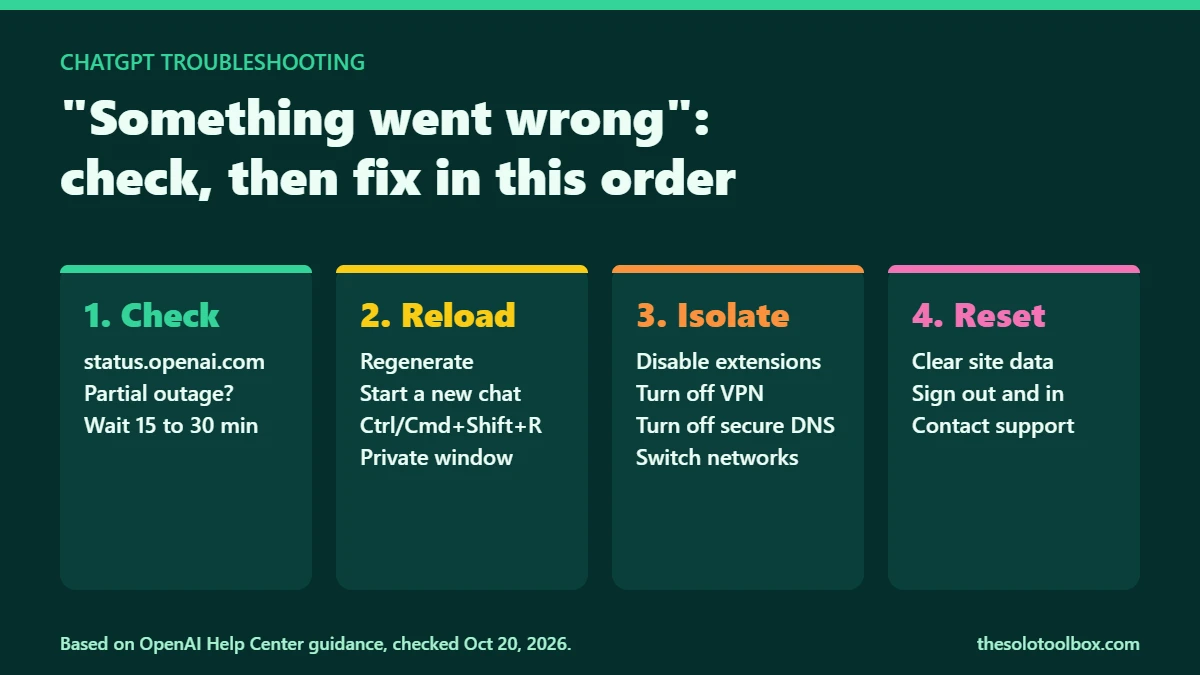
The ChatGPT “Something went wrong” error means a request failed somewhere between your device and OpenAI’s servers, without saying where. Check status.openai.com first; if there is no incident, the fix is usually local: start a new chat, hard-refresh, disable browser extensions, or turn off a VPN or secure DNS. OpenAI’s help center lists those same steps for this error.
Below: how to tell an outage from a local problem, the fixes in the order worth trying, what ChatGPT’s other error messages mean and when to contact OpenAI support.
Before you start
- Steps come from OpenAI’s help article on ChatGPT error messages, checked on October 27, 2026.
- Copy any long prompt you were writing before you refresh. A reload can clear the message box.
- The steps apply to the web version and the desktop app. Mobile app fixes are mostly the same: close the app, switch networks, sign out and back in.
Step 1: Is ChatGPT down, or is “Something went wrong” local?
Open status.openai.com. It lists ChatGPT, Conversations, Login, Codex and the API separately, so a partial outage shows up as one component turning yellow or red while the rest stay green.
The status page and user reports do not always agree. On October 20, 2026, a user-report tracker cited by the Sunday Guardian logged 285 reports at one point, against a baseline of 21, mostly about tools, image generation and PDF files. When we checked OpenAI’s status page that evening, it read “We’re not aware of any issues affecting our systems.” If reports are spiking but the status page is green, wait 15 to 30 minutes before changing settings on your own machine.
Step 2: Fix ChatGPT “Something went wrong,” in order
If there’s no outage, the ChatGPT “Something went wrong” error is probably local, so work down this list. Each step takes under a minute, and the first few solve most cases.
- Regenerate or start a new chat. Click the regenerate button under the failed reply. Very long conversations fail more often, so a fresh chat is worth trying early.
- Hard-refresh the page. Press Ctrl + Shift + R on Windows or Cmd + Shift + R on a Mac. In the desktop app, force-reload or quit and reopen it.
- Open ChatGPT in a private window. Incognito or InPrivate mode loads the site without your extensions and saved cookies. If it works there, the problem is one of those two.
- Disable extensions. OpenAI singles out privacy, security and script-blocking extensions. Turn them off one at a time to find the culprit.
- Turn off your VPN, proxy or secure DNS. OpenAI specifically names secure DNS tools such as Web Protect, which can block ChatGPT’s connection.
- Switch networks. Move from Wi-Fi to a phone hotspot, or the other way round. Work and school networks sometimes filter ChatGPT.
- Clear ChatGPT’s site data. In your browser’s site settings, clear cookies and data for chatgpt.com, and for chat.openai.com if you still use that address. Expect ChatGPT to sign you out.
- Sign out and back in. This refreshes your session if it expired or broke.
What other ChatGPT error messages mean
OpenAI’s help center groups ChatGPT’s errors by cause. The first fix differs for each:
| Error message | Usual cause | Try first |
|---|---|---|
| A network error occurred / error connecting to the websocket | VPN, proxy or security filter interrupting the connection | Turn off the VPN or filter, then switch networks |
| We detect suspicious activity / Unusual activity detected | Traffic from a flagged IP address, or someone else using your account | Turn off the VPN; if it continues, change your password |
| There was a problem preparing your chat | An extension blocking scripts or changing the page | Private window, or disable extensions |
| There was an error generating a response | Usually a one-off failure | Click regenerate |
| Stuck on Thinking or Generating | A long chat or a service slowdown | Wait 30 to 60 seconds, click Stop generating, then regenerate |
| Download failed / File not found | The generated file expired, or it is over 512 MB | Ask ChatGPT to generate the file again and download it right away |
When ChatGPT says something went wrong only with images or files
If text replies work but image generation, PDF uploads or other tools do not, it is often a partial service problem rather than your setup. Check whether the status page flags a single component, start a new chat and try again later. For downloads, OpenAI notes that generated files expire quickly, so save them as soon as they appear.
Partial outages hit other cloud services too. Our breakdown of the Revolut outage linked to Google Cloud shows how one provider’s problem can take down apps that look unrelated.
When ChatGPT keeps saying something went wrong: contact support
If the error survives every step above, OpenAI asks for evidence it can trace. Before contacting support through help.openai.com:
- Note the exact time the error appeared and your time zone.
- Note the model you were using and the conversation link.
- Copy the console errors from your browser’s developer tools (F12 on Windows, Cmd + Option + I on a Mac).
- Save a HAR file of the failed request if support asks for one. A HAR file can contain session cookies, so send it only to OpenAI support and never post it publicly.
While you wait, you can check settings that sometimes change after an update, such as ChatGPT’s voice or personalized ads in ChatGPT.
FAQ
Is ChatGPT down right now?
Check status.openai.com. It lists ChatGPT, Conversations, Login and Codex as separate components, so you can see whether the problem hits only part of the service. If the page shows no incident, the problem is more likely your browser, network or account.
Does clearing cookies delete my ChatGPT chats?
No. OpenAI stores your chat history in your account, not in the browser. Clearing cookies signs you out, so have your login details ready.
Can a VPN cause the ChatGPT “Something went wrong” error?
Yes. OpenAI lists VPNs, proxies and secure DNS tools as a cause of “Something went wrong,” network errors and suspicious-activity warnings. Turn the VPN off and reload to test.
Why does ChatGPT work on my phone but not my computer?
That points to something local on the computer: an extension, stale cookies or a security filter. Try a private window with extensions disabled first.
Bookmark the status page
Bookmark status.openai.com. The next time ChatGPT says something went wrong, one look tells you whether to wait or to start on the fixes above.
Related guides
Sources
- OpenAI Help Center: ChatGPT error messages
- OpenAI status page
- Sunday Guardian: OpenAI outage reports (Oct 20, 2026)