Claude auto mode is now the default: how to switch to manual
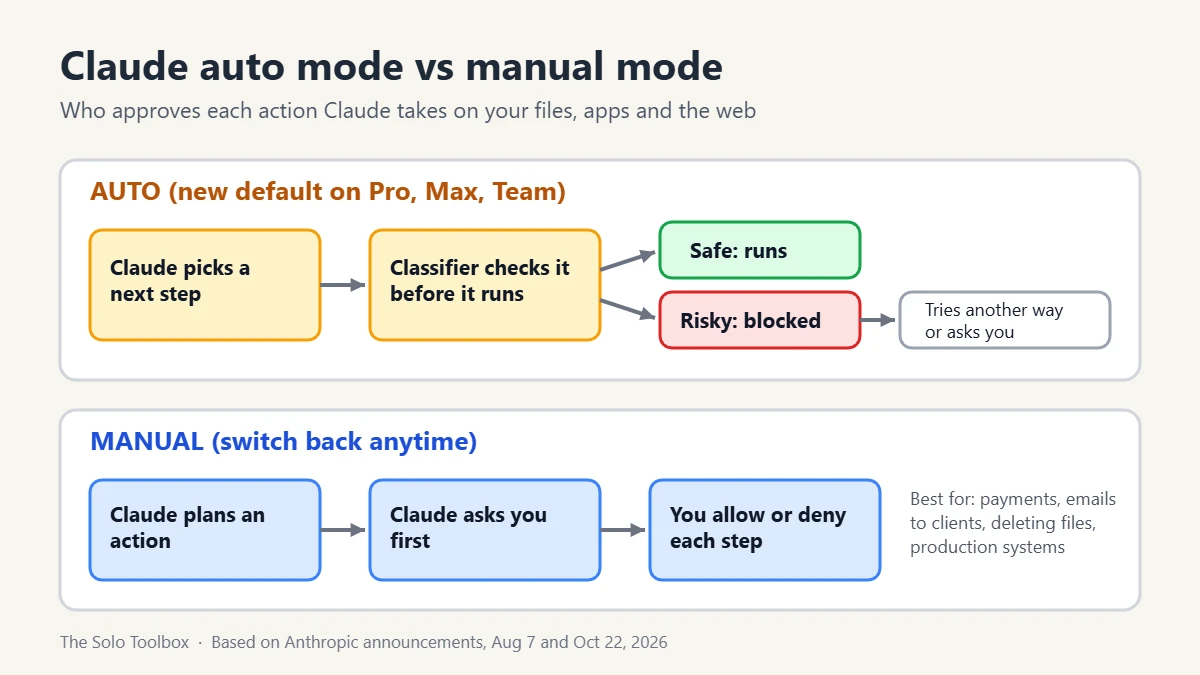
Starting the week of October 26, 2026, Claude sessions on the web, desktop and mobile apps run in auto mode by default on Pro, Max and Team plans. Instead of asking you to approve each action, an automated check reviews it and blocks the risky ones. You can switch back to manual approval at any time; in Claude Code’s desktop app that’s the mode selector under the prompt box, and in the terminal it’s Shift+Tab.
Below: what the check actually looks at, where to change the mode in each app, which settings keep your choice, and when manual approval is still the better call.
Before you start
- You’ll need: A Claude Pro, Max or Team plan (Enterprise and API users are still opt-in for now)
- Time: Under a minute to switch modes
- Before you change anything: Note which projects or folders touch client data, payments or live websites; those are the ones worth keeping on manual
What changed: auto mode moves from Claude Code to every Claude app
Anthropic first made auto mode the default for new Claude Code sessions on August 14, 2026. On October 22 it announced the next step on its official X account: “Starting next week, sessions across Claude web, desktop, and mobile apps will run in auto mode by default on Pro, Max, and Team plans.” The same post says you can “switch back to manual anytime.”
Anthropic did not give an exact rollout day, so the switch may reach your account later in the week than someone else’s. If you already pinned a default mode in Claude Code, Anthropic says new sessions keep it.
What the automated check does and doesn’t block
Every tool call Claude wants to make, such as running a command, editing a file or sending a network request, goes through a classifier before it runs. According to Anthropic’s August 7 announcement, the classifier targets actions that are irreversible, destructive, or that reach outside your environment.
- Hard block: sending your data somewhere it shouldn’t go (data exfiltration). Teams can add their own hard-deny rules.
- Extra checks: secrets and sensitive data, where a git push or pull request is headed (public, private or trusted), and the state of your repository before commands like
git reset --hard. - Prompt injection: tool results, such as web pages Claude reads, are screened for hidden instructions.
- Fallback: in Claude Code, three blocks in a row or 20 in one session drop you back to manual approvals.
When an action is blocked, Claude usually looks for a safer route or asks you. Anthropic is open about the limits: on its own synthetic adversarial test set, the classifier missed about 7% of risky actions. That number comes from a test set, not real traffic, and Anthropic still recommends reviewing high-stakes production changes yourself. Prompt injection is a live problem, not a theory; we covered AI agents being used to break into 100+ online stores earlier this month.
How to switch Claude back to manual mode
Claude Code desktop app (Windows and macOS)
- Open the Code tab and start or open a session.
- Find the mode selector in the row under the prompt box, or press Ctrl+Shift+M (Windows) or Cmd+Shift+M (macOS).
- Choose Manual. Older versions call it Ask permissions.
The desktop app remembers your choice per folder, so switching once in a client project keeps that project on manual. Shift+Tab does not cycle modes in the desktop app. In cloud sessions there is no Manual option; the closest is Accept edits.
Claude Code in the terminal
Press Shift+Tab to cycle permission modes until the status line no longer shows auto mode. To make manual the default for every new session, set "defaultMode": "default" under "permissions" in your Claude Code settings file. The desktop app reads the same file.
Claude on the web and in the mobile apps
Anthropic’s announcement promises a manual switch but, as of October 26, has not published the exact menu path for the web or the iPhone and Android apps. Look for the mode control next to the message box in a session. We’ll update this section once Anthropic documents the steps.
Team and Enterprise admins
Admins can pin an org-wide default with defaultMode in managed settings, or turn auto mode off entirely with disableAutoMode. Enterprise, Claude API, Amazon Bedrock, Google Cloud and Microsoft Foundry customers stay opt-in for now. Anthropic says it plans to make auto the default there within about a month and will email Enterprise admins first.
Which Claude mode should you use?
| Mode | What Claude does without asking | Good fit |
|---|---|---|
| Manual | Nothing: it asks before editing files or running commands | Client files, payments, live websites, anything you can’t undo |
| Accept edits | File edits and basic file commands like mkdir and mv | Drafting code or documents in a folder you back up |
| Plan | Reads and explores, then proposes a plan without editing | Getting a second opinion before a big change |
| Auto | Most actions, after the classifier clears them | Routine tasks in a test folder or sandbox |
| Bypass permissions | Almost everything, with no prompts | Only throwaway containers or virtual machines |
For a one-person business the practical split is simple: leave auto on for low-risk work, and keep manual for any folder that holds API keys or customer data. If you’ve ever pasted a key into a project, our guide to replacing exposed AI API keys walks through rotating it.
What this means for your data
Auto mode changes who approves actions, not what Anthropic stores. Your chat retention and model-training choices are separate settings; see how to stop AI companies training on your chats for where those live. Anthropic also says Pro, Max and Team users are no longer charged the classifier’s extra token usage, so auto mode shouldn’t eat into your plan limits faster than manual.
FAQ
Is Claude auto mode safe to leave on?
For low-stakes work it removes a lot of clicking, and it does block data exfiltration outright. It isn’t perfect: Anthropic’s own test found about a 7% miss rate on adversarial examples. Keep manual for anything irreversible.
Will Claude keep my manual setting?
In Claude Code, yes if you pinned a default in settings or picked a mode for a folder in the desktop app. Anthropic says users who pinned a default see no change.
Does auto mode use more of my usage limit?
Not on Pro, Max or Team. Anthropic says it stopped charging those plans for the classifier’s token overhead.
I’m on Enterprise. Does this affect me yet?
Not yet. Auto mode is opt-in for Enterprise and API customers, with the default switch planned within about a month and an email to admins beforehand.
Next step
Open the project or folder you’d least want an AI to touch unattended, switch it to Manual now, and leave auto on everywhere else. Then check back here; we’ll add the web and mobile steps once Anthropic publishes them.
Related guides
Sources
Checked on October 26, 2026, against Anthropic’s announcement, its auto mode article and the Claude Code desktop documentation. Anthropic has not yet documented the mode switch for the web and mobile apps, and the rollout date within the week is not public.
- Claude (@claudeai) on X, October 22, 2026: auto mode default across web, desktop and mobile
- Anthropic: Auto mode is now the default in Claude Code for Pro, Max, and Team plans (Aug 7, 2026, updated Oct 22)
- Claude Code Docs: Desktop application, permission modes
- Anthropic blog: Auto mode for Claude Code
- TokenPost: Anthropic will set auto mode as default across Claude apps next week (Oct 23, 2026)