KB5127648 Failed to Install? Fixes for 0x800f0845 and More

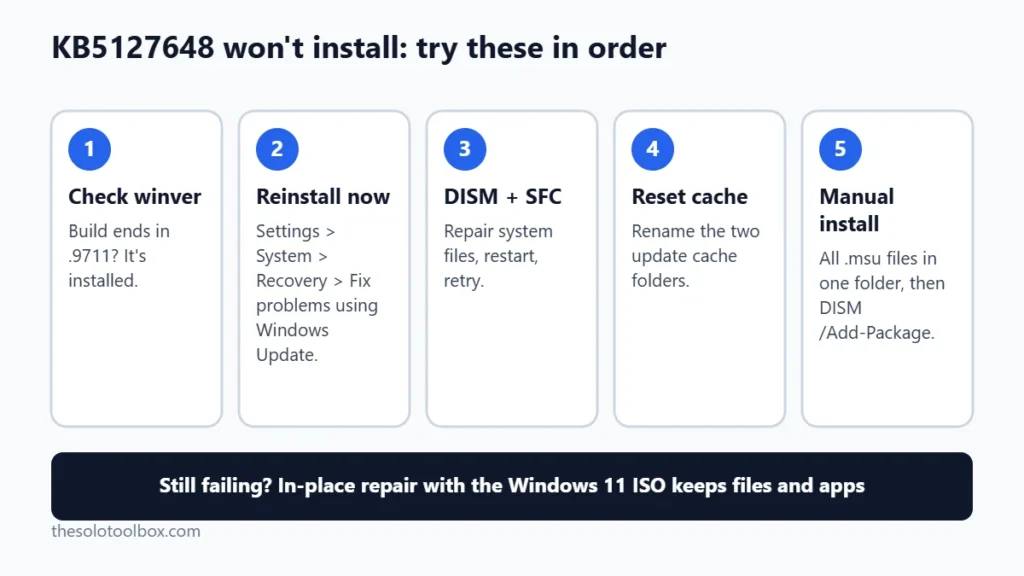
If KB5127648 fails to install with error 0x800f0845, 0x80070306 or 0x800f0989, the fix that works most often is Settings > System > Recovery > Fix problems using Windows Update > Reinstall now. It reinstalls the current Windows build and keeps your files, apps and settings. If that’s missing or fails, repair system files with DISM and SFC, reset the update cache, or install the update by hand from the Microsoft Update Catalog.
Below are those fixes in the order to try them, what each error usually points to, and how to confirm the update actually installed.
Before you start
- You’ll need: A Windows 11 PC on version 24H2, 25H2 or 26H2, signed in with an administrator account
- Time: 10 minutes for the first fixes; up to an hour for a repair reinstall
- Before you change anything: Free up at least 20 GB on drive C: and back up anything you can’t lose
What KB5127648 is and who’s seeing errors
KB5127648 is the October 13, 2026 Patch Tuesday security update for Windows 11. According to Microsoft’s release notes, it brings these builds:
| Windows 11 version | Build after KB5127648 |
|---|---|
| 26H2 | 26300.9711 |
| 25H2 | 26200.9711 |
| 24H2 | 26100.9711 |
Since release, people have reported failed installs on Microsoft Q&A and in coverage by Neowin and Windows Report (October 19). The codes reported are 0x800f0845, 0x80070306 and 0x800f0989. Microsoft had not listed install failures as a known issue for KB5127648 as of October 21, 2026, and hasn’t published a dedicated fix.
If you’re on Windows 11 24H2 Home or Pro, note that Microsoft says this is the last security update for those editions. Our guide to Windows 11 24H2 end of updates explains how to move to a newer version, which also gets you past a stuck update.
Check first: is the update actually missing?
Press Windows key + R, type winver and press Enter. If the build ends in .9711, KB5127648 is installed, even if Windows Update still shows an old failure. One Q&A poster saw the error while their build stayed at 26300.9457, which means the update rolled back.
Fix 1: Run “Fix problems using Windows Update”
- Open Settings > System > Recovery.
- Next to Fix problems using Windows Update, select Reinstall now.
- Keep the PC plugged in. The download is several gigabytes and the reinstall restarts the PC a few times.
- When it finishes, go to Settings > Windows Update and select Check for updates.
This keeps your files, apps and most settings. It may not be available on PCs managed by an employer. Windows Report and Windows Digitals both list it as the fix most people report success with, but neither is a Microsoft confirmation.
Fix 2: Repair system files with DISM and SFC
Damaged component files are a common cause of all three error codes. Open Terminal (Admin) by right-clicking the Start button, then run these one at a time:
DISM.exe /Online /Cleanup-Image /RestoreHealth
sfc /scannow
DISM can sit at 20% or 62% for several minutes; that’s normal. Restart when both finish, then try Windows Update again.
Fix 3: Reset the Windows Update cache
If the download itself is corrupted, clearing the cache forces a fresh copy. In Terminal (Admin), choose a Command Prompt tab and run:
net stop bits
net stop wuauserv
ren %systemroot%\SoftwareDistribution SoftwareDistribution.bak
ren %systemroot%\System32\catroot2 catroot2.bak
net start bits
net start wuauserv
If catroot2 won’t rename, also run net stop cryptsvc before it and net start cryptsvc after. Restart and check for updates. You can delete the two .bak folders once the update installs.
Running low on space also makes cumulative updates fail partway through. If drive C: has less than 20 GB free, work through how to free up disk space in Windows 11 before trying again.
Fix 4: Install KB5127648 manually
- Check your system type under Settings > System > About (x64 or ARM64).
- Search for KB5127648 on the Microsoft Update Catalog and pick the entry that matches your Windows version and system type.
- Download every .msu file the catalog lists for that entry. For 24H2 and 25H2, that can include an older checkpoint update that must be installed first.
- Put all the files in one folder, such as
C:\Updates, and run this in Terminal (Admin):DISM /Online /Add-Package /PackagePath:C:\Updates - Restart and run
winverto confirm the .9711 build.
Pointing DISM at the folder lets it find and apply the checkpoint and the cumulative update in the right order, so you don’t have to work out which one goes first.
Fix 5: In-place repair with the Windows 11 ISO
If nothing above works, download the Windows 11 ISO from Microsoft’s Download Windows 11 page, double-click it to mount it, run setup.exe, and choose to keep personal files and apps. This rebuilds Windows from clean files. Afterwards, run Windows Update; KB5127648 or a later cumulative update should install normally.
What the error codes usually mean
| Error | What’s been reported | Fix to start with |
|---|---|---|
| 0x800f0845 | Install starts, then fails or rolls back | Fix 1, then Fix 2 |
| 0x80070306 | Generic “errors occurred while processing” code; usually local file damage, not the update itself | Fix 1, then Fix 2 |
| 0x800f0989 | Install appears to finish, then Windows reports failure | Fix 2, then Fix 4 |
Microsoft doesn’t publish a public cause for these codes on KB5127648, so treat the table as a starting order, not a diagnosis. For the full error, check C:\Windows\Logs\CBS\CBS.log; Microsoft Support will ask for it if you open a case.
Other KB5127648 problems that aren’t install failures
If the update installed but something broke afterwards, those are different issues. Microsoft has acknowledged a Wi-Fi and VPN problem tied to KB5127648 and KB5126646, covered in our guide to Wi-Fi and VPN not connecting after the Windows update. USB audio devices failing with Code 10 is listed as mitigated in the release notes.
FAQ
Is it safe to skip KB5127648?
Not for long. It’s a security update, and November’s cumulative update will include its fixes. If you pause updates while troubleshooting, use Settings > Windows Update > Pause updates for one week at a time and keep trying.
Will “Fix problems using Windows Update” delete my files?
Microsoft says it keeps your apps, documents and settings. Back up anyway; any reinstall can go wrong on a PC that’s already having update trouble.
Windows says the update is already installed but it keeps failing. Why?
Check winver. If the build isn’t .9711, part of the update is installed and part isn’t. Fix 2 followed by Fix 1 usually clears that mixed state.
Next step
Run winver, note your build, and start with Fix 1. If you’re still stuck after Fix 4, report the error through the Feedback Hub app with your CBS.log attached so Microsoft can track it.
Related guides
Sources
Checked on October 21, 2026. Microsoft has not confirmed a cause or fix for these install errors; the fixes are standard Windows Update repair steps, and the success reports come from users and third-party sites, not from our own testing.
- Microsoft Support: KB5127648 release notes (October 13, 2026)
- Microsoft Q&A: KB5127648 error 0x800f0989 (October 17, 2026)
- Windows Report: Windows 11 KB5127648 triggers errors 0x800f0845 and more (October 19, 2026)
- Windows Digitals: Error 0x80070306 (KB5127648) (October 18, 2026)