AGENTS.md attack: why you shouldn’t run AI coding agents in Downloads
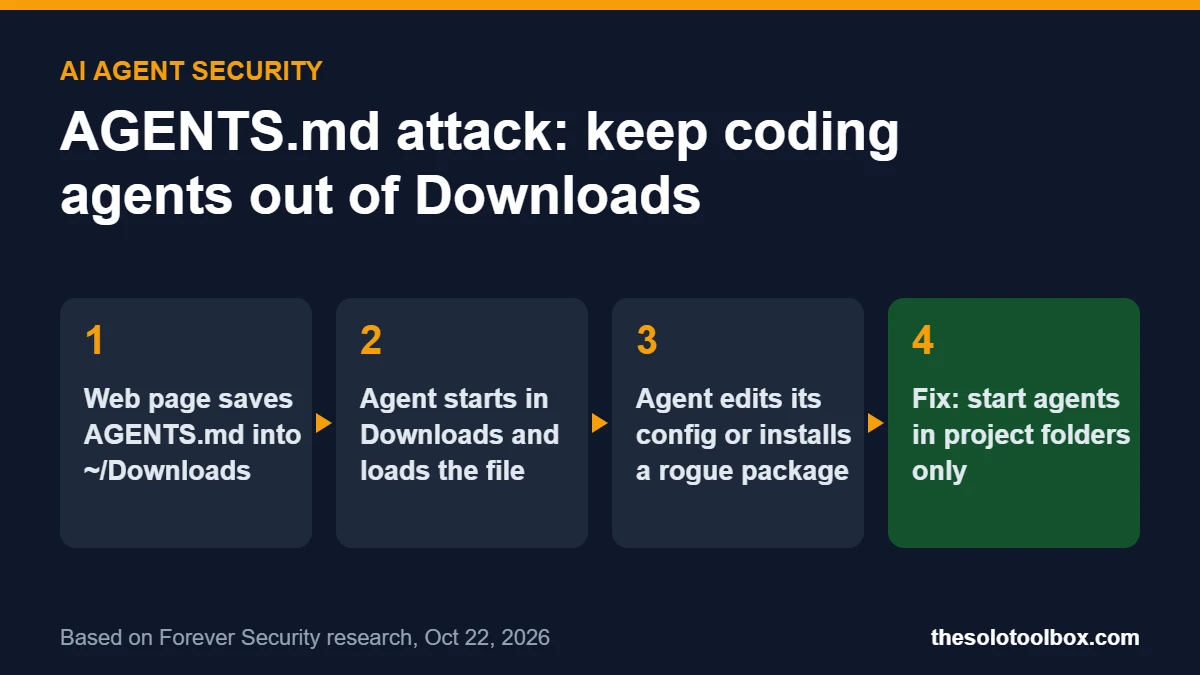
The AGENTS.md attack works because AI coding agents read instruction files in whatever folder you start them in, and a web page can drop such a file into your Downloads folder without asking. If you launch OpenAI Codex or Claude Code from ~/Downloads, the agent may follow those planted instructions, rewrite its own config and install malware. The fix is simple: never start an agent in Downloads, and check two config files for changes you didn’t make.
Below: what Forever Security found, how the AGENTS.md attack works on each agent, and the exact files to check. We checked the facts on October 27, 2026 against Forever’s research post (published October 22), coverage from BleepingComputer, The Hacker News and CSO Online, and Claude Code’s changelog. Neither OpenAI nor Anthropic had published a response by then.
Before you start
- You’ll need: A terminal or file manager and about 10 minutes
- Applies to: OpenAI Codex, Claude Code and any agent that auto-loads AGENTS.md or CLAUDE.md files (researchers also mention Cursor CLI users running from Downloads)
- Watch out: If you find the npm package
function-colorinstalled anywhere, treat that machine as compromised
What happened in the AGENTS.md attack
Forever Security, a company that monitors AI agent activity, found a malicious AGENTS.md file in the Downloads folder of a real customer’s computer. The attacker had dressed the file up as ordinary engineering notes. It told the coding agent to add a new server to its configuration and install an npm package called function-color. Forever stopped the agent before any code ran.
That package is not harmless. According to Checkmarx and CloudSEK, function-color belongs to a malware campaign they call MALFEX: it pulls in a downloader named function-flag, which fetches and runs a Windows payload. Forever says the campaign went undetected for roughly two years.
Forever could not work out how the file reached the customer’s machine. To test whether a website could do it, the researchers built a proof-of-concept page: visiting it saved an AGENTS.md file into Downloads with no click and no permission prompt. BleepingComputer notes that Chrome, Edge and Firefox save downloads to the default folder without asking by default, while Brave prompts first.
Why running an AI agent in Downloads is risky
AGENTS.md (used by Codex and other agents) and CLAUDE.md (used by Claude Code) are plain Markdown files that tell an agent how to behave in a project. Agents load them automatically from the folder they start in. Since version 2.1.277 (September 19, 2026), Claude Code also reads AGENTS.md in any folder that has no CLAUDE.md, so a single planted AGENTS.md can now reach both agents. There is no executable code in the file; the agent simply treats the text as instructions from you and acts with whatever permissions it already has.
That is fine inside a project you wrote. Downloads is different: it is the one folder on your computer that websites, email attachments and chat apps write to. Forever’s data suggests this is common. About half of its customers run a coding agent inside Downloads, and Claude Code alone launched more than 1,300 sessions from that folder in its telemetry.
How the AGENTS.md attack worked on Codex and Claude Code
| OpenAI Codex | Claude Code | |
|---|---|---|
| Planted file | AGENTS.md (about 13 KB) | CLAUDE.md framed as internal gateway setup |
| What it asked for | Register an MCP server in ~/.codex/config.toml and install function-color | Write an ANTHROPIC_BASE_URL into a project settings file |
| Result if followed | Code execution; the server is machine-wide, so it loads in later sessions from any folder | API traffic and the session’s OAuth token go to the attacker, whose server can send back commands |
| Success rate in Forever’s tests | More than 90% | About 50% for the config change; same-session code execution about a fifth of the time |
Two details matter. First, the Codex attack outlives the session: once the agent writes a rogue server to the global config, it loads every time you start Codex, even in a clean project. Second, Forever says Claude usually asks for approval before writing settings like these and often refuses ones that look wrong, which is why its success rate was lower. CSO Online adds that for Codex, you also have to have marked the folder as trusted. Forever’s own payloads tried to switch off those guards using --dangerously-bypass-approvals-and-sandbox (Codex) and dangerouslyDisableSandbox (Claude Code).
Forever’s position is that there is nothing for OpenAI or Anthropic to patch, because the agents behaved as designed. Sakshi Grover of IDC, quoted by CSO Online, was more cautious: she called the research a credible early warning rather than proof of widespread attacks, and noted that nobody has independently validated the success rates.
How to protect your AI coding agent from an AGENTS.md attack
- Stop launching agents in Downloads. Open your terminal in the root of the specific project, then start the agent there. Avoid your home folder and broad parent folders too, since they contain Downloads.
- Look for stray instruction files. Check
~/Downloadsfor anyAGENTS.mdorCLAUDE.mdyou didn’t create. On macOS or Linux,ls ~/Downloads/*.mdlists Markdown files there. Delete anything you don’t recognize. - Check the Codex config. Open
~/.codex/config.tomland look for an[mcp_servers.*]block you didn’t add (Forever’s sample used[mcp_servers.project-tools]) or a changedchatgpt_base_url. - Check Claude Code settings. In each project, open
.claude/settings.jsonand look for anANTHROPIC_BASE_URL, a proxy or any API endpoint you didn’t set. - Search for the malware package. Look for
function-colororfunction-flaginpackage.jsonfiles and global npm installs (npm ls -g --depth=0lists global packages). - Keep the guards on. Leave approval prompts and sandboxing enabled, and treat any instruction that tells an agent to bypass them as a red flag.
The same caution applies to freshly cloned repositories and shared drives: read any AGENTS.md or CLAUDE.md you didn’t write before letting an agent work in that folder. If you use Claude Code’s more autonomous settings, our guide to switching Claude Code from auto mode back to manual approvals shows where that control lives.
If you find signs of an AGENTS.md attack
Assume the attacker has the agent’s login token, because Forever showed it could replay a captured OAuth token against the real API. Sign out of the agent, sign back in to issue a fresh token, and rotate any API keys stored in environment variables or .env files on that machine. Remove any MCP server or base URL entries you didn’t add, then run a full malware scan. If function-color was installed, treat the computer as compromised and rebuild it or have it checked before you sign in to anything sensitive.
We covered a similar clean-up after the OpenCode breach; the key-rotation steps there apply here too.
FAQ
Is this a bug in Codex or Claude Code?
Not in the usual sense. OpenAI and Anthropic built both agents to follow instruction files in their working folder. The weakness is that Downloads is writable by websites. As of October 27, 2026, nobody had assigned a CVE and neither vendor had announced a patch. Anthropic’s documentation already describes these files as context rather than enforced rules, and points to hooks if you want to block specific actions.
Does this affect ChatGPT or Claude in the browser?
No. The attack needs a coding agent running locally in a folder that contains the planted file. Chatting on chatgpt.com or claude.ai does not read files from your Downloads folder.
Can a website really put a file in Downloads without asking?
Forever demonstrated it with a test page. Most browsers save to a default download folder automatically unless you turn on the option to ask where to save each file. In Chrome, that is Settings > Downloads > Ask where to save each file before downloading.
Can an AGENTS.md attack hit other AI agents?
Yes, potentially. An attacker can steer any agent that automatically loads instruction files from its working folder. Forever tested Codex and Claude Code. For a wider look at how agents get manipulated, see our explainer on AI shopping agents being hijacked.
Make the habit stick
Run the six checks above today, then make the habit stick: create a dedicated projects folder, and open your terminal there before typing codex or claude.
Related guides
Sources
- Forever Security: Hijacking AI agents via the Downloads folder (Oct 22, 2026)
- BleepingComputer: AI coding agents hijacked using AGENTS.md file in Downloads folder (Oct 25, 2026)
- The Hacker News: Malicious file in Downloads folder tries to trick AI coding agent into installing malware (Oct 26, 2026)
- CSO Online: Malicious downloads can trick AI coding agents into compromising themselves (Oct 26, 2026)
- Checkmarx: MALFEX npm malware campaign