OpenCode breach: how to replace your exposed AI API keys
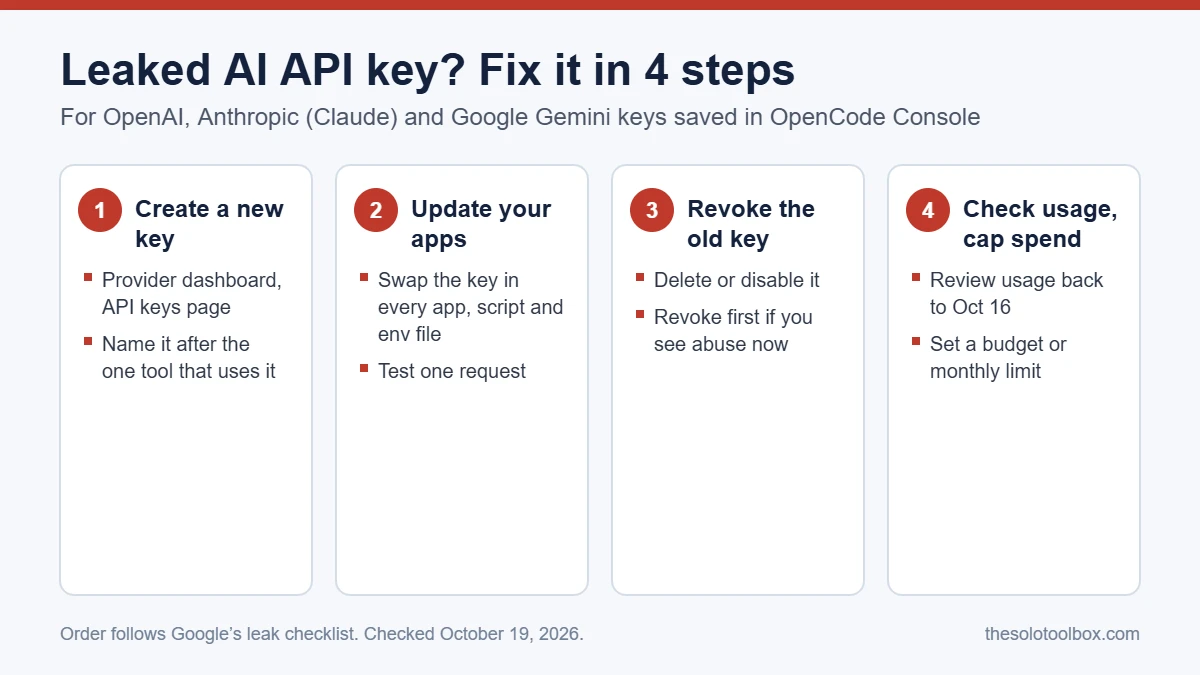
If you saved an OpenAI, Anthropic or Google API key in OpenCode Console, treat that key as exposed: create a replacement in the provider’s dashboard, switch your apps to it, revoke the old key, and check your usage for requests made since October 16, 2026. OpenCode says an intruder reached one of its legacy systems that night, and that keys belonging to 1.4% of Console users, all of whom had linked an outside AI provider, may have been exposed. Below: what happened, who needs to act, the exact steps for each provider, and how to cap the damage from the next leaked key.
Before you start
- You’ll need: admin access to your OpenAI Platform, Claude Console and/or Google AI Studio accounts, plus access to every app or script that uses the key.
- Applies to: keys stored in OpenCode Console, the hosted service. The OpenCode command-line and desktop apps keep keys locally and were not reported as affected.
- Time: about 10 to 20 minutes per provider.
- Heads-up: if you received OpenCode’s email titled “Action Required: Potential provider key breach”, act now even if your usage looks normal.
What happened in the OpenCode Console breach
OpenCode is an open-source AI coding agent. Console is its optional hosted service: a team saves a provider API key in a workspace, and Console makes the calls to OpenAI, Anthropic or Google so team members never see the key. That design is why the breach matters. The keys were sitting on OpenCode’s side.
- October 16 (night): an intruder reached a legacy system, according to OpenCode.
- October 17 (morning): OpenCode emailed affected users. In a post on X it called the incident ongoing, said it was working with Anthropic, OpenAI and Google, and linked it to “a large-scale distillation attack.”
- October 18: co-founder Dax Raad said attackers had been trying to break into OpenCode’s systems non-stop for 48 hours.
- October 19: The Hacker News reported that some users say they found unauthorized charges, from about $168 to $1,700. Those are users’ own claims and haven’t been confirmed by OpenCode or the providers.
What isn’t known yet: OpenCode hasn’t said whether any key was actually copied or used, how the legacy system was accessed, or how many keys it held. Plan as if your key was taken. Replacing a key costs a few minutes; an abused key is billed to you.
Do you need to do anything?
| Your setup | Exposure | What to do |
|---|---|---|
| Provider key saved in OpenCode Console and you got the email | Possible, per OpenCode | Replace the key now and audit usage |
| Provider key saved in Console, no email | Not indicated | Replace it anyway; it takes minutes |
| OpenCode CLI or desktop app only, key stored on your machine | Not reported as affected | No breach steps; set spending limits below |
The safe order: new key first, old key last
Google’s leak response checklist for Gemini keys uses this order, and it works for all three providers: generate a new key, update your app to use it, then disable or delete the old one, then audit usage. That keeps your tools running while you switch. If your usage page already shows requests you didn’t make, reverse it: revoke the old key immediately and accept a few minutes of downtime.
How to replace an OpenAI API key
- Sign in at platform.openai.com/api-keys and select the project the exposed key belongs to.
- Choose Create new secret key, give it a name that says which tool uses it, and copy it. OpenAI shows the full key only once.
- Paste the new key into every app, script or environment variable that used the old one, and send one test request.
- Back on the API keys list, delete the old key so it stops working.
- Open platform.openai.com/usage, filter by the old key, and look back to October 16 for spikes, unfamiliar models or requests at hours you weren’t working.
- Set a budget under Project > Limits > Set Budget.
Budgets apply to a whole project, not a single key. If you want a separate cap per tool, give each tool its own project and key.
How to replace an Anthropic (Claude) API key
- Sign in to Claude Console and go to Settings > API Keys (console.anthropic.com/settings/keys).
- Select Create Key, choose the workspace, name the key after the tool that will use it, and copy it. It’s shown only once.
- Update your apps and test one request.
- Disable or delete the old key from its menu on the same API Keys page.
- Check the Usage and Cost pages in Console for activity since October 16.
- Set a monthly cap in Settings > Limits: select Change Limit, enter a dollar amount, then Update Limit.
If you buy prepaid credits, leaving auto-reload turned off means a stolen key can’t spend more than the balance already in your account.
How to replace a Google Gemini API key
- Open the API Keys page in Google AI Studio (aistudio.google.com/api-keys) and generate a new key. Keys that don’t appear there are managed in the Google Cloud console under APIs & Services > Credentials.
- Update your app to use the new key and confirm it works.
- Disable or delete the compromised key in the Cloud console.
- Audit API usage and billing in the Cloud console for the same period.
- Restrict the new key: in AI Studio, choose Add restrictions > Restrict to Gemini API only > Restrict key. If your app runs from a fixed server, add an IP address restriction too.
Google’s key documentation recommends billing alerts in the Cloud console so you’re notified when costs spike. It doesn’t describe a hard spending cap for Gemini keys, so treat alerts as an early warning rather than a stop.
Check for charges you didn’t make
- Look for a jump in requests or cost starting the night of October 16 or later.
- Flag models you never use. Distillation attacks typically send large volumes of prompts to strong models so the answers can be used to train another model, and the key owner pays for those requests.
- Note the key name, dates and amounts before you contact the provider’s billing support. OpenCode says it’s working with all three providers, but none has published a refund policy for this incident as of October 19.
- Keep OpenCode’s notification email; it’s your evidence that the key was in a breached system.
Limit the damage from the next leaked key
- One key per tool. When a tool is breached, you revoke one key and nothing else breaks.
- Spending limits on every account. Project budgets in OpenAI, a monthly limit in Claude Console, and billing alerts in Google Cloud.
- Keys out of files you share. Google advises keeping keys out of source control and reading them from environment variables such as
GEMINI_API_KEY. - Fewer hosted copies. Each service that stores your key is one more place it can leak. Use a hosted key store only when you need team sharing.
- A monitored inbox. OpenCode warned users by email. Make sure your AI accounts use an address you actually read.
FAQ
Was the OpenCode CLI affected?
Not according to OpenCode. Co-founder Dax Raad said the incident involves “the OpenCode Console, not OpenCode itself.” The command-line and desktop apps store keys locally in a SQLite database, which wasn’t part of the breach.
Do I need to change my ChatGPT or Claude password?
The reported exposure is API keys, not account passwords. Revoking the key is what stops it working. Changing your password is still reasonable if you reused it anywhere, and two-step verification on your provider accounts makes it harder for anyone to create new keys.
Will OpenAI, Anthropic or Google refund unauthorized charges?
There’s no public commitment for this incident yet. Contact each provider’s billing support with the key name and the dates of the charges you didn’t make.
What is a distillation attack?
It’s an attempt to copy a model’s abilities by sending it huge numbers of prompts and training a different model on its answers. Stolen API keys let attackers run those requests on someone else’s bill. OpenCode hasn’t explained exactly how the attack and its breach are connected.
Next step
Once your keys are replaced, review what your AI tools keep about your work. Our guide on keeping client data out of AI training in ChatGPT, Claude, Gemini and Copilot covers the account settings. If breach notices like OpenCode’s tend to get lost among personal mail, set up a professional email address on your own domain for your business accounts.
How we checked this: facts were verified on October 19, 2026 against OpenCode’s statement on X, reporting by The Hacker News, and each provider’s own documentation. The investigation is ongoing and dashboard labels change; if a menu name differs, look for “API keys” and “Limits” in your provider’s settings.
Related guides
Sources
- OpenCode on X: incident statement (October 17, 2026)
- The Hacker News: OpenCode Console breach may have exposed OpenAI, Anthropic and Google API keys (October 19, 2026)
- Google AI for Developers: Using Gemini API keys
- Johns Hopkins CMTS: Managing API keys and usage limits on platform.openai.com
- AIsuru docs: Managing Anthropic API keys in Claude Console