USB headset no sound after Windows 11 update (Code 10): what works
If your USB headset, USB DAC, speakerphone or USB-C dongle stopped producing sound after a Windows 11 update and Device Manager shows “This device cannot start (Code 10)”, you’re most likely hitting a known Microsoft bug. It affects some USB Audio Class 1.0 devices, began with the September 2026 security update, and is still open after the October 13 update (KB5127648). Microsoft hasn’t released a full fix or a public workaround. Below: how to confirm it’s this bug, what has helped some people, what to avoid, and how to keep working until the patch arrives.
Before you start
- You’ll need: a Windows 11 PC and an administrator account to open Device Manager properties.
- Applies to: Windows 11 versions 24H2, 25H2, 26H1 and 26H2, plus several Windows 10 and Windows Server versions listed by Microsoft.
- Time: about 5 minutes to diagnose.
- Heads-up: Bluetooth, HDMI and built-in laptop audio don’t use this USB driver and aren’t part of the issue.
What Microsoft has confirmed
Microsoft’s Windows release health page lists the issue as “USB audio devices might fail to start or produce no sound.” Microsoft opened the entry on September 25, 2026, last updated it on September 29, and still listed it as Mitigated on October 27, which in practice means partly fixed. The symptoms Microsoft lists:
- Device Manager shows “This device cannot start (Code 10).”
- No audio output.
- Volume controls don’t respond or stay at zero.
- Sound settings are unresponsive or unavailable.
| Date | Update | What changed |
|---|---|---|
| September 8, 2026 | KB5124008 (security update) | Some USB Audio Class 1.0 devices stop working |
| September 14, 2026 | KB5129195 (emergency update) | Fixes failures in 8-channel and 3D audio modes only |
| October 13, 2026 | KB5127648 (security update) | Issue still listed as a known problem |
| As of October 27, 2026 | None yet | Microsoft says a fix will come in “a future Windows update” |
For the symptoms the emergency update didn’t fix, Microsoft hasn’t published steps for home users. It tells IT administrators who need an immediate workaround to contact Microsoft Support for Business.
Check whether your device is affected
- Right-click Start and select Device Manager.
- Expand Sound, video and game controllers. A device with a yellow warning icon is the one to check.
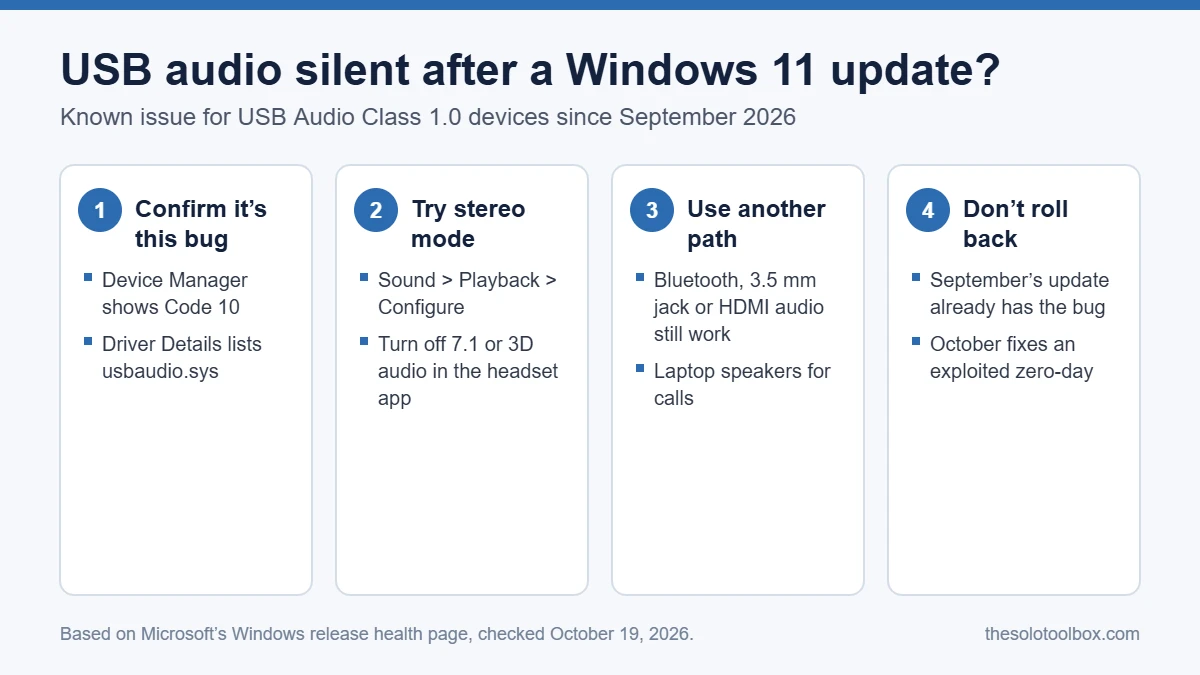
- Right-click it, select Properties, and read the Device status box on the General tab. Look for Code 10.
- Open the Driver tab and select Driver Details.
If the file list includes usbaudio.sys, the device is using Windows’ built-in USB Audio 1.0 driver, which is the group Microsoft says is affected. If it shows usbaudio2.sys, it’s using the USB Audio 2.0 driver, and your problem probably has a different cause. A manufacturer’s own driver name points elsewhere too.
What to try now
1. Switch the device to stereo (2-channel)
Some devices work in standard stereo and fail only in multichannel or 3D modes, and switching back to two channels restored sound for some people, according to Redmond Magazine. To try it:
- Right-click the speaker icon on the taskbar and select Sound settings, then More sound settings.
- On the Playback tab, select your USB device and choose Configure.
- Select Stereo and finish the wizard.
- If your headset has its own app with 7.1 or virtual surround, turn that off as well.
If Configure is greyed out or the device doesn’t appear at all, this step won’t help; that’s the unresolved part of the bug.
2. Use a different audio path for now
For calls and meetings, move to audio that doesn’t depend on the USB Audio 1.0 driver: a Bluetooth headset, a wired headset in the 3.5 mm jack, your monitor’s speakers over HDMI or DisplayPort, or the laptop’s built-in speakers and mic. Choose the new device under Settings > System > Sound, and check the speaker and mic selection inside Teams, Zoom or Meet, which keep their own device settings.
3. Check for a manufacturer driver
Microsoft’s driver documentation says that when a hardware maker’s driver exists on the PC or on Windows Update, it’s installed in place of the built-in class driver. If your headset or DAC maker offers a Windows driver, it may avoid usbaudio.sys entirely. We couldn’t confirm that this avoids the bug for every device, so treat it as worth a try, not a guaranteed fix.
Why rolling back the update won’t help
Uninstalling the latest update under Settings > Windows Update > Update history > Uninstall updates only takes you back one month. The problem started with September’s update, so removing October’s KB5127648 leaves you on a build that already has the bug. You’d also lose October’s security fixes, including a fix for a Windows Shell flaw (CVE-2026-96951) that attackers were already exploiting to bypass Mark of the Web warnings on downloaded files.
Pausing updates won’t bring your audio back either, but it’s reasonable if you want to avoid a surprise restart while you work around the problem. Our guide on stopping Windows 11 from restarting for updates during work hours covers the settings.
FAQ
Which devices use USB Audio Class 1.0?
Microsoft hasn’t named brands or models. USB Audio Class 1.0 is the older USB audio standard; it’s still used by simpler devices, and reports point to some bundled gaming headsets, USB-C to 3.5 mm dongles and conference speakerphones. The Driver Details check above is the reliable way to tell.
Does this affect Windows 10?
Yes. Microsoft’s list of affected platforms includes Windows 10 versions 22H2 and 21H2 and the 2016 and 2019 Enterprise LTSC releases, as well as Windows Server 2012 through 2025.
When will Microsoft fix it?
Microsoft hasn’t given a date. Its status page says it’s working on a fix for a future Windows update. The next optional preview update usually arrives in the fourth week of the month, and the next security update is due on November 10, 2026, the second Tuesday.
One catch: if your PC runs Windows 11 version 24H2 Home or Pro, the fix won’t reach you on that version. Those editions stopped getting updates on October 13, 2026, so move to 25H2 or 26H2 first. Our guide to Windows 11 24H2 end of updates shows how to check your version and upgrade.
My USB mic works but the headphones are silent. Is it the same bug?
Possibly. Microsoft lists missing output and unresponsive volume as symptoms. Check the output device in Device Manager the same way; if it shows Code 10 and usbaudio.sys, it fits.
Next step
Check Microsoft’s release health page after each Windows update; when the issue is marked Resolved, install that update, restart, and switch back to your USB device under Settings > System > Sound.
How we checked this: issue status, dates and symptoms come from Microsoft’s Windows release health page and were last checked on October 27, 2026, along with Microsoft’s USB audio driver documentation and reporting from Redmond Magazine and CyberInsider. We didn’t reproduce the bug on our own hardware.
Related guides
Sources
- Microsoft: Windows 11, version 26H2 known issues and notifications
- Microsoft Learn: USB Audio 2.0 drivers
- Redmond Magazine: Emergency Windows update fixes only part of USB audio problem (September 16, 2026)
- PCWorld: Windows 11’s September patch breaks USB audio (September 14, 2026)
- CyberInsider: Windows 11 October updates fix zero-day, VPN failures and black screens (October 13, 2026)