How to change ChatGPT’s voice and try the new GPT-Live voices
To change ChatGPT’s voice, open Settings > Voice, select Voice, and pick one from the list. OpenAI gives the same path for the mobile apps and the web. Since October 15, 2026, OpenAI has been rolling out GPT-Live-1.1, which adds new voices with more natural accents for French, German, Hindi, Japanese, Korean and Mexican Spanish, plus a new English voice called Bubbie. This guide covers the steps, every voice currently listed, the daily Voice limits on each plan, and what to do if the new voices haven’t reached your account.
Before you start
- You’ll need: the ChatGPT app for iPhone or Android, or ChatGPT in a web browser.
- Applies to: all ChatGPT plans. Free and Go accounts get the smaller GPT-Live-1.1 Quip model; Plus, Pro and Business get the full GPT-Live-1.1.
- Time: under a minute.
- Heads-up: the rollout is gradual, and OpenAI says available voices may vary by region and account.
What changed with GPT-Live-1.1
OpenAI’s ChatGPT release notes for October 15 list two new voice models: GPT-Live-1.1 and a smaller version called GPT-Live-1.1 Quip. The update brings more natural accents across languages, new voices for six languages, and a wider range of short phrases while Live is searching, so you hear less of the same “checking” filler. Which model you get depends on your plan:
| Plan | Voice model |
|---|---|
| Free, Go | GPT-Live-1.1 Quip |
| Plus, Pro, Business | GPT-Live-1.1 |
How to change ChatGPT’s voice
- Open ChatGPT on your phone or at chatgpt.com and open Settings from your profile menu.
- Select Voice.
- Select Voice again to see the list of voices.
- Pick a voice. Your next voice conversation uses it.
If you switch voices while a voice call is running, ChatGPT starts a new voice call in the same chat rather than changing the voice mid-sentence. On the very first voice conversation, the app asks you to choose a voice before you start.
Starting a voice conversation
On iPhone or Android, tap the Voice icon in the message bar and allow microphone access when asked. On the web, click the Voice icon in the prompt box and allow microphone access in your browser. On supported mobile versions you can make every new chat open in voice by turning on Start with Voice under Settings > Voice.
Every ChatGPT voice currently listed
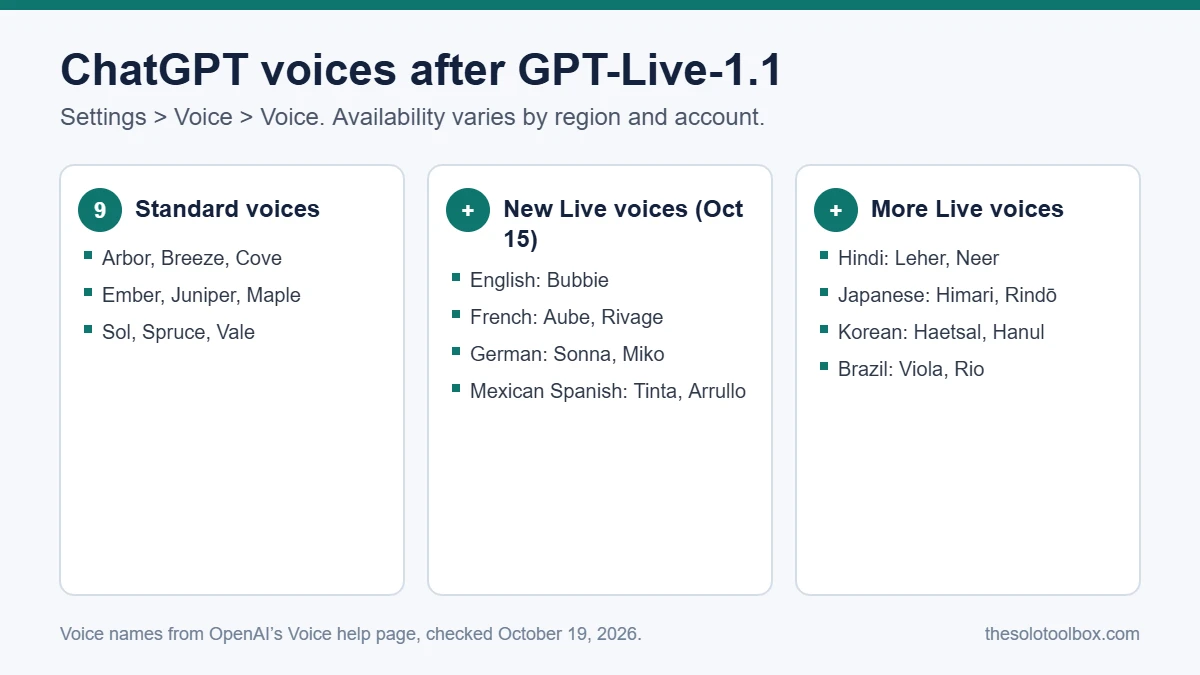
OpenAI’s Voice help page lists nine standard voices and a set of additional Live voices grouped by language:
| Group | Voices |
|---|---|
| Standard | Arbor, Breeze, Cove, Ember, Juniper, Maple, Sol, Spruce, Vale |
| English (new) | Bubbie |
| French (new) | Aube, Rivage |
| German (new) | Sonna, Miko |
| Hindi (new) | Leher, Neer |
| Japanese (new) | Himari, Rindō |
| Korean (new) | Haetsal, Hanul |
| Mexican Spanish (new) | Tinta, Arrullo |
| Brazil | Viola, Rio |
The Brazil voices appear on the help page but weren’t named as new in the October 15 release note.
ChatGPT Voice limits by plan
Voice in chats is measured over a rolling 24-hour window, not a calendar day. These are the limits OpenAI lists:
| Plan | Voice limit (rolling 24 hours) |
|---|---|
| Free | Limited Quip access; OpenAI says this may change |
| Go | 3 hours (Quip) |
| Plus | 3 hours (GPT-Live-1.1) |
| Pro ($100/month) | 15 hours |
| Pro ($200/month) | Unlimited, subject to abuse guardrails |
| Business Standard | 3 hours, then 1.25 credits per minute |
| Business Premium | 15 hours, then 1.25 credits per minute |
| K-12 Teachers | 3 hours |
| Enterprise (usage-based) | $0.05 per minute |
When you hit the limit, the voice call ends and you can continue the same chat in text. Calls can also end at the maximum session length or when the conversation gets too long.
New voices not showing? Check these
- Wait for the rollout. OpenAI is releasing GPT-Live-1.1 gradually. If the list hasn’t changed, your account hasn’t been switched over yet.
- Update the app. Install the latest ChatGPT version from the App Store or Google Play, then reopen Settings > Voice.
- Region and account. OpenAI says available voices vary by region and account, so a colleague may see options you don’t.
- Work accounts. On Business, Enterprise, Edu and Healthcare plans, Voice access depends on workspace settings your admin controls.
- Teen accounts. A parent or guardian can manage Voice through parental controls.
Settings that make voice calls work better
- Background noise: use headphones or move somewhere quieter. On iPhone, open Control Center during a call, select Mic Mode and turn on Voice Isolation.
- Interruptions: ask ChatGPT at the start to wait until you say you’re ready. Long pauses can still trigger a reply.
- Meetings: Live is built for one person. It may respond when people in the room talk to each other.
- Wrong date or time in answers: check your device or browser time zone, or say the date and location in your request.
- Background conversations: control whether a call keeps running when you leave the app under Settings > Voice.
What happens to your voice recordings
According to OpenAI’s Voice help page, audio from Live and Advanced voice conversations is stored with the chat transcript for 30 days. Deleting the chat removes its audio clips within 30 days, unless OpenAI must keep them for security, safety or legal reasons; archiving a chat doesn’t delete anything. In Standard mode, audio is deleted after transcription unless you chose to share it.
Voice clips aren’t used for training unless you opt in. On Free, Plus and Pro personal accounts, that choice sits under Settings > Data Controls, in Improve the model for everyone and its audio and video toggles. If you talk through client work by voice, leave those off.
FAQ
Is GPT-Live-1.1 free?
Free accounts get limited access to GPT-Live-1.1 Quip, the smaller model. The full GPT-Live-1.1 model is for Plus, Pro and Business plans.
Can I change the voice in the ChatGPT desktop app?
OpenAI’s help page gives the Settings > Voice path for mobile and web and doesn’t list separate steps for the desktop apps, which have their own Voice pricing and limits. If the desktop app doesn’t show the option, change the voice on your phone or the web.
Does changing the voice change the answers?
No. The voice controls how ChatGPT sounds. Which model answers depends on your plan: Quip on Free and Go, the full GPT-Live-1.1 on Plus and above.
Can I run two voice conversations at once?
No. OpenAI says only one voice conversation can run at a time.
Next step
Before you use voice for client calls or notes, check what ChatGPT keeps. Our guide to keeping client data out of AI training in ChatGPT, Claude, Gemini and Copilot walks through the data settings on each service.
How we checked this: menu paths, voice names and limits come from OpenAI’s ChatGPT release notes and Voice help page, checked on October 19, 2026. We didn’t test every voice on every plan, and OpenAI notes that voices, limits and Free access may change during the rollout.
Related guides
Sources
- OpenAI Help Center: ChatGPT release notes (GPT-Live-1.1 and new voices, October 15, 2026)
- OpenAI Help Center: ChatGPT Voice FAQ
- Notebookcheck: GPT-Live-1.1 brings new voices for six languages (October 16, 2026)