Broadcom WPS flaw (WPSplinter): is your router affected?
A flaw in Broadcom’s Wi-Fi Protected Setup (WPS) code, nicknamed WPSplinter, lets someone within Wi-Fi range take over certain routers without knowing the Wi-Fi password. There is no CVE, no patch has reached the devices the researcher tested, and switching WPS off in your router’s settings may not close the hole. To find out whether you’re exposed, identify your router model, check it against the researcher’s device list, and ask your internet provider or router maker for a firmware update.
This guide covers what was disclosed on October 16, 2026, which chips and routers are involved, the checks you can do today, and what to do if your router will never be fixed.
Before you start
- You’ll need: access to your router (to read the label) and, ideally, its admin page or your provider’s app.
- Applies to: routers, cable modems and ISP gateways with Broadcom Wi-Fi chips. The confirmed cases so far are Belgian ISP gateways, but the vulnerable code ships in products from dozens of vendors.
- Time: 10–15 minutes to check; longer if you need to contact your provider.
- Heads-up: No attacks in the wild have been reported. The working exploits so far are the researcher’s own.
What was disclosed
Security researcher Quentin Kaiser published the details on October 16, 2026, when he presented them at the Hexacon conference (write-up). He found two bugs in the code Broadcom routers use to reassemble fragmented WPS setup messages. A crafted sequence of Wi-Fi frames corrupts the router’s memory and lets an attacker run code as root, with no Wi-Fi password and no WPS button press.
He demonstrated two attacks on real ISP equipment:
- On an Orange Belgium Askey TCG3000 gateway, he read the stored Wi-Fi password out of memory, sent it back over the air, and joined the network.
- On a Proximus BBOX 3V+ (built by Sagemcom), he opened a remote shell carried entirely over Wi-Fi frames, with no outside server.
According to Kaiser’s timeline, he reported the bugs to Broadcom on July 18 and July 27, 2026. Broadcom replied that a patch existed, told him to contact device makers directly, and declined to assign a CVE. CERT/CC closed its case on August 4 because Broadcom is its own CVE authority. Kaiser says Broadcom knew of the issue as early as 2018 and recommended that manufacturers switch to the open-source hostapd WPS stack instead. As of October 15, none of the affected devices he identified had received a fix (The Register, The Hacker News).
Which chips and routers are affected
The bug sits in Broadcom’s own WPS implementation, which ships on two platform families. Your router’s outlook depends on which one it uses.
| Platform | Chips named | Fix outlook |
|---|---|---|
| eCos (older cable modems and gateways) | BCM3380, BCM3383, BCM33834 | Kaiser calls it a “forever day”: no realistic patch path |
| Linux (newer gateways and routers) | BCM3390, BCM65xx, BCM68xx | Fixable if the maker updates or replaces the WPS code |
In Belgium, Kaiser found the vulnerable parser on gateways from three of the four big providers: Proximus, Orange Belgium and VOO (Netgear CG3100 and CG3700, Technicolor TC7210 and CGA4233). Telenet’s Sagemcom F@st models are listed as “to be confirmed”. His rough estimate is about 1.56 million exposed devices in Belgium alone.
Outside Belgium, the WPSplinter project page lists vendors whose products contain the legacy Broadcom code, including ARRIS, Arcadyan, Askey, Cisco, Comtrend, Netgear, Nokia, Sagemcom, TP-Link, ZTE and Zyxel. The page says the list isn’t complete and that a matching chip alone doesn’t prove a device is vulnerable; the exact firmware matters.
How to check whether your router is affected
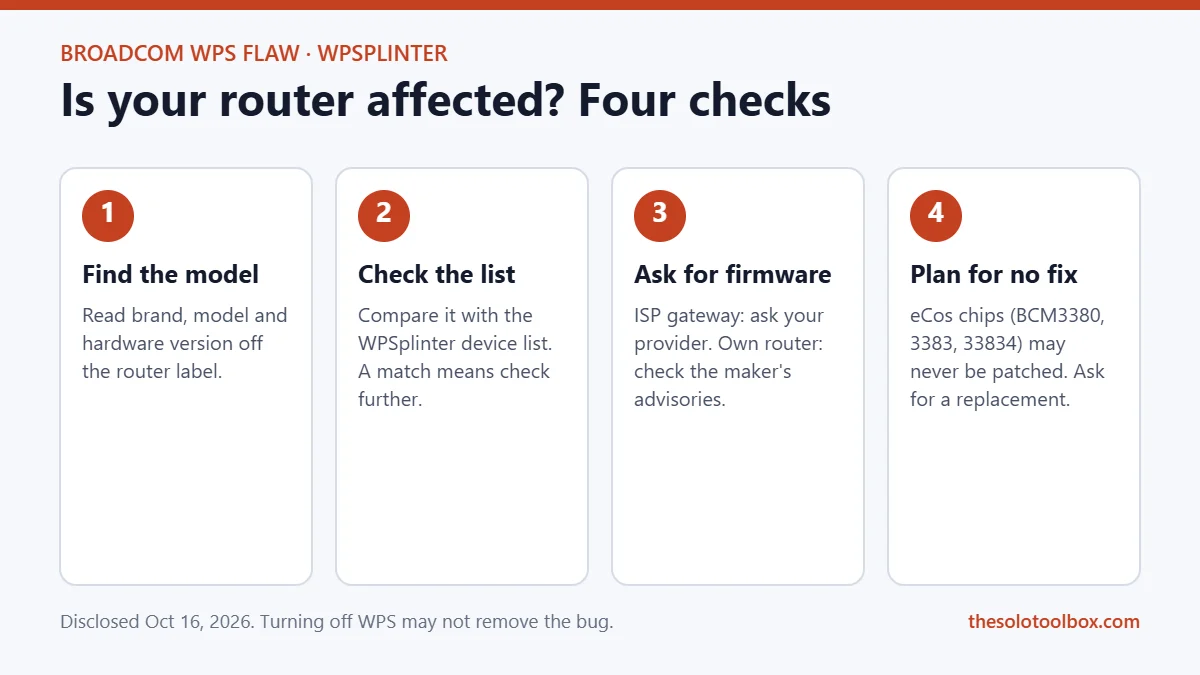
- Find the exact model. Turn the router or gateway over and read the label. Note the brand, the model number and, if shown, the hardware version. ISP gateways often carry the provider’s name (for example “bbox” or “Livebox”) alongside the manufacturer’s model code.
- Compare it with the list. Open the WPSplinter page and search for your brand and model. A match means “check further”, not “definitely vulnerable”.
- Check the firmware version. Log in to the router’s admin page (the address is usually printed on the label) or your provider’s app, and look for a status or system page that shows the firmware version and date.
- Ask the right company. If the router came from your internet provider, the provider controls its firmware, so contact them and ask whether the Broadcom WPS issue disclosed on October 16, 2026 is fixed on your model. If you bought the router yourself, check the maker’s support page or security advisories for your model.
Kaiser has also published detection tools in his GitHub repository: YARA rules for scanning extracted firmware and a script that fingerprints the legacy Broadcom code over the air. They are aimed at researchers and IT teams, and the project page treats them as triage aids that need confirmation against the exact firmware.
Should you turn off WPS?
Turning WPS off is still sensible: it closes older, well-known WPS PIN attacks and you rarely need it. But don’t treat it as a fix for this bug. The WPSplinter page warns that a settings toggle “may not remove or fully disable the vulnerable parser”, and Cybernews reports Kaiser’s view that disabling WPS may not eliminate the vulnerability.
To switch it off, log in to your router’s admin page or app and look under the wireless or Wi-Fi settings for an option labelled WPS or Wi-Fi Protected Setup. The exact menu differs by model, and some ISP gateways hide it or don’t offer it at all. After you turn it off, devices that joined with the WPS button stay connected; new devices will need the Wi-Fi password.
If your router is on the list
- Install the firmware update as soon as one exists, then change your Wi-Fi password. The demonstrated attack can read the stored password, so assume an exposed router’s password could be known.
- Ask your provider for a replacement if your gateway uses one of the eCos chips (BCM3380, BCM3383, BCM33834). Those devices may never get a fix.
- Consider bridge mode with your own router. Many ISPs let you switch the gateway to modem-only (bridge) mode and turn off its Wi-Fi, so a separate router you control handles wireless. The attack is delivered over Wi-Fi, so a gateway whose radio is switched off isn’t reachable this way. Ask your provider whether your gateway supports it, and pick a replacement router that gets regular firmware updates.
- Keep sensitive work on encrypted connections. An attacker with root on your router can watch and redirect traffic. HTTPS, a VPN, and two-step verification on important accounts limit what that access is worth.
The same principle applies to every device that stops getting updates. If your Windows PC is still on an unsupported build, our guide on moving off Windows 11 24H2 walks through it. And if you run a small business network, the SkyKick breach checklist shows the same “check your vendor’s access” habit applied to Microsoft 365.
What we know and don’t know
- Known: two bugs in Broadcom’s WPS reassembly code, working root exploits on two Belgian ISP gateways, no CVE, and no patched devices as of October 15, 2026.
- Not known: a complete list of affected models worldwide, when providers will ship fixes, and whether the WPS toggle blocks the bug on any given device.
- Not reported: any real-world attacks. Exploitation requires being within Wi-Fi range of the target, which limits it to someone nearby.
FAQ
Is WPSplinter being exploited right now?
No real-world attacks have been reported as of October 19, 2026. The working exploits published so far are the researcher’s proofs of concept. Because an attacker has to be within Wi-Fi range, mass internet-wide attacks aren’t possible with this bug.
Does this affect routers outside Belgium?
Probably. Belgium is where the researcher tested, but the legacy Broadcom WPS code ships in products from dozens of vendors worldwide. Check your exact model against the WPSplinter list and ask your provider or the router maker.
Is there a CVE number I can give my ISP?
No. Broadcom declined to assign one. Refer to it as the Broadcom WPS reassembly vulnerability disclosed by Quentin Kaiser on October 16, 2026, nicknamed WPSplinter, and link the project page.
Do mesh systems and Wi-Fi extenders count?
Only if they use the affected Broadcom WPS code. Look up the exact model on the WPSplinter list and check the maker’s security advisories, the same way you would for a main router.
How we checked: we read the researcher’s technical write-up and project page, and compared reporting from The Register, The Hacker News, Cybernews and Techzine published October 16–19, 2026. We didn’t test any routers ourselves. Device lists and patch status will change; check the project page for the latest.
Related guides
Sources
- Quentin Kaiser: One parser, two bugs, many routers (Oct 16, 2026)
- WPSplinter project page and device list
- The Register: Broadcom Wi-Fi bug turns sweet 16 (Oct 19, 2026)
- The Hacker News: Unpatched Broadcom Wi-Fi flaw lets attackers in range run code as root
- Cybernews: Broadcom chip flaw lets nearby hackers take over millions of routers
- Techzine: WPSplinter leaves millions of Belgian routers vulnerable
Next step: read your router’s model number off the label now and check it against the list. It takes five minutes, and it tells you whether you need to call your provider.