How to log out of ChatGPT and Claude on all devices
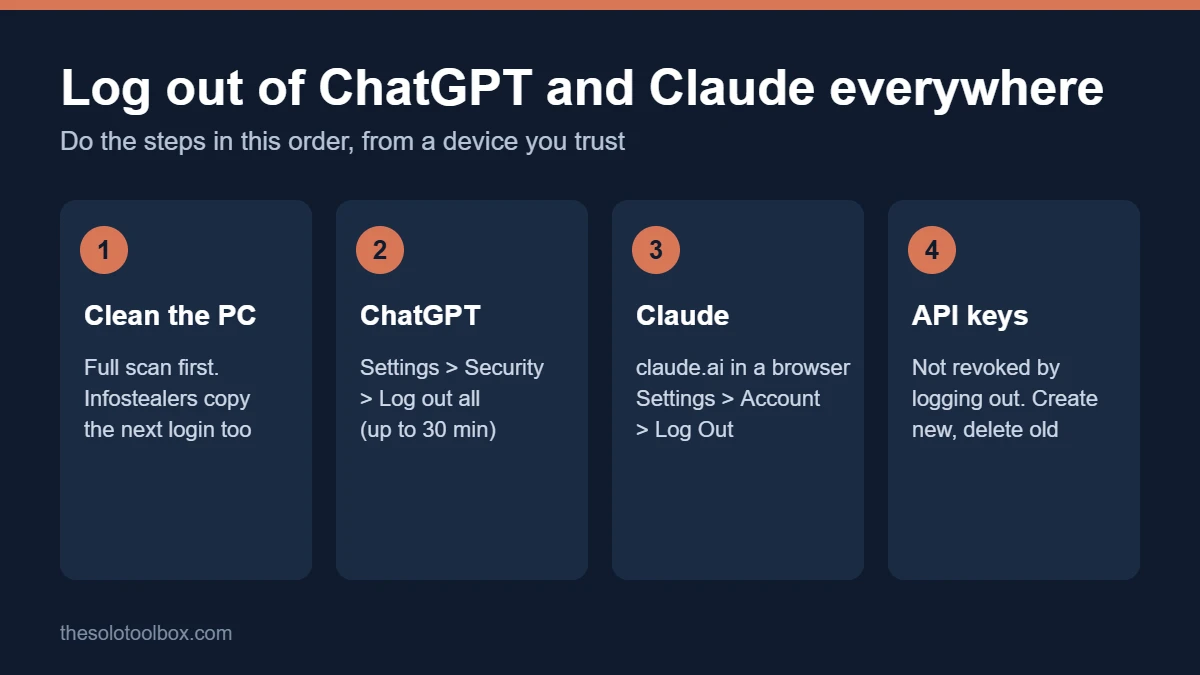
To log out of ChatGPT on all devices, open ChatGPT in a web browser, click your profile icon, then go to Settings > Security > Log out all. For Claude, open claude.ai in a browser, click your initials in the lower-left corner, then go to Settings > Account and choose Log Out to end every session, including Claude Code. Neither step cancels API keys, and neither helps if malware is still on your computer.
That last point matters this week. Check Point Research published an analysis on October 23, 2026 of an infostealer called Aokigahara (also tracked as Aoki) that copies login and session files from Claude, ChatGPT Desktop, Codex, Cursor, GitHub Copilot and other AI tools. This guide covers the right order of steps, how to end a single session, how to handle API keys and Claude Code tokens, and the signs that someone else is using your account. We checked the steps against OpenAI’s and Anthropic’s help centers on October 27, 2026.
Before you start
- You’ll need: A computer or phone you trust, a web browser, and access to the email address on your AI accounts
- Time: 10–20 minutes, longer if you need to clean a PC first
- Watch out: If you think your computer is infected, clean it before you sign back in. Infostealers grab the new session as soon as you log in again
Why you should log out of ChatGPT on all devices now
When you sign in to ChatGPT or Claude, the app stores a session token so you don’t have to type a password on every visit. Whoever holds that token can use your account without your password or two-factor code. Infostealer malware exists to copy exactly those files. On claude.ai, for example, a web session lasts 28 days and refreshes every time you use the site, so a stolen token can stay useful for weeks.
According to Check Point’s October 23 report, Aokigahara has a dedicated module for AI tools. It looks for Claude Code and Claude Desktop credential files, ChatGPT Desktop’s local data, Codex’s auth.json and .env files, Cursor and Windsurf state databases, GitHub Copilot and Gemini CLI configuration, and AWS sign-on caches. Symantec and Carbon Black’s Threat Hunter Team first reported the malware on October 15.
This has already cost people money. In late August, Anthropic emailed Claude users whose sessions common infostealers such as Lumma, Vidar and RedLine had stolen, signed them out, removed their saved payment cards and refunded unauthorized usage. Anthropic said nobody breached its own systems; the malware took the sessions from users’ computers.
Step 1: Make sure the computer is clean
Logging out kills the stolen session, but if the malware is still running it copies the next one. Do this first:
- Run a full scan with your security software. On Windows, open Windows Security > Virus & threat protection > Scan options, choose Microsoft Defender Offline scan and click Scan now.
- Remove apps you installed from unofficial sites, cracked software and browser extensions you don’t recognize. Anthropic says the malware it saw usually arrived that way.
- If the scan finds an infostealer, the safest fix is a full reset of the PC. Many infostealers install extra components that survive a simple removal.
- Do the logouts and password changes below from a different device you trust, such as your phone’s browser.
If you recently used an AI coding agent on downloaded files, our AGENTS.md attack guide explains a related risk, and the AOMEI Backupper malware check shows how to look for signs of a known infection.
Step 2: Log out of ChatGPT on all devices
- Open chatgpt.com in a web browser and sign in.
- Click your profile icon.
- Click Settings.
- Select Security.
- Click Log out all and confirm.
OpenAI says your current session ends right away, but other sessions can take up to 30 minutes to close. While you’re in Security, turn on multi-factor authentication if it’s off. If you use OpenAI’s API platform, it has its own Log out all option under the gear icon > Your Profile > Security, which closes sessions immediately.
Step 3: Log out of Claude on all devices
- Open claude.ai in a web browser. Anthropic says this option isn’t in the Claude iOS or Android apps.
- Click your initials in the lower-left corner.
- Select Settings, then Account.
- Click Log Out and confirm.
Anthropic says this ends sessions in web browsers, the mobile and desktop apps, Claude Code (including tokens made with setup-token for CI), and Claude in other tools such as Claude in Chrome and Claude in Slack. To sign back in you’ll need your Google login or a sign-in link sent to your email, so secure that email account first. Our guide to two-step verification for Google and Microsoft accounts walks through that.
End one Claude session instead of all of them
In Settings > Account, scroll to Active sessions (labeled Where you’re logged in in the newer layout). Each entry shows the device, browser, approximate location and last activity. Click the three-dot menu next to one you don’t recognize, choose Terminate and confirm. To sign out only Claude Code, go to Settings > Claude Code and click the trash can icon next to the token.
Step 4: Replace API keys and other tokens
Logging out of the website doesn’t touch API keys. Anthropic says so directly, and the Aokigahara report shows the malware collects .env and config files where developers often keep keys.
| What to replace | Where | Why |
|---|---|---|
| OpenAI API keys | OpenAI API platform, API keys page | Not revoked by Log out all |
| Anthropic API keys | Claude Console, API keys | Not affected by logging out of claude.ai |
| Claude Code tokens | claude.ai Settings > Claude Code | Removed by Log Out, or one at a time with the trash icon |
| Cursor, Copilot, Gemini CLI sign-ins | Sign out in each tool, then sign in again after cleaning the PC | Local state files are on Aokigahara’s list |
| Cloud keys (AWS, Azure, Google Cloud) | Each provider’s console | The same malware collects cloud credential files |
Create the new key first, update the apps that use it, then delete the old one so nothing breaks. Our OpenCode breach guide covers rotating developer keys in more detail.
Signs you need to log out of ChatGPT on all devices (or Claude)
- Chats in your history that you didn’t start (ChatGPT and Claude both keep a history list).
- Claude usage limits that refill and then drain while you’re not using it, which Anthropic described to affected users.
- Sessions in Claude’s Active sessions list from devices or places you don’t recognize.
- Unexpected charges, extra-usage purchases or API bills.
- Password-reset or sign-in emails you didn’t request.
If you see any of these, run the steps above in order, then contact OpenAI or Anthropic support about the charges.
FAQ
Does changing my password log out of ChatGPT on all devices?
Don’t count on it. Use Log out all in Settings > Security to end sessions explicitly; it’s the step OpenAI documents for this.
Can I log out of all Claude sessions from the app?
No. Anthropic says the log-out-everywhere option is only available on claude.ai in a web browser.
Does logging out of ChatGPT on all devices delete my chats?
No, on either service. Your conversations stay in your account and appear again when you sign back in.
Is Aokigahara on my Mac?
The Check Point and Symantec reports describe Windows malware, using Windows file paths and Credential Manager. Mac infostealers such as Atomic Stealer also steal browser sessions, so Mac users should still log out everywhere if they suspect an infection.
Check your sessions today
Open ChatGPT’s Settings > Security and Claude’s Settings > Account on a browser you trust and check the session lists today. It takes two minutes if nothing’s wrong.
Sources
- OpenAI Help Center: How to log out of all devices
- Claude Help Center: How do I log out of all active sessions?
- Claude Help Center: Managing your active sessions
- Check Point Research: Infostealer riding the AI train (Oct 23, 2026)
- Check Point Research: Threat intelligence report, Oct 26, 2026
- Symantec and Carbon Black Threat Hunter Team: Aoki infostealer (Oct 15, 2026)
- Engadget: Anthropic signs out Claude users to protect them from hackers (Sep 3, 2026)