OVHcloud CLI Compromised: How to Check If You’re Affected
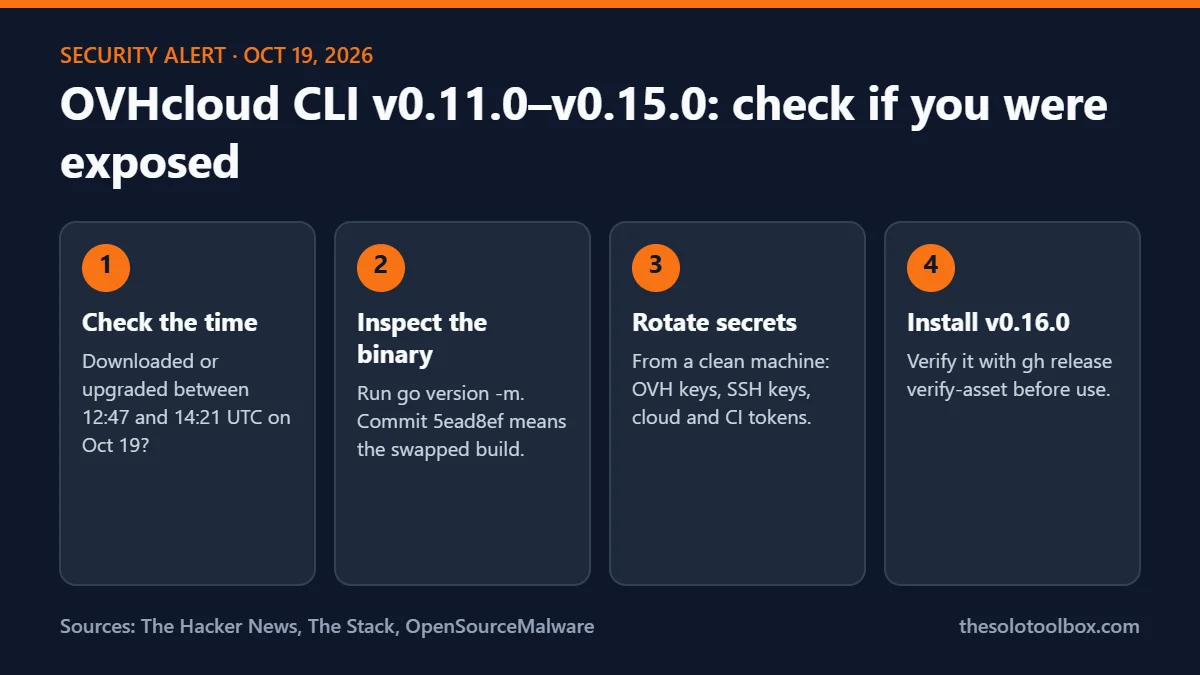
If you downloaded or updated the OVHcloud CLI between 12:47 and 14:21 UTC on October 19, 2026, treat that machine as exposed. During that 94-minute window, release files for versions v0.11.0 through v0.15.0 on GitHub were swapped for a build designed to read secrets from disk. OVHcloud’s advice is to change every secret stored on the affected machine and move to the clean v0.16.0 release.
This guide shows who was exposed and who wasn’t, how to inspect a binary without running it, which credentials to rotate, and how to verify the new release before you install it.
Before you start
- Facts were checked on October 21, 2026 against reporting from The Hacker News, The Stack, Gridinsoft and OpenSourceMalware. Sources are at the end.
- OVHcloud has promised a detailed postmortem but hadn’t published it at the time of writing. Some details below may change.
- Don’t run a binary you suspect. The checks in this guide read build information from the file without executing it.
What happened to the OVHcloud CLI
The OVHcloud CLI (the ovhcloud command, published in the ovh/ovhcloud-cli GitHub repository) is the official command-line tool for managing OVHcloud servers, domains and cloud projects. On Monday, October 19, someone used the GitHub account of one contributor to replace download archives attached to five existing releases. No new version number appeared, and the download links didn’t change, so anyone fetching those versions got the replacement files.
A customer spotted the swap because their CI job pinned the SHA-256 hash of the Linux arm64 archive and the hash no longer matched. They reported it in a public GitHub issue, since the repository had no private reporting channel. OVHcloud deleted the swapped files at 14:21 UTC and published v0.16.0 at 17:16 UTC as an immutable release with a signed attestation. Founder Octave Klaba said only this one repository was affected and that the release pipeline itself wasn’t touched.
What the malicious build does beyond “retrieve secrets from the disk” isn’t public. No copy of a swapped archive was preserved for analysis, so nobody has published which files it reads or where it sends them.
Which versions and platforms were affected
| Item | Status |
|---|---|
| v0.11.0, v0.12.0, v0.13.0, v0.14.0, v0.15.0 | Release files replaced on Oct 19 |
| v0.10.0 | Clean |
| v0.16.0 (released Oct 19, 17:16 UTC) | Clean, immutable, signed |
| macOS x86_64 and arm64, Linux x86_64 and arm64, Windows x86_64 | Archives replaced |
| Linux i386, Windows i386, Windows arm64, WebAssembly | Not changed |
| checksums.txt on each affected release | Replaced to match the bad files |
The last row matters most. Because checksums.txt was rewritten too, an archive and a checksum downloaded from the same release page would match each other even though both were malicious. A matching checksum from that page proves nothing for this window.
Were you exposed?
Installing one of those version numbers isn’t enough on its own. What counts is when you downloaded the file. You were likely exposed if, between 12:47 and 14:21 UTC on October 19, you did any of the following:
- Ran the official install script, which doesn’t check hashes.
- Downloaded an archive by hand from the GitHub release page of v0.11.0 to v0.15.0.
- Ran a CI job, Dockerfile or provisioning script that pulled a release archive without a pinned hash.
- Ran the CLI’s built-in upgrade on macOS or Linux after installing it by script or by hand.
You were most likely not exposed if you installed before 12:47 UTC that day and didn’t update during the window, built from source or used go install, or pulled the Docker image, which The Hacker News says was last pushed on September 21.
Homebrew is the one point where reports differ. The Hacker News says the Homebrew cask pinned the original SHA-256 hashes, so a swapped archive would have failed the check. OpenSourceMalware lists brew install and brew upgrade as possible exposure routes. If you ran either during the window, run the checks below anyway.
For reference, 12:47 to 14:21 UTC is 8:47 to 10:21 a.m. in New York and 13:47 to 15:21 in London.
How to check a binary without running it
The CLI is written in Go, so the binary carries its own build information. You can read it with the Go toolchain without executing the file:
go version -m ./ovhcloudLook at two lines in the output. In the malicious v0.15.0 Linux arm64 build, the module version read v0.15.1-0.20261013083505-5ead8ef9b43d+dirty, a pseudo-version from an untagged commit dated October 13, and the commit was 5ead8ef. The real v0.15.0 tag points to commit 760fd72. A build that references 5ead8ef is the swapped one.
Don’t rely on the word “dirty” alone. The Hacker News notes that the clean v0.16.0 build also reads v0.16.0+dirty, so the commit hash is the stronger signal.
If you still have the downloaded archive, compare its SHA-256 with a value you recorded before October 19, such as a hash pinned in your CI config or lockfile. The one published malicious hash is for the v0.15.0 Linux arm64 archive: 3833daffcaaaab27e4e0e0833240ffcb1df8df648f4ec0bc4a75c176e28933cb. The original archive’s hash was 5c2beb56e6d83a4b426565a1557791ef759316abcc4effb38dd627c90aeb80e0. Hashes for the other affected files haven’t been published.
Also check download timestamps in your shell history, CI logs, package caches and container build logs. On macOS, OpenSourceMalware suggests looking for a file named ~/init.json, which it describes as a marker left by the loader linked to the same account.
What to do if you ran an affected build
- Keep the file, don’t run it. Move it somewhere it can’t be executed if you or your security team want to inspect it later.
- Rotate secrets from a different, clean machine. Start with your OVHcloud API application key, application secret and consumer key, then anything else stored in
~/.ovh.confor environment variables. - Go wider than OVHcloud. Treat every secret readable by that user account as exposed: SSH keys, other cloud credentials, Kubernetes configs,
.envfiles, and tokens in.npmrc,.pypircor.netrc. - Check the logs. Review OVHcloud account activity, SSH logins and any other service the rotated keys could reach for access you don’t recognize since October 19.
- Remove the old binary and install v0.16.0 from the official release page, then verify it as shown below.
Deleting the binary doesn’t undo anything it already read. Rotation is the step that protects you. If your build servers or CI runners pulled an affected archive, rotate the secrets those runners hold too, including deploy keys and registry tokens.
How to verify v0.16.0 before installing
OVHcloud published v0.16.0 with a release attestation, which ties the files to the release in a way a later file swap can’t fake. With the GitHub CLI installed, check a downloaded file against the release:
gh release verify-asset v0.16.0 ./your-downloaded-archive -R ovh/ovhcloud-cliReplace the path with the archive you downloaded. In CI, pin the SHA-256 of each archive you fetch and fail the job if it changes. That one setting is what caught this attack.
The same lesson applies to other tools you install from GitHub release pages. The OpenCode breach also put developer API keys at risk, and our guides to the AOMEI Backupper malware check and the Rank Math Pro 3.0.123 malware walk through similar “is my copy the bad one” checks.
FAQ
Is the OVHcloud control panel or my hosting affected?
Nothing reported so far points to that. OVHcloud says one GitHub repository was affected and its build pipelines weren’t. The risk is to machines that ran a swapped CLI binary and the secrets stored on them.
I installed v0.15.0 in September. Am I at risk?
Not from this incident, if you didn’t reinstall or upgrade between 12:47 and 14:21 UTC on October 19. The files were replaced on that day, not when the versions were first published. Moving to v0.16.0 is still sensible.
Is it linked to GlassWorm?
Possibly. OpenSourceMalware found that the contributor account was compromised in March 2026 with a loader of the kind used by the GlassWorm campaign. The researchers call the link to the October swap their inference, and OVHcloud hasn’t confirmed it.
Should I switch to version v0.10.0?
The Stack reported v0.10.0 as clean, but v0.16.0 is newer, clean, and the only release with a signed attestation. Use v0.16.0 unless you have a specific reason to stay on an older version.
Next step
Search your CI logs and shell history for any OVHcloud CLI download on October 19, run go version -m on any binary installed that day, and rotate keys from a clean machine if you find one built from commit 5ead8ef. Then pin hashes in every pipeline that pulls release archives.
Related guides
Sources
- The Hacker News: Hackers hijack five OVHcloud CLI releases to distribute secret-stealing malware (October 2026)
- The Stack: OVHCloud repository hacked, customer reports incident
- Gridinsoft: OVHcloud CLI compromise, old releases, replaced files
- OpenSourceMalware: GlassWorm hacks OVH Cloud’s CLI tool