Should you delete DeepSeek after the US government ban?
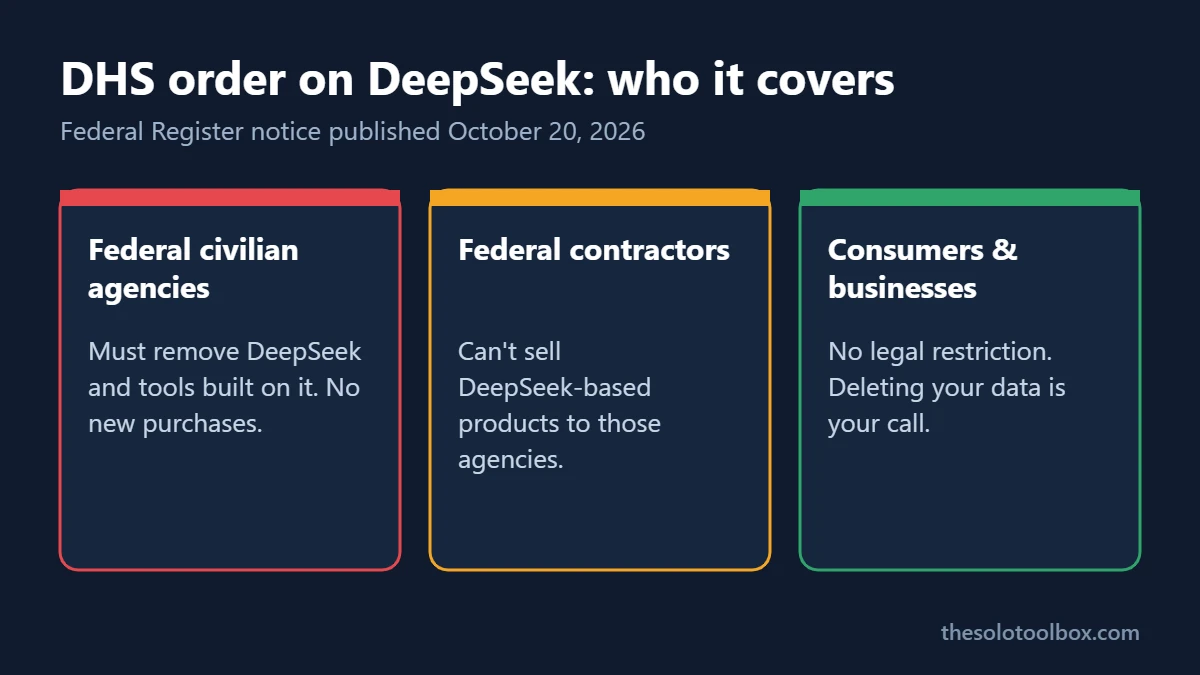
You don’t have to delete DeepSeek because of the new federal order, but you should if you’ve typed client data, passwords or anything work-related into it. The Department of Homeland Security order published on October 20, 2026 removes DeepSeek from federal civilian agency systems only. It doesn’t ban the app for the public, and it doesn’t stop private companies from using it.
What it does do is put DHS’s reasons on the record: DeepSeek is based in China, stores what you type there, and keeps it for as long as your account exists. Below is what the order covers, who should act, and the exact steps to export, wipe and delete a DeepSeek account.
Before you start
- You’ll need: your DeepSeek login (email, phone number or the Google account you signed up with).
- Time: about 5 minutes, plus a few minutes for the data export.
- Applies to: the DeepSeek website (chat.deepseek.com), the mobile apps, and the developer API at platform.deepseek.com.
What the DHS order on DeepSeek says
The notice is titled “Notice of Order Regarding Exclusion and Removal of DeepSeek Products from Federal Civilian Executive Branch Information Technology Systems and Procurements” (docket DHS-2026-0628). It was filed with the Federal Register on October 19 and published on October 20, 2026, under the Federal Acquisition Supply Chain Security Act of 2018.
It has two parts:
- Exclusion: federal civilian agencies can no longer buy products or services from Hangzhou DeepSeek Artificial Intelligence Co., Ltd or its affiliates.
- Removal: agencies have to take DeepSeek products off their IT systems, along with “third-party products and services developed using DeepSeek implementations.” That second part catches tools that quietly run a DeepSeek model under another brand.
According to PYMNTS‘ reading of the notice, DHS pointed to Chinese laws that let the government access company infrastructure, the personal data collected at sign-up, the fact that every prompt sends your text to the model, and open-source research that found critical vulnerabilities in DeepSeek’s iOS app. Coverage of the order also says agencies have 60 days to request an exception in writing, and that national security systems are handled separately.
Is DeepSeek banned for everyone in the US?
No. The order applies to civilian executive-branch agencies. Nothing in it makes the DeepSeek app illegal to download or use, and it places no rules on consumers, freelancers or private businesses. Several US states had already blocked DeepSeek on state-issued devices, and those rules also stop at government equipment.
The practical effect for everyone else comes through contracts. If you sell software or services to a federal civilian agency, expect questions about which AI models your product uses, because a DeepSeek model inside your tool now puts that tool on the removal list.
| Who you are | What the order means for you | What to do |
|---|---|---|
| Federal civilian employee | DeepSeek and tools built on it must come off agency systems | Follow your agency’s IT instructions; don’t use DeepSeek on work devices |
| Contractor or vendor to a federal agency | Agencies can’t buy DeepSeek-based products from you | List the AI models in your product and how data flows through them |
| Freelancer or small business | No legal restriction | Keep client data out of DeepSeek; consider deleting your account |
| Personal user | No legal restriction | Review what you’ve shared, turn off training, or delete the account |
What DeepSeek does with what you type
DeepSeek’s privacy policy (last updated February 10, 2026) answers most of the questions people are asking today:
- Where it’s stored: the policy says DeepSeek collects, processes and stores personal data in the People’s Republic of China.
- What’s collected: text and voice input, prompts, uploaded files and photos, chat history, plus device model, operating system, IP address, device identifiers and system language.
- How long it’s kept: for as long as you have an account, and longer in some cases, such as legal claims.
- Your controls: you can delete chat history in settings, opt out of model training, or ask for deletion at privacy@deepseek.com.
That last point is why deleting the app from your phone isn’t enough. Uninstalling removes the software; your account and chat history stay on DeepSeek’s servers until you delete them.
How to delete your DeepSeek data and account
These steps use the DeepSeek website, where the settings labels were documented most recently. The mobile app keeps the same options under your profile and Settings, but the button placement can differ.
1. Export your chats first
- Go to chat.deepseek.com and sign in.
- Open the sidebar (top-left icon), then click the three dots next to your name at the bottom left.
- Select Settings > Data.
- Next to Export data, click Export, then Download. The link stays valid for seven days.
2. Stop training on anything you keep
If you aren’t ready to delete the account, go to Settings > Data and turn off Help improve the model for everyone. This affects future chats; it doesn’t pull back conversations already used.
3. Delete all chats
In Settings > Data, click Delete all next to Delete all chats, then confirm with Delete all chats.
4. Delete the account
- Go to Settings > Profile.
- Click Delete next to Delete account.
- Type DELETE MY ACCOUNT and click Confirm delete my account.
- Uninstall the mobile app from your phone if you have it.
Deletion is permanent. If you signed up with a phone number and can’t find the option on the web, use the app, or email privacy@deepseek.com and ask for deletion of your account and personal data.
5. If you used the DeepSeek API
The developer platform at platform.deepseek.com uses the same login. Delete or rotate any API keys in your code before you close the account, and check whether you have prepaid balance left, because third-party account-deletion guides report that remaining balance is lost. Our guide to replacing exposed AI API keys walks through finding keys in config files and CI secrets.
What about running DeepSeek models on your own computer?
DeepSeek publishes some of its models as open weights, and people run them offline with tools such as Ollama or LM Studio. A model running entirely on your machine doesn’t send prompts to DeepSeek’s servers, so the data-storage concerns above don’t apply in the same way. The federal order still covers “DeepSeek implementations” inside agency systems, so this isn’t a workaround for government work. For personal or business use, the questions become the usual ones for any downloaded software: where you got the model file and what app you’re running it in.
FAQ
Is it illegal to use DeepSeek in the United States?
No. As of October 20, 2026, the federal order covers civilian agency systems and purchases, and state rules cover state-government devices. Personal and private-business use isn’t restricted by either.
Does uninstalling the DeepSeek app delete my data?
No. Your account and chat history stay on DeepSeek’s servers. Delete your chats and the account in Settings, or email privacy@deepseek.com.
Should I stop using other AI chatbots too?
The order is specific to DeepSeek. Every chatbot stores what you type somewhere, though, and most use it for training unless you opt out. Our guide to keeping client data out of AI training covers the settings in ChatGPT, Claude, Gemini and Copilot.
Did DHS say DeepSeek was hacked or leaked federal data?
No. The order is about supply-chain risk. Coverage of the notice says it doesn’t report a confirmed breach of federal systems.
How we checked: we read the DHS notice on the Federal Register’s public inspection site (filed October 19, 2026), coverage from PYMNTS and IT Munch, and DeepSeek’s privacy policy dated February 10, 2026. The account steps come from DeleteMe’s DeepSeek settings guide (updated September 14, 2026); we couldn’t confirm every label in the current mobile app. This isn’t legal advice for federal contractors; check your contract terms.
Related guides
Sources
- DHS: Notice of Order Regarding Exclusion and Removal of DeepSeek Products (Federal Register, Oct 20, 2026)
- PYMNTS: DHS Bans DeepSeek Across Federal Government Networks (Oct 19, 2026)
- IT Munch: DHS Orders DeepSeek Removed From Federal IT (Oct 20, 2026)
- DeepSeek Privacy Policy (updated Feb 10, 2026)
- DeleteMe: DeepSeek privacy settings guide
Next step: open DeepSeek, export your chats, and decide between turning off training or deleting the account. Then check which other AI tools hold your client work.