“Not registered to vote” text scam: how to check and what to do
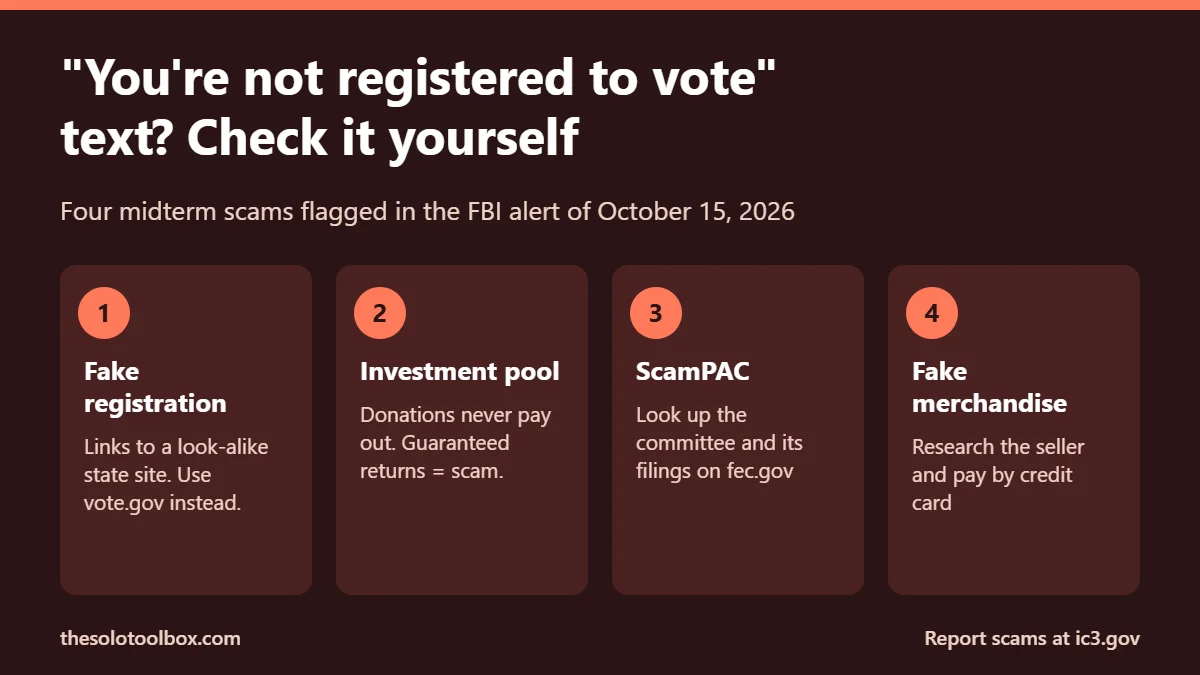
A text or email saying you’re “not registered to vote,” with a link to fix it, is one of four midterm scams the FBI flagged on October 15, 2026. The link leads to a fake state registration page that collects your personal details for identity theft. Don’t click it. Check your status yourself by going to vote.gov, which sends you to your state’s official election site.
The general election is on November 3, 2026, so expect these messages to peak this week, often with new twists such as a “changed” polling place. Below: what the texts look like, how to check your registration without touching the link, what to do if you really aren’t registered, and the steps to take if you already entered details.
Before you start
- You’ll need: your phone or computer and about 5 minutes.
- Safe sites to type in yourself: vote.gov, fec.gov, ic3.gov, reportfraud.ftc.gov.
- Applies to: anyone in the U.S. getting election texts, emails, calls or ads before the November 3, 2026 midterms.
What the FBI warned about
The FBI Internet Crime Complaint Center alert I-101526-3-PSA updates a 2024 warning. Scammers use candidates’ names, photos, logos and slogans, and increasingly use AI to generate realistic voices, images and messages that impersonate candidates, campaigns, government agencies and people you know. Help Net Security covered the alert on October 16.
| Scam | How it works | Red flag |
|---|---|---|
| Voter registration | Text or email says you aren’t registered and links to a fake state site | Any unsolicited link to “fix” your registration |
| Campaign investment pool | Pay into a pool that “pays out” if the candidate wins | Guaranteed returns; pressure to recruit others |
| Fake PAC (“ScamPAC”) | Donation goes to a group with no tie to the campaign | Group you can’t match to an FEC filing, or one that spends mostly on fundraising and “consulting” |
| Merchandise | Hats, shirts or flags paid for but never shipped | New store, prices well below normal, no reviews |
What the text usually looks like
Wording varies, but most follow the same pattern: an urgent claim, a deadline and a link. For example: “[State] Election Notice: our records show you are not registered to vote for Nov 3. Confirm your registration by 11:59 PM today: [short link].” The giveaways are the unsolicited link, the countdown, and a web address that isn’t a .gov site. Real election offices don’t give you hours to respond by text.
How to check your voter registration safely
- Ignore the link in the message. Open a new browser tab and type vote.gov yourself.
- Pick your state. vote.gov sends you to your state or local election office, where you can check your registration.
- Check that the address ends in .gov and matches the state office vote.gov linked to. Look-alike domains often add words such as “check,” “verify” or “register” to an official-sounding name.
- If your registration has a problem, fix it on that official site or call your county or local election office using the number listed there.
State election offices don’t need your Social Security number or bank details by text. A message asking for either is a scam.
What if you really aren’t registered?
If the official site says you’re not registered, a fake text was still a fake. But you may still have options, even this close to November 3. Registration deadlines are set by each state, and some states let you register in person during early voting or on Election Day itself. Your state’s page on vote.gov lists its deadlines and whether same-day registration is available.
If your deadline has passed and your state has no same-day option, call your county or local election office using the number on the official site and ask what your options are. Don’t pay anyone who offers to “fast-track” your registration: registering to vote is free everywhere in the U.S.
Election-week versions of the scam
As the election gets closer, the “not registered” text tends to change shape. Watch for these:
- “Your polling place has changed.” Look up your polling place yourself through your state’s election site, reached via vote.gov. Don’t trust a link or a phone number in the message.
- “Vote by text” or “vote by phone.” You can’t cast a ballot in a U.S. general election by text message or phone call. Any message offering that is false.
- “Election Day has moved” or “voting is extended for your party.” Election Day is November 3, 2026, for everyone. Rule changes don’t arrive by text.
- “Confirm your mail ballot.” Many states let you track your mail ballot. Use the tracker on the official state site, not a link sent to you.
Some of these aim to stop people voting rather than to steal from them. Report them too: your state or local election office wants to know, and so does the FBI at ic3.gov.
Calls and voice messages that sound like a candidate
The FBI says AI-generated content “makes these schemes harder for victims to detect.” A familiar voice is no longer proof. Hang up on any call that asks for money, gift cards, crypto or personal details, even if it sounds like a candidate or someone you know. Call back through a number you already have or one listed on the campaign’s or agency’s official site.
If a family member or friend is the “caller,” agree on a question only they would know. The same trick works against fake invites; our guide on stopping fake meeting invites in Google Calendar and Outlook covers a related scam route.
Before you donate or buy campaign merchandise
- Donations aren’t investments. The FBI says contributions “will not increase in value nor be returned.” Any promised payout is a scam.
- Look up the committee on fec.gov. Search the name in the FEC’s committee search and review its filings. A registered name alone doesn’t prove legitimacy; heavy spending on fundraising, consulting or administration is a warning sign.
- Give through the campaign’s own website, reached by typing the address, not through a link in a text.
- Research sellers before buying merchandise: look for reviews, complaints and a working contact address. Pay by credit card, which gives you dispute rights.
- Check apps too. Election-themed apps can be fakes; see how to spot a fake app on Google Play.
If you already clicked, paid or shared information
- Card or bank payment: call the number on the back of your card and dispute the charge. Ask for a new card number if you entered it on a fake site.
- Personal details: if you gave your Social Security number, freeze your credit with Equifax, Experian and TransUnion, and follow the recovery steps at IdentityTheft.gov.
- Passwords: change any password you typed into the page, and every account that reuses it. Turn on two-step verification.
- Report it: file a complaint at ic3.gov with the sender’s phone number, email, website, payment details and what you were told. You can also report to the FTC at reportfraud.ftc.gov.
- Report the text: forward it to 7726 (SPAM) so your carrier can block the sender, then delete it. The same steps work for other scam texts, such as fake package delivery texts.
FAQ
Is the “you are not registered to vote” text real?
Treat it as fake unless you’ve confirmed otherwise on your state’s official .gov election site. Even if your registration really has a problem, the fix is on that official site or through your local election office, never through a link in an unexpected text.
Do election offices text you about registration?
Some states and counties send official notices, but they won’t ask you to enter personal details through a link in an unexpected text. Check your status on your state’s site via vote.gov instead.
Is it safe to reply STOP to political texts?
For texts from real campaigns, STOP usually works. For suspected scams, don’t reply at all, since a reply confirms your number is active. Forward to 7726 and delete.
How can I tell if a candidate video is a deepfake?
You often can’t by looking. Check whether the campaign posted the same clip on its official site or verified accounts, and be suspicious of any video that ends with a request for money or personal information.
Where do I report an election scam?
The FBI asks people to report to ic3.gov or their local FBI field office, with as much detail about the contact and any payment as possible.
Last checked: October 27, 2026, against the FBI alert on ic3.gov. Update: added what the text looks like, what to do if you really aren’t registered, and election-week variants. This guide covers U.S. federal resources only; your state’s election office has the final word on your registration.
Related guides
Sources
- FBI IC3: Scammers Exploit 2026 U.S. Midterm Election to Perpetrate Multiple Fraud Schemes (Oct 15, 2026)
- Help Net Security: FBI warns of midterm election scams (Oct 16, 2026)
- Vote.gov: official voter registration links
- FEC: committee search
- FTC: IdentityTheft.gov
Next step: check your registration at vote.gov today, so the next “you’re not registered” text is easy to ignore.