Fake package delivery text? How to check it and report it
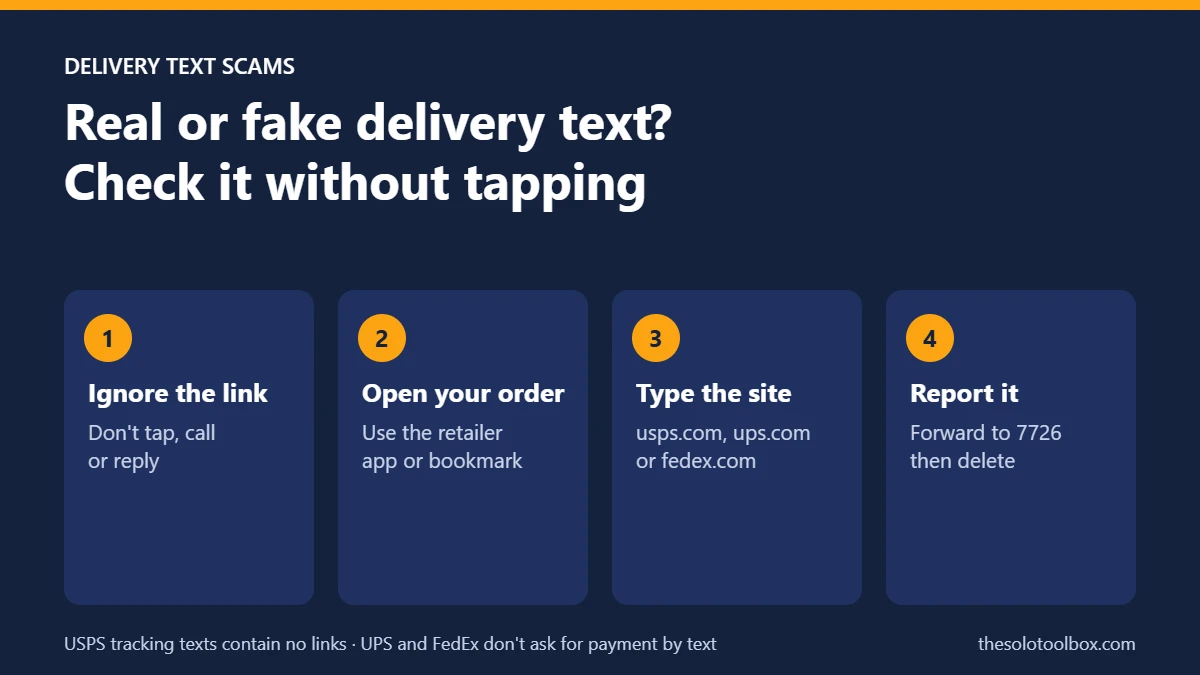
A text saying your package is on hold, undeliverable or waiting for a small redelivery fee is almost always a scam if it contains a link. USPS sends tracking texts only after you request them for a specific tracking number, and those texts contain no links. UPS and FedEx both say they don’t ask for payment or personal information in unsolicited texts. To check a package, open the retailer’s app or type usps.com, ups.com or fedex.com into your browser yourself.
A consumer-safety report distributed by Stacker on October 19, 2026, says these texts spike from early October through January as holiday orders grow. This guide shows how to check a delivery text without tapping it, the red flags carriers and the FCC list, how to report the message on iPhone and Android, and what to do if you already clicked or paid.
Before you start
- Don’t tap the link, call the number in the message, or reply.
- Take a screenshot that shows the sender’s number and the date. The US Postal Inspection Service asks for one when you report a USPS scam.
- Have your recent order confirmations or retailer apps open so you can match the message to a real order.
What USPS, UPS and FedEx actually send
| Carrier | What the carrier says | Where to report fakes |
|---|---|---|
| USPS | Sends tracking texts or emails only after you request tracking for a specific number. Those messages contain no links, and tracking is free. | Email spam@uspis.gov and forward the text to 7726 |
| UPS | Does not send unsolicited texts asking for personal information or payment before a package arrives. A real UPS representative can always give you a tracking number. | The fraud option on UPS’s email form at ups.com, and reportfraud.ftc.gov |
| FedEx | Does not request payment or personal information through unsolicited mail, text or email. | Forward to abuse@fedex.com |
How to check a delivery text without tapping it
- Read the sender and the link as text. Carrier links that don’t end in the carrier’s real domain, such as “usps-tracking” sites or misspellings like “fedx.com,” are fakes.
- Open the retailer’s app or website from your home screen or a bookmark, not from the message. Your order page shows the carrier and the real tracking number.
- If you want to check a tracking number from the text, type the carrier’s address yourself and paste only the number. Never paste the full link.
- If no order matches, the package isn’t yours. A message about a delivery you never asked anyone to track is a red flag on its own.
- Delete the text after you’ve reported it (see below).
Red flags in fake delivery texts
- A link to anything other than the carrier’s own domain.
- A small “redelivery,” “address correction” or customs fee with a short deadline.
- Requests for your Social Security number, card number, PIN or password to “confirm” your address.
- Spelling and grammar mistakes, or a sender using a personal phone number or email address.
- Callback numbers with an 809 area code or a 10-digit international number. The FCC warns that calling back can bring high connection and per-minute charges.
- Payment by gift card or wire transfer for a package someone says was “sent to you by mistake.”
Some people also receive real packages they never ordered. This is usually “brushing”: a seller ships cheap items to a real address so it can post fake reviews in the recipient’s name. You don’t owe anything for it. If it arrives with a QR code or a note asking you to visit a site, treat that the same way as a scam text.
How to report and filter scam texts on iPhone
In iOS 26, Apple can move texts from unknown senders out of your main list. Go to Settings > Apps > Messages, scroll to Unknown Senders and turn on Screen Unknown Senders. You can also set it from the Messages app: tap the Filters button, then Manage Filtering. The setting is off by default unless you had Filter Unknown Senders turned on before upgrading from iOS 18.
To report a specific message, forward it to 7726, the spam reporting number US carriers use, and use the junk reporting option Messages shows under texts from unknown senders.
How to report and filter scam texts on Android
In Google Messages, tap your profile picture, then Messages settings > Protection & Safety > Spam protection, and make sure Enable spam protection is on. Google says it’s on by default where your phone supports it. When Messages flags a text, tap Report spam.
On October 14, 2026, Google announced more protection for Messages, including warnings on links from numbers that aren’t in your contacts (for Android 6 and later) and an opt-in Enhanced protection mode rolling out “in the coming weeks.” If you don’t see those options yet, the standard spam protection setting above still applies. Fake delivery texts sometimes push you to install an app to “reschedule,” so read our guide on how to spot a fake app on Google Play before installing anything a text recommends.
Where to report a fake delivery text
- USPS scams: copy the message text into a new email to spam@uspis.gov, attach your screenshot, and say whether you clicked, lost money or shared information. Then forward the text to 7726.
- FedEx scams: forward the message to abuse@fedex.com.
- UPS scams: use the fraud option on UPS’s contact form at ups.com.
- Any delivery scam: report it to the FTC at reportfraud.ftc.gov. If you lost money, also file with the FBI at ic3.gov.
If you already clicked, paid or shared details
- If you only opened the page, close it. The Postal Inspection Service still advises telling your bank, even if you didn’t submit anything.
- If you entered card details, call the number on the back of your card. Ask the bank to cancel and reissue the card and to dispute any charges you don’t recognize.
- If you entered a password, change it on the real site, and change it anywhere else you used it. Then turn on two-step verification for that account.
- If you gave your Social Security number, go to IdentityTheft.gov for a recovery plan and place a free credit freeze with Equifax, Experian and TransUnion.
- If you installed an app from the link, uninstall it and run a scan with Google Play Protect.
- Report what happened at reportfraud.ftc.gov, and keep your screenshots for your bank.
FAQ
Does USPS text you about a package?
Only if you asked USPS to track a specific package by tracking number. USPS says those texts contain no links. A USPS text with a link that you didn’t request is a scam.
Is it safe to reply STOP to a delivery scam text?
Don’t reply at all. A reply tells the sender the number is active. We explain this in more detail in our guide to the “not registered to vote” text scam, which uses the same tactics.
What number do I forward scam texts to?
Forward them to 7726 (it spells SPAM on a keypad). For USPS scams, also email spam@uspis.gov.
Can a scam text hurt my phone if I just read it?
Agency guidance focuses on what you do next: tapping links, calling numbers, replying or installing apps. Reading the message and deleting it after you report it is the safe path.
How we checked this: carrier policies and reporting steps were checked on October 20, 2026, against the US Postal Inspection Service, UPS, FedEx and FCC pages listed below, Apple’s iOS 26 support article and Google’s Messages help page. Exact Messages menu labels can differ slightly by phone model and app version.
Next step: turn on Screen Unknown Senders on your iPhone or confirm spam protection is on in Google Messages today, before holiday shipping volume peaks.
Related guides
Sources
- US Postal Inspection Service: Smishing
- UPS: Protect yourself from fraud and scams
- FedEx: Fraud prevention
- FCC: How to identify and avoid package delivery scams
- Apple Support: View conversations from unknown senders in Messages on your iPhone
- Google Messages Help: spam protection
- Google: New Android scam protections (Oct 14, 2026)
- Stacker: Package and delivery scams spike as early holiday sales begin (Oct 19, 2026)