Exchange OWA not working after the October 2026 Windows update: fix
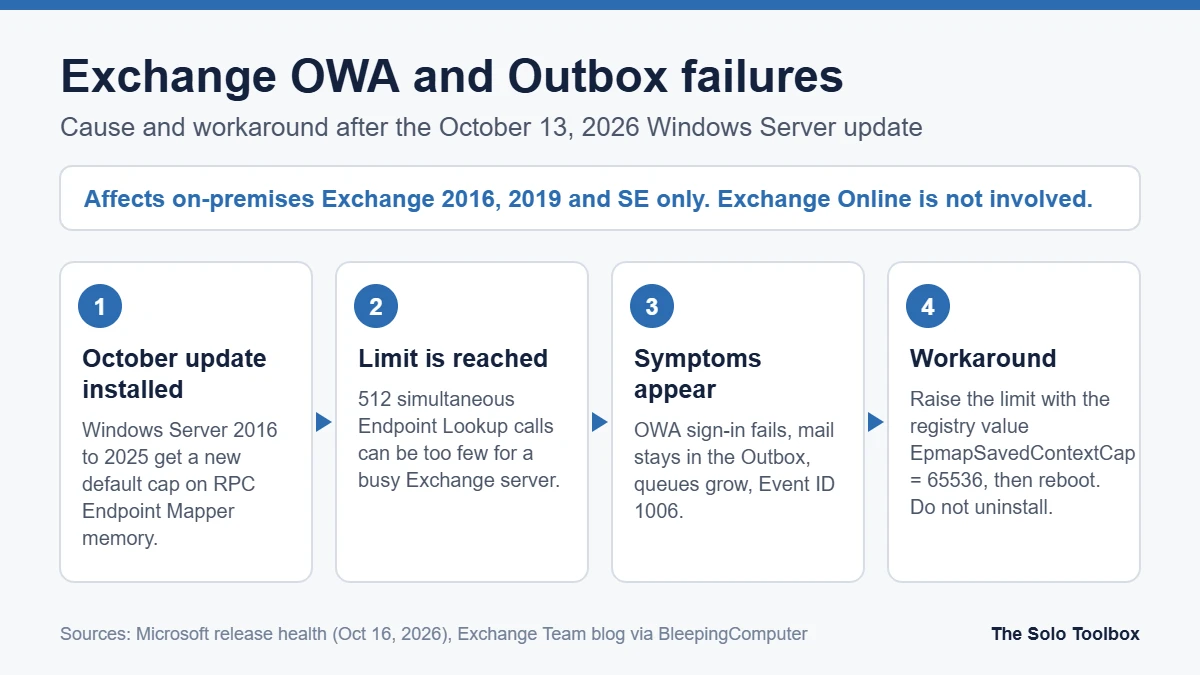
If users can’t sign in to Outlook on the web (OWA), or messages sit in the Outbox after your Exchange server installed the October 13, 2026 Windows Server update, you are probably hitting a limit that update added to the Windows RPC Endpoint Mapper. Microsoft has confirmed the problem, says not to uninstall the update, and offers a registry change that raises the limit. The issue only affects on-premises Exchange Server; Exchange Online in Microsoft 365 is not involved. Below: how to confirm it, the exact fix, and what to watch afterward.
Before you start
- You’ll need: local administrator rights on each Exchange server and a maintenance window for a reboot.
- Applies to: Exchange Server 2016, 2019 and Subscription Edition (SE) running on Windows Server 2016, 2019, 2022 or 2025 with the October 2026 Windows security update installed.
- Time: about 10 minutes per server, plus the reboot.
- Heads-up: this is a temporary mitigation, not Microsoft’s final fix. Back up the registry (or take a VM snapshot) before you change it.
What broke, and when
Microsoft’s Windows release health dashboard added the entry “Users might be unable to sign in to OWA or send emails on Exchange Server” on October 16, 2026. It lists the originating update for Windows Server 2025 as KB5126646 (OS build 26100.33650, released October 13) and names Windows Server 2016, 2019, 2022 and 2025 as affected. The Exchange team published a companion Tech Community post the same day. BleepingComputer and The Register reported on October 19 that admins had spent the weekend fighting the issue.
Microsoft’s explanation: the October update put a default cap on memory used by the RPC Endpoint Mapper. That default allows 512 simultaneous Endpoint Lookup calls, which a busy Exchange server can exceed. When it does, Exchange components can’t reach the mailbox databases.
Two details matter for troubleshooting:
- It happens even if you haven’t installed the October 2026 Exchange security update. The trigger is the Windows update, not the Exchange one.
- It can appear hours after the update. One admin quoted by The Register saw it return about every 20 hours, with each reboot buying only temporary relief. Lightly loaded servers may never hit it.
Symptoms that point to this bug
| What you see | Where to look |
|---|---|
| OWA sign-in fails or OWA shows a connection error | Browser, any user |
| Sent messages stay in the Outlook Outbox | Outlook desktop clients |
MapiExceptionMdbOffline: Unable to make connection to the server. (hr=0x80004005, ec=1142) | OWA error page |
| Event ID 1006 in the Application log | Event Viewer on the Exchange server |
| Delivery queues keep growing | Exchange Management Shell (Get-Queue) or Queue Viewer |
| Mailbox moves or replication stall | Migration batches, Get-MoveRequest |
If these started after the October update and a reboot clears them for a while, this issue is the likely cause.
How to confirm before changing anything
- Check that the October update is installed. In PowerShell, run
Get-HotFix | Sort-Object InstalledOn -Descending | Select-Object -First 5, or open Settings > Windows Update > Update history. On Windows Server 2025 look for KB5126646; other versions get their own October 13 cumulative update number. - Open Event Viewer > Windows Logs > Application and filter for Event ID 1006 around the times users reported problems.
- In the Exchange Management Shell, run
Get-Queueand see whether message counts are climbing. - Check whether the mitigation is already present:
reg query "HKLM\SOFTWARE\Microsoft\Rpc" /v EpmapSavedContextCap. “Unable to find” means it isn’t set.
The fix: raise the Endpoint Mapper limit
This is the workaround from Microsoft’s Exchange team post, as reported by BleepingComputer. Run it on every affected Exchange server.
- Sign in to the Exchange server and open Command Prompt as administrator.
- Run:
reg add "HKLM\SOFTWARE\Microsoft\Rpc" /v EpmapSavedContextCap /t REG_DWORD /d 65536 /f- Restart the server. The setting doesn’t apply until the reboot.
- Test OWA sign-in, send a message from Outlook, and confirm queues drain with
Get-Queue. - Keep watching Event ID 1006 and queue sizes for at least a day. If the symptoms return, Microsoft says to raise the limit further.
In a Database Availability Group, apply the change and reboot one member at a time, moving active databases off each server first, so users keep access during the work.
Why you shouldn’t uninstall the October update
Removing the update would also remove that month’s Windows security fixes, and Microsoft explicitly advises against it. The registry change targets the one setting that causes the problem and leaves the rest of the patch in place. If the mitigation doesn’t help, Microsoft’s release health entry says affected organizations can get further help through Microsoft Support for business.
What it means if you run a small office Exchange server
Plenty of small firms still run a single on-premises Exchange box, often maintained by an outside IT contractor who may not have seen the advisory. If that’s you, forward this to whoever applies your updates and ask them to check the registry value above.
It’s also a good moment to look at the bigger picture. Microsoft said in July that the extended security update (ESU) program for Exchange 2016 and 2019 ends this month, and the October bug shows how much hands-on care an on-premises mail server needs. Even if you stay on-premises, confirm your SPF, DKIM and DMARC records are still right after any mail-flow change (our guide) and set an automatic reply if clients may notice delays while you fix it.
FAQ
Does this affect Microsoft 365 or Outlook.com?
No. Microsoft’s entry covers on-premises Exchange servers only. If you use Exchange Online and see Outbox problems, check the Microsoft 365 service health page instead.
Do I need the October Exchange security update for this to happen?
No. Microsoft says the issue occurs even on servers without the October 2026 Exchange security update. The Windows Server update alone triggers it.
Is the registry change permanent?
It stays until you remove it, but Microsoft describes it as a temporary mitigation while it investigates. As of October 26, Microsoft hasn’t released a permanent fix. The next scheduled Windows security update is Patch Tuesday, November 10, 2026; check its known-issues notes before you remove the registry value.
Will a reboot alone fix it?
Only briefly. Admins report the problem coming back after hours of load. The registry change is what stops the recurrence.
How we checked this: we read Microsoft’s Windows Server 2025 release health entry (opened October 16, 2026; still marked Mitigated, with no permanent fix, when we rechecked on October 26) and reports from BleepingComputer and The Register published October 19. Last checked: October 26, 2026. The registry value is as published in Microsoft’s Exchange team post via BleepingComputer; we haven’t tested it on our own servers. Microsoft says it is still investigating, so check the release health page for updates.
Next step
Run the reg query command from the confirmation steps on each Exchange server today. If the value is missing and users have reported OWA or Outbox problems, schedule the registry change and a reboot tonight.
Related guides
Sources
- Microsoft: Windows Server 2025 known issues and notifications (release health)
- Microsoft Exchange Team: Exchange servers may become unstable after installation of October 2026 Windows updates
- BleepingComputer: Microsoft: October Windows Server updates break Exchange sign-in, mail flow (October 19, 2026)
- The Register: Admin spent all weekend on servers after Microsoft breaks Exchange Server with October updates (October 19, 2026)