CVE-2026-98432: How to Check and Patch Your Linux Server
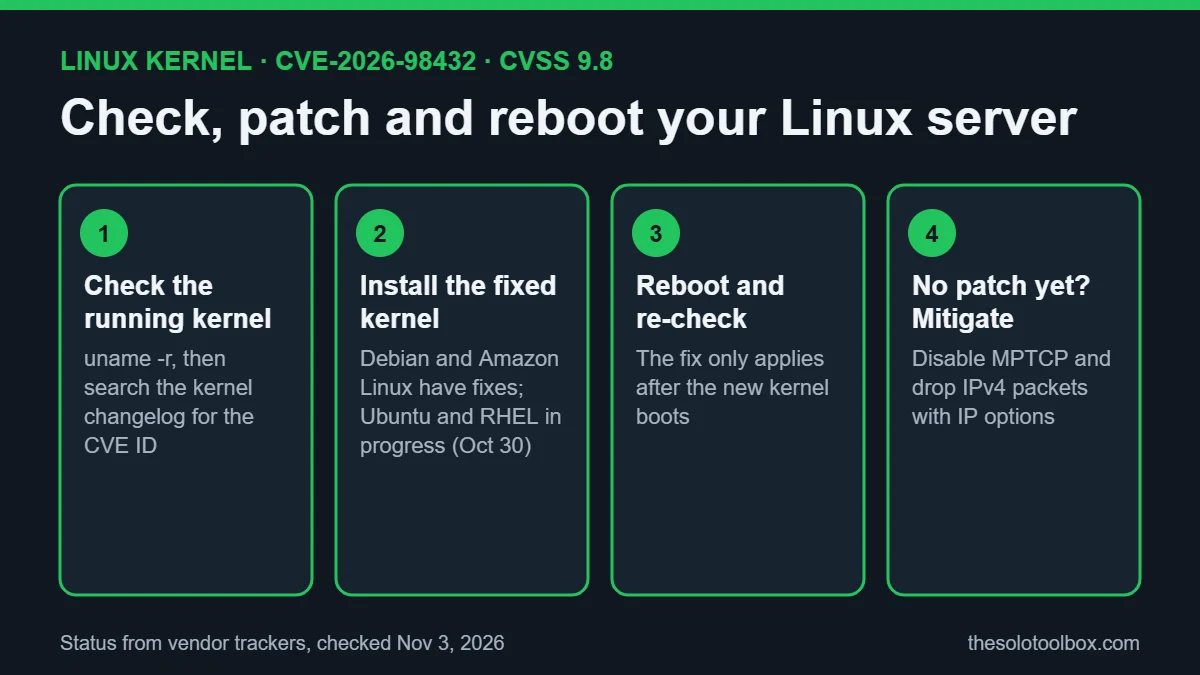
CVE-2026-98432 is a use-after-free bug in the Linux kernel’s IPv4 TCP connection setup, rated 9.8 (critical) by the kernel CVE team. Any Linux host running kernel 4.4 or later with a reachable IPv4 TCP port is in scope, and Anthropic has shown a working remote root exploit against servers with a multipath TCP (MPTCP) listener. The fix is a patched kernel plus a reboot; Debian and Amazon Linux have one, while Ubuntu and Red Hat were still listing the fix as in progress on October 30.
Below: what the bug is, how to check the kernel you are actually running, the fixed versions per distribution, and the interim mitigations vendors recommend if your distro has not shipped a kernel yet.
Before you start
- Who this is for: anyone running a Linux VPS, home server, NAS-style box or cloud instance that accepts incoming connections.
- What you need: SSH or console access with sudo rights.
- Time: 5 minutes to check; 10–20 minutes to update and reboot.
- Before you reboot: make sure you have console access (your host’s web console or KVM) in case the server does not come back on the network.
What CVE-2026-98432 is
The bug sits in how the kernel handles IP options on a half-open TCP connection. When a connection request is turned into a full socket, the kernel can free the options while another part of the handshake code is still using them. Red Hat describes the trigger as a race during concurrent processing of retransmitted TCP connection requests or socket migrations, and says the usual result is a crash (denial of service) or memory corruption. IPv6 is not affected by this specific issue.
Timeline from the vendor pages: the bug dates to Linux 4.4; the upstream fix landed on October 5, 2026; the CVE was published on October 15. On October 27, Anthropic’s Frontier Red Team published a write-up describing a zero-click exploit, built with an unreleased Claude research model, that runs commands as root on servers with an MPTCP listener. Anthropic says the exploit took about 48 minutes to leak a kernel pointer and five more to reach command execution. It did not publish exploit code.
Is it being exploited?
As of October 29, no vendor advisory reported attacks in the wild, according to Aikido’s summary of the advisories. That can change quickly once details are public, and CloudLinux says it could not reproduce Anthropic’s result, so treat the exploit as credible but unconfirmed by third parties.
Step 1: Check the kernel you are running
Installing an update does not protect you until the new kernel boots. Check the running version first:
uname -rThen confirm whether that exact kernel contains the fix by searching its changelog for the CVE ID. A count of 1 or more means the fix is in.
| Distro | Command |
|---|---|
| Debian | zgrep -c CVE-2026-98432 /usr/share/doc/linux-image-$(uname -r)/changelog.gz |
| Ubuntu | apt changelog linux-image-$(uname -r) | grep -c CVE-2026-98432 or pro fix CVE-2026-98432 |
| RHEL, Rocky, Alma | rpm -q --changelog kernel-core-$(uname -r) | grep -c CVE-2026-98432 |
| Amazon Linux | compare uname -r with the versions in AWS bulletin 2026-160-AWS |
If you compile your own kernel, the fixed upstream stable releases are 5.10.272, 5.15.223, 6.1.190, 6.6.159, 6.12.113, 6.18.56 and 7.2.10, plus 7.3. The kernel CVE team recommends moving to the latest stable release in your branch rather than cherry-picking the single commit.
Which distros have a fix
Status as listed on each vendor’s tracker when we checked (pages last updated October 30–31, 2026). Check the linked pages for changes before acting.
| Distribution | Status | Fixed package |
|---|---|---|
| Debian 13 (trixie) | Fixed | linux 6.12.113-1 or later (DSA-6568-1) |
| Debian 12 (bookworm) | Fixed | linux 6.1.190-1 (DLA-4841-1) or linux-6.12 6.12.113-1~deb12u1 |
| Amazon Linux 2 / 2023 | Fixed | patched kernels for 4.14 through 6.18 |
| Ubuntu 22.04, 24.04, 26.04, 26.10 | Work in progress | none yet |
| Ubuntu 16.04, 18.04, 20.04 | Vulnerable | none listed |
| RHEL 8, 9, 10 and OpenShift | Affected, fix being expedited | none yet (bulletin RHSB-2026-016) |
| Oracle Linux, SUSE | Fixes shipped for some kernels | see vendor advisory |
Step 2: Install the patched kernel and reboot
If your distro has a fix, update the kernel package and reboot:
- Debian:
sudo apt update && sudo apt full-upgrade, thensudo reboot. - Amazon Linux 2:
sudo yum update kernel && sudo reboot. - Amazon Linux 2023:
sudo dnf update kernel --releasever=latest && sudo reboot. - Ubuntu and RHEL family: run your normal update (
sudo apt update && sudo apt upgradeorsudo dnf update kernel) daily until the CVE shows as fixed, then reboot.
After the reboot, run uname -r again and repeat the changelog check. A server that installed the new kernel but never rebooted is still vulnerable.
Managed container platforms on AWS have their own fixed builds: EKS and ECS-optimized AMI release v20261031 or later, and Fargate tasks launched after November 1, 2026, 6:00 AM PDT. AWS Lambda is not affected.
Step 3: Mitigate if no patch is available yet
None of these fix the bug. They reduce exposure until a kernel arrives.
Check whether MPTCP is enabled
Anthropic’s exploit needs an MPTCP listener. Check the setting and look for listening MPTCP sockets:
cat /proc/sys/net/mptcp/enabled
sudo ss -Mlnp
A value of 1 means MPTCP is allowed. On Ubuntu cloud kernels, ss -M needs the mptcp_diag module from linux-modules-extra-$(uname -r). To turn MPTCP off host-wide, run sudo sysctl -w net.mptcp.enabled=0 and add the same line to a file in /etc/sysctl.d/ so it survives a reboot. This does not affect sockets that are already open, so restart services afterwards. For Go 1.24+ programs, GODEBUG=multipathtcp=0 disables it per program, though the Go Security Team calls that approach fragile and says hosts without MPTCP may still be exposed to similar attacks.
Drop IPv4 packets that carry IP options
IPv4 options are rare in ordinary traffic, so both Red Hat and AWS suggest dropping them at the host firewall. Red Hat’s nftables rule, saved as cve-2026-98432.nft:
table inet cve_2026_98432 {
  chain input {
    type filter hook input priority -310; policy accept;
    ip protocol tcp ip hdrlength > 5 counter drop
  }
}
Test it with sudo nft --check --file cve-2026-98432.nft, load it with sudo nft --file cve-2026-98432.nft, and confirm with sudo nft list table inet cve_2026_98432. Remove it after patching with sudo nft delete table inet cve_2026_98432. If you use iptables, AWS gives the equivalent: iptables -I INPUT 1 -m u32 --u32 '0>>24&0x0f=6:15' -j DROP. Rules added this way do not persist across reboots unless you save them.
A third option from AWS is to put the server behind a separate load balancer or managed service that terminates TCP. A reverse proxy running on the same host does not count, because the vulnerable kernel still handles the incoming connection.
FAQ
Does CVE-2026-98432 affect my desktop Linux PC?
The bug is in the kernel’s handling of incoming IPv4 TCP connections, so the risk is highest for machines that accept connections from the internet. A laptop behind a home router with no open ports is far less exposed, but it should still take the kernel update when your distro ships it.
Is turning off MPTCP enough?
No. It blocks the specific route Anthropic used, but the underlying bug is in IPv4 TCP handling, and the Go Security Team warns that systems without MPTCP listeners may still be attackable. Treat it as a stopgap.
Do I have to reboot after the update?
Yes, unless you use a live-patching service such as Ubuntu Livepatch, kpatch or KernelCare and it reports this CVE as covered. Without that, the old, vulnerable kernel keeps running until the machine restarts.
Why do Red Hat and the kernel team rate it so differently?
Scores range from 9.8 (kernel CVE team) to 5.9 (Red Hat CVSS, although Red Hat’s own severity label is Critical). Vendors weigh how hard the race is to win and which configurations they ship by default. The patching advice is the same everywhere.
Related guides
- Android “SMS of Death” bug: how to check your phone is patched
- Refrigeration Controller Hack: How to Check If Yours Is Exposed
- OVHcloud CLI Compromised: How to Check If You’re Affected
Sources
How we checked: on November 3, 2026, we read the Ubuntu, Debian and Red Hat security trackers, Red Hat bulletin RHSB-2026-016, AWS bulletin 2026-160-AWS as summarized by Aikido, and Anthropic’s October 27 research post. Commands come from those vendors and ComputingForGeeks’ test write-up; we did not run the exploit or test every distro ourselves.
- Anthropic: Discovering and exploiting vulnerabilities in critical, real-world software with Claude (October 27, 2026)
- Ubuntu security: CVE-2026-98432 (updated October 30, 2026)
- Debian security tracker: CVE-2026-98432
- Red Hat: RHSB-2026-016 Use-after-free, kernel IPv4 (October 30, 2026)
- AWS security bulletin 2026-160-AWS
- Aikido: Linux kernel TCP RCE vulnerability (CVE-2026-98432) (November 2, 2026)
- ComputingForGeeks: Check and patch the Linux kernel TCP flaw (October 31, 2026)
Next step: run uname -r on every internet-facing Linux server you manage today. If you also self-host Git or a NAS, see our guides to patching GitLab CVE-2026-97229 and updating Synology DSM against C3RB3R ransomware, and our explainer on the Tailscale SSH “Tailworm” flaw.