BTCPay Server Hack: Check Your Version and Rebuild If Needed
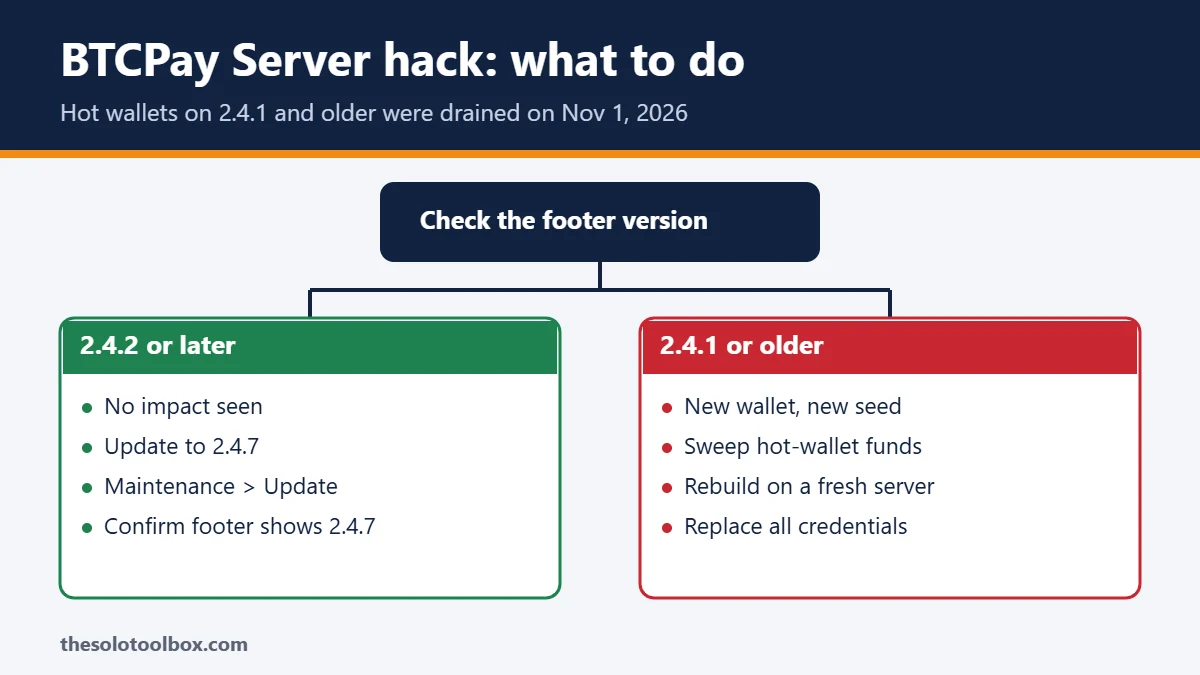
If your BTCPay Server was running version 2.4.1 or older on November 1, 2026, the BTCPay project says to treat it as compromised: move any remaining hot-wallet funds to a brand-new wallet, then rebuild on a fresh server. Updating the old server is not enough, even if your balance looks untouched. Servers that were already on 2.4.2 or later when the warning went out have shown no impact so far.
This guide explains what happened, how to find your version, which servers need a rebuild and how to report a theft. We checked every step on November 3, 2026 against BTCPay Server’s November 2 incident post, its August 2.4.2 security advisory, the GitHub release notes and BleepingComputer’s coverage.
Before you start
- You’ll need: your BTCPay admin login, SSH or hosting-panel access to the server, and a trusted computer or hardware wallet for creating a new wallet
- Time: 10 minutes to check and update; plan an hour or more for a rebuild
- Key fact: wallets whose spending keys live off the server, such as hardware wallets, were not affected by these thefts
What happened
BTCPay Server is free, self-hosted software that lets shops and freelancers accept Bitcoin and other coins directly into their own wallets. A hot wallet is one where the keys needed to spend funds are stored on the server itself.
BTCPay’s published timeline, in UTC:
- August 7, 2026: version 2.4.2 fixed a critical vulnerability. At the time, BTCPay said it let attackers grab credential files for LND Lightning nodes, and that on-chain hot wallets were not affected.
- November 1, 13:46: a hot-wallet drain described in incident reports took place. BTCPay says it does not yet know when attacks first began.
- November 1, 20:56: the first theft report arrived by email. BTCPay asked hosting providers, including LunaNode, to take instances offline and, at 22:25, told operators on X to shut down their servers.
- November 2: BTCPay confirmed the attacks targeted servers on 2.4.1 (released July 23, 2026) or older, using a different method to exploit the same flaw fixed in 2.4.2. Bitcoin and Litecoin were stolen.
The current release is 2.4.7, an emergency update that fixes 85 findings from Anthropic’s open-source code scanner, including one rated critical and 13 rated high.
Who needs to do what
| Your situation on November 1 | Risk | What BTCPay recommends |
|---|---|---|
| Already on 2.4.2 or later | No impact seen | Update to 2.4.7 |
| On 2.4.1 or older, no theft noticed | Treat as compromised | Sweep funds, rebuild on a fresh server |
| On 2.4.1 or older, updated after the warning | Still treat as compromised | Sweep funds, rebuild on a fresh server |
| Funds stolen or signs of unauthorized access | Compromised | Rebuild, replace all credentials, report the theft |
| Old version, but wallet keys held off the server | Funds not affected by these thefts | Rebuild the server anyway |
How to check your BTCPay Server version
- Log in to your BTCPay Server as an administrator.
- Scroll to the bottom of any page. The version number appears in the footer.
- If your host took the server offline and you cannot log in, contact the host. BTCPay tells hosted users on 2.4.1 or older to ask their provider for help moving to a fresh virtual machine.
If you are not sure which version you ran on November 1, for example because an automatic update ran after the warning, follow the rebuild steps. BTCPay’s advice covers servers that were updated after the warning, too.
If you were on 2.4.2 or later: update to 2.4.7
- In the admin area, go to Server Settings → Maintenance → Update.
- For a Docker install, connect over SSH and run
sudo su -, thencd btcpayserver-docker, then./btcpay-update.sh. - When it finishes, check that the footer shows 2.4.7.
If you were on 2.4.1 or older: sweep and rebuild
Updating cannot remove access an attacker may already have, so BTCPay recommends replacing the server rather than repairing it.
- On a trusted device, create a new wallet with a new seed. Do not reuse the old seed: funds restored from it on a new server remain at risk.
- Sweep any remaining hot-wallet funds into the new wallet.
- Save logs and transaction records you may need for a report, then take the old server offline.
- Create a fresh virtual machine and install the latest BTCPay Server release from official sources. Connect the new wallet. Do not restore a full backup of the old server onto it.
- From a trusted device, revoke and replace every credential the old server could reach: hosting account, SSH keys, application logins, API keys and Lightning credentials. Never type new credentials on the old machine.
- Reconnect your shop. New API keys mean any store plugin or checkout integration needs the new keys before it can create invoices again.
How to report a theft
Email security@btcpayserver.org and include:
- The BTCPay Server version you were running, when you last updated and the version before that, if you know it.
- When you noticed the theft, with your time zone.
- Relevant public transaction IDs and addresses.
Never send seed phrases, private keys or passwords, and strip secrets from any logs you share. BTCPay also asks victims to report thefts to local police. It has published two destination addresses from the incident reports, but warns that some activity at those addresses predates the thefts, so their balances should not be read as a confirmed loss total.
How to lower hot-wallet risk from now on
- Accept payments into a wallet whose spending keys are held off the server, such as a hardware wallet. BTCPay calls this its recommended practice.
- If you need a hot wallet for refunds or payouts, keep only working funds in it and sweep the rest to off-server storage on a schedule.
- Watch for new releases. BTCPay announces them on X and in its Telegram group, and on GitHub you can use Watch → Custom → Releases on the btcpayserver repository.
The same patch-or-rebuild question has come up with other self-hosted tools this month. See our checks for GitLab CVE-2026-97229 and Synology C3RB3R ransomware.
FAQ
Does updating to 2.4.7 fix a server that was on 2.4.1?
No. It closes the known holes, but BTCPay says an update cannot remove access an attacker already gained. Old servers should be replaced.
My balance hasn’t changed. Am I safe?
Not necessarily. BTCPay says an unchanged wallet balance does not rule out an earlier attack, which is why it recommends sweeping and rebuilding anyway.
Were hardware wallet funds affected?
BTCPay says funds in wallets whose spending keys are held off the server were unaffected by these thefts.
Is this the same bug as the August LND attacks?
It is the same vulnerability, fixed in 2.4.2, but exploited in a different way that reached on-chain hot wallets. Advice from August that hot wallets were safe no longer applies to servers on 2.4.1 or older.
Next step
Log in now and read the version in the footer. If it says 2.4.2 or later, update to 2.4.7. If it says 2.4.1 or older, or you can’t be sure, create a new wallet on a trusted device and start the rebuild before reconnecting your store.
Sources
- BTCPay Server: Security incident affecting BTCPay Server 2.4.1 and earlier (Nov 2, 2026)
- BTCPay Server: Security advisory – update to 2.4.2 immediately (Aug 2026)
- GitHub: BTCPay Server release notes, including 2.4.7
- BleepingComputer: BTCPay Server warns of hot wallet crypto thefts on outdated instances (Nov 2, 2026)