GitLab CVE-2026-97229: Check If Your Server Is Patched
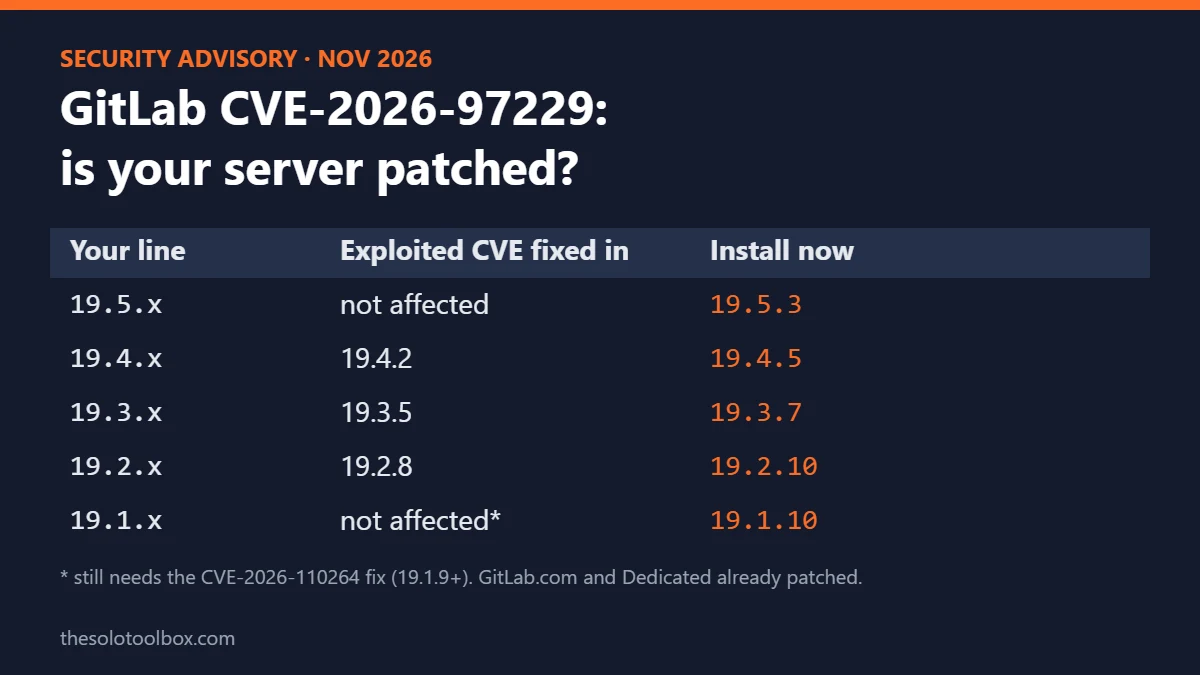
If you run your own GitLab server, check its version today. CVE-2026-97229 is a CVSS 10.0 flaw that lets an unauthenticated attacker run code on a GitLab server through a crafted regular expression in a CI/CD configuration, CISA lists it as exploited in attacks, and it’s fixed in GitLab 19.2.8, 19.3.5 and 19.4.2 or later. GitLab.com and GitLab Dedicated are already patched.
Below: which versions are affected, how to read your version in under a minute, which release to move to (a second CVSS 10.0 bug, CVE-2026-110264, was fixed nine days later), how to upgrade a Linux package or Docker install, and what to review if your server sat unpatched on the internet.
Before you start
- Affected: self-managed GitLab CE and EE 19.2, 19.3 and 19.4 below the fixed versions
- Not affected: GitLab.com and GitLab Dedicated
- Upgrade to: the newest patch for your version line: 19.5.3, 19.4.5, 19.3.7, 19.2.10, 19.1.10, 19.0.11 or 18.11.14 (released October 29, 2026)
- You need: admin access to the server and a fresh backup
What happened
- October 12, 2026: GitLab shipped critical patch release 19.4.2, 19.3.5 and 19.2.8. It fixes an integer overflow in the CI/CD Regular Expression Compiler, the component that parses regular expressions in pipeline configuration files. GitLab rated it CVSS 10.0.
- October 21, 2026: a second critical release fixed CVE-2026-110264, another integer overflow in the regular expression compiler that also allows unauthenticated code execution. This one reaches back to GitLab 7.0, so GitLab backported fixes to 18.11, 19.0, 19.1 and 19.2.
- October 29, 2026: CISA added CVE-2026-97229 to its Known Exploited Vulnerabilities catalog, with a November 1 deadline for US federal agencies. The same day GitLab published patch release 19.5.3 and matching updates for older lines.
- November 1, 2026: Shadowserver said it was tracking more than 1,000 GitLab instances still vulnerable to CVE-2026-97229 and more than 11,300 vulnerable to CVE-2026-110264, out of about 39,000 it sees each day, as reported by BleepingComputer.
Which GitLab versions are affected
The two flaws cover different version ranges, so patching only for the exploited one can leave you open to the other.
| CVE | Patched | Affected versions | First fixed versions |
|---|---|---|---|
| CVE-2026-97229 (exploited) | Oct 12, 2026 | 19.2 before 19.2.8, 19.3 before 19.3.5, 19.4 before 19.4.2 | 19.2.8, 19.3.5, 19.4.2 |
| CVE-2026-110264 | Oct 21, 2026 | 7.0 before 18.11.13, 19.0 before 19.0.10, 19.1 before 19.1.9, 19.2 before 19.2.9, 19.3 before 19.3.6, 19.4 before 19.4.3, 19.5 before 19.5.1 | 18.11.13, 19.0.10, 19.1.9, 19.2.9, 19.3.6, 19.4.3, 19.5.1 |
Example: a server upgraded to 19.4.2 on October 12 is safe from CVE-2026-97229 but still exposed to CVE-2026-110264 until it reaches 19.4.3. Moving to the newest patch for your line covers both.
How to check your GitLab version
GitLab’s own version instructions work on any self-managed instance:
- Sign in to your GitLab instance.
- In the left sidebar, at the bottom, select Help > Help.
- Read the version at the top of the page, for example GitLab Enterprise Edition 19.4.1-ee.
If you prefer the server shell on a Linux package (Omnibus) install, this prints the GitLab version along with other environment details:
sudo gitlab-rake gitlab:env:infoOn Docker, run the same command inside the container, replacing gitlab with your container name:
docker exec -it gitlab gitlab-rake gitlab:env:infoWhich version to upgrade to
Stay on your current version line and install its newest patch. A patch upgrade inside the same line (for example 19.3.4 to 19.3.7) doesn’t need a multi-step upgrade path. The newest patches as of the October 29, 2026 release:
| If you run | Upgrade to |
|---|---|
| 19.5.x | 19.5.3 |
| 19.4.x | 19.4.5 |
| 19.3.x | 19.3.7 |
| 19.2.x | 19.2.10 |
| 19.1.x | 19.1.10 |
| 19.0.x | 19.0.11 |
| 18.11.x | 18.11.14 |
| 18.10 or older | No patch on your line. Plan a multi-step upgrade using GitLab’s upgrade path documentation |
For anything older than 18.11, read GitLab’s upgrade path documentation first. It lists the required upgrade stops, and skipping them can break background migrations.
How to upgrade a Linux package or Docker install
1. Back up first
Create an application backup, then copy the two configuration files the backup doesn’t include. GitLab’s backup documentation says /etc/gitlab/gitlab-secrets.json and /etc/gitlab/gitlab.rb must be backed up separately.
sudo gitlab-backup create
sudo cp /etc/gitlab/gitlab-secrets.json /etc/gitlab/gitlab.rb /root/
2. Install the patch (Debian or Ubuntu)
A plain apt install gitlab-ee installs the newest package in the repository, which can jump to another version line. To stay on your line, list the available builds and pin one:
sudo apt update
apt-cache madison gitlab-ee | head
sudo apt install gitlab-ee=19.4.5-ee.0
Use gitlab-ce and the matching -ce.0 build if you run Community Edition. On RHEL-based systems, use dnf with the version shown by dnf --showduplicates list gitlab-ee.
3. Or update the Docker image
Change the image tag in your compose file or run command to the patched build, for example gitlab/gitlab-ee:19.4.5-ee.0, pull it and recreate the container. Your data survives as long as /etc/gitlab, /var/log/gitlab and /var/opt/gitlab are mounted volumes.
4. Confirm the version
Open Help > Help again or rerun gitlab-rake gitlab:env:info, and check the number against the table above.
If your server was exposed before you patched
Patching closes the hole but doesn’t remove anything an attacker already planted. If the instance was reachable from the internet while it ran an affected version, review these:
- GitLab’s detections: the October 12 advisory lists six threat detections for CVE-2026-97229, including Onigmo native worker crash, ci regexp guard rejection and ci lint workhorse worker crash. Compare them with your logs.
- Accounts and tokens: in the Admin area, look for users, administrators, personal access tokens and deploy keys created since October 12 that nobody on your team made.
- CI/CD: check for new runners, edited pipeline files and changed CI/CD variables. If you find signs of access, rotate every secret stored in CI/CD variables and every cloud key the server could read.
- Exposure: if only your team uses the instance, keep it off the public internet. A VPN or an allowlist at the firewall cuts off unauthenticated attacks like this one. If you use Tailscale for that, check our Tailscale SSH TailWorm guide as well.
Leaked credentials tend to be the long tail of a server compromise. Our OVHcloud CLI compromise check walks through rotating API keys after a tool you rely on was breached, and the same order applies here.
What we could not verify
- The 1,000 and 11,300 counts come from Shadowserver via BleepingComputer. We didn’t access Shadowserver’s dashboard directly.
- GitLab makes vulnerability issues public 90 days after the fix, so technical details of the attacks aren’t available yet.
- CVE-2026-110264 was not in CISA’s catalog as of the October 30, 2026 catalog version we checked. That means no confirmed exploitation, not that it’s safe to skip.
- The 19.4.2 bug-fix list includes Ruby regexp patches for Ruby 3.3 and 3.4. Linux packages and Docker images bundle their own Ruby. If you compile GitLab from source, check how your build gets the patched Ruby; we couldn’t confirm the exact steps for source installs.
FAQ
Is GitLab.com affected by CVE-2026-97229?
No. GitLab says GitLab.com already runs the patched version and GitLab Dedicated tenants were patched before the public release. Only self-managed installations need action.
I run GitLab 19.1. Am I safe?
GitLab lists only 19.2, 19.3 and 19.4 as affected by CVE-2026-97229. But 19.1 is affected by CVE-2026-110264 until 19.1.9, so upgrade to 19.1.10, the newest 19.1 patch as of October 29, 2026.
Is there a workaround if I can’t upgrade today?
GitLab’s advisory doesn’t list one. Until you can patch, reduce exposure: block public access to the instance at the firewall or put it behind a VPN, then schedule the upgrade as soon as possible.
Do I need to update GitLab Runner too?
The advisory covers GitLab Community Edition and Enterprise Edition, not GitLab Runner. Keep runners current anyway, and review them if you suspect the server was compromised, because an attacker with server access can change CI/CD jobs.
Next step
Open Help > Help on your instance now. If the version is below the upgrade table, take a backup and install the newest patch for your line today. If you also host WordPress on your own server, our October 21 PHP security release guide covers the other patch from the same week.
Related guides
- CVE-2026-98432: How to Check and Patch Your Linux Server
- OpenCode breach: how to replace your exposed AI API keys
- Synology C3RB3R Ransomware: Update DSM and Lock Down Your NAS
Sources
- GitLab: Critical Patch Release 19.4.2, 19.3.5, 19.2.8 (October 12, 2026; checked November 2, 2026)
- GitLab: Critical Patch Release 19.5.1, 19.4.3, 19.3.6, 19.2.9, 19.1.9, 19.0.10, 18.11.13 (October 21, 2026; checked November 2, 2026)
- GitLab: Patch Release 19.5.3, 19.4.5, 19.3.7, 19.2.10, 19.1.10, 19.0.11, 18.11.14 (October 29, 2026; checked November 2, 2026)
- CISA Known Exploited Vulnerabilities catalog (catalog version 2026.10.30; checked November 2, 2026)
- BleepingComputer: Over 1,000 GitLab servers vulnerable to ongoing RCE attacks (November 2, 2026)
- GitLab Docs: Find your GitLab version (checked November 2, 2026)
- GitLab Docs: Back up GitLab and GitLab Docs: Plan your upgrade path (checked November 2, 2026)