Android “SMS of Death” bug: how to check your phone is patched
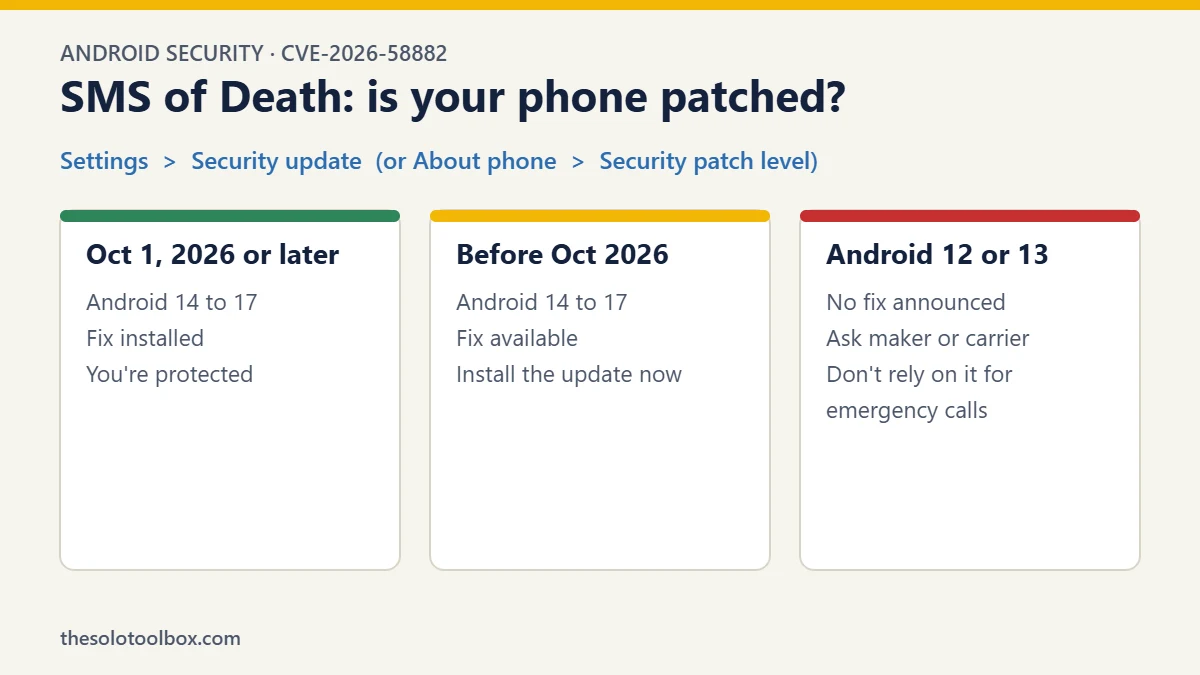
A newly published Android bug nicknamed SMS of Death lets someone crash your phone’s calling service with a single text message you never see. If your phone shows an Android security update dated October 1, 2026 or later, you have Google’s fix. If it’s older, install any update your phone offers today. Phones still on Android 12 or 13 have no announced fix.
The flaw is tracked as CVE-2026-58882. Security researcher Mark Blaszczyk published the details, along with working attack code, on October 29, 2026. Because the code is now public, the window between “someone could do this” and “someone is doing this” is short. This guide covers what the bug does, how to check your phone in under a minute, and what to do if your phone can’t be updated.
Before you start
- Who this affects: Android phones from Android 12 onward, including Samsung Galaxy and Google Pixel models
- What protects you: a security patch level of 2026-10-01 or later
- Time needed: about one minute to check, longer if an update needs to install
- iPhone users: not affected; this is a bug in Android’s own telephony code
What the SMS of Death bug does
Your carrier can send a phone a special kind of text called a WAP Push message. It’s normally used behind the scenes for things like network settings, and it never appears in your messages app. Blaszczyk found that Android misreads one number inside these messages. A few carefully chosen bytes make that number negative, and the part of Android that handles calls (a system process called com.android.phone) crashes when it tries to use it.
In practice, that means:
- Calls drop without warning, including calls to emergency services, according to the researcher’s write-up.
- There’s nothing to see. The message doesn’t show up in your inbox, there’s no notification, and the sender’s number isn’t shown.
- It can repeat. The bad message stays in a queue on the phone, so Android tries to process it again after the phone service restarts. The researcher found that around 20 such messages could leave a phone unusable for an extended period, and Android’s own crash protection can eventually push the phone into recovery mode.
You don’t have to tap a link, open anything or reply. That’s what makes this different from the scam texts we usually warn about, like fake package delivery messages, where your best defence is not clicking. Here, the only real defence is the software update.
Which Android phones are affected
The vulnerable code dates back to Android 12. Here’s where each version stands, based on the researcher’s disclosure and reporting from Android Authority and Security Affairs:
| Android version | Fix available? | What to do |
|---|---|---|
| Android 17 | Yes, October 2026 security update | Check your patch date |
| Android 16 | Yes, October 2026 security update | Check your patch date |
| Android 15 | Yes, October 2026 security update | Check your patch date |
| Android 14 | Yes, October 2026 security update | Check your patch date |
| Android 13 | No fix announced | See “If your phone can’t get the update” |
| Android 12 | No fix announced | See “If your phone can’t get the update” |
A fix existing doesn’t mean your phone has it. Google wrote the fix and shared it with phone makers, but Samsung, Motorola, OnePlus and others then ship it on their own schedules, and carriers can add further delays. That’s why the patch date on your own phone is the only thing that answers the question.
How to check if your Android phone is patched
The setting names differ slightly between brands, but you’re always looking for the same thing: a date labelled Android security update or Security patch level. If it says October 1, 2026 (or 2026-10-01) or anything later, you’re covered.
Google Pixel
- Open Settings.
- Go to Security & privacy > System & updates > Security update.
- Read the date at the top of the screen. Tap Check for update if it’s older than October 1, 2026.
Samsung Galaxy
- Open Settings > About phone > Software information.
- Look at Android security patch level.
- If it’s older than October 1, 2026, go back to Settings > Software update > Download and install.
Other Android phones
Open Settings and use the search bar at the top to search for “security update” or “patch level”. Most phones put it under About phone, System or Software update. Our guide to the Android November 2026 security update shows how to install the newest patch.
While you’re there, also check for a Google Play system update. It’s a separate update that some phones receive for parts of Android, and our guide on how to check for a Google Play system update shows where to find it. It doesn’t replace the security update for this bug, but it’s worth keeping current.
If the update is available but won’t install
Samsung owners in particular have reported stuck updates this autumn. If yours hangs or shows an “Access Denied” error, our guide to fixing a stuck One UI 9 update covers the usual causes. In general:
- Connect to Wi-Fi and plug in the charger; many phones won’t install updates on low battery.
- Free up a few gigabytes of storage if the phone says there isn’t enough space.
- Restart the phone, then check for the update again.
If your phone can’t get the update
If your phone is on Android 12 or 13, or its maker has stopped sending security updates, there’s no setting that blocks these messages. A few honest options:
- Ask your manufacturer or carrier whether a patch is coming for your model. Some makers support phones longer than others, and a direct answer is better than guessing.
- Don’t rely on that phone as your only way to make emergency calls. That’s the part of this bug that matters most. If it’s the phone you keep for a parent, a child or your business line, this is a reasonable moment to replace it with a model that still gets monthly updates.
- Ignore apps that claim to fix it. No app from the Play Store can patch Android’s system telephony code. An app that promises to is, at best, useless, and our guide to spotting fake apps on Google Play explains what to look out for.
What to do if your phone is already stuck crashing
If your phone keeps dropping its signal, losing calls or restarting, and it isn’t patched, don’t factory reset it straight away. A reset erases anything that isn’t backed up.
- Contact your carrier first. Explain that the phone service keeps crashing. Carriers can sometimes see and clear messages that are stuck being resent to your number.
- Contact the phone maker’s support. Samsung, Google and others can walk you through recovery options for your specific model.
- Back up if you can. If the phone stays usable for even a few minutes at a time, use Wi-Fi to let your photos and contacts sync to your Google account.
The researcher documented a way to remove the stuck messages with Android Debug Bridge (ADB), a developer tool that connects a phone to a computer. It avoids wiping the phone, but it only works if USB debugging was already switched on, which isn’t the case on most phones. If you’re not comfortable with developer tools, let your carrier or manufacturer handle it.
Why Google’s fix arrived so quietly
The timeline is unusual. Blaszczyk says he reported the bug to Google on May 5, 2026, and that Google initially didn’t treat it as a security issue. Android’s own code records show a fix was written on June 15. GrapheneOS, a privacy-focused version of Android, says the fix went out to phone makers through Google’s security preview programme in July.
Google then shipped the fix in the October update for Android 14 through 17, but didn’t list it in October’s public security bulletin. According to GrapheneOS, CVE-2026-58882 is listed with a Critical rating in the November 2026 Android Security Bulletin. When that bulletin is public, it gives phone makers and IT teams an official reference to check against. We’ll update this guide if Google’s bulletin says anything different.
For ordinary users, the practical lesson is the same one this bug keeps teaching: a phone that’s still getting monthly security updates is protected from flaws you’ll never hear about, and one that isn’t, isn’t.
FAQ
Can SMS of Death affect my phone if I never open the message?
Yes. The message never appears in your inbox, so there’s nothing to open. Android processes it in the background, which is why installing the update is the only real protection.
Is my iPhone affected?
No. The bug is in Android’s telephony framework. iPhones handle these messages with different code.
Can I block WAP Push messages myself?
Not on a standard Android phone. There’s no setting for it, and blocking unknown numbers in your messages app doesn’t help, because these messages never reach the messages app.
Does SMS of Death steal data or install malware?
Based on the published research, no. It crashes the phone service and disrupts calls. That’s still serious, because it can cut off an emergency call, but there’s no report of it being used to read data or take over a phone.
My phone says the patch is from September. Am I at risk?
Yes, until you update. The fix is in the October 2026 security update for Android 14 to 17. Check for an update now, and if none is offered, ask your carrier or manufacturer when it’s coming.
How we checked this: facts come from the researcher’s published disclosure, statements from GrapheneOS, and reporting by Android Authority, Security Affairs and eSecurity Planet, cross-checked on November 2, 2026. The settings paths come from Google’s and Samsung’s own help documentation. We did not reproduce the attack.
Sources
- SMS of Death: Mark Blaszczyk’s technical disclosure
- Security Affairs: SMS of Death lets attackers crash Android call services (November 1, 2026)
- eSecurity Planet: Android SMS of Death flaw can drop emergency calls (October 30, 2026)
- Android Authority: Android’s SMS of Death bug can knock out your phone
- Google: Check and update your Android version
- Android Security Bulletins