TeamViewer Vulnerability: How to Update to Version 15.83
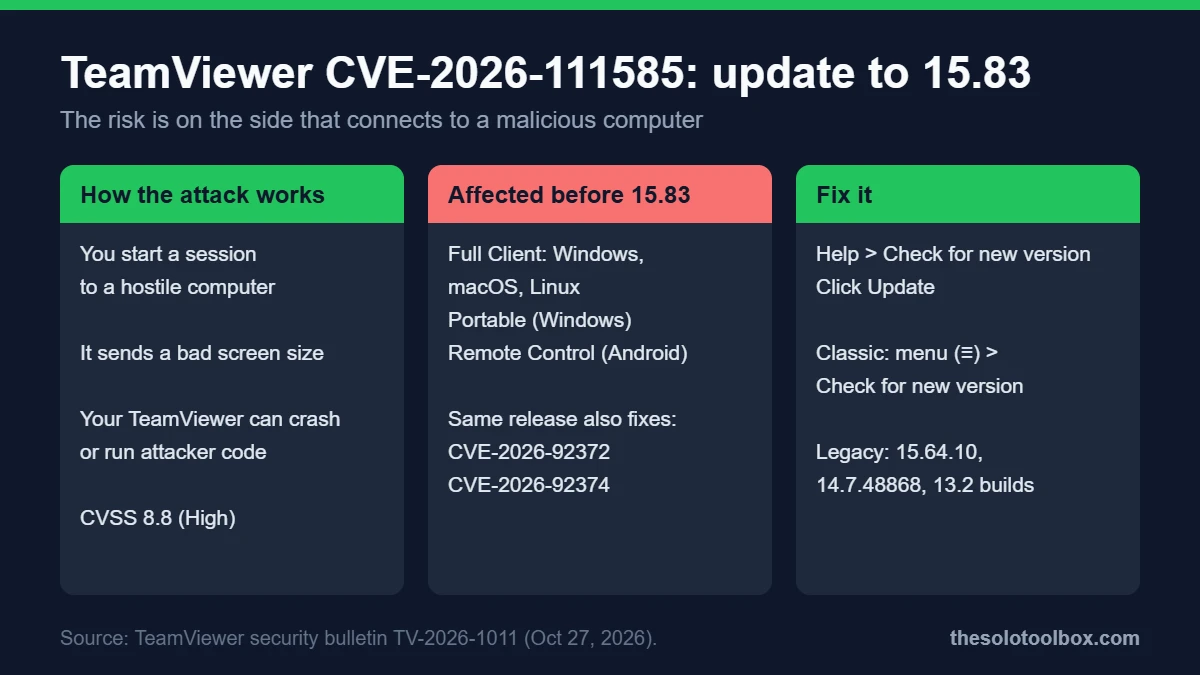
TeamViewer 15.83 fixes CVE-2026-111585, a high-severity flaw (CVSS 8.8) that lets a malicious or compromised computer crash, and potentially take over, the TeamViewer app of the person who connects to it. Every Full Client and Portable version before 15.83 on Windows, macOS and Linux is affected, along with the Android Remote Control app. To fix it, open TeamViewer, click Help, then Check for new version, and install 15.83 or later.
Below: who is at risk, the two other flaws fixed in the same release, the exact fixed versions (including legacy builds for Windows 7 and 8), and how to check and update on each platform.
Before you start
- Applies to: anyone who uses TeamViewer to connect to other computers, especially IT helpers, freelancers and family tech support
- You need: the TeamViewer app and permission to install updates on your device
- Time: about 5 minutes per device
- Key fact: TeamViewer says it is not aware of any exploitation in the wild, and there is no workaround other than updating
What the TeamViewer vulnerability does
TeamViewer published security bulletin TV-2026-1011 on October 27, 2026 and updated it on October 28. The main issue, CVE-2026-111585, is an integer overflow in how the TeamViewer client handles the remote screen size sent by the computer you connect to.
That reverses the usual threat. Most remote-access warnings are about someone getting into your PC. Here, the danger is connecting out to a machine that has been tampered with. According to The Hacker News, the researcher who reported it showed code execution on Windows once the user starts a session to the malicious host, with no password or extra click needed beyond that.
The attack still requires you to start a remote-control session to a hostile computer. People who support many outside machines face the most exposure: managed service providers, freelance IT support, and anyone who connects to a stranger’s PC. That last case includes scam calls that ask you to connect to their computer, which our guide to fake IT support on Microsoft Teams explains how to recognize.
All three flaws fixed in TeamViewer 15.83
| CVE | Severity | What it affects | Risk |
|---|---|---|---|
| CVE-2026-111585 | 8.8 High | Full Client and Portable (Windows, macOS, Linux), Android Remote Control app | A malicious host can crash the viewer and may run code on your device |
| CVE-2026-92372 | 8.8 High | Full Client and Host on Linux and macOS | Out-of-bounds write that can lead to code execution; can also be triggered by opening a crafted .tvs session recording |
| CVE-2026-92374 | 7.8 High | Full Client and Host on macOS | Local privilege escalation to root through a file race condition |
TeamViewer Host, which only receives connections, is not listed as affected by CVE-2026-111585. Host is still affected by the other two flaws on Linux and macOS, so update it as well.
Fixed versions
Current builds:
| Product | Fixed version |
|---|---|
| TeamViewer Full Client (Windows, macOS, Linux) | 15.83 |
| TeamViewer Host (Windows, macOS, Linux) | 15.83 |
| TeamViewer Portable (Windows) | 15.83 |
| TeamViewer Remote Control app (Android) | 15.83 |
Legacy builds, for older licenses and operating systems:
| Legacy branch | Fixed version |
|---|---|
| 15.64 for Windows 7 and 8 (Full Client and Host) | 15.64.10 |
| 14.7 (Windows, macOS, Linux) | 14.7.48868 |
| 13.2 for Windows | 13.2.36231 |
| 13.2 for Linux | 13.2.154008 |
| 13.2 for macOS | 13.2.154007 |
How to check your TeamViewer version
- Windows 11: open Settings > Apps > Installed apps and search for TeamViewer. The version number appears under the app name.
- macOS: open Finder > Applications, select TeamViewer, and press Command+I. The version appears in the Get Info window.
- Android: long-press the TeamViewer Remote Control icon, tap App info, and scroll to the version number at the bottom.
- Linux: check your package manager, for example
apt list --installed teamvieweron Debian or Ubuntu.
How to update TeamViewer
Windows, macOS and Linux (manual)
TeamViewer’s update guide gives these steps:
- Open TeamViewer and sign in.
- In the current Remote interface, click Help in the bottom-left corner, then Check for new version.
- If a new version is available, click Update. TeamViewer restarts and installs it.
- In TeamViewer (Classic), click the three-line menu (≡), then Check for new version, and confirm with OK.
If the in-app check fails, download the current installer from TeamViewer’s download page and install it over the old version.
Automatic updates
TeamViewer checks for updates weekly by default. To confirm the setting, go to Settings > Go to this device’s settings > Advanced settings > Open advanced settings. A weekly check can leave you exposed for days after a security release, so run the manual check now rather than waiting.
Android
Open the Google Play Store, search for TeamViewer Remote Control, and tap Update if it appears.
Computers you support remotely
Connect as usual and use the Remote update button in the remote-control toolbar. TeamViewer closes on the other computer, installs the new version and reconnects you.
Extra precautions until every device is updated
- Only start sessions to computers you know and expect. Decline requests to connect to an unfamiliar ID, even from a caller who claims to be support.
- Don’t open .tvs session recordings you received from someone else on a Mac or Linux machine that hasn’t been updated.
- Treat remote-access apps like VPN clients: they need prompt updates. Our NordVPN Windows vulnerability guide covers a similar version check for another always-installed app.
Frequently asked questions
Has the TeamViewer vulnerability been exploited?
TeamViewer’s bulletin says it was not aware of any active exploitation at the time of publication. That can change, which is why updating now matters more than waiting for reports.
I only let others connect to me. Am I affected?
CVE-2026-111585 affects the side that connects out. If you only run TeamViewer Host, that specific flaw doesn’t apply, but on macOS and Linux the other two flaws do. Update either way.
Is there a workaround if I can’t update?
No. TeamViewer lists no workaround. The safest interim step is to avoid connecting to any computer you don’t control.
What about TeamViewer Remote Management?
TeamViewer fixed Remote Management add-on issues in a separate bulletin, TV-2026-1012, delivered through automatic updates according to The Hacker News. We did not review that bulletin for this guide.
What to do next
Run Help > Check for new version on every computer where you use TeamViewer, confirm it reports 15.83 or later, then use Remote update on the machines you support.
Sources
Checked on November 4, 2026. CVE details, affected products and fixed versions come from TeamViewer’s bulletin TV-2026-1011; update steps come from TeamViewer’s knowledge base. Exploit details are as reported by The Hacker News and were not independently tested.
- TeamViewer: Security bulletin TV-2026-1011 (Oct 27, 2026; updated Oct 28)
- TeamViewer Knowledge Base: Update TeamViewer
- The Hacker News: TeamViewer flaw lets remote computers attack users who connect (Oct 30, 2026)