Node-RED Attacks: How to Secure Your Editor With adminAuth
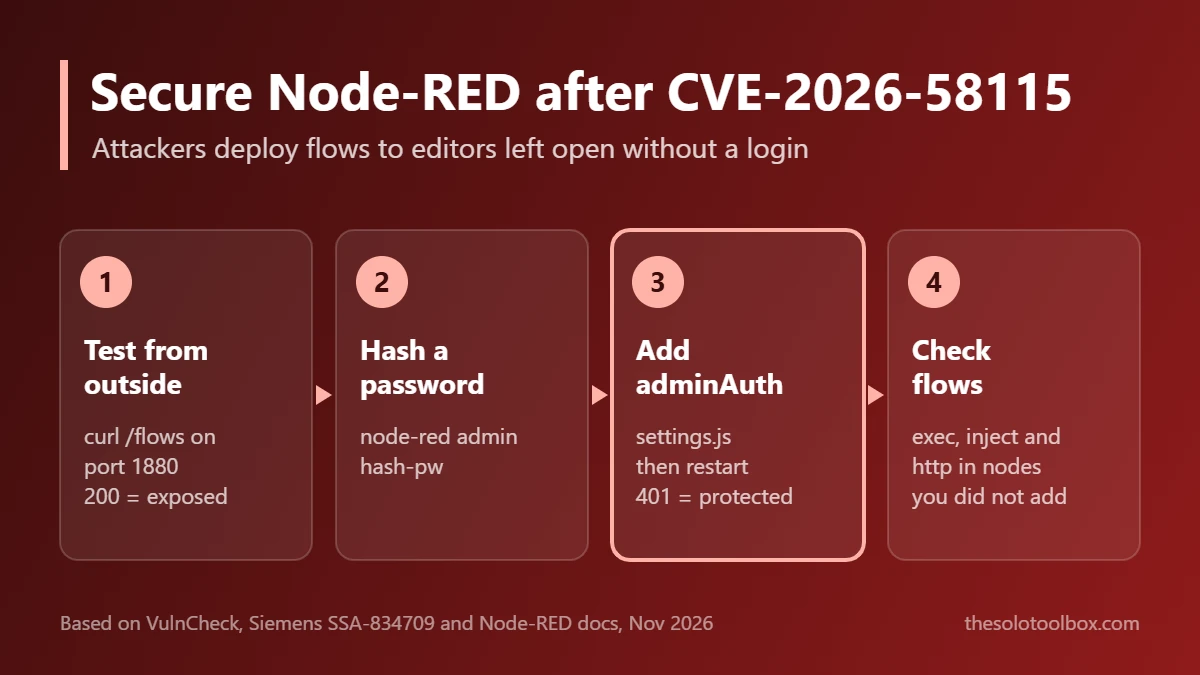
If your Node-RED editor can be reached from the internet without a login, assume someone has already tried to deploy a flow on it. Since October 30, 2026, attackers have been sending a single unauthenticated POST /flows request to open Node-RED instances that wires an inject node to an exec node and downloads a Linux bot. The fix is to turn on adminAuth, stop exposing port 1880, and check your flows for anything you did not build.
This guide covers what the CVE-2026-58115 attacks do, how to tell whether your instance is reachable, how to secure Node-RED with a hashed password, and how to look for signs of compromise.
Before you start
- You’ll need: shell access to the machine or container running Node-RED, and a text editor for
settings.js - Time: about 15 minutes to add a login and restart; longer if you find unknown flows
- Key fact: the Node-RED documentation states the editor is not secured by default, so anyone who can reach its address can deploy changes
What happened with CVE-2026-58115
CVE-2026-58115 was published by Siemens on August 11, 2026 in advisory SSA-834709. It affects the SIMATIC IoT2050 Advanced (6ES7647-0BA00-1YA2) running Industrial OS with Node-RED installed, in all versions before V4.3.4.1. Siemens rates it CVSS 10.0: the device does not enforce authentication on the Node-RED HTTP interface, so anyone on the network can deploy nodes that run system commands.
On November 2, 2026, VulnCheck reported that one of its canaries caught exploitation on October 30, with 16 attempts from the same source through November 1. VulnCheck describes the activity as opportunistic mass scanning: the same source also probed Apache Solr, Gitea, MLflow, Traefik and other software. VulnCheck added the CVE to its own KEV list; as of the Help Net Security report on November 3, CISA had not.
The CVE number is specific to the Siemens build, but the attack works against any Node-RED editor left open. The request does not exploit a code bug in Node-RED itself. It uses the normal admin API that an unsecured editor exposes to everyone. Langflow is the opposite case, a real code flaw that bypasses the login: our Langflow 1.13.0 update guide covers it.
What the attackers deploy
According to VulnCheck’s write-up, the attack chain looks like this:
- A
POST /flowsrequest deploys a flow with an inject node set to fire once, one second after deploy. - The inject node triggers an exec node that runs
echo <base64> | base64 -d | sh. - The decoded script downloads
bot-linux-amd64with wget (or curl as a fallback), saves it as/dev/shm/.b, and starts it in the background withsetsidornohup. - Later variants pulled a shell script to
/tmp/.s, a second binary saved as/tmp/.kworker, and added an http in endpoint such as/cmdwired to an exec node. That endpoint is a webshell, and it stays in your flows after a reboot.
The bot in /dev/shm lives in memory and disappears on reboot unless persistence was added. The webshell flow does not. Rebooting is not a cleanup step.
Check if your Node-RED editor is exposed
Node-RED listens on port 1880 by default. Run these checks from a device outside your network, such as a phone on mobile data, using your public IP or domain:
- Open
http://YOUR-PUBLIC-IP:1880in a browser. If the flow editor loads without a login screen, it is exposed and unsecured. - From a terminal, run the command below. A JSON list of your flows means the admin API is open. A
401 Unauthorizedresponse meansadminAuthis working. - Check your router for a port-forward rule on 1880, and your cloud firewall or security group for an inbound rule allowing it from 0.0.0.0/0.
curl -s -o /dev/null -w "%{http_code}\n" http://YOUR-PUBLIC-IP:1880/flowsA 200 result from outside your network is the case attackers are scanning for.
How to secure Node-RED with adminAuth
These steps follow the official Securing Node-RED guide. The settings file is settings.js in your Node-RED user directory, which is ~/.node-red on most installs. In the official Docker image, it sits in the /data volume.
1. Generate a password hash
On Node-RED 1.1.0 or later, run the built-in hashing tool and type a strong password when prompted:
node-red admin hash-pwIt prints a bcrypt hash that starts with $2b$ or $2a$. Copy it. Never put the plain password in settings.js.
2. Add adminAuth to settings.js
Open settings.js, find the commented-out adminAuth block, uncomment it, and replace the password with your hash:
adminAuth: {
    type: "credentials",
    users: [{
        username: "admin",
        password: "PASTE-YOUR-BCRYPT-HASH-HERE",
        permissions: "*"
    }]
},
Use a username other than admin if you can. For a second person who only needs to view flows, add another user with permissions: "read".
3. Protect HTTP endpoints and stop listening everywhere
- httpNodeAuth puts a username and password on routes created with http in nodes. Use it if your flows serve dashboards or webhooks:
httpNodeAuth: {user:"user", pass:"BCRYPT-HASH"}, - https takes a PEM
keyandcert, so the login is not sent in clear text. If Node-RED sits behind a reverse proxy that already terminates TLS, set it there instead. - uiHost in
settings.jscontrols which interface the editor listens on. Setting it to"127.0.0.1"limits access to the machine itself; reach it remotely through a VPN or SSH tunnel.
4. Restart and confirm
Restart Node-RED (node-red-restart on installs made with the Raspberry Pi script, docker restart <container> for Docker, or your service manager). Reload the editor: you should now see a login screen, and the curl check above should return 401. Finally, remove the port-forward or firewall rule for 1880 unless you truly need it.
Look for signs of compromise
If your editor was open at any point since late October, check these before trusting the machine:
| Where to look | What to look for |
|---|---|
| Flow editor, every tab | Exec nodes, inject nodes set to run once, or http in nodes (such as /cmd) that you did not create |
/dev/shm and /tmp | Hidden files named .b, .s or .kworker; run ls -la /dev/shm /tmp |
| Running processes | Anything started from /dev/shm or /tmp. Real kernel workers show as [kworker/...] in brackets, not as a file path |
| Outbound connections | Traffic to 85.215.73.250 on port 8080 or 45.194.90.57 on port 38472, the servers listed by VulnCheck |
If you find any of these, disconnect the machine from the network, export your flows for reference, and rebuild from a clean OS image. Change every password, API key and token stored in your flows, since flows_cred.json holds them on the same machine. VulnCheck notes it did not retrieve the bot binary, so its full capabilities are not known.
If you use a Siemens SIMATIC IoT2050 Advanced
Siemens’ fix is firmware V4.3.4.1 or later, available from Siemens Industry Online Support. Siemens lists two alternatives if you cannot update: uninstall Node-RED, or harden it with the steps above. Industrial devices should not be reachable from the internet at all; for exposed building and plant controllers, our guide on checking whether a refrigeration controller is exposed walks through the same kind of network audit.
FAQ
Does this affect Node-RED on a Raspberry Pi or in Docker?
The CVE is assigned to the Siemens device, but the attack technique works on any Node-RED instance where the editor is reachable and adminAuth is not set. Raspberry Pi, Docker and Home Assistant users with port 1880 forwarded are exactly what mass scanners find.
Is updating Node-RED enough?
No. Upstream Node-RED still ships with the editor unsecured by default, so a newer version does not add a login for you. You have to configure adminAuth.
Can I keep remote access to the editor?
Yes. The safer options are a VPN such as WireGuard or Tailscale, or an SSH tunnel to a Node-RED bound to 127.0.0.1. If you run Tailscale, read our note on the Tailscale SSH vulnerability and make sure your client is current.
Was my data stolen?
Public reports describe a bot download and webshells, not confirmed data theft. Anything the Node-RED process could read, including stored credentials, should be treated as exposed if you find the indicators above.
Next step
Run the curl check against your public address now. If it returns 200, add adminAuth with a hashed password, close port 1880, and then review every flow tab for exec and http in nodes. If the Node-RED host is a Linux server that also needs kernel patches this week, see how to check and patch CVE-2026-98432.
Sources
Facts checked on November 3, 2026 against the primary advisories and documentation below. We did not test the exploit ourselves.
- Siemens SSA-834709: Missing Authentication Vulnerability in Node-RED on SIMATIC IoT2050 Advanced (August 11, 2026)
- VulnCheck: Exploitation targeting Node-RED (November 2, 2026)
- Node-RED documentation: Securing Node-RED
- The Hacker News: Attackers Exploit Critical Siemens IoT2050 Flaw (November 3, 2026)
- Help Net Security: Attackers exploit critical Node-RED flaw (November 3, 2026)