Langflow 1.13.0 Update: Fix the Critical Auth Bypass and RCE Flaws
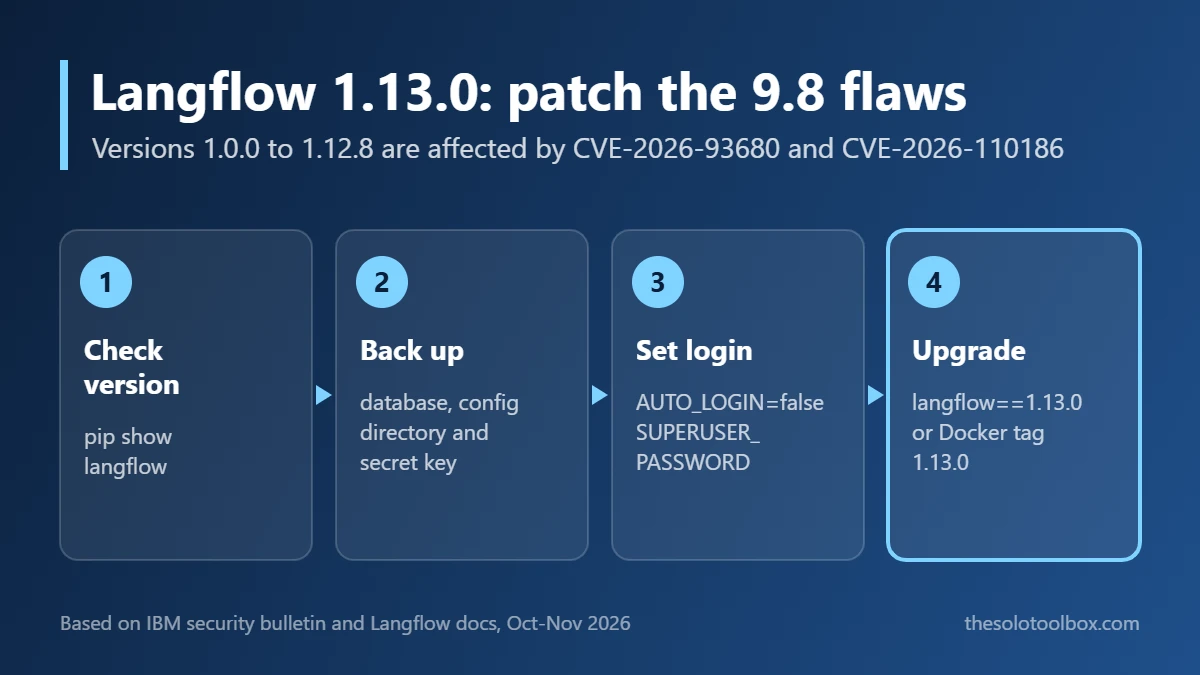
Langflow 1.13.0 fixes two critical flaws, CVE-2026-93680 and CVE-2026-110186, that let an attacker with no account bypass authentication and run code on the server. Every Langflow OSS release from 1.0.0 through 1.12.8 is affected, and IBM’s bulletin lists no workaround, so upgrading to 1.13.0 is the fix. Plan the upgrade around Langflow’s login settings, or you can lock yourself out.
Below: what each CVE does, how to check your version, the exact upgrade commands for pip, uv and Docker, and how to keep your admin account working afterward.
Before you start
- You’ll need: shell access to the Langflow host, and a backup of the Langflow database and config directory
- Time: 10 to 20 minutes for a single server
- Key fact: a public Metasploit module that tests the auth bypass exists, according to The Hacker News, so open instances are easy to find
What the Langflow vulnerabilities are
IBM published the security bulletin for Langflow OSS on October 28, 2026 and updated it on October 29. It covers four Langflow flaws plus three in the bundled Hono web library:
| CVE | CVSS | What it allows | Login needed? |
|---|---|---|---|
| CVE-2026-93680 | 9.8 | Authentication bypass | No |
| CVE-2026-110186 | 9.8 | Remote code execution, reachable through MCP tool enumeration | No |
| CVE-2026-110193 | 8.8 | An authenticated user can make the Agentic Assistant run OS commands on the server | Yes (low privilege) |
| CVE-2026-110192 | 6.5 | Exposure of insufficiently protected credentials | Yes |
| CVE-2026-84363, -84364, -84365 | 5.3 to 6.5 | Hono issues: cache bypass, heap exhaustion, path traversal (fixed in Hono 4.13.5) | Varies |
The two 9.8 flaws are the reason to act today. Together they mean anyone who can reach your Langflow port may be able to get past the login and execute commands with the server’s permissions, including reading the API keys stored in your flows. If you also run Node-RED, open editors are under attack right now as well: see how to secure Node-RED with adminAuth.
Is anyone exploiting it?
IBM does not say. The Hacker News reported on November 2 that neither critical flaw was in CISA’s Known Exploited Vulnerabilities catalog as of October 30, while six older Langflow flaws are. It also reported that a public Metasploit module for CVE-2026-93680 connects to the MCP endpoint without credentials and lists available tools. That module does not run code, but it lowers the effort needed to find vulnerable servers. We could not confirm active attacks.
Check which Langflow version you run
- pip or uv install: run
pip show langflow(oruv pip show langflow) in the same environment Langflow runs in and read theVersion:line. - Docker: run
docker psand look at the image tag. If it sayslangflowai/langflow:latest, check the running version withdocker exec <container> pip show langflow, becauselatestmay be an old pull. - Managed or bundled installs: check the vendor’s own advisory, since packaged builds follow their own release schedule.
Any version from 1.0.0 to 1.12.8 needs the update. According to The Hacker News, the earlier 1.12.4 and 1.12.5 releases fixed a separate batch of CVEs and do not cover these.
Before you upgrade: set up login
According to the Langflow authentication docs (written for the 1.13.x line), official release packages, tagged source archives and Docker images turn automatic login off by default. If you have been relying on auto-login, Langflow will ask for a password after the upgrade, and startup fails if no superuser password is set. Prepare first:
- Back up the Langflow database and config directory, including the secret key. Without the secret key, saved credentials cannot be decrypted.
- Set
LANGFLOW_AUTO_LOGIN=false. - Set
LANGFLOW_SUPERUSERto your existing admin username (the default islangflow). - Set
LANGFLOW_SUPERUSER_PASSWORDto a strong password. It cannot be the legacy valuelangflow. - Set
LANGFLOW_ENABLE_SIGNUP=falseif you do not want strangers creating accounts, and setLANGFLOW_SECRET_KEYexplicitly for production.
If an older .env file contains LANGFLOW_AUTO_LOGIN=true, that line overrides the new default. Delete it.
How to update Langflow to 1.13.0
pip
pip install --upgrade "langflow==1.13.0"uv
uv pip install "langflow==1.13.0"The docs’ general upgrade command, uv pip install langflow -U, installs whatever is newest. Pinning the version keeps you on the release IBM lists as fixed.
Docker and Docker Compose
docker pull langflowai/langflow:1.13.0With Compose, set image: langflowai/langflow:1.13.0 in your compose file, then run docker compose pull and docker compose up -d. Keep your volumes. The Docker deployment docs warn that without LANGFLOW_CONFIG_DIR plus LANGFLOW_SAVE_DB_IN_CONFIG_DIR=true (SQLite) or LANGFLOW_DATABASE_URL (PostgreSQL), the database and secret key live inside the container and are lost when it is replaced.
Confirm the upgrade
Restart Langflow, run pip show langflow again (or check the image tag), and confirm it reports 1.13.0. Open the UI in a private browser window: you should get a login page, not your flows.
If you are locked out after upgrading
The Langflow docs say not to delete or reinstall Langflow. Instead, temporarily set LANGFLOW_AUTO_LOGIN=true, call /api/v1/auto_login on localhost to get an access token, find your user ID at /api/v1/users/whoami, and send a PATCH to /api/v1/users/USER_ID with a new password. Then set auto-login back to false, put the new password in LANGFLOW_SUPERUSER_PASSWORD, and restart.
Harden the server after patching
- Keep port 7860 off the public internet. Put Langflow behind a VPN or a reverse proxy with its own authentication.
- Rotate the LLM provider keys, database passwords and tokens stored in your flows if the server was exposed while on 1.12.8 or older. Disabling auto-login does not revoke sessions or API keys issued before.
- Review the Users page for accounts you did not create.
- Check the host itself. If it is a Linux server, the CVE-2026-98432 kernel patch guide covers this week’s other critical update.
AI developer tools are a common target right now. The same week brought a malicious Claude Code extension for Cursor and fake ChatGPT and Claude desktop apps on GitHub.
FAQ
I only run Langflow on my laptop. Do I still need to update?
Yes. A copy that listens only on localhost is far harder to reach than a public server, but anything else on your network, or a port you forget to close later, can change that. IBM’s bulletin covers Langflow OSS 1.0.0 through 1.12.8 with no exceptions for local installs.
Is there a workaround if I cannot upgrade today?
IBM lists none. The practical stopgap is to make the server unreachable: stop the service or block port 7860 at the firewall until you can upgrade.
Do I need 1.13.0 exactly, or can I go newer?
Any release after 1.13.0 should include the fixes, but IBM names 1.13.0 as the fixed version. Check the release notes before jumping to a newer line.
Next step
Run pip show langflow or check your Docker tag now. If it is 1.12.8 or older, back up, set LANGFLOW_SUPERUSER_PASSWORD, and upgrade to 1.13.0 before the server spends another night exposed.
Sources
Checked on November 3, 2026. CVE details and affected versions come from IBM’s bulletin. Exploitation and Metasploit details are as reported by The Hacker News and were not independently verified.
- IBM Security Bulletin: Langflow OSS affected by multiple vulnerabilities (October 28, updated October 29, 2026)
- The Hacker News: Critical Langflow Flaws Could Let Unauthenticated Attackers Run Code on Servers (November 2, 2026)
- Langflow docs: API keys and authentication
- Langflow docs: Deploy Langflow on Docker
- Langflow docs: Install Langflow