mSecure Breach Warning: What to Change First, in Order
mSeven Software, the company behind the mSecure password manager, emailed customers on November 3, 2026 about “suspicious activity” linked to the app and told them to protect everything stored in it: change passwords, reset or re-enroll two-factor authentication, and remove existing passkeys. It has not said what happened or whether vault data was taken, so the practical answer is to reset your most important accounts today and work down the list by risk, not alphabetically.
Below: what mSecure has and hasn’t confirmed, a priority order for a vault with hundreds of entries, how to handle stored 2FA codes and passkeys, and how to export your data first if you plan to switch.
Before you start
- Applies to: anyone with data in mSecure, on any platform. Users who synced through mSecure Cloud should treat this as most urgent (see below)
- You need: access to your main email account and phone, and about an hour for the first round
- Time: 30 to 60 minutes for the high-risk accounts; the rest can be spread over several days
- Status: as of November 4, 2026, 9 AM ET, mSeven had not published an incident report or said what data was involved
What mSecure told customers on November 3
According to The Register, which saw the email, mSeven said it had “recently learned of suspicious activity associated with the mSecure password management application,” started an investigation, took steps to mitigate the issue and brought in outside security experts. The email then recommended changing passwords, resetting or re-enrolling two-factor methods, or removing passkeys for the information stored in mSecure.
What the email does not say:
- What the suspicious activity was, or when it started
- Whether attackers reached encrypted vault data, account metadata (such as email addresses), or neither
- Which versions or platforms are involved
- Whether the advice covers every account in your vault or only your mSecure login
Customers have filled mSecure’s community forum with exactly those questions. In a separate forum thread, one customer posted that a support agent told them the issue only affects people who sync through mSecure Cloud, and that there was “no evidence” the confidential data in the cloud database was accessed. That is a customer relaying a support ticket, not an official statement, and mSeven has not confirmed it publicly.
Do you really need to change every password?
Not all at once. Password manager vaults are encrypted with a key derived from your master password, so a stolen copy of a vault is not readable on its own. The risk depends on two things mSeven hasn’t disclosed: whether vault data was copied, and how strong your master password is. A long, unique master password buys you time. A short or reused one does not.
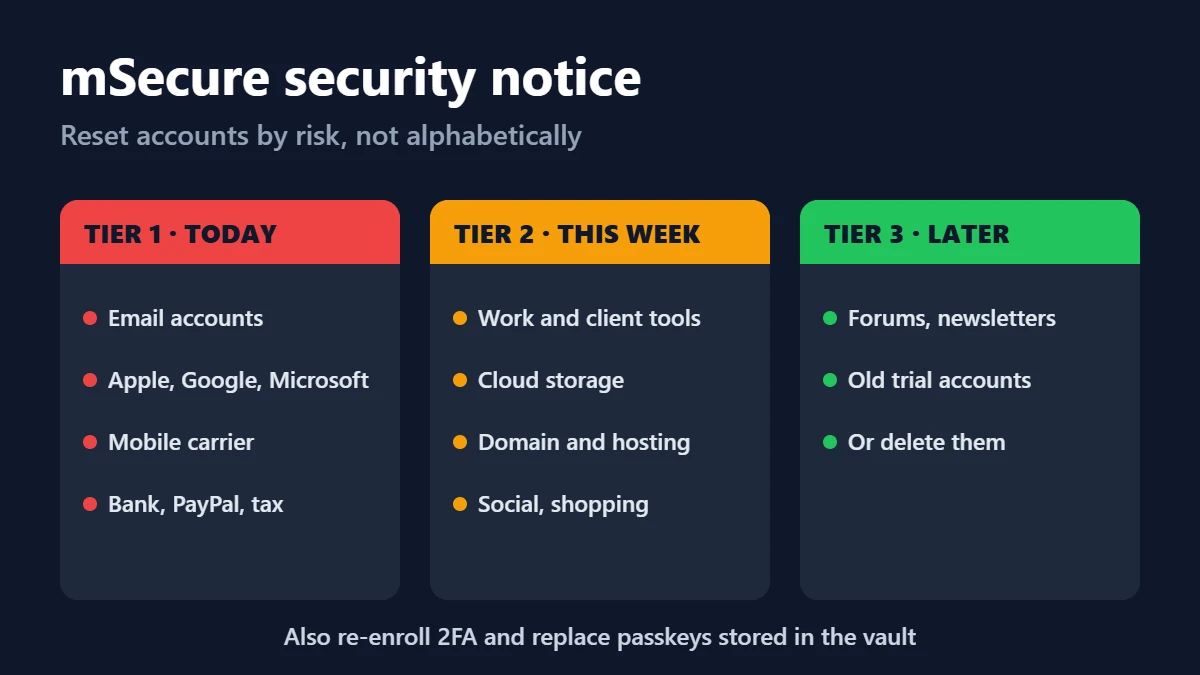
Because nobody outside the company knows which case applies, the sensible plan is to treat the vault as exposed and reset accounts in order of damage. If mSeven later confirms that only account metadata was touched, you can stop after the first tier.
Priority order for resetting your accounts
| Tier | Accounts | When |
|---|---|---|
| 1 | Main email accounts (they reset everything else), Apple ID, Google and Microsoft accounts, your mobile carrier account | Today |
| 1 | Banking, brokerage, PayPal and other payment apps, tax and government portals | Today |
| 2 | Work and client systems, cloud storage, domain registrar and web hosting, accounting software | This week |
| 2 | Social accounts and shopping sites with saved cards | This week |
| 3 | Forums, newsletters, old trial accounts | When you next sign in, or delete the account |
Sort your vault by these tiers before you start. Deleting tier 3 accounts you no longer use is faster than changing their passwords and removes them from future breaches.
How to handle 2FA codes and passkeys stored in mSecure
If you only used mSecure for passwords and your 2FA codes arrive by SMS or come from a separate authenticator app, there is nothing to re-enroll. If mSecure also held authenticator secrets (the setup keys behind six-digit codes), backup codes or passkeys, those need replacing, because anyone with the secret can generate valid codes.
- For each tier 1 account, open its security settings and turn off the existing authenticator method.
- Set it up again. This creates a new secret, so the old one stops working. Save the new secret in a different app from your passwords if you can.
- Generate new backup or recovery codes. Doing this cancels the old set on most services.
- For passkeys stored in mSecure, remove the passkey from the account’s security page, then create a new one on your phone or in another password manager. Our guide to setting up passkeys for Google and Microsoft accounts shows where those settings live for the two most common accounts.
- While you’re in each account’s security page, sign out other sessions and check recent sign-in activity for locations or devices you don’t recognize.
If you’re switching: export from mSecure first
Change passwords after you move, not before, or you’ll do the work twice. mSecure’s export instructions are:
- Mac: open and unlock mSecure, then choose File > Export > CSV, name the file, pick your options and click Export.
- Windows: open and unlock mSecure, click the gear icon, then Backups > Export Data to CSV File. The Windows app exports only the current view, so select All Items first.
The CSV is plain text. Import it into the new manager right away, then delete the file and empty the Recycle Bin or Trash. Don’t email it to yourself or put it in cloud storage. After the import, change passwords from inside the new manager so the new values save automatically.
Watch for phishing that uses this news
Security incidents at well-known services are usually followed by fake “reset your account” emails. Don’t follow links in any message about this incident; open the mSecure app or type the support address yourself. To see which of your email addresses have already appeared in past breaches, use the free tools in our guide to checking whether your email was in a data breach.
Frequently asked questions
Was mSecure hacked?
mSeven has confirmed “suspicious activity,” an investigation and mitigation steps. It has not used the word breach or said what, if anything, was taken. Treat it as a possible exposure until the company publishes details.
Should I change my mSecure master password?
Yes, if you plan to stay. It protects future syncs. It does not re-encrypt any copy of your vault that may already have been taken, which is why the tier 1 resets still matter.
I never used mSecure Cloud. Am I affected?
A support reply posted by a customer says only cloud-sync users are affected, but mSeven hasn’t confirmed that publicly. If your data never synced through mSecure Cloud, your risk may be lower, but until the company says so, tier 1 resets are cheap insurance.
Is it safe to keep using mSecure?
That depends on what mSeven discloses. Without an explanation of the cause and the fix, there’s no way to judge. If you stay, keep an eye on the forum’s Announcements section for an official update.
What to do next
Spend the next hour on tier 1: email, Apple/Google/Microsoft, carrier and money accounts, including fresh 2FA for each. Then decide whether to stay or export. If you run a business, our write-up of the DreamHost password reset incident covers how to handle a vendor notice that leaves out the details.
How we checked: we read The Register’s November 3 report of the email, mSecure’s support site and its community forum on November 4, 2026. We could not see the original email ourselves, and no official incident page existed when this was written. We’ll update this article if mSeven publishes details.
Sources
- The Register: Password manager mSecure tells users to change passwords, won’t say why (Nov 3, 2026)
- mSecure Support forum: Important Security Notice 2026-11-03
- mSecure Support forum: Update from mSecure Team (customer post)
- mSecure Support: Export Data to a CSV File