How to check whether your email was in a data breach
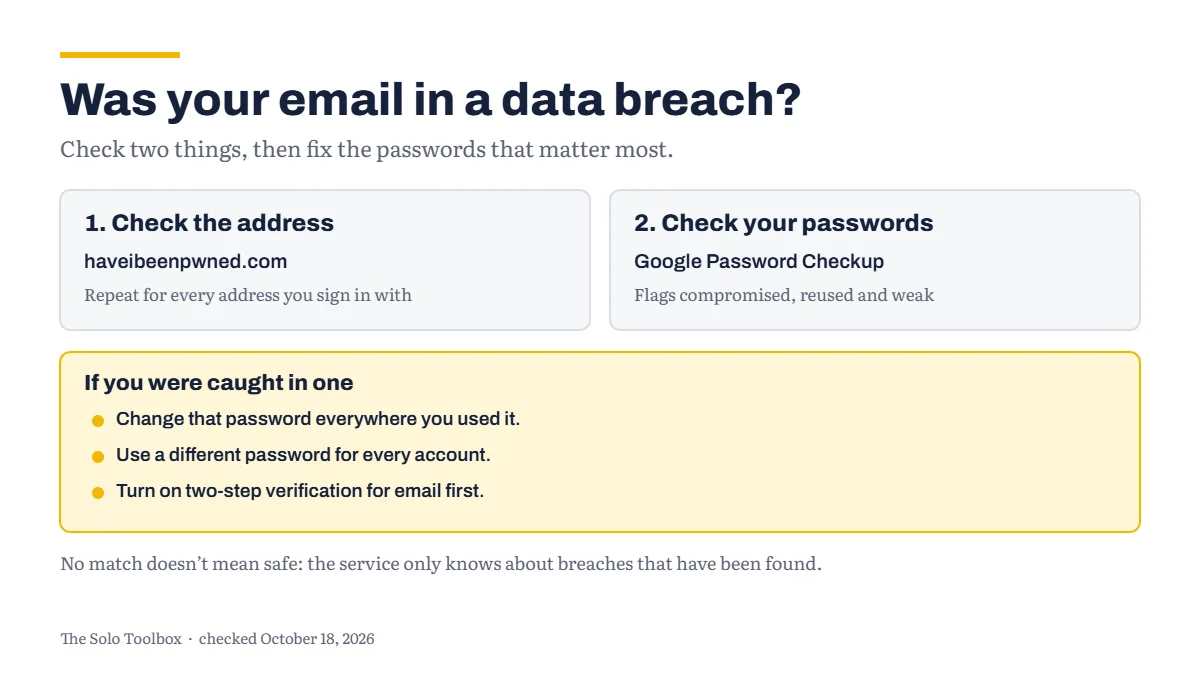
To check whether your email address has turned up in a data breach, search it at Have I Been Pwned (haveibeenpwned.com), a free service that collects data from known breaches. Then check your saved passwords with Google’s Password Checkup. A match doesn’t mean someone is in your account. It means a password or other details you used on that site may now be known, so the fix is to change any password you used there, everywhere you used it, and turn on two-step verification. A clean result is not a guarantee either: the service only knows about breaches that have been found and loaded.
Before you start
- You’ll need: your email addresses, including any old ones you still use to sign in, and access to your password manager or browser’s saved passwords.
- Applies to: any email address. The Password Checkup steps use Chrome or a Google account.
- Time: 5 minutes to check, longer if you have passwords to change.
- How we checked this: based on Have I Been Pwned’s own FAQ and Google’s help pages, checked October 18, 2026.
Check your email address
- Go to haveibeenpwned.com.
- Enter your email address and run the search.
- Repeat for each address you use to sign in to things, including old personal addresses that are still attached to accounts.
The service’s FAQ says searches aren’t logged and are sent over an encrypted connection. It’s also candid that you can’t independently verify that, and suggests not using it if you’re worried. Searching only checks whether an address appears in breach data; it doesn’t show anyone your password.
What a result means
- A match: your address appeared in one or more breaches. Each one is listed with the site it came from. Work out whether you still have an account there and what password you used.
- A paste: your address appeared in text posted publicly online. Have I Been Pwned notes that this doesn’t by itself confirm a breach, but it’s worth reviewing and changing the related passwords.
- No match: good news, but not proof. The FAQ is clear that it only holds a subset of breached data, so absence from its records doesn’t mean an address is safe.
Some breaches are flagged as sensitive and never appear in public searches. Have I Been Pwned only shows those to the verified owner of the address, after they sign in.
Check your saved passwords
Have I Been Pwned tells you about your email address. Google’s Password Checkup looks at the passwords themselves and flags three problems: compromised (the username and password combination has been published online), reused and weak.
In Chrome:
- Select More at the top right, then Passwords and autofill, then Google Password Manager.
- On the left, select Checkup.
In another browser, go to passwords.google.com, select Go to Password Checkup, then Check passwords.
Older guides also point to Google’s dark web report. Google discontinued it: scans stopped on January 15, 2026, and the report closed on February 16, 2026. Google now recommends Password Checkup, Security Checkup and passkeys instead.
What to do if you’ve been caught in a breach
Work through these in order, starting with the accounts that matter most to your business, such as email, banking, your website host and your accounting software.
- Change the password on the breached site, if you still use it. If you don’t, consider closing the account.
- Change it everywhere else you used the same password. This matters most. Attackers try leaked passwords on other sites, so a reused password from an old forum can open your email.
- Use a different password for every account. A password manager makes this practical. Google’s Password Manager can generate and save them.
- Turn on two-step verification for your email and other key accounts, so a leaked password alone isn’t enough. Our guide to turning on two-step verification for Google and Microsoft accounts walks through it.
- Don’t trust breach alerts blindly. Google advises that if you’re told a password is unsafe, you go to Password Checkup directly to confirm the alert is genuine. Apply the same rule to any email about a breach: don’t use its links; go to the site yourself.
Get warned about future breaches
Have I Been Pwned’s Notify me service is free. Enter your address, confirm it by clicking the link the service emails you, and you’ll get a message if the address appears in a new breach. It only sends alerts to the address being monitored, so you can’t watch someone else’s.
If you own your business’s domain, Have I Been Pwned also offers domain search monitoring. Its free and paid options change, so check the current plans on its site.
If it doesn’t work
- The verification email for Notify me doesn’t arrive: check your spam folder. If your own business email often lands in spam, our guide to fixing SPF, DKIM and DMARC may help.
- Password Checkup shows no passwords: it can only check passwords saved in Google Password Manager. Passwords stored elsewhere need to be checked in the password manager you use.
- You can’t remember which password you used on a breached site: treat any password you’ve reused as exposed and change it.
For more practical guides like this one, browse our how-to guides.
Sources
- Have I Been Pwned: Frequently asked questions
- Have I Been Pwned: Get free breach notifications
- Google: Change compromised passwords in your Google Account
- Google One: How dark web report works
Last checked: October 18, 2026. Online services change their features often. If something here no longer matches what you see, let us know.