pull_request_target Blocked: How to Fix GitHub Actions Workflows
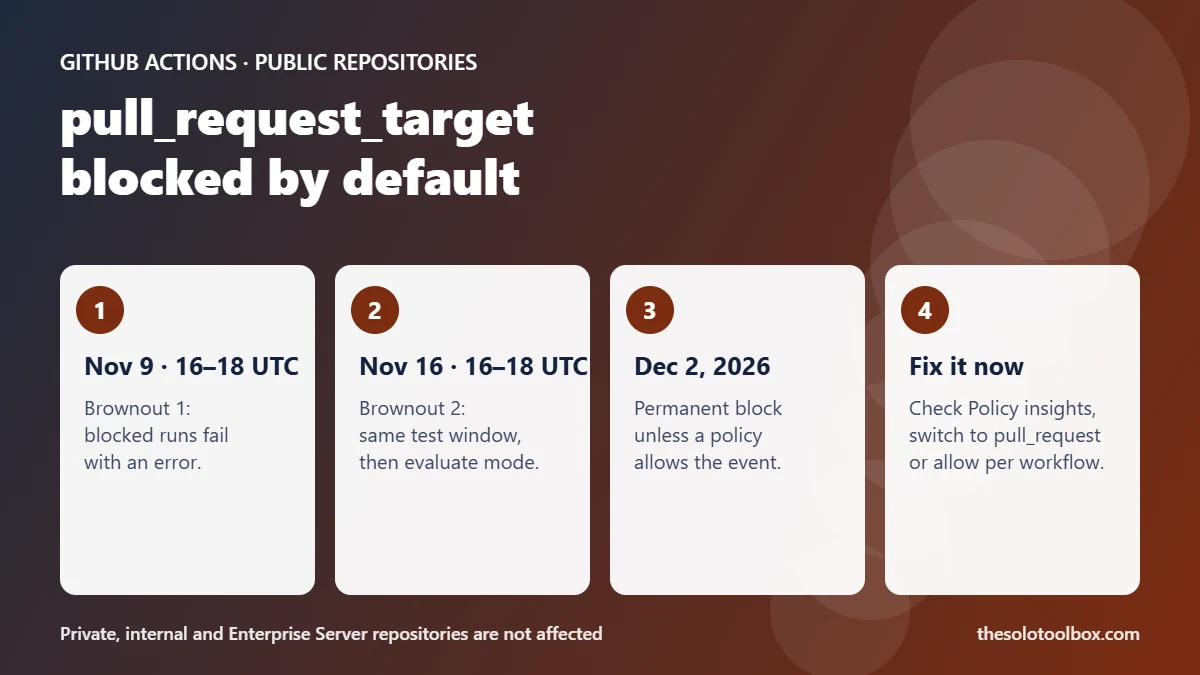
Starting December 2, 2026, GitHub Actions will block workflows triggered by pull_request_target in public repositories unless an Actions event policy explicitly allows them. Before that, GitHub will enforce the block during two brownouts, on November 9 and November 16 from 16:00 to 18:00 UTC. To avoid failed runs, find the affected workflows in Policy insights, then either switch them to pull_request or add a policy that allows pull_request_target.
This guide shows how to check whether your repository is affected, how to decide between the two fixes, and how to harden a workflow that has to keep the trigger.
Before you start
- Affected: public repositories on GitHub Free, GitHub Team and GitHub Enterprise Cloud
- Not affected: private and internal repositories, and GitHub Enterprise Server
- Who can fix it: repository admins, organization owners or enterprise owners
- Deadline: first brownout November 9, 2026, 16:00 UTC; permanent block December 2, 2026
- Checked: November 3, 2026, against the GitHub changelog and GitHub Docs
What changed
GitHub announced in a November 2 changelog post that a default rule blocking pull_request_target is coming to public repositories through workflow execution protections. Enforcement had been scheduled for November 2 and has moved to December 2, 2026.
The rule currently runs in evaluate mode: workflows still run, but GitHub logs the runs it would have blocked. During each brownout window, blocked runs fail with an error annotation and the workflow doesn’t execute. After each window the rule goes back to evaluate mode until December 2.
| Date | Time (UTC) | What happens |
|---|---|---|
| Now to November 9 | — | Evaluate mode: runs continue, would-be blocks show in Policy insights |
| November 9, 2026 | 16:00–18:00 | Brownout 1: blocked runs fail |
| November 16, 2026 | 16:00–18:00 | Brownout 2: blocked runs fail |
| December 2, 2026 | — | Permanent enforcement in affected public repositories |
The rule doesn’t replace an event policy you’ve already configured. It only applies to public repositories that don’t have an applicable Actions event policy.
Why GitHub is blocking pull_request_target
pull_request_target runs in the context of the base repository. The job gets the base repository’s GITHUB_TOKEN and access to repository and organization secrets, even when the pull request comes from a fork. By default the workflow file and actions/checkout use the default branch, so no fork code runs.
The risk starts when a workflow checks out the pull request head and then builds or tests it. A fork can change a Makefile, a build script or a dependency and have it run with your secrets. GitHub calls this a “pwn request.” The vulnerable pattern looks like this:
# INSECURE example from GitHub Docs
on:
  pull_request_target:
jobs:
  build:
    runs-on: ubuntu-latest
    steps:
      - uses: actions/checkout@v6
        with:
          ref: ${{ github.event.pull_request.head.sha }}
      - name: Test
        run: make test
Supply-chain attacks that go after developer tooling have been a steady theme this year, from the AGENTS.md downloads-folder attack to fake AI desktop apps hosted on GitHub. This default rule closes one of the most common paths into a CI pipeline.
How to check if your repository is affected
- Open the repository (or organization) on GitHub and click the Settings tab.
- In the left sidebar, under Actions, click Policies.
- Open Policy insights, which sits directly under the Actions policies page.
- Look for workflow runs the default rule would have blocked. Each one is a workflow triggered by
pull_request_target. - For enterprises, start from the Policies tab, then Actions > Policies.
A quick local check also works: search your .github/workflows folder for pull_request_target.
grep -rn "pull_request_target" .github/workflows/Fix 1: switch to pull_request when you don’t need secrets
pull_request fires on the same pull request activity, runs the workflow from the merge commit, and gives fork pull requests a read-only token without secrets. If a workflow only runs tests, lints or builds and doesn’t need a secret, change the trigger:
on:
  pull_request:
    branches: [ main ]
Then remove any ref: ${{ github.event.pull_request.head.sha }} line from actions/checkout, because pull_request already checks out the merge commit. Push the change and open a test pull request from a fork to confirm it runs.
Fix 2: allow pull_request_target with an Actions event policy
Keep the trigger only for workflows that need write access or secrets and never run the fork’s code, such as labeling, triage bots or posting comments.
- Go to Settings > Actions > Policies and create a new policy.
- Give it a name, for example Allow labeler on pull_request_target.
- Choose an enforcement status. Evaluate is available on GitHub Enterprise Cloud only.
- Target the repositories and use workflow file targeting so only the specific workflow (for example
.github/workflows/labeler.yml) is allowed. - Under Restrict events, include
pull_request_targetin the allowed events, along with the other events that workflow uses. - Save, then check Policy insights to confirm the workflow is no longer flagged.
Policies can also be managed through the REST API endpoints for GitHub Actions policies, which helps if you maintain many repositories.
Which fix should you pick?
| What the workflow does | Recommended fix |
|---|---|
| Runs tests or builds on fork PRs, no secrets | Switch to pull_request |
| Labels, triages or comments on PRs, never checks out fork code | Allow pull_request_target for that workflow only |
| Checks out the PR head and runs it with secrets | Restructure: split untrusted build from the step that needs secrets |
| Unused or legacy workflow | Delete it and leave the default block in place |
Harden a workflow that keeps pull_request_target
- Never execute checked-out fork code. That includes
npm install, build scripts and config files the PR brings along. - Cut token permissions. Set a minimal
permissions:block and pass only the secrets that job needs. - Know the cache rule. These workflows get read-only cache access in the default branch’s scope; populate caches from a
pushworkflow instead. - Use ephemeral runners. Self-hosted runners must be isolated from internal resources and not reused between runs.
- Scan the workflow. GitHub recommends turning on CodeQL for GitHub Actions to catch command injection.
actions/checkout also has an input named allow-unsafe-pr-checkout: true that permits checking out fork pull request head refs. GitHub says to use it only after confirming the checked-out code is never executed.
FAQ
Are private repositories affected by the pull_request_target block?
No. GitHub says private and internal repositories aren’t affected. The default rule applies to public repositories on GitHub Free, Team and Enterprise Cloud.
What happens to my workflow during the November 9 brownout?
Between 16:00 and 18:00 UTC, pull_request_target runs blocked by the default rule fail with an error annotation and don’t execute. After the window, the rule returns to evaluate mode.
Does GitHub Enterprise Server get this change?
No. The changelog says the change does not apply to GitHub Enterprise Server.
I already have an Actions event policy. Do I need to do anything?
The default rule doesn’t replace an applicable event policy you’ve already configured. Check Policy insights to confirm your existing policy covers the workflows that use pull_request_target.
Limitations
We checked dates and menu paths against GitHub’s changelog and Docs on November 3, 2026, but didn’t run the brownout ourselves. GitHub moved the enforcement date once already, so check the changelog again before November 9. Settings labels may differ slightly between personal, organization and enterprise accounts.
Next step
Before November 9, run the grep command above on every public repository you maintain, then open Policy insights to confirm the list. If you also run self-hosted Git, our GitLab CVE-2026-97229 patch check covers the other side of the pipeline.
Running a Next.js site? Here’s what the November 2026 Next.js security fixes mean.
Sources
- GitHub Changelog: pull_request_target blocked by default December 2 (November 2, 2026)
- GitHub Docs: Securely using pull_request_target
- GitHub Docs: Governing execution of GitHub Actions workflows
- GitHub Docs: REST API endpoints for GitHub Actions policies