Fake ChatGPT and Claude desktop apps on GitHub: check your PC
If you downloaded a ChatGPT or Claude desktop app from a GitHub page, a ZIP file or a site other than openai.com, claude.com or the Microsoft Store, check your PC. Check Point Research found fake GitHub projects named “GPT-5.6 Sol,” “GPT-6 Astra” and “Claude Opus” that bundle a genuine, signed OpenAI or Anthropic installer with a hidden malicious file. Windows shows a trusted publisher, but the extra file installs a cryptominer that runs every time the PC starts.
Below: how the trick works, the exact files and folders to look for, how to remove it, and where to get the real apps. We checked the details against Check Point’s report (published October 27, updated October 30, 2026), coverage from Help Net Security, Infosecurity Magazine and ITPro, and Anthropic’s download page, on November 3, 2026.
Before you start
- You’ll need: a Windows PC and about 15 minutes
- Affected: Windows only, based on the samples Check Point analyzed
- Not affected: apps installed from claude.com, openai.com or the Microsoft Store
What Check Point found
The campaign, which Check Point calls Yoba, uses GitHub repositories with GitHub Pages sites that rank well in Google results for AI desktop app searches. The repos offer ZIP downloads named sol-setup.zip, Setup-Claude.zip and GPT-6-Astra-Setup.zip. eSecurity Planet reports the earliest repo dates to July 16, with malicious releases uploaded between August 30 and September 4. None of the coverage we read says GitHub has removed the repos.
Inside each ZIP is a legitimate Setup.exe signed by OpenAI or Anthropic, plus a malicious winmm.dll in the same folder. When you run the real installer, Windows loads the DLL next to it first. This is DLL sideloading: the signature check on Setup.exe passes, so nothing looks wrong.
What the malware does
- Copies itself to
C:\ProgramData\WMProcess - Creates a scheduled task that runs as SYSTEM three minutes after every boot, with “Microsoft Corporation” as the author
- Downloads its next stage using a Telegram channel and DNS-over-HTTPS lookups
- Runs the XMRig cryptominer inside
svchost.exe, so it looks like a normal Windows process
Check Point only observed a miner as the final payload and did not report password or file theft. The loader can fetch other payloads later, so treat an infected PC as compromised, not just slow.
How to check your PC
- Open File Explorer, paste
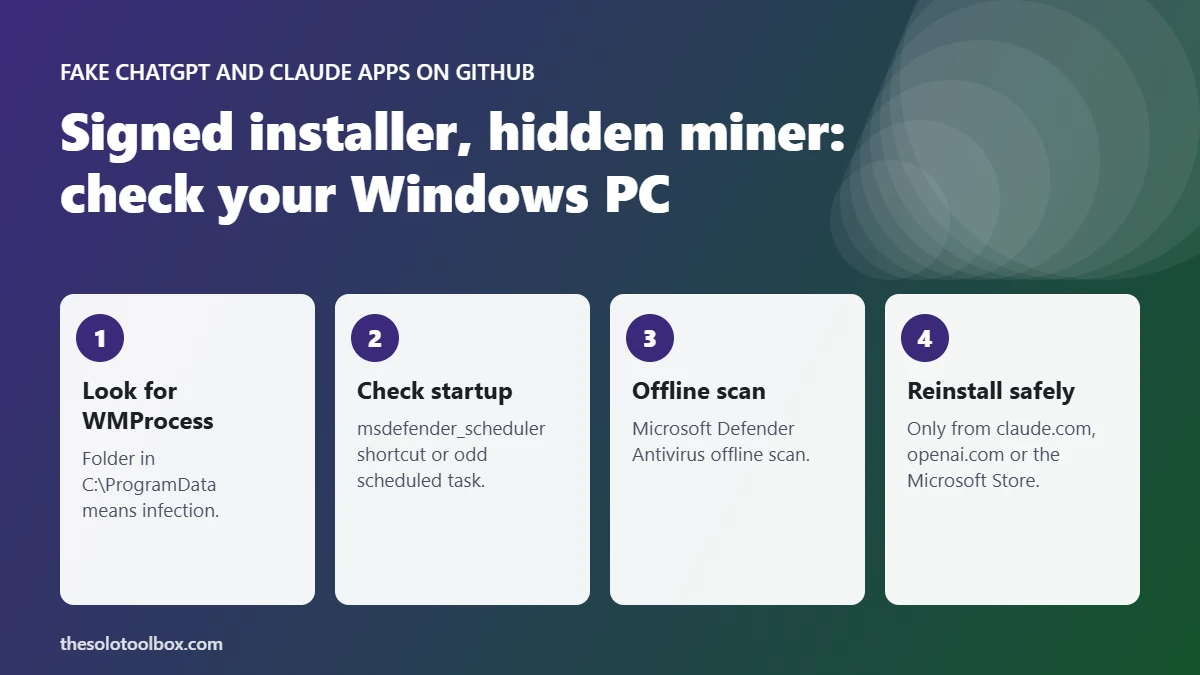
C:\ProgramData\WMProcessinto the address bar and press Enter. If the folder exists, your PC is likely infected.ProgramDatais hidden, but pasting the path works. - Paste
%APPDATA%into the address bar and look for a folder named Microsaft Difendir (misspelled on purpose). Check Point found it in an earlier version. - Press Win + R, type
shell:startup, and look for a shortcut starting with msdefender_scheduler. - Open Task Scheduler, select Task Scheduler Library, and look for a task you don’t recognize that points to a file in
ProgramData\WMProcess. Check the Actions tab, not just the author. - Open Task Manager with Ctrl + Shift + Esc. Sustained high CPU from a Service Host entry while the PC is idle, with loud fans, fits a miner.
- Check where your AI app came from. In Settings > Apps > Installed apps, a ChatGPT or Claude entry is fine if you installed it from the official site or the Store. A copy you unpacked from a GitHub ZIP is not.
How to remove it
- Disconnect from the internet if you found any of the items above.
- Open Windows Security > Virus & threat protection > Scan options, choose Microsoft Defender Antivirus (offline scan), and select Scan now. The PC restarts and scans before Windows loads.
- Delete the scheduled task and the
WMProcessfolder if the scan didn’t remove them, and delete the ZIP and anything you extracted from it. - From a clean device, change the passwords you used on that PC, starting with email, and turn on two-step verification. Our guide to signing out of ChatGPT and Claude everywhere covers the AI accounts.
- If anything still looks wrong, back up your files and reset Windows. Our free Windows 11 backup guide walks through the backup.
Where to download the real ChatGPT and Claude apps
| App | Official source | Avoid |
|---|---|---|
| Claude desktop (Windows, macOS) | claude.com/download or the Microsoft Store listing linked there | GitHub repos, ZIP files, “free Opus” sites |
| ChatGPT desktop | openai.com/chatgpt/download, or the link inside your ChatGPT account | GitHub repos offering “GPT-6” or unreleased models |
Anthropic’s download page links only to its own servers and the Microsoft Store, and OpenAI offers its app through openai.com, not GitHub ZIP files. A repo promising a model that hasn’t launched, or free access to a paid model, is a lure. The same rule applies on phones, as we explained in how to spot fake apps on Google Play, and for coding tools, covered in our Claude Code extension check.
Why a signed installer didn’t protect you
A digital signature proves who made a specific file. It says nothing about other files sitting in the same folder. Windows checks the signature of Setup.exe, finds a valid OpenAI or Anthropic certificate, and then lets that program load a DLL from its own folder. Downloading the installer directly from the vendor avoids the problem, because the vendor’s package doesn’t include the extra DLL.
FAQ
Is the real ChatGPT or Claude app infected?
No. Check Point says the attackers reused genuine signed installers. The malicious part is a separate DLL added to the fake ZIP.
Are Macs affected?
Check Point’s report covers Windows files only. It doesn’t mention a macOS version.
Will antivirus catch it?
Check Point says the malware checks for sandboxes and virtual machines to avoid analysis. Run a Microsoft Defender offline scan and the manual checks above rather than relying on a quick scan.
Next step
Paste C:\ProgramData\WMProcess into File Explorer now. If Windows says it can’t find it, you’re clear of this campaign. Then reinstall any AI app you got from a third-party site using the official links above.
If you open RAR archives on Windows, check that WinRAR is on version 7.13 or later; older versions can be exploited by a booby-trapped archive.
Sources
- Check Point Research: Tricks from the past deployed via signed ChatGPT and Claude binaries (Oct 27, 2026)
- Help Net Security: Yoba malware hides in fake desktop versions of ChatGPT and Claude (Oct 29, 2026)
- Infosecurity Magazine: Attackers hide malware behind signed ChatGPT and Claude binaries (Oct 28, 2026)
- eSecurity Planet: Fake ChatGPT and Claude downloads on GitHub (Oct 29, 2026)
- Check Point: Threat Intelligence Report, November 2, 2026
- Anthropic: Download Claude