ChatGPT and Codex Will Share One Usage Limit From December. Here’s How to Prepare

Starting in December, ChatGPT Plus, Pro and Business subscribers will get one usage allowance that covers both ChatGPT and Codex, OpenAI’s coding agent. Usage will be counted in tokens, so heavier models and longer tasks drain the allowance faster. Quick chats with the fast Instant model won’t count at all.
That’s the core of the ChatGPT Codex shared usage limit, and it was announced in the quietest way possible: an update to an OpenAI Help Center article, reported as changed on October 31, 2026, rather than a blog post or launch event. OpenAI hasn’t published an exact start date or how big each plan’s allowance will be.
If you only use ChatGPT for occasional questions, you may never notice. If ChatGPT is your writing assistant, research desk and coding partner rolled into one subscription, this change affects how you plan your week. Here’s what’s confirmed, what isn’t, and what to do before December.
What OpenAI actually changed
OpenAI’s help article, Understanding ChatGPT and Codex usage limits, now says that from December the usage allowance on Plus, Pro and Business will be shared across ChatGPT and Codex. OpenAI ties the change to bringing the agentic features of ChatGPT Work into the main ChatGPT experience. That’s the same change behind the merge of ChatGPT’s Chat and Work tabs.
The confirmed details are short:
- Plans covered: Plus, Pro and Business. Free, Go and Enterprise are not mentioned.
- One pool: chat in ChatGPT and work in Codex draw from the same allowance.
- Measured in tokens: the chunks of text a model reads and writes. A request’s cost depends on the model you pick and the job you give it.
- One exemption: Instant chat does not use the allowance.
- Where to look: combined remaining usage and reset times will appear under Settings → Usage.
- At the limit: you can wait for the reset, upgrade your plan, or buy credits for eligible features.
OpenAI also says it expects most people won’t have to wait for a reset more often than they do today. That is a forecast for typical users, not a promise for yours.
What OpenAI hasn’t said yet
The gaps matter as much as the announcement:
- No start date. The article says “December” and nothing more precise.
- No allowance sizes. There is no token figure for Plus, Pro or Business.
- No conversion table for how chat tokens and Codex tokens count against each other.
- No word on reset windows. Paid plans have used rolling five-hour and weekly limits for agent features; the article doesn’t say whether that structure stays.
- No credit pricing for buying extra usage under the new system.
- Little on Business seats, especially teams already on credit-based billing.
Treat any article that quotes a precise December date or a token number as guessing, unless it links to an OpenAI page that says so.
Why this matters if ChatGPT is your whole toolbox
Today, chatting with ChatGPT’s advanced models and running Codex tasks are metered separately. A long afternoon of coding doesn’t eat into your ability to draft a proposal that evening.
In December, it will. Everything advanced draws from one tank.
Part of this already happens. OpenAI’s credits documentation says that on Plus and Pro, Codex, ChatGPT Work, Word, Excel and PowerPoint can already share one agentic allowance. December’s change pulls conversations with the more capable chat models into that same pool.
For a solo operator, that changes three things.
Your heaviest task now sets the pace for everything else. An agent that spends twenty minutes refactoring a codebase or building a spreadsheet model can burn through far more tokens than a day of email drafting. If that run happens on Monday morning, it’s Monday’s writing time that pays for it.
Model choice becomes a budget decision. The spread between models is large. On the credit rate card OpenAI publishes for its Office add-ins, output from its top GPT-6 model costs about 42 times as many credits per million tokens as its lightest GPT-5.6 model (1,250 credits versus 30), and input costs 50 times as much. That card isn’t the December formula, but it shows the scale: picking the most powerful model for a small job can cost you many times what it needs to. Our guide to GPT-6.1 Terra and when to use it can help you match models to tasks.
Instant becomes your free lane. Because Instant chat doesn’t count, quick lookups, rewording, summaries and brainstorming can move there at no cost to your allowance. The skill to build now is noticing which tasks really need a reasoning model.
Who is affected, plan by plan
| Plan | Affected in December? | What to expect |
|---|---|---|
| Free | Not mentioned | No change announced |
| Go | Not mentioned | No change announced |
| Plus | Yes | One allowance for advanced chat and Codex; Instant exempt |
| Pro | Yes | Same model, larger allowance than Plus (size not yet published) |
| Business | Yes | Shared per user; details for credit-billed workspaces still unclear |
| Enterprise / Edu | Not mentioned | Check with your admin |
If you run a small team on Business, the practical question is whether one heavy Codex user can run themselves dry mid-week. OpenAI hasn’t said how it works across seats on credit-based billing, so ask your OpenAI contact or watch the admin console in December.
How to prepare: a two-week routine
You can’t know your December allowance yet, but you can learn your own usage pattern now. That turns December from a surprise into a check.
- Write down what you use ChatGPT and Codex for. List your recurring jobs for one week: client emails, research, content drafts, spreadsheet work, coding sessions. Note which model each uses.
- Check your current limits as you go. Look in ChatGPT’s settings for any usage display your plan shows today. If you use the Codex command-line tool, its
/statuscommand reports current usage. Screenshot the numbers when you’re close to a limit and note the day and time. - Spot your heavy hitters. Long Codex runs, deep research, big file analysis and agent tasks in Work are the likely biggest consumers. Mark which ones you couldn’t skip in a busy week.
- Move light work to Instant. For two weeks, default to Instant for quick questions and short rewrites. Switch to a reasoning model only when Instant’s answer isn’t good enough. You’ll learn quickly where the line is.
- Batch agent work. If you rely on Codex, group tasks into fewer, well-scoped sessions with clear instructions. Vague prompts that send an agent exploring cost more and achieve less.
- Set a December reminder. When the change lands, open Settings → Usage and compare what you see against your notes. That’s the first real number you’ll get.
What to do when you hit the shared limit
OpenAI gives three options. Here’s how to choose between them as a small business.
Wait for the reset if the work can slip a few hours and this is the first time it’s happened. Check Settings → Usage for the reset time and switch to Instant or offline work meanwhile.
Buy credits if you hit the wall occasionally, usually during crunch weeks. Paying for overflow is often cheaper than a permanently bigger plan. Check what credits cost in your country before you rely on them.
Upgrade if you hit the limit most weeks and it’s costing you billable time. Do the arithmetic: if a stalled afternoon costs you more than the price difference to the next plan, the upgrade pays for itself.
There’s a fourth option OpenAI won’t mention: split the load. Some developers already keep coding work in a separate tool or on API billing so that it can’t starve their everyday ChatGPT use. That adds complexity, so it only makes sense if the shared limit actually pinches.
Is this good or bad news?
It’s both, depending on how you work.
The case for: one meter is easier to understand than several. You can see one balance and one reset time instead of tracking separate limits for chat, Codex and Work. If you rarely touch Codex, the shared pool may give you more room for heavy chat days than separate caps did. And making Instant free of the meter is a real concession.
The case against: heavy Codex users lose the separation that protected their writing and research time. Early reaction on X from developers centred on exactly that worry. Token-based metering also makes your plan less predictable, because the same prompt can cost very different amounts depending on the model and how much work the agent decides to do.
The bigger picture is that AI subscriptions are moving from “messages per hour” toward something closer to metered compute. That’s fairer to the provider and more transparent about what’s expensive, but it puts more of the budgeting work on you. Anthropic is wrestling with the same question; see our look at what the Claude Ultra plan’s missing 5-hour limit really means.
Key takeaways
- From December, Plus, Pro and Business share one token-based allowance across ChatGPT and Codex.
- Instant chat is exempt; advanced models and agent tasks draw more.
- OpenAI hasn’t published a start date, allowance sizes or reset windows.
- Combined usage and reset times will show in Settings → Usage.
- Spend November learning your own usage pattern so December’s numbers mean something.
Frequently asked questions
When does the ChatGPT and Codex shared limit start?
OpenAI says December 2026. It has not named a day, so the change could arrive at any point in the month and may roll out gradually.
Does Codex use my ChatGPT limit now?
On Plus and Pro, Codex already shares an agentic allowance with ChatGPT Work and the Office features. From December, conversations with ChatGPT’s advanced models join that same pool.
Does Instant chat count toward the limit?
No. OpenAI says Instant chat won’t draw from the shared allowance.
Will I hit my limit more often?
OpenAI expects most users won’t wait for resets more often than today. Heavy Codex users who also chat a lot with reasoning models are the most likely exceptions.
How do I check how much usage I have left?
Once the change is live, OpenAI says combined remaining usage and reset times will appear in Settings → Usage. Codex command-line users can also check with /status.
Does this affect ChatGPT Free or Go?
OpenAI’s article names only Plus, Pro and Business. It says nothing about Free, Go or Enterprise.
Are prices changing?
No price change has been announced alongside this. The change is about how usage is counted, not what plans cost.
The bottom line
The ChatGPT Codex shared usage limit isn’t a price hike, and for light users it may be invisible. For anyone who runs a business on one ChatGPT subscription, it turns usage into a budget you’ll need to manage. You have about a month before it lands: use it to learn which of your tasks are expensive, move the cheap ones to Instant, and decide in advance whether you’d rather wait, buy credits or upgrade when you hit the wall.
We’ll update this guide when OpenAI publishes the start date and allowance sizes.
Sources: OpenAI Help Center: Understanding ChatGPT and Codex usage limits; OpenAI Help Center: Using credits in ChatGPT personal plans.
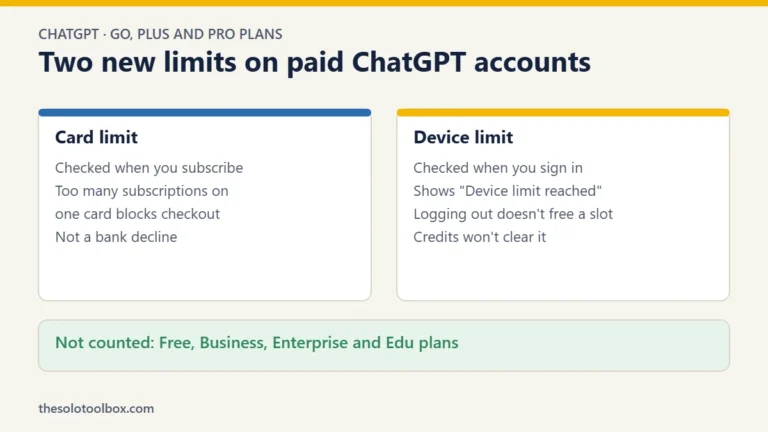
If ChatGPT shows “Device limit reached” when you sign in, here’s what OpenAI’s card and device limits mean.
OpenAI is also merging Chat and Work in the ChatGPT desktop app.
Related guides
- Notion AI credits change on Nov 2: what Business users get
- Claude Code Refusing Your Game? What Changed and What to Do
- ChatGPT ‘Something went wrong’ error: how to fix it