Pixel Watch Battery Drain: How to Get Google’s Fix Now
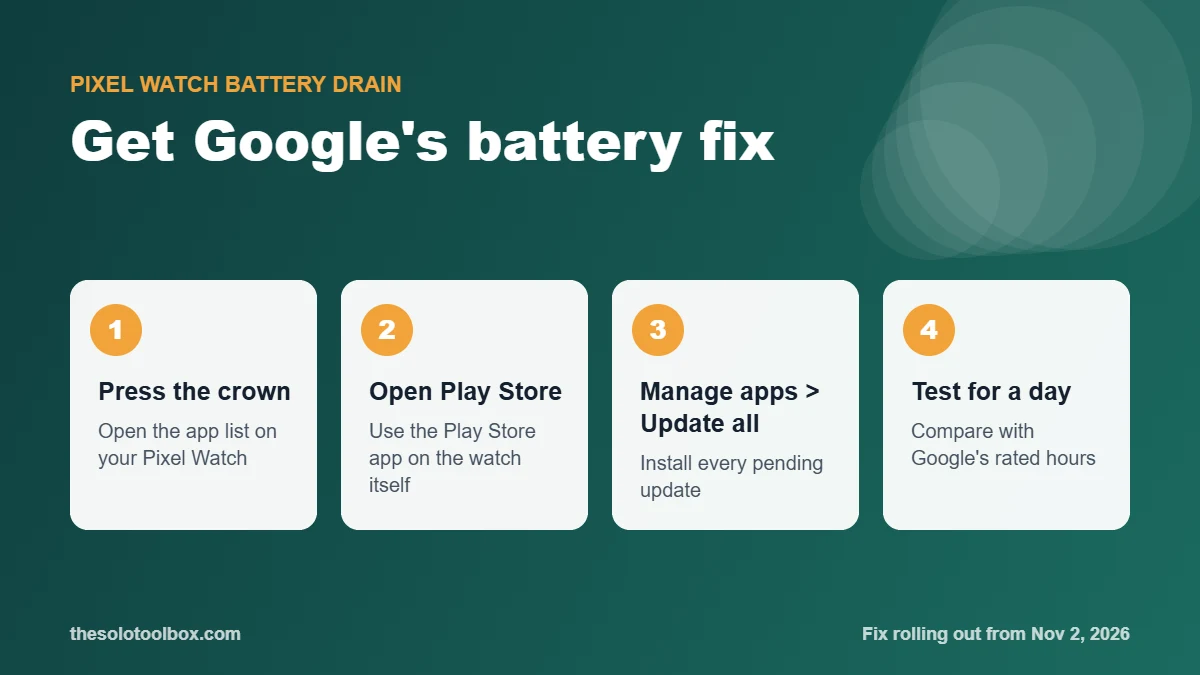
If your Pixel Watch suddenly started dying in around 12 hours, Google says it has found the cause and a fix is rolling out now. To get it, press the crown on the watch, open the Play Store, and tap Manage apps > Update all. Google told 9to5Google the rollout “will be complete over the next couple of days,” so the update may not show up on every watch yet.
This guide covers what Google has confirmed, how to install the fix, how to tell whether your battery is back to normal, and what to try if it still drains fast.
Before you start
- Applies to: Pixel Watch owners seeing sudden, unusual battery drain. Reports cover the Pixel Watch 2 and later
- You need: the watch connected to Wi-Fi or your phone, and at least 20 to 30 percent charge (or the watch on its charger)
- Time: 5 minutes to update, then a full day of normal use to judge the result
- Key fact: the fix arrives as app updates through the watch’s Play Store, not only as a system update
What Google has confirmed
Complaints started trending in late October on Reddit and other forums. Android Authority reported on October 29, 2026 that owners from the Pixel Watch 2 up to the current models were seeing battery life fall from a day or two to about 12 hours, even when the watch sat idle. Turning off the Always-on Display didn’t make much difference for most of them.
| Date (2026) | What happened |
|---|---|
| Oct 29 | Reports of sudden drain across several Pixel Watch generations; Google replies on Reddit that it has “identified a battery drain issue, affecting a small number of Pixel Watch users” |
| Nov 2 | Google tells 9to5Google the fix has begun rolling out and will finish “over the next couple of days” |
| Nov 3, 3:05 AM ET | Android Authority updates its report: Google confirms the fix is rolling out |
Google has not said what caused the drain or whether a recent Wear OS update triggered it. Because the fix ships as app updates and hit several hardware generations at once, a software fault is the likely explanation, but that is our inference, not something Google has stated.
How to install the Pixel Watch battery fix
- Put the watch on its charger or make sure it has a reasonable charge, and keep your phone nearby with Bluetooth on (or connect the watch to Wi-Fi).
- Press the crown to open the app list.
- Open the Play Store app on the watch.
- Tap Manage apps, then Update all.
- Wait for every update to finish. If the list is empty, there is nothing new for your watch yet; check again later today, since the rollout is staged.
- While you’re there, check for a system update too: open Settings > System > System updates.
The steps above come from Google’s statement. Google didn’t name the app or version number that carries the fix, so you can’t confirm it by version. Running Update all is the reliable way to make sure you have it.
How to tell if your battery is back to normal
Give the watch a full charge after updating, then use it for a normal day. Compare what you get with Google’s own figures from its Pixel Watch battery help page:
| Model | Google’s rated battery life |
|---|---|
| Pixel Watch 5 / Watch 4 (45 mm) | Up to 40 hours with Always-on Display on; up to 72 hours with Battery Saver |
| Pixel Watch 5 / Watch 4 (41 mm) | Up to 30 hours with Always-on Display on; up to 48 hours with Battery Saver |
| Pixel Watch 3 (41 and 45 mm) | Up to 24 hours with Always-on Display on; up to 36 hours with Battery Saver |
| Pixel Watch 2 | Up to 24 hours with Always-on Display on |
Those are best-case numbers from Google’s testing, so heavy GPS, LTE or workout tracking will cut them. The bug looked very different: watches losing half or more of their usual runtime while doing nothing. If yours now gets through a working day with charge to spare, the fix has probably landed.
Still draining? What to try next
Work through these in order. They are standard battery settings from Google’s help page, not a substitute for the fix, but they reduce drain while the rollout reaches you.
- Run Update all again. Staged rollouts can reach the same watch in pieces over a day or two.
- Restart the watch. A restart clears stuck background processes that keep the processor awake.
- Turn on Battery Saver for the rest of the day if you need the watch to last until you can charge it.
- Turn off Tilt-to-wake and the Always-on Display to rule them out. Owners reported that turning off the display alone didn’t stop this particular bug.
- Use Bedtime mode overnight so the screen stays off while you sleep.
- On LTE models, set Mobile mode to Off or Automatic so the watch doesn’t hold a cellular connection while your phone is nearby.
Should you factory reset?
Not yet. Some owners said a full reset helped, but it didn’t work for everyone, and it means re-pairing the watch and setting up payments, apps and watch faces again. Wait at least two days for the fix to reach you first. If you do reset later, make sure your phone’s data is backed up; our guide to backing up your Google account with Takeout covers the account side.
If the drain continues after the rollout window and a reset, contact Google support. A watch that still can’t last a day at that point may have a separate battery problem.
Frequently asked questions
Which Pixel Watch models are affected?
Reports covered the Pixel Watch 2 and later models. Google said only “a small number” of users were affected and did not publish a model list.
Is there a version number to look for?
Google didn’t publish one. Install every pending update from the watch’s Play Store under Manage apps.
Did the bug damage my battery?
There is no sign of that. Google described it as a battery drain issue fixed through updates, and battery life should recover once the fix is installed. If it doesn’t, contact Google support.
Do I need to update the Pixel Watch app on my phone too?
Google’s instructions only mention updating apps on the watch. Keeping the phone’s Pixel Watch app current is still sensible, and our Android November 2026 security update guide shows how to check your phone for updates.
What to do next
Run Play Store > Manage apps > Update all on the watch today and again tomorrow, then judge battery life over one full day. If it’s still poor by November 5, restart the watch and try the settings above before considering a reset.
Sources
Checked on November 4, 2026. Google’s statements are quoted as published by 9to5Google and Android Authority; Google has not posted a separate support notice about this bug, and we could not test the fix on a watch ourselves. Battery figures come from Google’s help page.
- 9to5Google: Google confirms something was draining Pixel Watch batteries, fix rolling out (Nov 3, 2026)
- Android Authority: Google confirms fix for Pixel Watch battery drain issue, updated Nov 3, 2026
- Google Pixel Watch Help: Charge Google Pixel Watch and tips to improve battery life