Android November 2026 Security Update: How to Check and Install

The Android November 2026 security update fixes 216 vulnerabilities, 23 of them rated critical, including a Framework flaw that Google says could allow remote code execution with no user interaction. To check whether you have it, open Settings > About phone > Android version and look at Android security update: a date of November 5, 2026 (2026-11-05) or later covers everything in the bulletin. If it’s older, go to Settings > System > Software updates and install what’s offered.
Google published the November 2026 Android Security Bulletin on November 2, 2026, and Samsung posted its matching November maintenance release on November 3. This guide covers what the update fixes, which patch level you need, when Pixel and Samsung phones get it, and what to do while you wait. We read both bulletins directly on November 3, 2026, and counted the entries ourselves.
Before you start
- You’ll need: your phone on Wi-Fi, charged to at least 75%, and about 10 to 20 minutes for the install
- Target patch level: 2026-11-05 or later (2026-11-01 covers only part of the bulletin)
- Affected versions: Android 14, 15, 16, 16 QPR2 and 17
- Exploited? Google’s bulletin does not mark any issue as under active exploitation
What the November 2026 update fixes
The bulletin lists 216 CVEs across Android’s own code and chip vendors’ components. The ones that matter most for ordinary users are the critical bugs reachable without you tapping anything:
- CVE-2026-58868 (Framework, critical): remote code execution. Google calls this the most severe issue and says no extra privileges or user interaction are needed.
- CVE-2026-58876 and CVE-2026-58936 (System, critical): two more remote code execution bugs. CVE-2026-58876 sits in Media Codecs, which Google also patches through Google Play system updates.
- CVE-2026-55275, CVE-2026-55283 and CVE-2026-58984 (System, critical): elevation of privilege. The first two affect Android 16 and later only.
- CVE-2026-58814 and CVE-2026-58882 (System, critical): denial of service bugs that can knock out a phone function.
- Kernel (critical): Bluetooth bugs CVE-2026-53256 and CVE-2026-89774, an HID bug (CVE-2026-80604) and three pKVM bugs.
- Chipsets: eight critical MediaTek modem bugs and one critical Qualcomm closed-source bug (CVE-2026-25285).
Google rates severity by what a bug could do if Android’s built-in protections were bypassed, so “critical” doesn’t mean an attack is happening. It does mean a patched phone is meaningfully safer than an unpatched one.
Which patch level you need: 2026-11-01 vs 2026-11-05
Google splits each monthly bulletin into two patch levels so phone makers can ship the common Android fixes faster.
| Patch level | What it covers | Includes |
|---|---|---|
| 2026-11-01 | 119 fixes in Android runtime, Framework and System | The Framework and System remote code execution bugs |
| 2026-11-05 | Everything above plus 97 kernel and chipset fixes | Bluetooth, pKVM, HID, Arm, MediaTek, Qualcomm, Imagination and Unisoc fixes |
If your phone shows 2026-11-01, you have the Android-side fixes but not the kernel and chipset ones. A 2026-11-05 date means your phone maker has applied all of them.
How to check your Android security patch level
- Open Settings.
- Tap About phone (or About tablet), then Android version.
- Read the date under Android security update. On Samsung phones, go to Settings > About phone > Software information and look for Android security patch level.
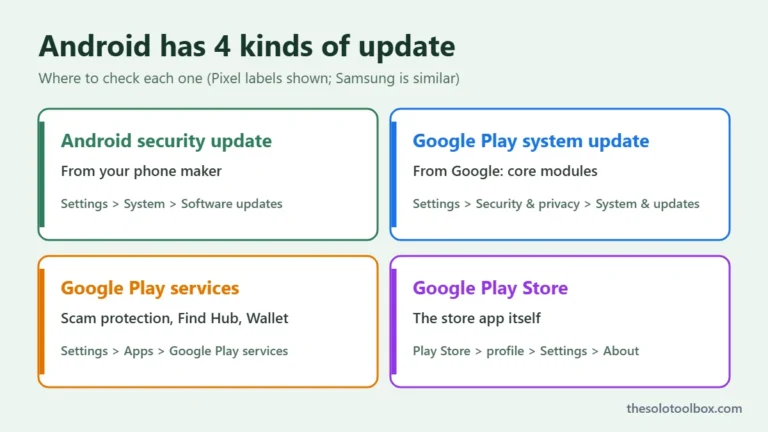
- Note the Google Play system update date in the same place. It’s a separate update, covered below.
How to install the November update
Pixel and most Android phones
- Connect to Wi-Fi and charge to at least 75%, as Google recommends.
- Open Settings > System > Software updates.
- Tap the update option if one is listed and follow the prompts. Restart when asked.
- Recheck the patch date afterward. Some phones install a 2026-11-01 build first and a 2026-11-05 build later.
Samsung Galaxy phones
Go to Settings > Software update > Download and install. Samsung’s November 2026 Security Maintenance Release, published November 3, includes Google’s patches plus 24 Samsung-specific fixes, among them a bootloader out-of-bounds write and a camera library flaw that could allow code execution. Samsung says delivery timing varies by region and model, and flagship models come first.
Google Play system update
Several November fixes, including Media Codecs, MediaProvider, WiFi and Telephony bugs, also ship through Google Play system updates. Those can arrive even on phones whose maker is slow with full updates. Our guide on how to check for a Google Play system update shows where to find it on Pixel, Samsung and other phones.
When will my phone get it?
- Pixel: Google hadn’t posted the November Pixel Update Bulletin when we checked on the morning of November 3. The October one went out on October 6. Google says Pixel OTAs start the day the bulletin is published and take about a week and a half to reach every device.
- Samsung: the November package is announced; rollout depends on model, country and carrier.
- Other brands: timing is set by each manufacturer and carrier. Google’s help page tells non-Pixel owners to contact their manufacturer or carrier for schedules.
- Android 13 or older: these versions aren’t listed in the bulletin. Phones stuck there won’t get these fixes through the bulletin.
What to do until the update arrives
- Install the Google Play system update as soon as it’s offered, since it carries some of the media fixes.
- Don’t open images, videos or audio files from people you don’t know. Several of the critical bugs sit in media handling.
- Keep Google Play Protect on. Google’s bulletin names it as one of the protections that make exploitation harder.
- Install apps only from Google Play. Our guide to spotting fake apps on Google Play covers the warning signs.
- If you use an Android TV box from an unknown brand, it may never get patches. See how to check an Android TV box for malware.
FAQ
Is anyone exploiting these bugs?
Google’s bulletin doesn’t flag any November issue as under limited, targeted exploitation, which it does when it has evidence of attacks. That can change, so updating promptly is still the right call.
My phone says 2026-11-01. Am I safe?
You have the Android Framework and System fixes, including the remote code execution bugs. You’re still missing the kernel and chipset fixes in the 2026-11-05 level, so install the next update your phone offers.
Why hasn’t my phone got the update yet?
Google shares fixes with phone makers at least a month before publishing, but each maker tests and ships on its own schedule, and carriers can add delays. Check Software updates again in a few days.
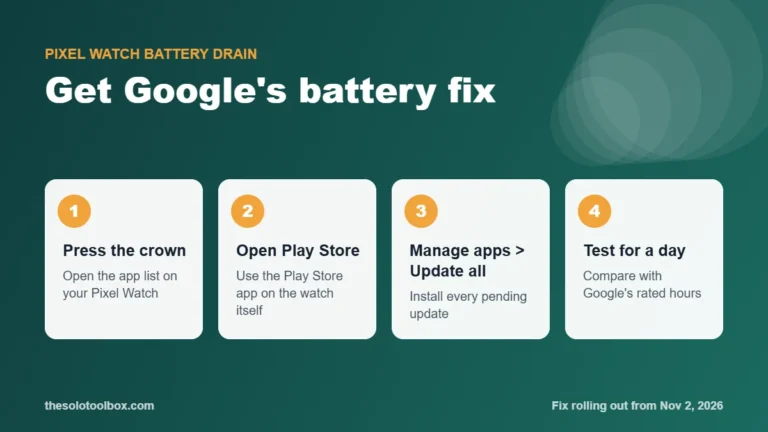
Pixel Watch owners seeing fast battery drain can get Google’s fix now.
Using a Xiaomi, Redmi or POCO phone? Check which devices are eligible for HyperOS 4.
Sources
- Google: Android Security Bulletin, November 2026 (published November 2, 2026)
- Samsung Mobile Security: SMR Nov-2026 (published November 3, 2026)
- Google: Pixel Update Bulletins
- Google: Check and update your Android version
- SecurityOnline: Android Security Update for November 2026 (November 3, 2026)
We counted 216 CVEs and 23 critical ratings directly from Google’s bulletin tables. Settings labels vary by phone maker and Android version. Next step: check your Android security update date now, and set a reminder to check again next week if it’s still showing October.