How to stop Discord messages showing up in web search
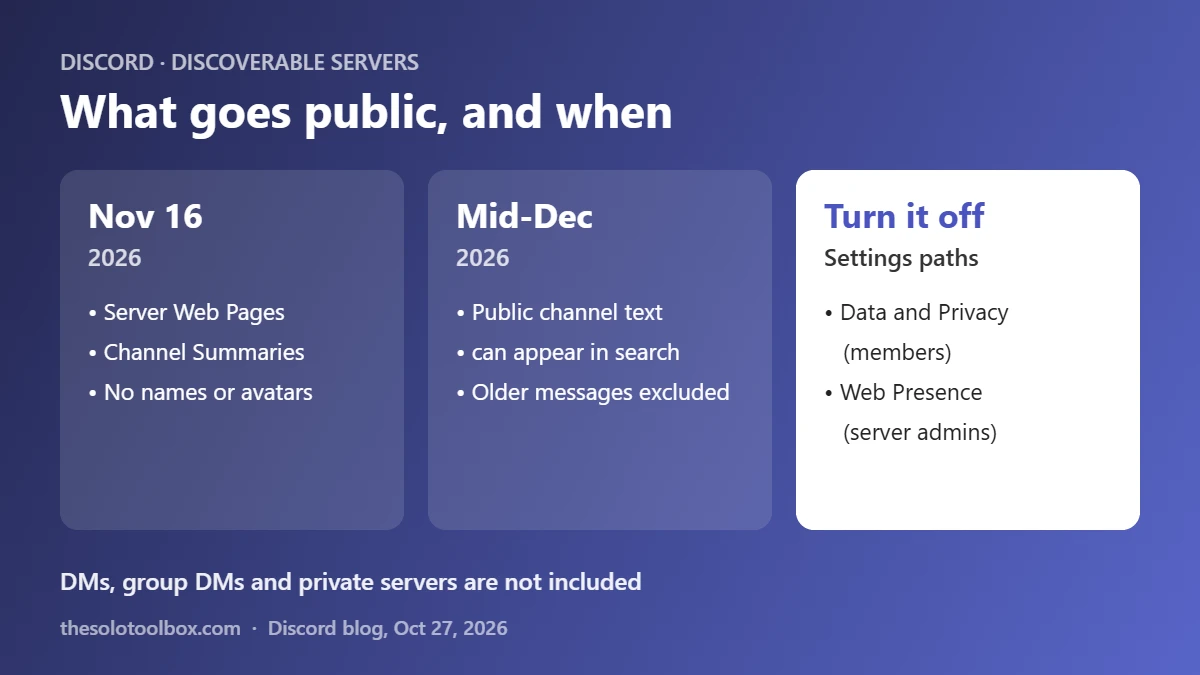
To keep your Discord messages out of web search, open User Settings > Data and Privacy and turn off Show my message content from Discoverable channels on web pages. If you run a Discoverable Server, go to Server Settings > Web Presence to choose which channels appear on the web or opt all of them out. Discord’s server web pages and channel summaries go live on November 16, 2026, and message text starts appearing in mid-December.
This guide explains what Discord is publishing, which servers are affected, and the exact settings for members and admins, including what the member switch does not cover. We checked Discord’s October 27, 2026 announcement on November 2, 2026.
Before you start
- Affected: public channels in Discoverable Servers only
- Not affected: DMs, group DMs, private servers and non-Discoverable community servers
- Key dates: server web pages and summaries from November 16, 2026; message text from mid-December 2026
- Default: on for adult members in most countries; off by default in the EU, UK, Canada, Brazil, Australia and South Korea
What Discord is changing
In a blog post dated October 27, 2026, Discord said conversations in Discoverable Servers will become “easier to find for people searching the web.” The rollout has three parts:
- Server Web Pages (November 16, 2026): every Discoverable Server gets a public web page. If the moderators don’t build one, Discord creates a default page from the Server Profile.
- Channel Summaries (November 16, 2026): automated summaries of active conversations appear on that page, without usernames or avatars.
- Channel Messages (from mid-December 2026): message text from public channels can appear on the server’s web page and in web search results, again without usernames or avatars. Discord says messages sent before mid-December 2026 are not included, and the rollout is gradual.
Discord’s post talks about “web search” in general and doesn’t name Google or any other search engine.
Which servers are affected
Only Discoverable Servers. Discord describes these as servers with at least 1,000 members, at least eight weeks old, that meet its activity and safety requirements and that anyone can join without an invite link. If your server is small, invite-only or private, nothing in this change applies to it.
Discord’s own wording on private spaces is direct: DMs, group DMs and private servers are “always private and not included.” Channels where content may show up on the web are labeled before you post.
How to stop your messages appearing on the web (members)
- Open Discord and select the gear icon to open User Settings. In a browser, you can go straight to discord.com/settings/data-and-privacy.
- Select Data and Privacy.
- Turn off Show my message content from Discoverable channels on web pages.
That one switch covers every Discoverable Server you belong to. Turning it off stops future messages from appearing. Messages you sent while it was on stay up unless you delete them, so if you change your mind in January, delete any public-channel posts you don’t want indexed.
What the member switch does not cover
Channel Summaries are generated separately and are not controlled by your switch. A summary can still describe a conversation you took part in, without your name, unless the server’s admins turn summaries off. If that matters to you, ask the admins or post sensitive questions in DMs or a private server instead.
If you live in the EU, UK, Canada, Brazil, Australia or South Korea
Discord says the member setting is off by default in these countries “given legal restrictions.” You don’t need to do anything, but check the switch anyway, especially if you’ve used a VPN or moved. Teen accounts are excluded everywhere and can’t turn the setting on until they are adults.
How to control web visibility for your server (admins)
- Open your server, select the server name, and choose Server Settings.
- Select Web Presence. Discord started rolling out these controls on October 27, 2026.
- Choose which public channels can appear on the web, or opt all channels out.
- Edit the Server Web Page content so the default page doesn’t go live with an outdated description.
If you change nothing, Discord says public channels stay on and your Server Web Page goes live on November 16, 2026. If you don’t want a public web page at all, Discord’s suggested route is switching the server back to a regular Community Server, which also removes it from Server Discovery.
What to check before November 16
| Who | Setting | What it controls |
|---|---|---|
| Members | User Settings > Data and Privacy | Whether your message text appears on web pages and in search |
| Admins | Server Settings > Web Presence | Which channels appear, the server web page, and summaries |
| Admins | Leave Discovery (switch to Community Server) | Removes the server web page entirely |
Admins of support servers, fan communities and open-source projects may want this visibility, since answers become findable without joining. Servers where members share personal details, screenshots or account problems should review channel by channel. Once a page is indexed, search engines can keep a cached copy for a while after you remove it.
What we could not verify
Discord links two Help Center articles with more detail, but its Help Center did not load for us, so the exact labels inside Web Presence are taken from the blog post’s descriptions and may differ slightly in the app. Discord hasn’t said which search engines will index the pages or how fast removed messages drop out of results.
FAQ
Will my Discord DMs show up on Google?
No. Discord says DMs, group DMs and private servers are always private and not part of this change.
When will Discord messages start appearing in search?
Server web pages and channel summaries start November 16, 2026. Message text from public channels begins in mid-December 2026 and rolls out gradually.
Will my username be shown next to my messages?
No. Discord says usernames and avatars are not shown next to messages or summaries on the web pages. The message text itself can still identify you if you mention personal details.
Can I remove messages that are already on the web?
Turning off the setting only affects future messages. Delete older posts in public channels of Discoverable Servers if you want them removed.
Set your Discord search preference before mid-December
Open User Settings > Data and Privacy now and set the switch the way you want it before mid-December. If you moderate a Discoverable Server, review Web Presence before November 16 and tell your members which channels will be public. While you’re tightening privacy settings, also check whether your email address has appeared in a data breach and turn on two-step verification for the accounts tied to your Discord login.
Related guides
- Reddit Login Required? What Changes for Logged-Out Users
- How to keep client data out of AI training in ChatGPT, Claude, Gemini and Copilot
- Google privacy policy change: keep Gmail out of your ads
Sources
- Discord: Making content from Discoverable Servers easier to discover (October 27, 2026; checked November 2, 2026)
- Discord blog index (checked November 2, 2026)