ChatGPT Chat and Work Merge: What Changes in the Desktop App
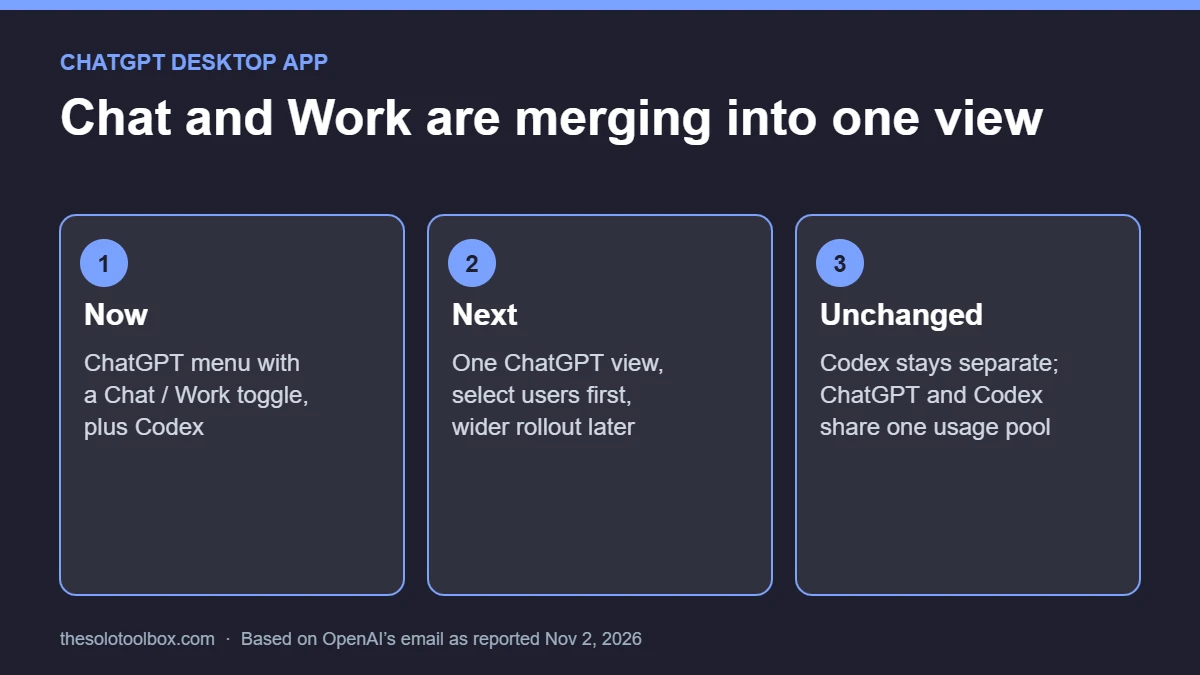
OpenAI is merging the Chat and Work tabs in ChatGPT into a single view, so you’ll no longer pick a toggle before asking a quick question or handing off a long task. According to an OpenAI email reported by TechCrunch on November 2, 2026, the merged version goes to select users first for feedback before a wider rollout. Codex stays a separate section of the desktop app, and ChatGPT and Codex will draw from the same usage allowance.
You don’t need to do anything yet. This guide explains what the desktop app looks like today, what the merge changes and doesn’t, how it ties into the shared usage limit, whether to keep the ChatGPT Classic app, and what to tidy up before the switch reaches you. We checked the details against OpenAI’s help center and TechCrunch’s report on November 3, 2026.
Before you start
- Who’s affected: ChatGPT users on the new desktop app for macOS and Windows first; web and mobile also have Chat and Work today
- Rollout: select users first; OpenAI hasn’t given a date for everyone
- Not changing: Codex remains its own section with separate history
- Time needed: about 10 minutes to organize chats and check your plan’s limits
What the ChatGPT desktop app looks like now
Since July 2026, the new ChatGPT desktop app has had three modes. OpenAI’s help page on the new desktop app describes them this way:
- Chat: questions, search and conversations.
- Work: research and analysis, plus documents, spreadsheets, presentations, reports and Sites.
- Codex: software development with local files, repositories and terminals.
You choose ChatGPT or Codex from the menu, then switch between Chat and Work with a toggle. Chat and Work conversations already share the Recents list, where you can sort, filter and pin them, and projects appear under Projects, where you pick Chat or Work to start something new.
That two-level choice is what OpenAI is removing. OpenAI president Greg Brockman called the redesigned app “kind of a mess” in a July 29 interview reported by 9to5Mac, and said then that the Work tab would fold into ChatGPT by the end of the year.
What changes when Chat and Work merge
- One place to start: per OpenAI’s email, you’ll be able to go from exploring an idea to having ChatGPT carry it out in the same conversation, without switching to Work.
- Files and plugins in the same flow: the email says you can bring in files and plugins and ask ChatGPT to build a website, create a presentation or take actions on the web, while you review and guide its work.
- Gradual rollout: select users get it first. Everyone else keeps the current toggle until OpenAI expands it.
OpenAI hasn’t said whether the model picker or reasoning settings change with the merge. Claims on Reddit that the picker is going away aren’t confirmed by any OpenAI page we found.
What stays the same
- Codex remains a separate experience in the desktop app. OpenAI’s email says so directly, and the help page notes Codex history is kept separate from ChatGPT history.
- Codex still isn’t selectable on web or mobile. Supported desktop Codex chats are reachable from the Remote tab in the ChatGPT mobile app.
- Cloud Work chats already sync across web, mobile and desktop, so a task started on your phone shows up on your computer.
- OpenAI says the current navigation doesn’t change a workspace’s access permissions, security settings or governance controls. It hasn’t published a separate statement for the merged version.
What the merge means for your usage limits
The same email says that with this transition, ChatGPT and Codex will draw tokens from one shared allowance. OpenAI told users this won’t affect most people, but that depending on usage and model choice, some may wait for resets more often. Heavy Codex users who also chat all day are the group most likely to notice.
We covered the December start date and what counts against the pool in ChatGPT and Codex will share one usage limit from December. If you’re comparing plans, our look at Claude’s Ultra plan and its limits covers the closest rival option; TechCrunch notes Anthropic merged Claude’s chat and Cowork into one screen in September.
ChatGPT vs ChatGPT Classic: which desktop app to keep
If you installed the new app over an older one, you may see two apps. Here’s how OpenAI’s help page describes them:
| ChatGPT (new app) | ChatGPT Classic | |
|---|---|---|
| Modes | Chat and Work under ChatGPT, plus Codex | The previous ChatGPT desktop experience |
| Gets the Chat and Work merge | Yes, as it rolls out | OpenAI hasn’t said; new agent features may be new-app only |
| Updates | Model updates and new features | Model updates, bug fixes, security patches and existing Enterprise support |
| Migration required | Sign in with the same account | No; you can keep using it |
Keep Classic only if you rely on something that works better there today. For everything else, the new app is where OpenAI is putting new agent features.
How to prepare before the merge reaches you
- Update the desktop app. Codex app users get the new ChatGPT app through a normal update. Users of the old ChatGPT app follow the in-app prompt to download it, then sign in with the same account.
- Pin the chats you return to. In Recents, pin long-running Work tasks so they’re easy to find once the toggle is gone.
- Group related chats into Projects. Projects already hold both Chat and Work threads, so they carry over cleanly.
- Check your usage habits. If you hit limits on Work or Codex today, expect the shared pool to make that more noticeable.
- Review signed-in devices. If you’ve installed the app on several computers, see how to log out of ChatGPT on all devices and remove the ones you no longer use.
If the app misbehaves after an update, our fix guide for ChatGPT’s “Something went wrong” error covers the usual causes.
Timeline: what’s confirmed
| Date | What happened | Status |
|---|---|---|
| July 9, 2026 | New desktop app launches with Chat, Work and Codex | Widely reported at launch |
| July 29, 2026 | Brockman says the Work tab should be gone by year end | Statement of direction, no date |
| November 2, 2026 | OpenAI emails users about the merge; select users first | Confirmed by TechCrunch |
| December 2026 | ChatGPT and Codex share one usage allowance | Announced by OpenAI; exact day not published |
FAQ
Will I lose my Work chats when the tabs merge?
OpenAI hasn’t announced any deletion. Chat and Work conversations already appear together in Recents, and cloud Work chats sync across devices, so they’re already part of one history.
Do I have to stop using ChatGPT Classic?
No. OpenAI says you can keep using it and that it still gets model updates and security patches. Some new agent features may only arrive in the new app.
Is Codex merging into Chat too?
No. OpenAI says Codex will remain a separate experience in the desktop app. Only the usage allowance is shared.
When will everyone get the merged view?
OpenAI hasn’t published a date. It’s testing with select users first, and Brockman’s July comment pointed to the end of 2026.
Sources
- TechCrunch: OpenAI is finally merging ChatGPT’s Chat and Work tabs (November 2, 2026)
- OpenAI Help Center: Moving to the new ChatGPT desktop app
- 9to5Mac: OpenAI president admits new ChatGPT desktop app is ‘kind of a mess’ (July 29, 2026)
We haven’t had access to the merged view, so this guide describes OpenAI’s stated plans rather than hands-on use. We’ll update it when the rollout widens. Next step: pin your active Work chats in Recents today so nothing gets lost in the switch.