ChatGPT Dots: What They Are and How to Check If You Have One
The Solo Toolbox · Software Help for One-Person Businesses
ChatGPT Dots are always-on AI agents that live in ChatGPT, each with its own cloud computer, and keep working on tasks between your conversations. OpenAI began testing them with a small number of $20-a-month Plus subscribers on November 19, 2026, and you can’t opt in: if your account was picked, the dot shows up on its own. Everyone else needs Pro, Business Premium, or, since November 19, a Business Standard plan.
This guide covers what a dot does, who can use one, how to tell if you have it, and the settings to change before you hand it real work.
Before you start
- Who this is for: ChatGPT Plus and Business users who’ve seen “Dots” mentioned and want to know if they have it, plus anyone deciding whether to upgrade for it.
- Where it works: you create a dot on the ChatGPT desktop app or ChatGPT on a desktop browser. The mobile apps can use a dot but can’t create one.
- How we checked this: on November 24, 2026 we read OpenAI’s Help Center article “Getting started with your dot” (updated that day), plus reports from Engadget, Startup Fortune and Emergent on the Plus test and Business Standard expansion. OpenAI hasn’t published an announcement for the Plus test beyond a post on X by ChatGPT engineering lead Thibault Sottiaux. We haven’t used a dot ourselves.
What a ChatGPT dot is
A dot is a personal agent rather than a chat. It starts from your ChatGPT memory, runs on its own cloud computer and keeps going after you close the chat window: it can research something overnight, draft files, run scheduled jobs and come back with results. OpenAI’s help article says dots run on GPT-6 Astra; reports on the latest expansion say Business Standard users also get a GPT-6.1 Terra option.
Each dot has a handle, by default @yourname-dot, and a profile page that splits its work into In progress, Scheduled and Completed. Reports say dots can connect to more than 4,000 apps, though OpenAI’s help article only describes managing them under Customize > Plugins.
Dots first launched at DevDay on September 29, 2026 for Pro, Business Premium and Enterprise accounts.
Who can get Dots right now
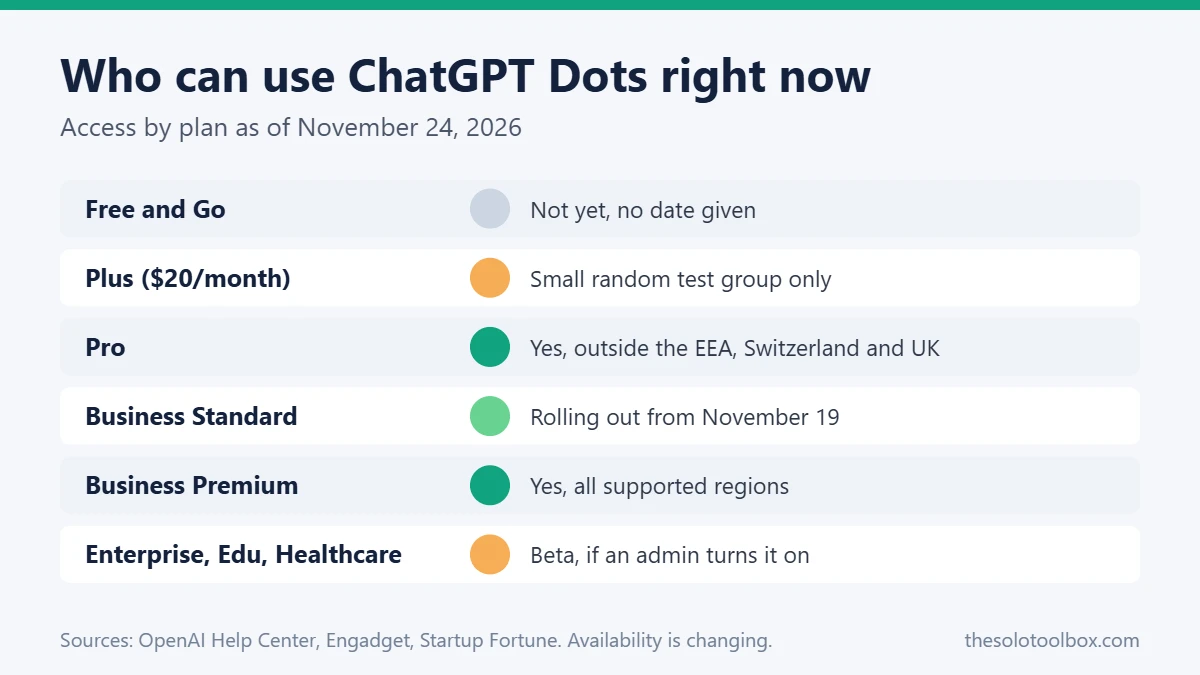
| Plan | Dots access (November 24, 2026) |
|---|---|
| Free and Go | Not yet; OpenAI has said “soon” without a date |
| Plus ($20/month) | Small test group only, picked at random |
| Pro | Yes, outside the EEA, Switzerland and the UK |
| Business Standard | Rolling out from November 19, one dot per member |
| Business Premium | Yes, in all supported regions |
| Enterprise, Edu, Healthcare | Beta, only if a workspace admin turns it on |
For Plus, OpenAI hasn’t said how many accounts are in the test, how long it runs or whether it will stay. Startup Fortune, citing TBreak, reports that testers must be 18 or older, that the test excludes the EEA, Switzerland and the UK, and that OpenAI support can’t add you manually. It’s also unclear whether Plus testers get the higher usage allowance that Pro and Business Premium include for the first month.
How to check if you have a dot
- Open ChatGPT on the desktop app or on chatgpt.com in a desktop browser, signed in to the account you pay for.
- Look for a Dots entry or a prompt to set up your dot. OpenAI’s help article doesn’t say exactly where the entry point appears, and testers report it simply appears in eligible accounts. Your first dot is included at no extra cost.
- On mobile, Pro users are getting a redesigned app with a Dot tab first, so a missing tab on your phone doesn’t mean your account lacks access.
- If you see nothing on desktop and you’re on Plus, you’re most likely not in the test. Reports say support can’t add you, so waiting is the only option.
If you’re on Business Standard and still see nothing, ask your workspace admin: the rollout is gradual, and one report says it starts with US workspaces, which OpenAI hasn’t confirmed.
Settings to change before you give it real work
A dot can act on your behalf, so set limits first. All of these are in the dot’s profile:
- Custom rules: go to Customize > Custom rules. For each kind of action you can choose take action without asking, take action if pre-approved, ask before taking action or hand off to you. For anything that sends email, spends money or touches client files, choose ask or hand off.
- Local computer access: this starts off. Leave it off unless a task needs your files; turn it on with Allow access in the desktop app and back off with Revoke access.
- Connected apps: manage them under Customize > Plugins. Disconnecting an app stops future access but doesn’t delete data the dot already pulled from it.
- Memory: review what it knows under Customize > Memory, and remove client details you don’t want it carrying into other tasks.
For how far banks and card networks currently let agents go with payments, see our explainer on whether an AI agent can use your bank account.
How to pause or reset a dot
- Pause: open the dot’s profile, select the ••• menu, then Pause. Tap Paused • Tap to resume to restart it.
- Reset: in the same menu, select Reset, review what will be removed and confirm. Reset deletes the dot’s conversations, saved memories and scheduled tasks. There’s no separate delete option.
How Dots compare with other agents
Dots are OpenAI’s answer to agents that keep working without you watching. If you already pay for Claude or Gemini, compare before upgrading: see our guides to Claude computer use for Team and Enterprise and Tasks in Gemini. The main difference with a dot is that it has its own cloud computer and memory that persist across conversations, rather than acting only inside a chat or a scheduled prompt.
FAQ
Can I pay extra to join the Plus test?
No. OpenAI picks Plus accounts itself. The only guaranteed way to get a dot now is a Pro or Business Premium plan, or Business Standard as its rollout reaches you.
Can my dot text or call me?
Texting is a limited beta for Pro users in the US, sent through a third-party provider; reply STOP to end it. OpenAI’s help article says a dot can’t start a phone call and doesn’t get its own email address at launch.
Does a dot train on my data?
The help article doesn’t say dots are treated differently from the rest of ChatGPT, so your account’s model-training setting applies. Check it with our guide to keeping client data out of AI training.
Can I have more than one dot?
Not yet. Every eligible account gets one; OpenAI says more dots and higher output tiers are planned.
What to do next
Open ChatGPT on desktop and look for a Dots entry. If you have a dot, set custom rules to ask before taking action before connecting email or payment apps, and start with one research task you can check by hand. If you don’t, nothing on Plus will change that today; the Business Standard rollout is the next place access is widening.
Related guides
Sources
- OpenAI Help Center: Getting started with your dot
- Engadget: OpenAI is testing Dots personal agents on its $20 per month Plus tier (November 20, 2026)
- Startup Fortune: OpenAI starts testing Dots agents on ChatGPT Plus (November 20, 2026)
- Emergent: OpenAI Dots expands to Business Standard, Plus test begins (November 20, 2026)
Last checked: November 24, 2026. If something here is out of date, let us know.