Turnitin Cyberattack: What Students and Teachers Should Do
The Solo Toolbox · Software Help for One-Person Businesses
Turnitin said on November 24, 2026 that it found “unauthorized activity involving certain customer-facing Turnitin systems” and is investigating with outside security specialists. It has not said whether student papers, names or email addresses were accessed, so for now the useful moves are to secure how you sign in and to distrust any email that uses the Turnitin name. Turnitin says the service is safe to keep using, and your school decides whether submissions continue as normal.
Below: what Turnitin has confirmed, what it hasn’t, and the steps students, instructors and school IT staff should take while the investigation runs.
Before you start
- Who this is for: students, teachers, teaching assistants and school IT admins who use Turnitin Feedback Studio, Similarity or iThenticate, either directly at turnitin.com or through Canvas, Moodle, Blackboard, Brightspace or another learning platform.
- Time needed: about 15 minutes.
- How we checked this: on November 24, 2026 we read BleepingComputer’s and Neowin’s reports, both quoting CEO Chris Caren’s letter, and checked Turnitin’s homepage and blog, where we could not find the letter linked. Turnitin told BleepingComputer it had no further details to share, so expect this guide to change.
What Turnitin has confirmed
According to the CEO letter quoted by BleepingComputer and Neowin, Turnitin:
- detected unauthorized activity involving “certain customer-facing” systems;
- started its incident response plan, brought in external cybersecurity specialists and notified law enforcement and cyber regulators;
- says its systems are fully operational and safe to use;
- says the affected systems do not collect government ID credentials or institutional financial information;
- is still investigating “the nature and full scope of the incident” and monitoring for further unauthorized activity.
As of the evening of November 24, no ransomware or extortion group had publicly claimed the attack. Turnitin says its software is used by more than 16,000 institutions in over 185 countries and by 71 million students, which is why even a limited incident gets attention.
What is still unknown
| Question | Status on November 24, 2026 |
|---|---|
| When did the intrusion start? | Not disclosed |
| Were names, emails or course details accessed? | Not disclosed |
| Were submitted papers or reports accessed? | Not disclosed |
| Were passwords involved? | Not disclosed |
| How many people are affected? | Not disclosed |
| Who did it? | No public claim |
The only data types Turnitin has ruled out are government ID credentials and institutional financial information. That leaves the data most students actually give Turnitin, such as their name, school email and uploaded work, neither confirmed nor ruled out.
How you sign in decides what you need to do
Most students never create a Turnitin password. When your instructor sets up a Turnitin assignment inside Canvas, Moodle, Blackboard or Brightspace, you sign in to that platform with your school account and it passes your name, email and course details to Turnitin. In that case there is no Turnitin password to change, but your details are still among the data Turnitin holds.
Instructors, administrators and some students log in at turnitin.com with an email address and a Turnitin password, often after joining a class with a class ID and enrollment key. Those direct accounts are the ones where a password change makes sense.
5 steps for students and teachers
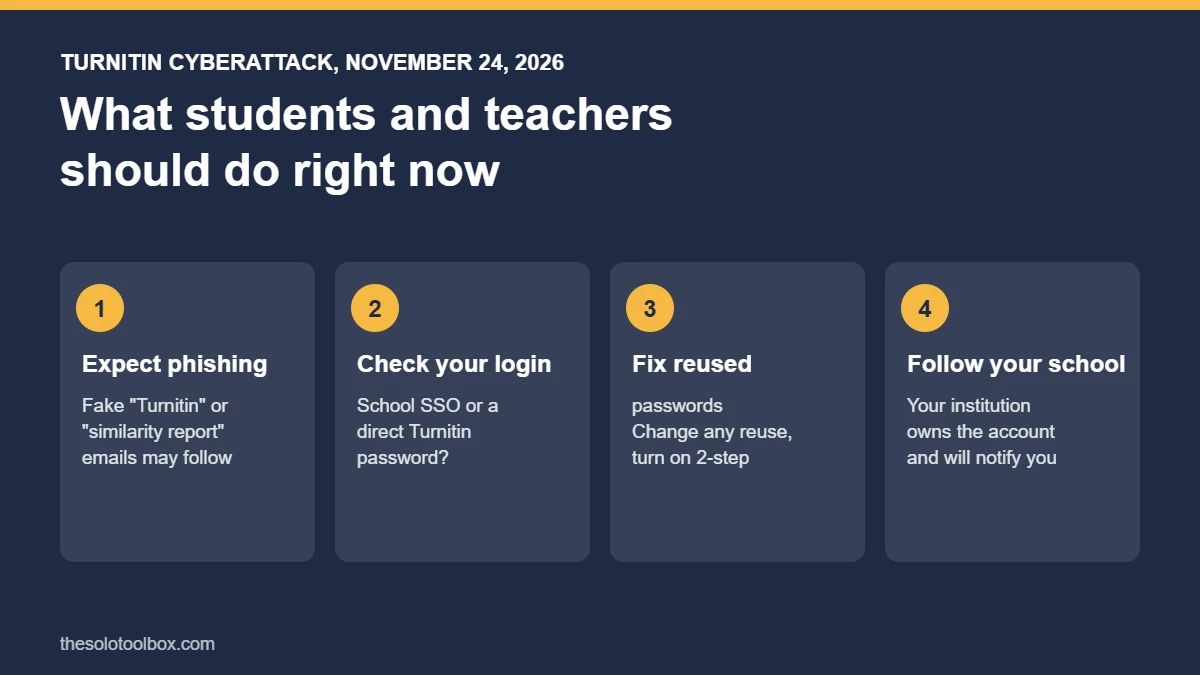
- Treat Turnitin-branded emails as suspect for the next few weeks. Anyone holding names, school emails and course names can write a convincing “Your similarity report is ready”, “Academic integrity flag on your submission” or “Resubmit your paper” message. Don’t click links in those emails. Open your course in your learning platform or type turnitin.com yourself.
- Work out how you sign in. If you only reach Turnitin from inside your course, skip to step 4. If you have bookmarked turnitin.com and type a password there, continue with step 3.
- Change a direct Turnitin password, and any copies of it. Turnitin hasn’t said passwords were affected; this is a precaution. If you used the same password for your email, social accounts or bank, change those first, because reused passwords are what attackers try elsewhere.
- Turn on two-step verification for your school and personal email. Your school Microsoft 365 or Google account is the key to Turnitin through your learning platform. Our guide to turning on two-step verification for Google and Microsoft accounts walks through both.
- Never share a sign-in code. Nobody from Turnitin or your school IT team needs the six-digit code sent to your phone. A caller or email asking for it is the attack.
For instructors and school IT admins
- Brief students now. A two-line announcement in your learning platform saying “Turnitin will never ask you to log in through an email link” lands before any phishing does. End-of-term deadlines make students more likely to click.
- Review Turnitin accounts with admin or instructor rights. Remove staff who have left and make sure shared departmental logins aren’t using old passwords.
- Ask your Turnitin account manager about integration keys. Turnitin hasn’t asked customers to rotate LTI or API credentials. Get that answer in writing rather than guessing.
- Loop in your data protection officer. In the UK and EU the school is usually the data controller for student data in Turnitin, so notification decisions may land with you once Turnitin confirms what was accessed.
Should you stop using Turnitin?
Not on your own. Turnitin says the service is safe to use, there is no public evidence that submissions were taken, and your instructor’s deadline still stands. If your school pauses Turnitin, it will tell you where to submit instead.
The exception is unusually sensitive work, such as unpublished research checked through iThenticate or a thesis under embargo. Ask your supervisor or research office whether to wait for Turnitin’s findings before uploading.
FAQ
Was my paper stolen in the Turnitin cyberattack?
Turnitin has not said. Its statement on November 24, 2026 does not mention submissions, and it has not disclosed what data, if any, was accessed. Until it does, assume your name, email address and course details could be involved and watch for phishing.
Is Turnitin down right now?
No. Turnitin says its systems are fully operational, and BleepingComputer reported that Turnitin’s status page showed no incidents for November 2026. Deadlines set by your school still apply unless your instructor says otherwise.
Do I need to change my Turnitin password?
Only if you have a direct Turnitin login with its own password. If you open Turnitin only from inside Canvas, Moodle, Blackboard or Brightspace, you sign in with your school account and there is no separate Turnitin password to change.
Will Turnitin tell me if my data was exposed?
Turnitin has not said how or when it will notify people. Because schools hold the contract, notices often arrive through your institution, so check your school email and course announcements.
What to do next
Spend five minutes on the habits that protect you from this breach and the next one: check whether your email address has already appeared in known breaches, change any password you reuse, and keep an eye out for fake deadline emails. We’ll update this guide when Turnitin says what data was involved.
Related guides
Sources
- BleepingComputer: Turnitin discloses cyberattack affecting customer-facing systems (November 24, 2026)
- Neowin: Edtech company Turnitin discloses cyberattack affecting customer-facing systems (November 24, 2026)
- Turnitin homepage
Last checked: November 24, 2026. If something here is out of date, let us know.