Infostealer Stole Your Passwords? What to Do First
The Solo Toolbox · Software Help for One-Person Businesses
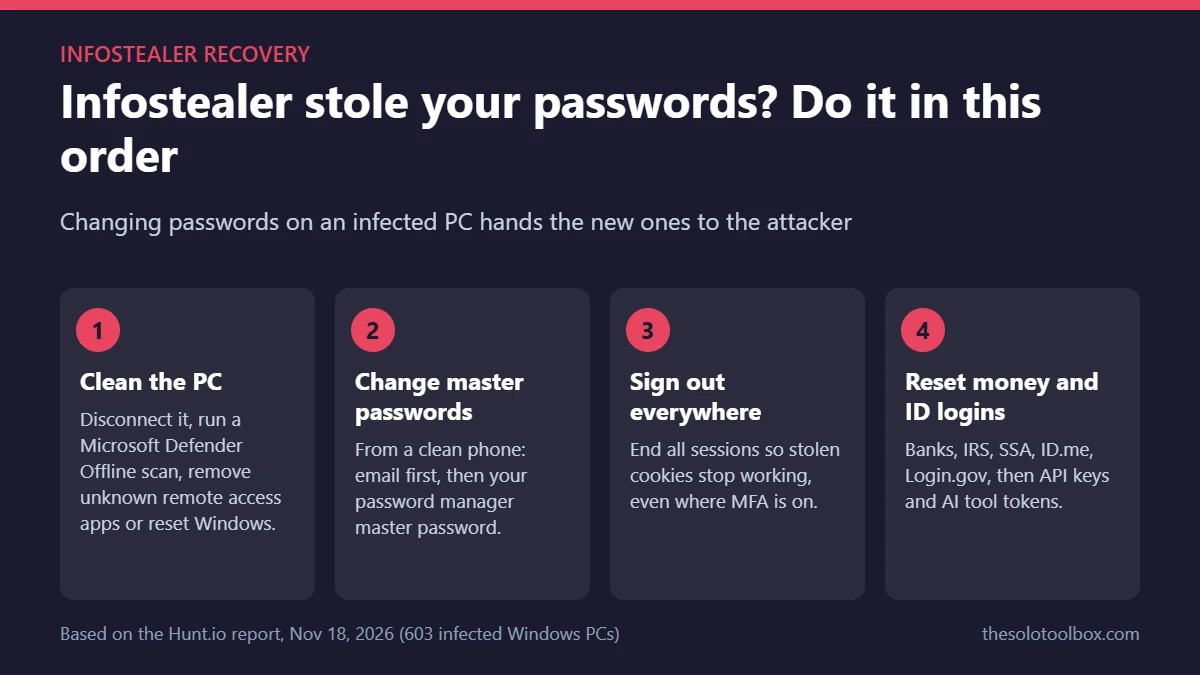
If infostealer malware stole your passwords, clean the infected computer before you change anything, because new passwords typed on that PC can be stolen again. Then, from a phone or another clean device, change your email and password manager master password first, sign out of every active session, and reset bank and government logins.
That order matters more than usual after a report from threat intelligence firm Hunt.io, published November 18, 2026 and covered by Security Affairs on November 20. It describes an operation that took over 603 Windows PCs, decrypted LastPass vaults, cracked 1Password master passwords offline, and reused stolen browser cookies to get into Microsoft 365 accounts without an MFA prompt. This guide explains what was taken and gives the recovery steps in the order that works.
Before you start
- You’ll need: a clean second device (a phone is fine), your password manager, and about an hour.
- Applies to: Windows PCs, Chrome and Edge, LastPass, 1Password and KeePass users, plus anyone with bank, IRS, SSA, ID.me or Login.gov logins saved on a computer.
- Time: 30 to 90 minutes, depending on how many accounts you have.
- How we checked this: figures come from the Hunt.io report and Security Affairs’ write-up, read on November 22, 2026. Hunt.io did not publish a victim list or the lure used to infect PCs, so there is no way to look up whether you were among the 603.
What Hunt.io found
Hunt.io found the operator’s stolen data on an exposed server in the Netherlands. The report calls most victims ordinary people using their own Windows PCs, many of whom already used a password manager and MFA. Its key numbers, which it describes as minimums:
| What was stolen | Detail from the report |
|---|---|
| Infected PCs | 603 implants checking in between October 12 and November 8, 2026 |
| LastPass | Vaults from the Chrome extension decrypted; one vault yielded 2,880 logins and 17 passkeys |
| 1Password | Master password cracked offline for two victims, using wordlists built from their other stolen passwords |
| KeePass | A live database file copied from a developer’s workstation |
| Chrome and Edge | At least 3,345 saved logins decrypted from 16 victims, plus cookie files |
| Microsoft 365 | Session cookies replayed to get tokens without an MFA prompt in two organisations |
| Banks and government | At least 57 victims had US bank or government logins; at least 46 had ID.me, Login.gov or benefits accounts |
| Crypto and AI tools | 6,570 crypto platform records; session tokens for 35 AI developer tools including Claude, Codex and Gemini |
Hunt.io attributes the operation to a Russian-speaking operator based on comments in 249 files. It says no bank or agency was breached; everything was taken from the victims’ own computers.
Why your password manager and MFA did not stop it
A password manager protects you against reused and phished passwords. It cannot protect a vault on a computer the attacker already controls: the malware can copy the vault file, read what the browser has decrypted, or record the master password as you type it.
MFA has a similar gap. After you sign in, the site gives your browser a session cookie so you are not asked again. Malware that copies that cookie can use it from another machine, and the site sees a session that already passed MFA. That is why signing out of every session is a required step, not an optional one.
Step 1: Clean the infected PC first
- Disconnect the PC from the internet (unplug Ethernet or turn off Wi-Fi) while you work from another device.
- Run an offline scan: open Windows Security > Virus & threat protection > Scan options, select Microsoft Defender Offline scan, then Scan now. The PC restarts to run it.
- Open Settings > Apps > Installed apps and look for remote access tools you did not install. This operation installed ConnectWise ScreenConnect and Level.io to keep access. If your employer’s IT team uses those tools, ask them before removing anything.
- If the scan finds malware, or you are not sure the PC is clean, back up your documents and reset Windows from Settings > System > Recovery > Reset this PC, choosing Remove everything.
Do not sign in to your password manager on that PC again until it is clean.
Step 2: Change the most important passwords from a clean device
Use your phone or another computer you trust, and work in this order:
- Your main email account. Whoever controls it can reset everything else.
- Your password manager master password. Pick a new one that is not based on any other password you use; the 1Password cracks in this report used wordlists built from victims’ other passwords.
- Banking and payment accounts, then check recent transactions and payees.
- Government and identity accounts such as IRS, SSA, ID.me and Login.gov. If you are in the US, you can also request an IRS Identity Protection PIN at irs.gov/ippin, which blocks someone else from filing a tax return in your name.
- Everything else in the vault, starting with accounts that hold money or personal documents.
Step 3: Sign out of every session
Changing a password does not always end sessions that already exist. After each password change, use the account’s “sign out of all devices” or “sessions” option. On a Google account, go to Security > Your devices > Manage all devices and sign out of anything you do not recognise. Our guide on how to log out of ChatGPT and Claude on all devices covers AI accounts.
For a work Microsoft 365 account, tell your IT team. Admins can revoke all sessions for a user, which is the step that cuts off a stolen cookie.
Step 4: Rotate API keys and developer tokens
If you use AI command-line tools or cloud services on the infected PC, treat their credential files like SSH keys, as Hunt.io recommends. Revoke and reissue API keys from each provider’s dashboard, sign out of Claude, Codex, Gemini and GitHub CLI sessions, and move keys out of shell environment variables into a secrets manager.
Step 5: Make the next theft less useful
- Switch key accounts to passkeys. A passkey cannot be typed into a fake site. It does not stop cookie theft on an infected PC, but it removes the reusable password. See how to set up passkeys for Google and Microsoft.
- Stop saving passwords in the browser if you already use a password manager; the report pulled thousands of plaintext logins from Chrome and Edge.
- Never keep exported vault files on the same computer as the password manager.
- Review browser extensions using our guide to check Chrome extension permissions.
What we could not verify
Hunt.io did not say how the PCs were infected beyond a Python script launched silently from the AppData\Roaming folder, and it did not publish victims’ names or say whether they were notified. If you have not seen unexpected logins, new remote access apps or password reset emails, you are unlikely to be one of the 603, but the steps above are still the right response to any infostealer infection.
FAQ
Can I check if my passwords were stolen in this Hunt.io operation?
No public lookup exists. Hunt.io did not release a victim list. Watch for login alerts, password reset emails you did not request, and unfamiliar remote access apps on your PC.
Should I stop using a password manager?
No. In this case the malware was already on the victims’ computers. Reusing passwords without a manager would expose you to far more common attacks.
Does changing my password log out a hacker?
Not always. Some sites keep existing sessions open after a password change. Use the sign out of all devices option, or ask your IT team to revoke sessions for a work account.
Why clean the PC before changing passwords?
If the malware is still running, it can capture the new passwords as you type them or copy the new session cookies.
What to do next
If you think a PC was infected, start with the offline Defender scan today, then work through the password list from your phone. If you only want to check for older exposures, see how to check if your email was in a data breach.
Related guides
Sources
- Hunt.io: US bank, IRS and SSA logins stolen by a Russian-speaking operator (November 18, 2026)
- Security Affairs: Hunt.io uncovers Russian-speaking credential theft operation (November 20, 2026)
- Microsoft Support: Remove malware from your Windows PC
- IRS: Get an Identity Protection PIN
Last checked: November 22, 2026. If something here is out of date, let us know.