Fake Shopping Ads in Search Results: How to Spot Them
The Solo Toolbox · Software Help for One-Person Businesses
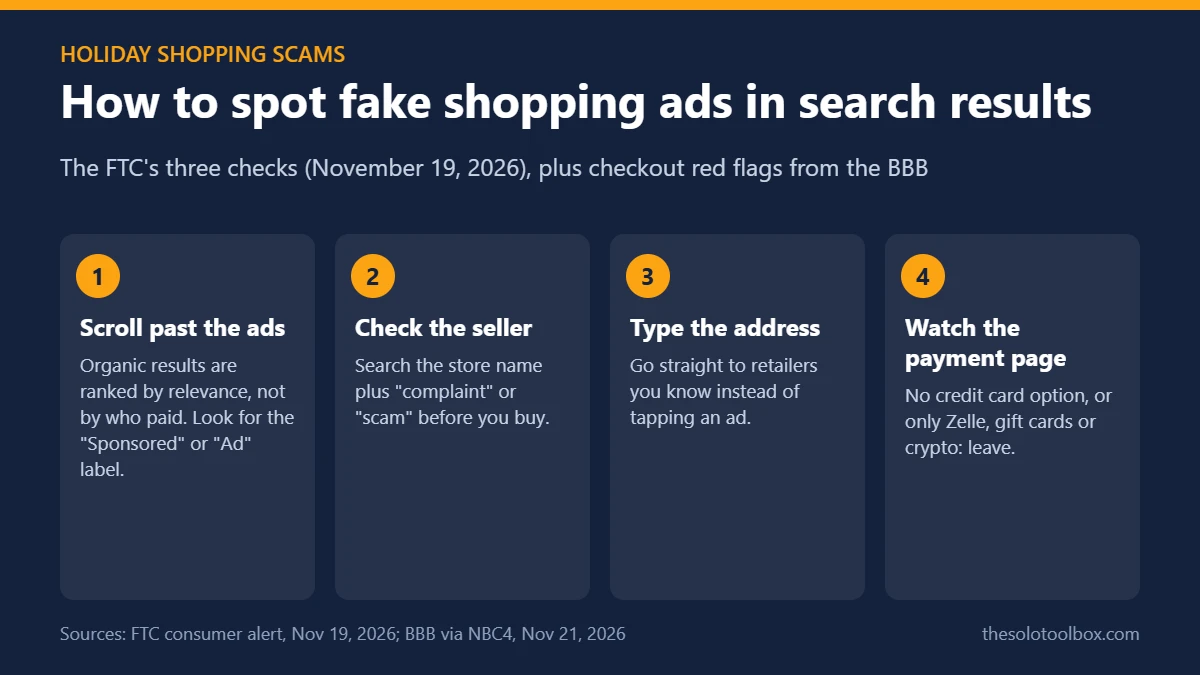
Fake shopping ads in search results are paid ads that scam stores buy so their links show up next to, or above, real retailers on Google and Bing. The FTC’s November 19, 2026 alert gives three checks: scroll past the ads to the regular results, search the store’s name with “complaint” or “scam” before you buy, and type a retailer’s address yourself when you know it.
With Black Friday on November 27, this guide shows how to tell a sponsored result from a normal one, the warning signs on a store’s checkout page, why AI-built shops make the old tells less useful, and what to do if you already paid.
Before you start
- You’ll need: the browser or phone you shop on.
- Applies to: Google and Bing search on any device, plus shopping links you find through search.
- Time: about 2 minutes per unfamiliar store.
- How we checked this: the advice comes from the FTC alert published November 19, 2026, the FTC’s open request for comments on its Impersonation Rule, and Better Business Bureau guidance reported by NBC4 Columbus on November 21, 2026. All were read on November 22, 2026. We did not test any scam sites.
What the FTC warned about this week
The FTC’s alert, “How to avoid holiday shopping scams in your search results,” says scammers pay for search ads that can sit right beside a real company’s ads and sometimes at the very top of the page. Clicking one can lead you to pay a scammer or hand over details such as a bank account number, which can then be used for identity theft.
Two days later, Lee Anne Lanigan of the Better Business Bureau of Central and Southeast Ohio told NBC4 that AI now lets scammers build fake storefronts, product photos and reviews quickly, and that poor grammar is no longer a reliable sign of a scam.
Separately, the FTC is asking the public whether social media sites, search engines and other platforms should have to vet advertisers and remove impersonation ads. Comments are open until November 30, 2026.
How to tell a sponsored result from a regular one
Search engines label paid placements, but the label is small and easy to scroll past on a phone:
- Google: ads carry a bold “Sponsored” label above the link. Shopping ads with product photos are also sponsored.
- Bing: ads are marked “Ad” or appear in a block labelled as ads.
- Regular (organic) results: no label. The FTC notes these are ranked by relevance, not by who paid the most, so they are more likely to lead to the right place.
On Google, the three-dot menu next to an ad opens a panel about that ad. Where Google has verified the advertiser, it shows the advertiser’s name. If the name has nothing to do with the brand in the headline, close the tab.
Five checks before you buy from a store you found in search
- Read the address bar, not the headline. Scam stores often use a real brand name with extra words, a misspelling or a different ending (for example brand-outlet-sale instead of the brand’s own domain). The padlock icon only means the connection is encrypted; scam sites have one too.
- Search the store’s name with “complaint” or “scam”. This is the FTC’s second check. No results at all for a store selling sold-out items at half price is itself a warning.
- Go to retailers you know directly. If you know the address, type it into the browser or use the store’s own app instead of tapping an ad.
- Look at how you are asked to pay. The BBB says a store that will not take a credit card is a red flag. Requests for bank transfer, Zelle, gift cards or crypto are worse.
- Check the returns page and contact details. The BBB’s most common complaint pattern is that the product never arrives, arrives in poor quality, or cannot be returned. A store with no physical address, no phone number and a returns policy copied from another site fits that pattern.
| What you see | What it can mean | What to do |
|---|---|---|
| Top result is “Sponsored” with a brand name, but the URL is different | Possible impersonation ad | Scroll to the organic result or type the brand’s address |
| Sold-out item in stock at 50 to 80 percent off | Classic bait | Compare the price on two retailers you know |
| Checkout offers only bank transfer, Zelle, gift cards or crypto | Payment you cannot dispute | Do not pay; leave the site |
| Polished photos and dozens of five-star reviews on a brand-new site | Possibly AI-generated storefront | Search the store name plus “scam” |
| No phone number, no address, contact form only | No way to get a refund | Buy elsewhere |
Why AI-built stores are harder to spot
Older advice told shoppers to look for typos and blurry photos. The BBB warning is that generative AI removes both: product images look glossy, descriptions read cleanly, and reviews can be written in bulk. That shifts the useful checks away from how the site looks and toward things a scammer cannot fake as easily: the domain, the payment methods, and what other buyers say on sites the store does not control.
The same applies to deals pushed at you in social feeds and texts. Our guide to a fake package delivery text covers the shipping scams that tend to follow a holiday order.
What to do if you already paid
- Call your card issuer or bank now. Use the number on the back of your card and ask to dispute the charge. The BBB says paying by credit card gives you the best chance of getting money back. Debit card and bank transfer disputes are harder, so move fast.
- Change any password you used on the site. If you created an account with a password you use elsewhere, change it on those other accounts too. Our guide on how to check if your email was in a data breach shows what to look for next.
- Watch for follow-up messages. Scam stores often send fake “shipping problem” emails or texts asking for more details. Do not reply or click.
- Report it. File a report at ReportFraud.ftc.gov. The BBB also suggests filing a police report, which some banks ask for in a dispute.
- Report the ad. On Google, open the three-dot menu next to the ad and choose the option to report it.
How to comment on the FTC’s scam-ad proposal
The FTC is considering changes to its Rule on Impersonation of Government and Businesses that would cover how platforms handle scam ads, including whether they should vet advertisers first and give users a way to report impersonation ads. You can read the notice and submit a comment through the Federal Register listing until November 30, 2026. The FTC’s own alert page shows a “Comments closed” status line that conflicts with that date, so check the Federal Register page before you write.
FAQ
Are sponsored results on Google safe to click?
Many are real retailers, but scam stores can buy the same placements. The FTC’s advice is to scroll past the ads, or type the address of a store you already know.
Does a padlock icon mean a shopping site is legitimate?
No. The padlock means the connection is encrypted. Scam sites routinely use HTTPS, so check the domain, payment options and reviews instead.
How do I check if an online store is a scam?
Search the store’s name with the words “complaint” or “scam”, compare its prices with retailers you know, and check whether it accepts credit cards and lists a real address and phone number.
Can I get my money back from a fake online store?
Contact your card issuer or bank right away to dispute the charge. Credit card disputes usually give the best chance of recovery. Bank transfers, gift cards and crypto are much harder to reverse.
What to do next
Before you shop this week, bookmark the sites of the retailers you plan to buy from and use those bookmarks instead of searching. If a deal sends you to a store you have never heard of, run the five checks above before you enter a card number. If your browser starts showing pop-ups after visiting a shady site, follow our steps to stop fake virus notifications in Edge.
Related guides
Sources
- FTC Consumer Alert: How to avoid holiday shopping scams in your search results (November 19, 2026)
- FTC Consumer Alert: Tell the FTC about imposter ads online (November 2, 2026)
- Federal Register: Rule on Impersonation of Government and Businesses (October 1, 2026)
- NBC4: Better Business Bureau urges consumers to beware of AI scams this holiday season (November 21, 2026)
- FTC: ReportFraud.ftc.gov
Last checked: November 22, 2026. If something here is out of date, let us know.