NIKKE launcher malware: how to check and clean your PC
If you opened the Goddess of Victory: NIKKE launcher on a Windows PC at any point since September 27, 2026, check that PC now. Script files the launcher downloads from the publisher’s servers were tampered with, and from late October they could install a remote-access agent that reads files, takes screenshots, and steals browser data and NIKKE logins. Players who only use the iOS or Android app are not affected, according to the publisher.
This guide covers the confirmed timeline of the NIKKE launcher malware, how to check the launcher log for the infection marker, how to remove what the malware leaves behind, and which passwords to change first.
Before you start
- Applies to: the Windows PC launcher for NIKKE, including the Google Play Games build. The mobile apps were not affected.
- Risk window: any launch after September 27, 2026, 15:41 (UTC+9), per Level Infinite
- You’ll need: about 15 minutes, Notepad, and a second device (phone or another PC) for password changes
- How we checked this: facts cross-checked on November 4–5, 2026 against Level Infinite’s statement on X, its security notice as reported by Inven Global, BleepingComputer’s analysis, and the independent researcher’s write-up. We did not run the malware or test the removal ourselves.
What happened to the NIKKE PC launcher
On November 4, the NIKKE team posted on X that the PC launcher’s script files “may have been tampered with by a third party” and that a client fix went out that day around 02:30 (UTC+9). A day later, publisher Level Infinite published an apology and timeline:
| Date (UTC+9, per Level Infinite) | What happened |
|---|---|
| Sept 27, 10:59 | A domain used by some game services (insightjs.com) was taken over by a third party |
| Sept 27, 15:41–15:42 | Four official CDN script files loaded by the launcher were modified |
| Oct 30, 03:52 | Malware started reaching players’ PCs through the modified scripts |
| Nov 4, ~00:00–02:23 | Level Infinite spotted the problem and restored three of the four files |
| Nov 4, 12:09 | CDN cache refreshed for the fourth file |
| Nov 5, 08:00 | The official PC client now runs an automatic scan (ACE) that detects and deletes the malware at launch |
Dates differ slightly between sources. Independent researcher MotherSphere, whose technical write-up first laid out the attack, says the agent could install from October 23 at the latest. Treat any launch since late September as worth checking.
What the malware can do
According to BleepingComputer, the modified scripts pulled a payload called insight.bundle, which installed a remote-access agent the researcher calls K2F. While the launcher was open, it could run commands, browse and download files, take screenshots, collect NIKKE credentials, and steal data saved in web browsers. A second component, a DLL named platform_experience_helper.dll, could keep running after the launcher closed and contained code aimed at crypto wallet extensions such as MetaMask, Phantom and Coinbase Wallet. Nobody has confirmed how many PCs received that DLL or whether any wallets were emptied.
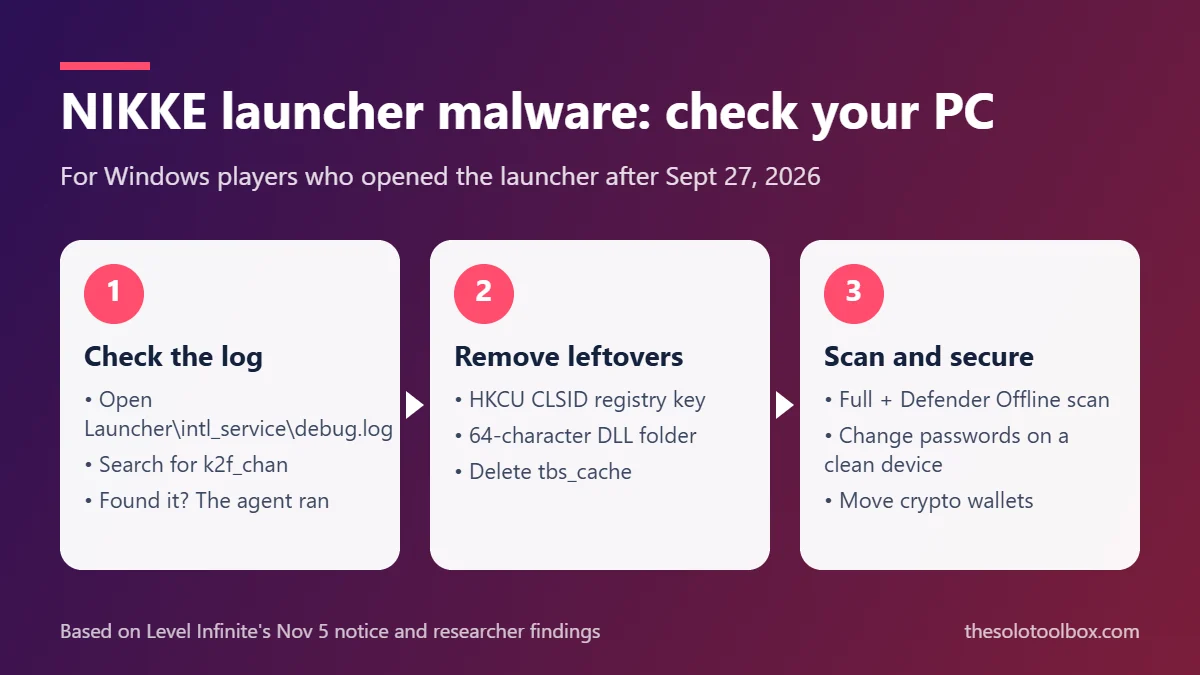
Step 1: Check the launcher log for the infection marker
Do this before you open the launcher again. Level Infinite’s own guide asks you to disconnect from the internet and close NIKKE, the launcher and Google Chrome first, and to make sure no NIKKE icon is left in the system tray.
- Right-click the NIKKE shortcut on your desktop and choose Open file location.
- Go to Launcher\intl_service\ inside the install folder, for example
C:\NIKKE\Launcher\intl_service\debug.logorC:\NIKKE_GOOGLE\Launcher\intl_service\debug.log. - Right-click debug.log, choose Open with > Notepad.
- Press Ctrl + F and search for
k2f_chan.
If k2f_chan appears, the agent ran on your PC. Go through every step below. If it doesn’t appear, Level Infinite still says it cannot rule out risk, so update your antivirus and run a full scan anyway.
Step 2: Remove what the malware leaves behind
These steps edit the registry and delete files. Delete only the exact items named here.
- Registry entry. Press Win + R, type
regedit, and go toHKEY_CURRENT_USER\Software\Classes\CLSID\{E77CC89B-7401-4C04-8CED-149DB35ADD04}. If that key exists under HKEY_CURRENT_USER, delete it. A key with the same ID under HKEY_LOCAL_MACHINE is a normal Windows Parental Controls entry; leave it alone. (The key ID comes from the researcher’s write-up.) - Restart Windows. The DLL stays locked while it’s loaded.
- Leftover DLL folder. Press Win + R and open
%LOCALAPPDATA%\Google\Chrome\User Data\PlatformExperienceHelper. Delete any subfolder whose name is exactly 64 characters of 0–9 and a–f and that contains platform_experience_helper.dll. Don’t delete the PlatformExperienceHelper folder itself; Chrome uses it. - Launcher cache. Press Win + R, open
%APPDATA%\nikke_launcher(ornikke_launcher_googlefor the Google Play Games build), and delete the tbs_cache folder. It can still hold the modified scripts, and the launcher would load them again.
The researcher suggests copying tbs_cache somewhere safe before deleting it if you want to keep evidence, since it holds traces that show whether the agent ran. Malwarebytes now flags two files there as Trojan.Loader.K2F and Trojan.Trace.K2F.
Step 3: Scan, then change passwords from a clean device
- Update Microsoft Defender or your antivirus and run a full scan, then a Microsoft Defender Offline scan (Windows Security > Virus & threat protection > Scan options). The researcher reports Defender Offline missed the DLL on one machine, so a clean result is not proof.
- If the marker was in your log, change passwords from your phone or another computer, starting with email, then any account saved in Chrome, then banking and NIKKE. Turn on two-step verification where you can.
- If you keep a browser crypto wallet on that PC, move funds to a new wallet created on a clean device. A recovery phrase typed or stored on an infected PC should be treated as exposed.
- Revoke and reissue any API keys or access tokens used on the PC, as Level Infinite’s notice advises.
BleepingComputer recommends reinstalling Windows if you confirm the infection. That is the only way to be sure nothing else was dropped while the attacker had remote access. Back up documents first with a free Windows 11 backup, and scan the backup before restoring.
Will Level Infinite compensate players?
Level Infinite says it is preparing in-game compensation and will take reports through its official customer support center from players who suffered gameplay disruption, damage to other accounts, or financial losses linked to the incident. It has not published amounts or a deadline as of November 5.
Frequently asked questions
Is it safe to open the NIKKE launcher now?
Level Infinite says the files were restored on November 4 and the client scans for the malware from November 5. Delete tbs_cache first, and finish the log check before relaunching so you know whether you also need to change passwords and clean up the PC.
I only play NIKKE on my phone. Do I need to do anything?
No. Level Infinite says the mobile version was not affected.
My log has no k2f_chan entry. Am I safe?
Probably, but not certainly. Level Infinite says risk can’t be fully ruled out, so run an updated full scan and keep an eye on breach alerts for your email.
How did attackers get in?
Level Infinite says a domain used by game services was hijacked. It hasn’t explained how the official CDN files were modified, which is why researchers suggest blocking insightjs.com and insightjs.org in your firewall or router.
Next step: open debug.log and search for k2f_chan before you do anything else. While you’re cleaning up, review your Chrome extensions, since browser data was a target.
Sources
- NIKKE (official) on X: launcher script tampering notice, November 4, 2026
- Inven Global: Level Infinite apologizes, publishes timeline and security check guide (November 5, 2026)
- BleepingComputer: NIKKE PC game launcher hacked to spread remote access, data-stealing malware (November 4, 2026)
- MotherSphere (GitHub): NIKKE PC launcher compromise technical write-up and indicators
- GamesRadar: Stellar Blade studio confirms NIKKE launcher was hacked