0xC0000099 Error After Windows 11 Hotpatch: How to Fix It
The Solo Toolbox · Software Help for One-Person Businesses
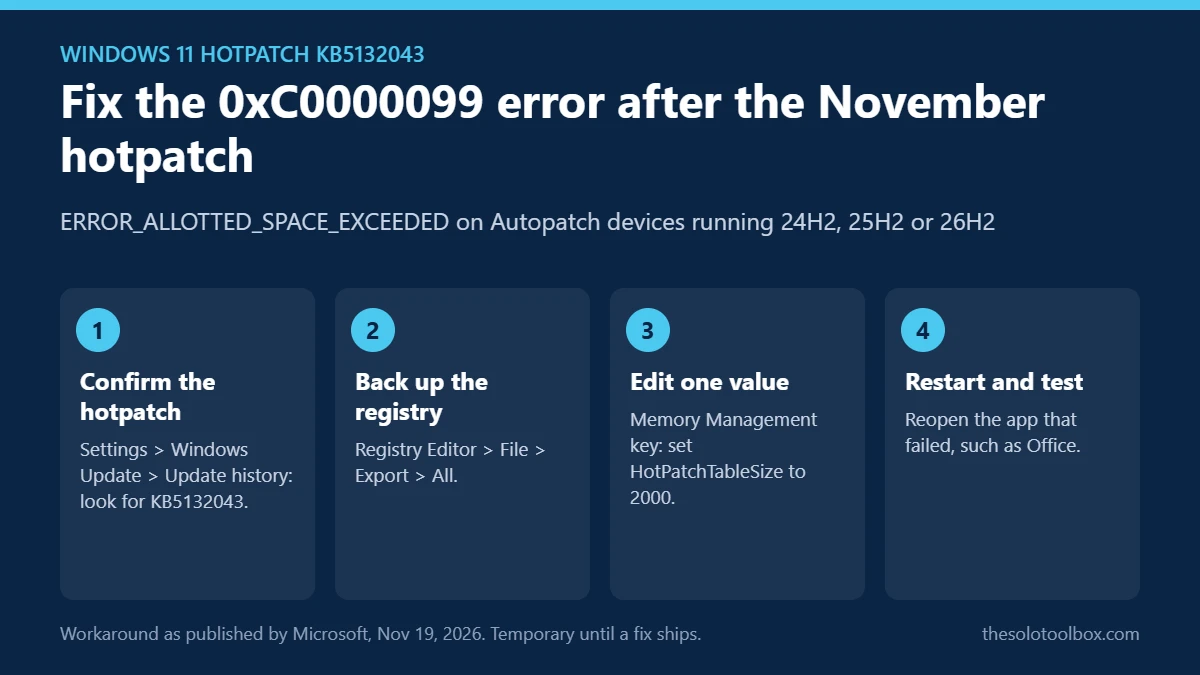
The 0xC0000099 error (ERROR_ALLOTTED_SPACE_EXCEEDED) appears on Windows 11 24H2, 25H2 and 26H2 PCs that installed the November 2026 hotpatch, KB5132043, through Windows Autopatch. Microsoft’s workaround is to set the HotPatchTableSize registry value to 2000 and restart. PCs that installed the regular November Patch Tuesday update are not affected.
Microsoft confirmed the problem on November 19, 2026. This guide shows how to tell whether your PC has the hotpatch, the exact registry steps, what the error looks like, and the other November update issues that produce similar symptoms.
Before you start
- You’ll need: an administrator account on the PC.
- Applies to: Windows 11 Enterprise devices on hotpatch updates (OS builds 26100.9911, 26200.9911 and 26300.9911) managed through Windows Autopatch.
- Time: about 5 minutes plus a restart.
- How we checked this: the workaround wording comes from Microsoft’s statement as published by BleepingComputer and gHacks on November 19, 2026. We also read the KB5132043 support page and the Windows 11 26H2 release health page on November 22, 2026; neither listed this issue at that time. We did not reproduce the error ourselves.
What the 0xC0000099 error looks like
Microsoft says affected devices “might experience an error when installing, launching, or running some applications,” with messages similar to ERROR_ALLOTTED_SPACE_EXCEEDED (0xC0000099). The error can appear during setup, when an app opens, or partway through using an app that worked fine before the update.
Microsoft’s investigation points to apps that load the 32-bit Windows Installer library, msi.dll. That happens most often with 32-bit apps, but Microsoft says 64-bit apps can hit it under certain conditions. Microsoft Office is the only app named; other affected third-party apps were not listed.
Check whether your PC has the hotpatch
- Open Settings > Windows Update > Update history.
- Under Quality Updates, look for KB5132043. Microsoft’s page for it is titled “November 10, 2026—Hotpatch KB5132043 (OS Builds 26300.9911, 26200.9911, and 26100.9911).”
- If you only see the standard November security update instead, this issue does not apply to you. Look at the other causes further down.
Hotpatch updates install without a restart and are delivered through Windows Autopatch, which requires a Windows 10 or 11 Enterprise E3 license or higher. Home and Pro PCs on consumer Windows Update do not get them.
How to fix 0xC0000099 with the HotPatchTableSize workaround
Editing the registry incorrectly can cause serious problems. Microsoft recommends backing up the registry first. In Registry Editor, select File > Export, choose All under Export range, and save the file somewhere you can find it.
- Open the Start menu, type regedit, and select Registry Editor. Approve the User Account Control prompt.
- Go to
HKEY_LOCAL_MACHINE\SYSTEM\CurrentControlSet\Control\Session Manager\Memory Management. You can paste that path into the address bar at the top of Registry Editor. - In the right-hand pane, double-click HotPatchTableSize.
- Set Value data to 2000 and select OK.
- Close Registry Editor and restart the PC.
- Open the app that was failing to confirm the error is gone.
Microsoft’s published steps do not state the value type or whether 2000 is meant as a decimal or hexadecimal number. Edit the existing value rather than creating a new one, and if you manage many devices, check Microsoft’s note in the Microsoft 365 admin center (message WI1559710) for the exact detail before deploying it by script.
Is a permanent fix coming?
Microsoft calls the registry change a temporary mitigation until a fix is released and has not given a date. As of November 22, 2026, the KB5132043 page still said Microsoft was not aware of any issues with the update, and the issue was not listed on the public Windows 11 26H2 release health page. No Known Issue Rollback was mentioned.
Other November 2026 update problems with similar symptoms
If your PC does not have the hotpatch, these confirmed November issues may explain what you see:
| Symptom | Cause | Status |
|---|---|---|
| Apps fail to install or open with 0xC0000099 | November hotpatch KB5132043 (Autopatch devices) | Registry workaround; fix pending |
| Windows activation error 0x80041008 | November security updates | Fixed by out-of-band updates, per gHacks |
| USB audio device silent or fails to start | USB Audio Class 1.0 issue | Resolved in KB5132061 (November 10) |
| SQL Server linked server connections stay open | October update KB5127648 on server devices | Confirmed; out-of-band fix expected |
Our running list of Windows 11 26H2 known issues has more detail, and if an update will not install at all, see how to fix KB5127648 failing to install.
FAQ
Does the 0xC0000099 hotpatch bug affect Windows 11 Home?
No. Microsoft says only devices that installed the November 2026 hotpatch through Windows Autopatch are affected. Home and Pro PCs receive the standard monthly update instead.
What does ERROR_ALLOTTED_SPACE_EXCEEDED mean?
It is a Windows status code (0xC0000099) meaning a fixed-size allocation ran out of room. In this case Microsoft links it to the hotpatch table used when apps load msi.dll.
Do I need to undo the registry change after Microsoft fixes it?
Microsoft has not said. Keep the registry backup you exported so you can restore the original value once a fix ships and Microsoft publishes guidance.
Which apps are affected by the hotpatch issue?
Microsoft names Microsoft Office and says third-party apps are also affected, mostly 32-bit apps that load the Windows Installer library msi.dll.
What to do next
If you run a small business fleet on Autopatch, apply the workaround to one affected PC first, confirm Office opens, then roll it out. Before any registry change on a PC you rely on, make sure you have a recent backup; our guide to back up Windows 11 for free covers the built-in options.
Related guides
Sources
- BleepingComputer: Microsoft confirms app installation, launch issues after hotpatch (November 19, 2026)
- gHacks: Microsoft confirms Windows 11 hotpatch breaks app installs and shares a registry workaround (November 19, 2026)
- Microsoft Support: November 10, 2026—Hotpatch KB5132043
- Microsoft Learn: Windows 11, version 26H2 known issues and notifications
Last checked: November 22, 2026. If something here is out of date, let us know.