How to Stop Facebook Accessing Your Photo Gallery
The Solo Toolbox · Software Help for One-Person Businesses
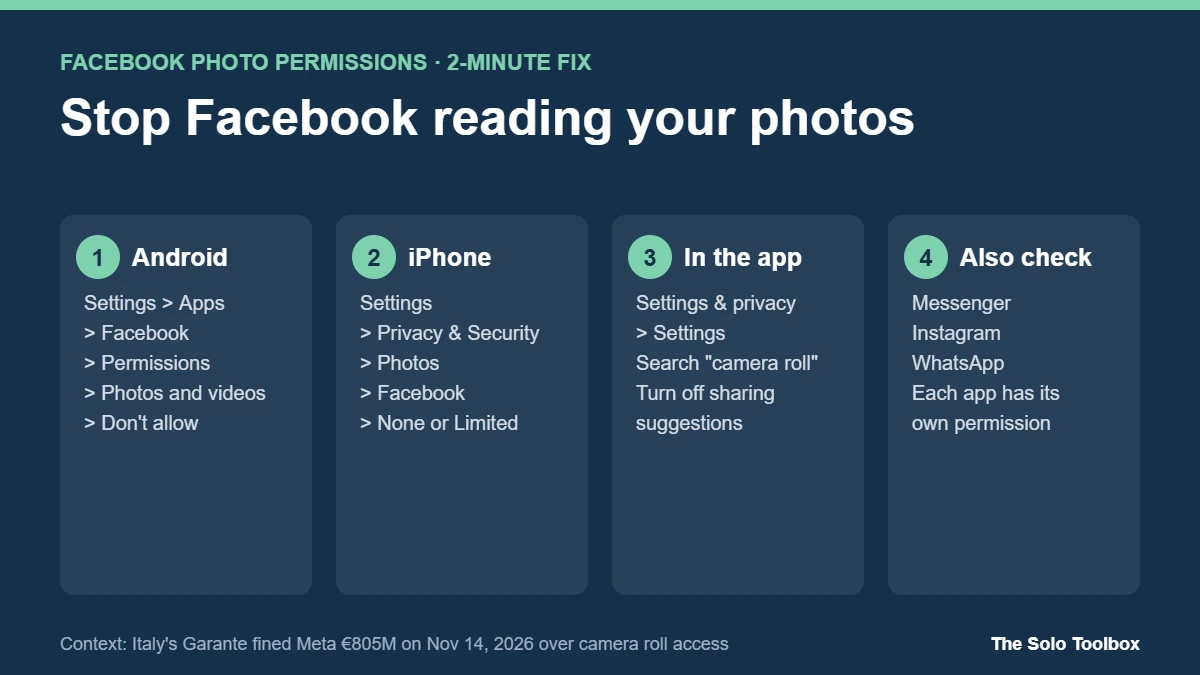
To stop Facebook accessing your photo gallery, change the app’s photo permission in your phone’s settings: on Android, go to Settings > Apps > Facebook > Permissions > Photos and videos and choose Don’t allow or limited access; on iPhone, go to Settings > Privacy & Security > Photos > Facebook and choose None or Limited Access. The phone setting overrides anything inside the app, so it works even if you can’t find Facebook’s own camera roll toggle.
The question has come up because Italy’s privacy regulator fined Meta €805 million on November 14, 2026 over how Facebook read Android users’ camera rolls. This guide explains what the ruling found, the steps on each platform, which access level to pick, and what changes in the app afterwards.
Before you start
- Applies to: the Facebook app on Android and iPhone. Facebook in a web browser can only see files you pick yourself, so it isn’t affected.
- You’ll need: about two minutes. Menu names on Android vary a little between Samsung, Pixel and other phones.
- How we checked this: on November 24, 2026 we read the Garante’s press release of November 14, Malwarebytes’ coverage of the fine, Meta’s October 2025 announcement of its camera roll suggestions feature, and Google’s Android help page on app permissions. We could not load Facebook’s Help Center page on camera roll settings, so the in-app steps below are described more loosely than the phone steps.
Why Facebook’s photo access is in the news
Italy’s data protection authority, the Garante per la protezione dei dati personali, fined Meta Platforms Ireland €805 million, about 0.47% of the group’s worldwide turnover. The case is about a feature called “Get camera roll suggestions when you’re browsing Facebook”, available since 2023, which looks through the phone’s gallery to suggest photos and videos you might post.
The Garante found that:
- Facebook asked for gallery access with one permission covering the whole app, introduced by a vague notice about enabling “other features”, which didn’t make clear that photo suggestions were part of it.
- The suggestions feature was switched on by default.
- About 20 million Android users in Italy were affected, and Meta’s later fixes reached only people who updated the app.
Meta must now ask for separate consent for the feature and keep it off by default, with 60 days to comply. Meta told Reuters the fine is disproportionate and that it will appeal. The order applies in Italy; it doesn’t change how the app behaves anywhere else.
Separately, Meta announced an opt-in version of camera roll suggestions for the US and Canada in October 2025 that creates edits and collages from your gallery. Meta says those suggestions are only visible to you and that it doesn’t use camera roll media to improve Meta AI unless you edit or share it with its AI tools. The Garante says it may look separately at a 2026 feature that processes gallery content in the cloud.
How to stop Facebook accessing photos on Android
- Open Settings and tap Apps. On some phones it’s Apps & notifications or Applications.
- Tap Facebook. If it isn’t listed, tap See all apps first.
- Tap Permissions, then Photos and videos.
- Choose Don’t allow to block access completely, or Allow limited access to share only photos you pick. Limited access appears on Android 14 and later.
A shortcut on most phones: long-press the Facebook icon, tap the i (App info) button, then go to Permissions.
How to stop Facebook accessing photos on iPhone
- Open Settings and tap Privacy & Security.
- Tap Photos, then Facebook.
- Choose None to block access, or Limited Access and select the specific photos Facebook can see.
On recent iOS versions you can also reach the same setting from Settings > Apps > Facebook > Photos.
Which access level should you choose?
| Setting | What Facebook can see | Best for |
|---|---|---|
| Full access / Allow all | Every photo and video, including new ones as you take them | People who post from their camera roll several times a day |
| Limited access | Only the items you’ve selected; you can add more later | Most people who post occasionally |
| None / Don’t allow | Nothing in the gallery | People who rarely post photos, or post from a computer |
Limited access is the practical middle ground. Facebook still works for posting, but the suggestions feature can’t scan photos you haven’t handed over.
Turn off camera roll suggestions inside Facebook
Meta says the suggestions feature can be managed or turned off “in your Facebook camera roll settings”. The menu location has moved between app versions and we couldn’t confirm the current path, so the quickest route is search: in the Facebook app, open the menu, tap Settings & privacy > Settings, and type “camera roll” into the settings search box. Turn off any camera roll sharing suggestions option you find.
Do this as well as the phone setting, not instead of it. The phone permission controls what the app can read; the in-app toggle only controls one feature that uses it.
What changes after you restrict access
- When you go to post a photo, Facebook will either show only the photos you allowed or ask for access again. Your phone’s prompt includes an option to pick specific photos, which adds items without granting full access.
- Suggested posts, collages and memories built from your camera roll stop appearing.
- Photos already uploaded to Facebook stay on Facebook. Changing the permission doesn’t delete anything Meta already holds.
- Messenger is a separate app with its own photo permission, so repeat the steps for it if you use it.
Frequently asked questions
Does Facebook upload my whole camera roll?
For the original suggestions feature, the Garante’s concern was access to the gallery without proper consent; its press release doesn’t say every photo was uploaded. It does say it may separately examine a feature launched in 2026 that processes gallery content in the cloud. Limiting the permission is the simplest way to control what any of these features can reach.
Will Facebook still work if I choose None?
Yes. Browsing, messaging and commenting work as normal. You’ll be asked for access when you try to add a photo, and you can grant limited access at that point.
Does this also stop Instagram or WhatsApp?
No. Each app has its own permission. Repeat the same steps for Instagram, WhatsApp and Messenger.
Does the Italian ruling protect users in other countries?
No. It orders changes for Italy. In other countries, your phone settings are the reliable control.
What to do next
Set Facebook and Messenger to limited access now, then check the same permission for every other social app on your phone. If you’re reviewing what happens to your data in AI tools more broadly, our guide to keeping your data out of AI training covers ChatGPT, Claude, Gemini and Copilot, and our explainer on Meta’s new business terms covers what changed for websites that use Meta tools.
Related guides
Sources
- Garante per la protezione dei dati personali: press release on the Meta fine (November 14, 2026, Italian)
- Malwarebytes: Facebook may have access to your entire photo gallery (November 17, 2026)
- Meta: New Facebook feature suggests edits and collages to share (October 17, 2025)
- Google: Change app permissions on your Android phone
Last checked: November 24, 2026. If something here is out of date, let us know.