Does Gemini Train on Your Chats If You Pay? How to Stop It
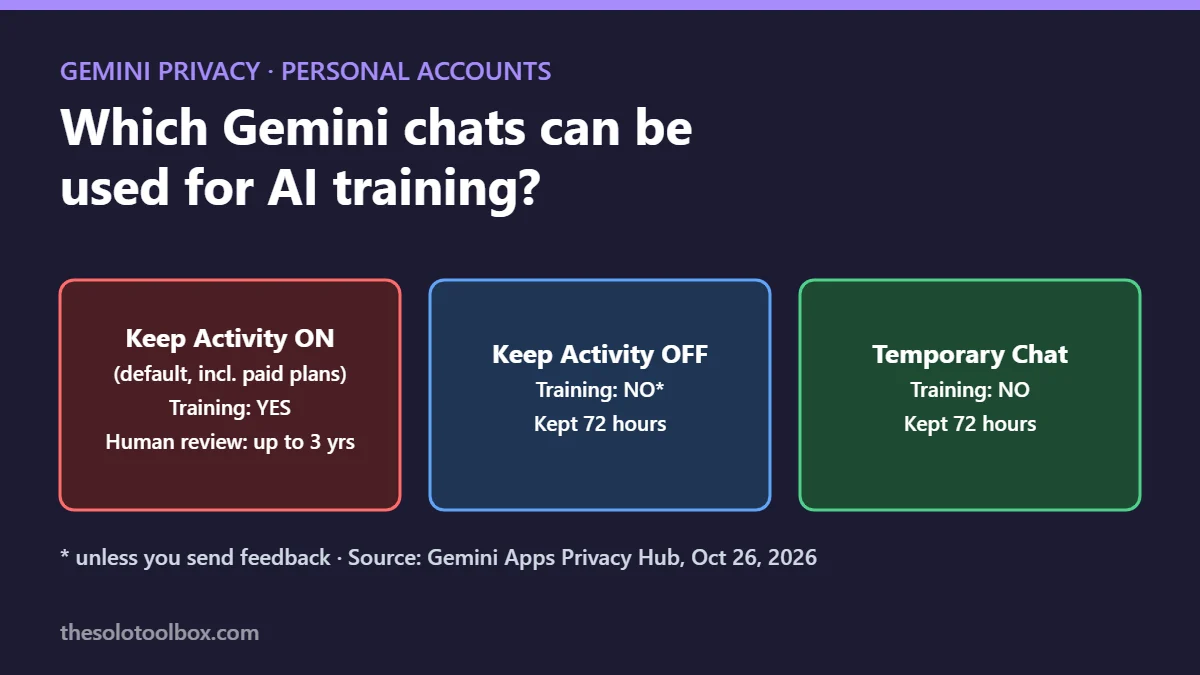
Yes. Paying for a Google AI plan doesn’t change how Gemini treats chats on a personal Google account. If Keep Activity is on, which is the default for adults, Google can use your conversations to train its AI models and send a sample to human reviewers, who may keep them for up to three years. The two ways out are turning Keep Activity off or using Temporary Chat.
The question resurfaced this week in a “Tell HN” post on Hacker News titled “Gemini trains on chat history, even for subscribers (personal accounts).” We checked the claim against Google’s Gemini Apps Privacy Hub (last updated October 26, 2026) and the Gemini Apps Activity help page. Below: what Google’s policy says, how to turn training off on each device, and what you give up.
Before you start
- Applies to: the Gemini app on Android and iPhone, and gemini.google.com, signed in with a personal Google account, including Google AI Pro and Ultra subscribers
- Doesn’t apply to: work or school accounts, where your Google Workspace administrator controls these settings
- Time: about 2 minutes
- Trade-off: with Keep Activity off, new chats don’t appear in your history and Gemini can’t pick up past conversations
What Google’s privacy hub says
The Gemini Apps Privacy Hub states that Google “uses your activity to provide, develop, and improve its services (including training generative AI models).” The key points:
- Keep Activity is on by default if you’re 18 or over.
- Human review: “A subset of chats are reviewed by human reviewers (including Google’s trained service providers).” Those chats are disconnected from your account first and “retained for up to three years.”
- Deleting doesn’t reach reviewed chats. Google says chats already reviewed “aren’t deleted because they aren’t connected to your Google Account.”
- Uploads count too. Photos, videos and files you add to a chat are covered by the same Keep Activity setting.
- Google’s own warning: “Please don’t enter confidential information that you wouldn’t want a reviewer to see or Google to use to improve our services.”
Does paying for Google AI Pro or Ultra change anything?
Not for training. The privacy hub lists “subscription information” among the data Google collects when you have a paid Google AI plan, but neither the hub nor the activity help page carves out an exception for subscribers. As of November 4, a paid personal account follows the same Keep Activity rules as a free one.
Work and school accounts are the exception. Google says Gemini use on those accounts “may be subject to different data handling terms,” and the Keep Activity switch is controlled by the organization’s admin. Google’s developer products (the Gemini API and Vertex AI) have their own terms, which we didn’t review for this article.
How to stop Gemini from training on your chats
Turning off Keep Activity stops Google using your future chats to improve its models, unless you send feedback (more on that below). You’ll see two options: Turn off keeps your existing history; Turn off and delete activity also clears it.
On the web (gemini.google.com)
- Open gemini.google.com and sign in.
- Click Settings & help, then Activity.
- Near the top, click On.
- Choose Turn off or Turn off and delete activity.
In the Gemini app on Android or iPhone
- Open the Gemini app.
- Tap Menu at the left, then your profile picture or initial.
- Tap Gemini Apps Activity.
- Near the top, tap On, then Turn off or Turn off and delete activity.
The setting follows your Google account, so changing it once covers every device signed in with that account.
Temporary Chat vs Keep Activity off
If you want history for most chats but not for sensitive ones, Temporary Chat is the per-conversation option. Here’s how the two compare, based on Google’s privacy hub.
| Keep Activity on | Keep Activity off | Temporary Chat | |
|---|---|---|---|
| Shows in your chat history | Yes | No | No |
| Used to train Google’s AI models | Yes | No, unless you send feedback | No |
| Can be sampled for human review to improve AI | Yes, kept up to 3 years | Only feedback you submit | No |
| Stored with your account | Until you delete it or auto-delete runs | 72 hours | 72 hours |
The 72-hour retention applies in both private modes. Google says it keeps those chats to respond to you, using “the last 24 hours of your chat as context,” and to protect “Google, our users, and the public,” which can still involve human reviewers for safety purposes.
Other ways your Gemini data gets used
- Feedback buttons. If Keep Activity is off and you rate a response or send feedback, Google collects “the last 24 hours of your chats” along with it. Reviewed feedback is kept up to three years.
- Gemini Live audio, video and screen sharing. A separate setting, Improve Google services with your audio and Gemini Live videos & screenshares, is off by default and only works with Keep Activity on. Transcripts of Live chats still fall under Keep Activity.
- Screen automation on Android. When Gemini acts in apps for you, the hub says screenshots “are reviewed by trained reviewers and used to improve Google services if Keep Activity is on.”
What it means for you
If you’ve used Gemini with default settings, some of your past chats may already sit with reviewers, disconnected from your account, and deleting your history won’t remove them. Turning off Keep Activity only changes what happens from now on.
For freelancers and small businesses, the practical rule is the one Google itself gives: keep client names, contracts, health details and passwords out of Gemini unless you’re using a work account whose admin has set data controls, or a Temporary Chat. Our comparison of how to keep client data out of AI training in ChatGPT, Claude, Gemini and Copilot covers the equivalent switches in the other assistants. If you use Gemini in the car, the Gemini Personal Intelligence settings for Android Auto are worth checking too.
FAQ
Does turning off Keep Activity delete my old chats?
Only if you choose Turn off and delete activity. Plain Turn off stops saving new chats but leaves your existing history in place. Either way, chats already sampled for human review stay with Google for up to three years.
Is Temporary Chat completely private?
No. Google keeps temporary chats with your account for 72 hours and can review them for safety and abuse. They’re not used to train models or for human review aimed at improving AI.
Can I keep my history but opt out of training?
Not with a single switch. On personal accounts, Keep Activity controls both history and training. The closest workaround is leaving it on for everyday questions and starting a Temporary Chat for anything sensitive.
Do Gemini features inside Gmail and Docs follow the same rule?
We limited this check to the Gemini app and gemini.google.com. Gemini features built into Gmail, Docs and other Google apps may be covered by different terms, so check the privacy information shown in each app before assuming the same rules apply.
Next step
Open Settings & help > Activity on gemini.google.com now and decide which mode fits how you use Gemini. If you work with documents in Gemini, our guide to editing files in Gemini chat covers working with PDFs, Docs and Sheets inside a chat.
How we checked: quotes and settings paths come from Google’s Gemini Apps Privacy Hub (updated October 26, 2026) and the Gemini Apps Activity help page for web, Android and iOS, read on November 4, 2026. We found no subscriber-specific exception in those pages; menu labels can change between app versions.
Sources
- Gemini Apps Privacy Hub (Google)
- Manage & delete your Gemini Apps activity (Google Help)
- Tell HN: Gemini trains on chat history, even for subscribers (Hacker News)