Conductor Cloud Shutting Down: Move Workspaces Before Nov 13
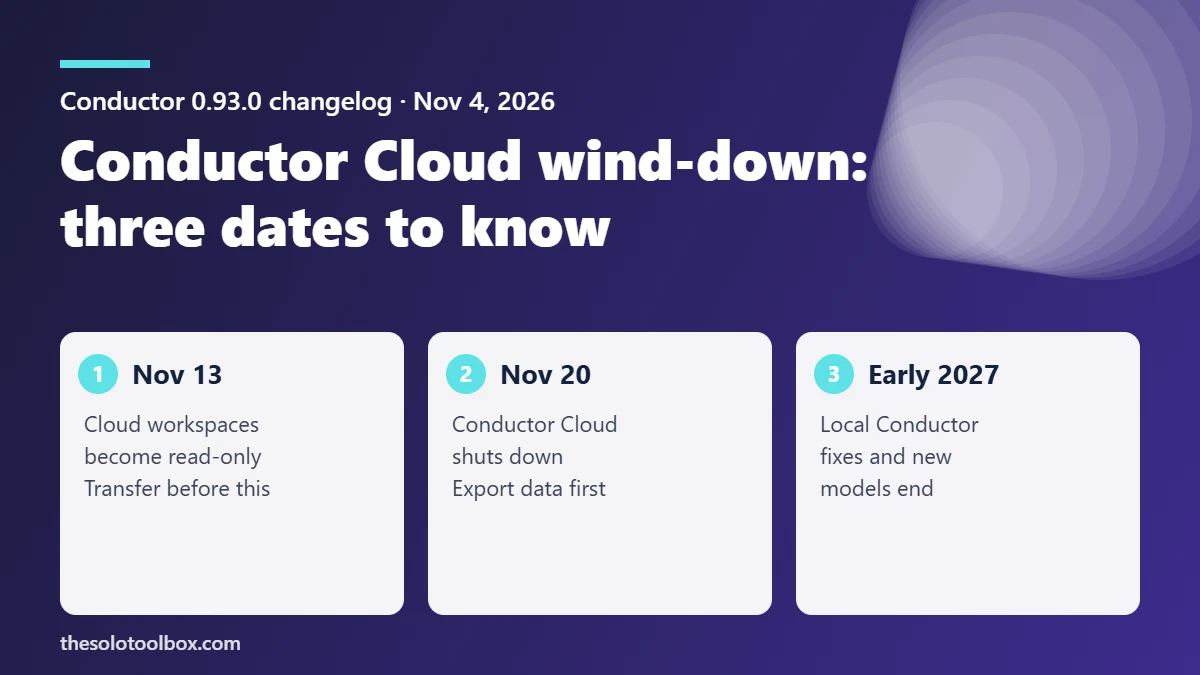
Conductor Cloud becomes read-only on November 13, 2026 and shuts down on November 20, after Conductor announced on November 4 that it is joining Meta. To keep your work, right-click each cloud workspace in the Conductor Mac app and choose Transfer to local, then export a full copy of your data from Settings → Account → Export data. The local Mac app keeps working and gets new models and critical fixes until early 2027.
Below: the exact dates, what each deadline stops you doing, a checklist for moving workspaces, the settings you have to recreate by hand, and what happens to local Conductor.
Before you start
- Who this is for: developers and teams who run coding agents in Conductor Cloud workspaces.
- What you need: the Conductor Mac app, enough free disk space for each repository you move, and access to your team’s secrets store.
- Do it before November 13: after that date cloud workspaces are read-only, so agents can no longer make changes there.
What Conductor announced and when Cloud stops
Conductor co-founder Charlie Holtz posted the announcement on November 4, and the same day’s 0.93.0 changelog set out the wind-down. The Verge reported that Meta bought the company for an undisclosed amount, following xAI’s purchase of Cursor.
| Date | What changes |
|---|---|
| Nov 4, 2026 | Acquisition announced; Conductor 0.93.0 changelog lists the wind-down dates |
| Nov 13, 2026 | Conductor Cloud goes read-only |
| Nov 20, 2026 | Conductor Cloud shuts down |
| Early 2027 | Local Conductor stops getting new models and critical bug fixes |
Conductor says it will release “something new” early next year but has not said what it is, whether it will be free or whether today’s workspaces will carry over. Plan on the assumption that anything left in Cloud after November 20 is gone.
How to move cloud workspaces to your Mac
- Update the Conductor Mac app to version 0.93.0 or later, the release that announced the wind-down.
- In the sidebar, right-click a cloud workspace and choose Transfer to local. Conductor moves the workspace and its chats onto your Mac.
- Open the moved workspace and confirm the branch, the uncommitted changes and the chat history are all there.
- Repeat for every workspace you want to keep. Shared workspaces belong to your organization, so agree with teammates who moves which one so nothing is skipped.
- Go to Settings → Account → Export data and download the export as a backup, even if every transfer worked.
Commit and push any work you care about to GitHub as well. A pushed branch survives no matter what happens to Conductor, and archived cloud workspaces now show their PRs, last known changes and file tree in the right panel, which helps you spot anything still unpushed.
Settings you have to recreate by hand
According to Conductor’s Cloud documentation, each organization shares one “Cloud Computer” that holds its repositories, environment variables, secrets and installed software. A local workspace runs on your Mac with your local project settings instead, so expect to rebuild these:
- Environment variables and secrets. Copy them from your password manager or secrets store, not from the cloud sandbox. Never paste production secrets into chat with an agent.
- Setup scripts and installed tools. Anything the Cloud Computer build installed, such as runtimes, CLIs or database clients, has to be installed on your Mac.
- Always-on agents. Cloud agents kept running after you closed your laptop. Local processes stop when your Mac sleeps or shuts down, so long jobs need the lid open or a different host.
- Team visibility. Local workspaces live in your own Conductor app. Teammates can no longer follow the same chat, so share progress through pull requests.
Once you’ve moved everything, tidy up access. Conductor Cloud connected to GitHub, and you added an agent credential during setup. After November 20, remove Conductor’s access in GitHub under Settings → Applications, checking both the installed GitHub Apps and authorized OAuth apps lists (GitHub’s guide to reviewing installed GitHub Apps covers organization accounts too) and rotate any API key you gave the cloud sandbox. Our Northflank secrets rotation guide walks through doing that without breaking deploys.
What happens to local Conductor
Local Conductor keeps working “as normal” for now. The 0.93.0 release itself added GPT-6.1 Terra to the Codex model picker and fixed the Claude usage display. Conductor says new models and critical bug fixes continue until early 2027 and has given no firm end date. After that, an unmaintained tool that drives coding agents with access to your repositories is a security risk, so pick a replacement before support ends rather than after.
If you run agents locally, keep them inside the project folder and away from places like Downloads; our explainer on the AGENTS.md Downloads folder attack shows why.
FAQ
Can I still use Conductor Cloud after November 13?
You can open it, but workspaces become read-only, so agents can’t run new changes. Transfer to local works best before that date. Contact support@conductor.build if a transfer fails.
Does Transfer to local keep my chats?
Yes. Conductor’s changelog says the transfer moves “a cloud workspace and its chats” to your Mac.
Will my Conductor data go to Meta?
Conductor’s announcement and changelog don’t say what happens to stored user data. Read the privacy policy on conductor.build or ask support if that matters to you, and export your data first either way.
Is there a Windows or Linux version of local Conductor?
Conductor’s docs describe local workspaces as running on “your Mac”. We found no Windows or Linux app.
Related guides
- Zeabur shutting down: what to do before December 1
- ChatGPT and Codex Will Share One Usage Limit From December
- Northflank Breach: Which Secrets to Rotate and How to Check
Sources
How we checked: on November 5, 2026 we read Conductor’s announcement, the 0.93.0 changelog dated November 4 for the dates and menu paths, and Conductor’s Cloud documentation for what the Cloud Computer stores. Acquisition details come from The Verge. We did not run a transfer ourselves, and Conductor has not published details of its next product.
- Conductor: Conductor is joining Meta
- Conductor changelog 0.93.0 (Nov 4, 2026)
- Conductor Docs: What is Conductor Cloud?
- The Verge tech news feed: “Meta bought an AI coding startup” (Nov 4, 2026)
- GitHub Docs: Reviewing and modifying installed GitHub Apps
Next step: open Conductor today, update to 0.93.0, and transfer your most active cloud workspace first. Then run Export data before November 13.