Microsoft 365 Outage Phishing: Spot the Fake “Restore Messages” Email
The Solo Toolbox · Software Help for One-Person Businesses
An email saying your Microsoft 365 messages were “held” during an outage and will be deleted in 24 hours unless you click RESTORE MESSAGES is a phishing scam. Microsoft Threat Intelligence first flagged the campaign on November 13, 2026, and Microsoft says no mail was lost in the real Exchange Online outage of November 12: every queued message was delivered. Delete the email, and if you already clicked and typed a password, reset it and sign out of all sessions now.
The warning is circulating again this week after Windows Central reported on November 23 that the lures are still landing in inboxes. Below: what the fake email looks like, how to check it in under a minute, what to do if you clicked, and what Microsoft 365 admins should search for.
Before you start
- You’ll need: access to the mailbox that received the email and, if you entered a password, a second device to sign in from.
- Applies to: anyone with a work or school Microsoft 365 account (Outlook, Exchange Online), plus the people who run those tenants.
- How we checked this: on November 23, 2026 we read Microsoft’s Security Blog post of November 16, SecurityWeek’s report on the outage and campaign, and Windows Central’s November 23 follow-up. We did not receive or open a sample of the email ourselves, so the examples below come from Microsoft’s published indicators.
What the fake outage email looks like
Microsoft published the details of the campaign in its post “High volume phishing campaign uses Microsoft 365 outage lures to target multiple industry sectors.” The emails share a pattern you can check quickly:
| What to check | What the scam uses |
|---|---|
| Subject line | “Outage – ” followed by a random code, such as “Outage – aF7vG6”. Variants: “Restore — 4 messages …” and “Strengthen – Security …”, sometimes with an [External] tag |
| Sender name | A three-letter prefix plus “Outage Notification” or “Service Health”, for example “MSF Outage Notification” |
| Sending domain | moments-notice[.]com, planetmaison[.]com or newbooker[.]com, none of them Microsoft domains |
| Body | Claims an Exchange Online incident held four of your messages, mentions Outlook, Teams, SharePoint and Copilot, and threatens deletion within 24 hours |
| Button | RESTORE MESSAGES or TAKE ACTION, which goes through a tracking link and lands on reallifeaccounting[.]com or outagefixed[.]sbs / outagerestored[.]sbs |
The brackets in those domains are there so nobody clicks them by accident. Microsoft also found a hidden block of fake conversation text inside the emails, an attempt to get past spam filters.
Why the lure works
The outage it borrows from was real. On November 12, 2026, an Exchange Online incident (tracked as EX1550543 and marked resolved November 13) left some users unable to receive mail for close to a day. Microsoft traced it to a network capacity upgrade and said it was not a cyberattack. We covered the outage itself in our Microsoft outage guide.
So the email names a genuine incident, then adds a false demand (your mail is stuck) and a short deadline. That combination is enough to make people click before they think. The fix is simple: there is nothing to restore. Microsoft’s incident report says queued messages were delivered once service recovered.
How to check a Microsoft 365 service notice in one minute
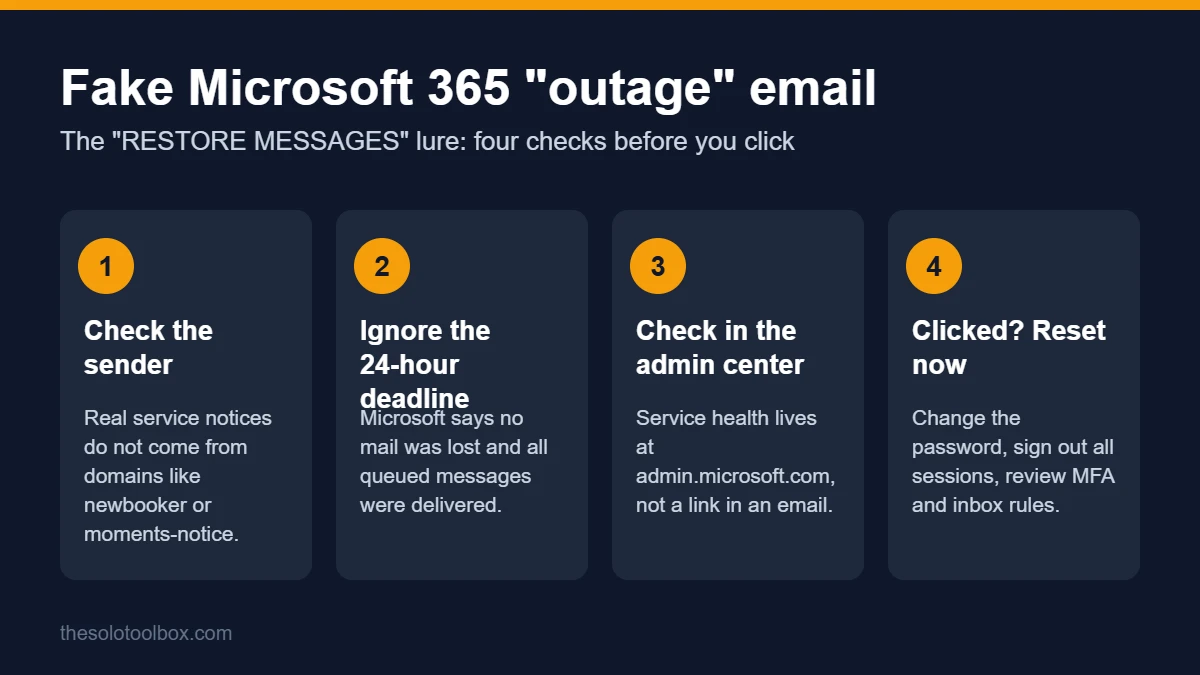
- Look at the sender address, not the display name. In Outlook, click or tap the sender name to expand the full address. A service notice that comes from a domain that isn’t Microsoft’s, or your own company’s, is fake.
- Hover over the button without clicking. On a computer, the real destination shows in the bottom corner of Outlook or your browser. Anything that isn’t a microsoft.com or office.com address you recognise is a reason to stop.
- Check service health yourself. Admins can open the Microsoft 365 admin center at admin.microsoft.com and go to Health > Service health. Everyone else can ask IT, or simply open Outlook and see whether mail is flowing.
- Report it. Use the Report button in Outlook (or your company’s reporting add-in) and choose Phishing. That puts the message in front of your security team and helps Microsoft’s filters.
Microsoft’s own guidance is blunt: legitimate Microsoft 365 service-health messages don’t send you to non-Microsoft websites to recover held mail.
What to do if you clicked or entered your password
Microsoft says it had not seen credentials being captured or malware being delivered in this campaign, but it describes the activity as likely credential phishing and couldn’t see the final page. Treat a typed password as stolen.
- Change your password from a device you trust, by going to the Microsoft sign-in page directly rather than any link in the email.
- Sign out everywhere. For a work or school account, use Sign out everywhere at myaccount.microsoft.com; for a personal account, look under Security at account.microsoft.com. On a work account, ask IT to revoke sessions and refresh tokens, which they can do in Microsoft Entra.
- Check your sign-in methods. Remove any phone number or authenticator app you don’t recognise. If you only use SMS codes, consider a passkey; our passkey setup guide covers Microsoft accounts.
- Look for mailbox rules. In Outlook on the web, go to Settings > Mail > Rules and Forwarding. Attackers often add a rule that forwards or deletes mail so you don’t notice.
- Tell IT what you entered and when. The time matters when they search sign-in logs.
If you think someone already got in, our guide to a hacked business email account walks through the full cleanup.
What Microsoft 365 admins should check
Microsoft says Defender for Office 365 now blocks and quarantines these messages, and Defender blocks the domains. Tenants without Defender, or messages that arrived before detections updated, still need a look. From Microsoft’s post:
- Search and purge. In Threat Explorer or Advanced hunting, search the EmailEvents table for the three sender domains and the “Outage –” subject pattern, then remove delivered copies.
- Find clicks. Query UrlClickEvents and EmailUrlInfo for reallifeaccounting[.]com, outagefixed[.]sbs, outagerestored[.]sbs and the path /themelist0.html.
- Contain anyone who clicked. Reset the password, revoke sessions and refresh tokens, verify MFA registrations, and review OAuth consents, inbox rules, forwarding and delegate permissions.
- Block carefully. Block or watch the landing domains, but Microsoft advises against blocking shared delivery services such as SendGrid outright on this evidence.
- Harden. Turn on Safe Links, Safe Attachments and Zero-hour auto purge (ZAP), and move users toward phishing-resistant MFA such as passkeys or security keys.
What we still don’t know
- How many organisations received the emails. Microsoft gave no volume figures or named sectors.
- Whether anyone’s password was actually stolen. Microsoft says it did not observe credential capture, but it also didn’t have the final page’s code.
- Who is behind it. Microsoft has not attributed the campaign.
Frequently asked questions
Did Microsoft really lose emails in the November outage?
No. Microsoft says no mail was lost and all queued messages were delivered after the November 12 Exchange Online incident. Any email asking you to recover held messages is fake.
Does Microsoft ever email me about outages?
Admins get service-health notices through the Microsoft 365 admin center and can choose to receive them by email. Those notices point back to the admin center. They don’t ask regular users to click a button to rescue mail.
I only opened the email. Am I at risk?
Microsoft saw no malware or attachments in this campaign, so opening it is unlikely to cause harm on its own. Delete it and report it. The risk starts when you click and type a password.
Will multi-factor authentication protect me?
It helps, but phishing kits can relay codes in real time. Passkeys and security keys resist that, which is why Microsoft recommends them.
What to do next
Search your inbox for “Outage –” right now, delete anything matching, and report one copy to IT. If you manage a tenant, run the EmailEvents search above and check click logs before Monday’s mail volume buries the evidence.
Related guides
Sources
- Microsoft Security Blog: High volume phishing campaign uses Microsoft 365 outage lures to target multiple industry sectors (November 16, 2026)
- SecurityWeek: Microsoft Rules Out Cyberattack in Outage, Warns of Phishing Campaign (November 16, 2026)
- Windows Central: Scammers are using Microsoft’s massive Outlook outage as phishing bait (November 23, 2026)
Last checked: November 23, 2026. If something here is out of date, let us know.