Entra Connect Health Breach: What Microsoft 365 Admins Should Do
The Solo Toolbox · Software Help for One-Person Businesses
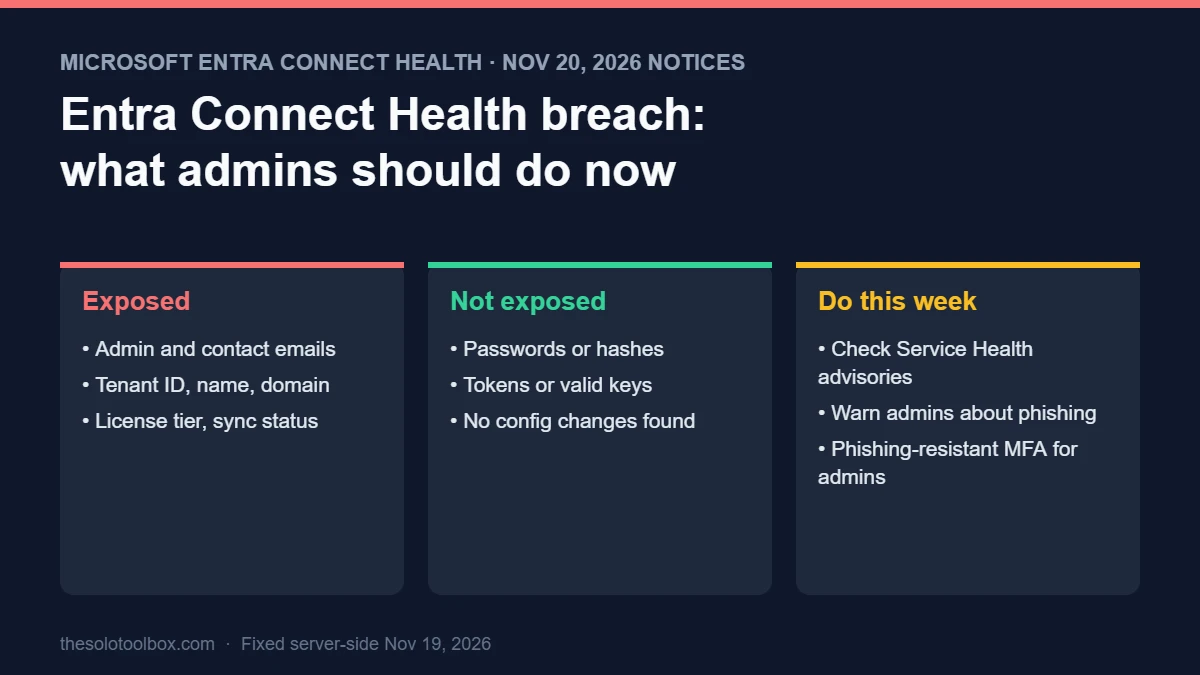
Microsoft is notifying some Microsoft 365 and Entra customers that attackers read their tenant’s admin contact emails and configuration details through a flaw in the Entra Connect Health service. No passwords, password hashes, tokens or valid keys were exposed, Microsoft fixed the flaw on its side on November 19, 2026, and there’s nothing to patch. The real risk is phishing: attackers now know who your admins are and which domain and license tier you use, so the next step is to warn those people and lock down admin sign-ins.
This guide covers what was exposed, how to tell whether your tenant was affected, and the checks to run this week.
Before you start
- Applies to: organizations using Microsoft Entra ID (including Microsoft 365 business plans), especially those that sync on-premises Active Directory with Entra Connect and use Connect Health. Managed service providers may have notices for several customer tenants.
- You’ll need: a Global Administrator or Security Administrator account, or at least Reports Reader to view sign-in logs.
- How we checked this: on November 23, 2026 we read BleepingComputer’s report of November 21, which quotes Microsoft’s notice and a Microsoft spokesperson, plus follow-up coverage from SecurityOnline, ITdaily and The Backroom Tech, and Microsoft Learn pages on sign-in logs and authentication strengths. We have not seen Microsoft’s notice ourselves, and Microsoft hasn’t published a public advisory or CVE or said how many tenants were affected.
What happened
| Date (2026) | Event |
|---|---|
| July 23 | Flawed behavior introduced in the Entra Connect Health API |
| November 9 | Microsoft detects the vulnerability |
| November 19 | Microsoft deploys a server-side fix |
| November 20 | Investigation concludes; affected tenants notified through Azure Service Health |
| November 21 | Admins report notices on Reddit; BleepingComputer publishes the story |
Microsoft’s notice, as quoted by BleepingComputer, says it found “unauthorized read-only access to tenant-level metadata” and “did not identify any unauthorized configuration changes.” A Microsoft spokesperson said the company notified impacted customers through Azure Service Health.
What data was exposed, and what wasn’t
| Exposed (read-only) | Not exposed, per Microsoft |
|---|---|
| Email addresses of tenant technical contacts and administrator accounts | Passwords and password hashes |
| Tenant ID, display name and initial domain name (yourname.onmicrosoft.com) | Authentication tokens |
| Country code and region | Valid cryptographic keys |
| Entra license tier, directory sync status and last sync time | On-premises server and Active Directory topology |
| Connect Health onboarding status | Azure subscription information |
| An expired certificate from a Microsoft service shut down in late 2024 (Microsoft says it poses no risk) |
None of this lets anyone sign in. It does give an attacker a ready-made target list: the right people to phish, your real tenant name to put in a fake Microsoft email, and whether you sync with on-premises AD.
How to tell if your tenant was affected
- Sign in to the Azure portal directly, not through a link in an email.
- Search for Service Health and open Security advisories.
- Look for a notice about Microsoft Entra Connect Health dated on or after November 20, 2026. Reports say only tenants that received this direct notice had confirmed unauthorized access.
If you can’t see the advisory, ask whoever holds Global Administrator or subscription Owner rights to check; security advisory details are restricted to privileged roles. Microsoft also published a read-only PowerShell script at aka.ms/ConnectHealth/scripts that shows the kinds of metadata involved. It displays your current values, not a record of what the attacker saw, so it can’t prove you weren’t affected.
Expect copycats. A phishing email claiming to be “your Entra breach notice” is an easy lure this week. Microsoft’s notices arrive in Azure Service Health, so verify any email about this in the portal before clicking anything.
What to do now
1. Warn the people whose addresses were exposed
Tell your Global Administrators and technical contacts to expect targeted phishing that names Microsoft Entra, your tenant or your domain. That includes fake MFA prompts, “license expiring” emails and calls claiming to be Microsoft support. Our guide to fake IT support messages in Microsoft Teams shows what these approaches look like.
2. Require phishing-resistant MFA for admins
In the Microsoft Entra admin center, create a Conditional Access policy for admin roles and, under grant controls, choose Require authentication strength > Phishing-resistant MFA strength. That allows FIDO2 security keys, passkeys, Windows Hello for Business and certificate-based authentication, and blocks codes and push approvals that can be phished. Conditional Access needs Entra ID P1, which is included in Microsoft 365 Business Premium. On Business Basic or Standard, register passkeys for every admin account at minimum; our passkey setup guide walks through it.
3. Review sign-in and audit logs
Go to Entra ID > Monitoring & health > Sign-in logs and filter by your admin accounts for the period since July 23, 2026. Look for sign-ins from unfamiliar countries, new devices and failed MFA attempts. Then open Audit logs in the same section and check for new app registrations, role assignments or MFA method changes you didn’t make. The original access was through a Microsoft API, so it may not appear in your logs; you’re looking for follow-up attacks.
4. Check your Connect Health setup
Microsoft’s notice asks customers to review Connect Health configurations. In the Entra admin center under Hybrid management > Microsoft Entra Connect, open Connect Health and confirm the registered agents and servers are ones you recognize. If you stopped syncing from on-premises AD years ago, remove agents for servers that no longer exist.
5. Tidy up admin accounts
Count your Global Administrators. Microsoft recommends fewer than five. Remove admin rights from anyone who doesn’t need them daily, and make sure no admin account is also someone’s everyday mailbox.
Frequently asked questions
Do I need to install an update?
No. Microsoft fixed the flaw on the server side on November 19, 2026. There is no client or agent update tied to this issue.
Should I reset admin passwords?
Microsoft says no passwords or tokens were exposed, so a reset isn’t required because of this incident. If an admin account still relies on a password plus SMS or app codes, moving it to phishing-resistant MFA does more than a reset.
I use Microsoft 365 but not Entra Connect. Am I affected?
Possibly not. Microsoft hasn’t said which tenants were in scope, but the flaw was in the Connect Health API. Check Service Health for a notice; if there’s none, you have no confirmed exposure, though the phishing advice still applies.
Is there a CVE?
Not one we could find as of November 23, 2026. Microsoft has communicated through customer notices rather than a public security advisory.
What to do next
Check Service Health today, send a short warning to your admins and technical contacts, and schedule the phishing-resistant MFA change this week. If anyone on your team already clicked a suspicious Microsoft email, follow our steps for a hacked business email account.
Related guides
Sources
- BleepingComputer: Microsoft Entra Connect Health flaw exploited to steal tenant data (November 21, 2026)
- SecurityOnline: Microsoft Entra Connect Health exposure leaked tenant metadata
- ITdaily: Attackers stole tenant data through flaw in Microsoft Entra Connect Health
- The Backroom Tech: Microsoft warns attackers exploited Entra Connect Health
- Microsoft Learn: Sign-in logs in Microsoft Entra ID
- Microsoft Learn: Conditional Access authentication strengths
Last checked: November 23, 2026. If something here is out of date, let us know.