Chainstack breach: what to do now (rotate node credentials)
The Solo Toolbox · Software Help for One-Person Businesses
If you have a Chainstack account, do three things now: change your Chainstack password (and any other account that used the same one), rotate your node credentials in the Chainstack console, and replace your platform API keys if you use them. Chainstack disclosed on November 3, 2026 that an attacker reached its production systems and a database of customer names, emails and password hashes.
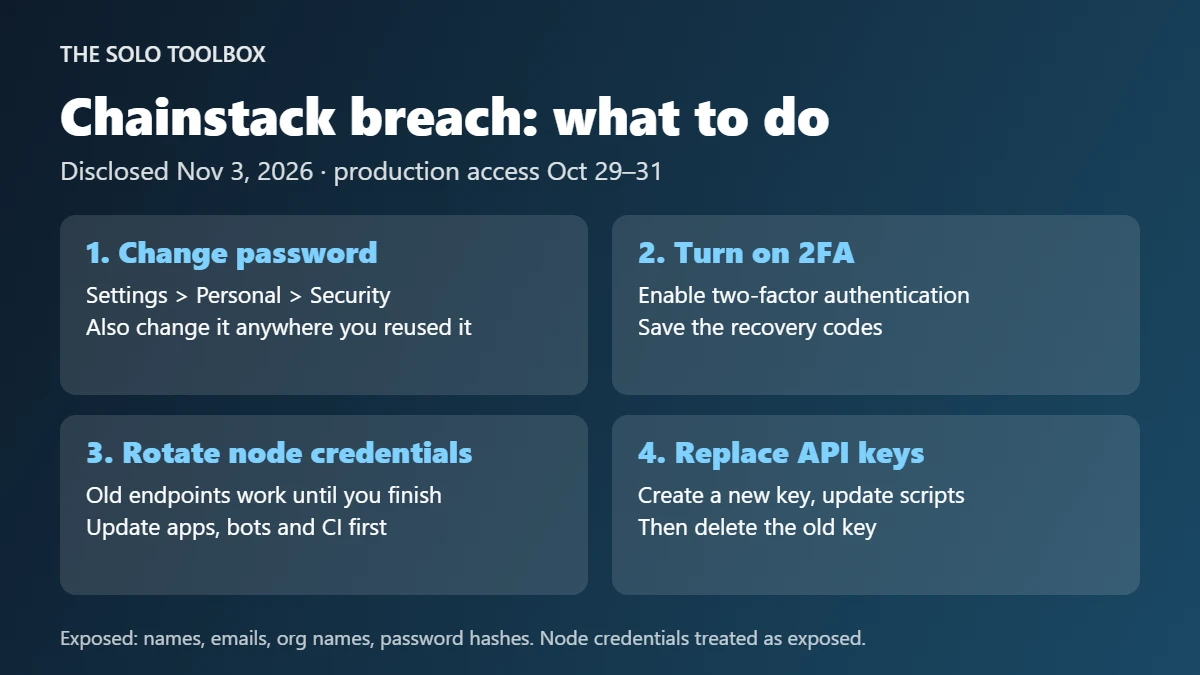
Below is what Chainstack has confirmed, what it hasn’t, and the exact steps for each fix, in the order that limits damage fastest.
Before you start
- Applies to: anyone with a Chainstack account, including team members invited to an organization
- You need: access to the Chainstack console and to every app, bot or service that calls your node endpoints
- Time: 10 minutes for the account, longer if many services use your node URLs
- How we checked this: facts come from Chainstack’s incident report (published November 3, 2026) and Chainstack’s documentation, read November 4, 2026
What happened at Chainstack
Chainstack’s own timeline:
| Date (2026) | Event |
|---|---|
| October 26 | An attacker got into a development environment through a third-party component |
| October 29 | The attacker reached parts of the production environment |
| October 31 | Chainstack detected the intrusion and cut the access paths |
| November 2 | Investigation finished |
| November 3 | Public disclosure and email to all customers |
Chainstack has not named the third-party component. Its notice links to coverage of a wider AI-assisted attack campaign from late October. The Hacker News, citing CrowdStrike research, connects that campaign to a China-linked group and reports other affected companies, including WorkOS and Chainalysis. That attribution comes from CrowdStrike and The Hacker News, not from Chainstack.
What data was exposed
- Confirmed exposed: organization names, account holder names, the email addresses of organization members, and password hashes.
- Treated as exposed: node credentials. Chainstack says the attacker had access to the systems holding them and it has “no evidence they were read,” but it asks every customer to rotate them.
- Not exposed, per Chainstack: full card numbers and security codes, which it says it does not store. It also says customer nodes, the console and the API were not modified.
- Not disclosed: how the passwords were hashed, and whether platform API keys were in the accessed systems. Chainstack still tells API users to regenerate them.
Node credentials matter most. A Chainstack endpoint usually carries its access token in the URL, for example https://ethereum-mainnet.core.chainstack.com/YOUR_AUTH_TOKEN, or uses a basic-auth username and password. Anyone holding that URL can send requests billed to your plan and read whatever your node serves.
Step 1: Change your Chainstack password
- Sign in to the Chainstack console.
- Go to Settings > Personal.
- Under Security, select Change password.
- Enter your current password, then the new one twice, and click Save.
Then change the password anywhere else you reused it, starting with email and exchange accounts. Hashes can be cracked offline, and weak or reused passwords fall first. Our guide on checking whether your email was in a data breach shows how to see where else your address has leaked.
Step 2: Turn on two-factor authentication
Chainstack’s notice doesn’t require this, but it closes the door on anyone who cracks your old hash.
- Go to Settings > Personal > Security and select Enable two-factor authentication.
- Enter your current password.
- Save the recovery codes. They are shown once.
- Scan the QR code with an authenticator app such as Google Authenticator, Microsoft Authenticator or Authy.
- Enter the 6-digit code and click Enable 2FA.
Our two-step verification guide covers the same protection for your Google and Microsoft accounts, which are the usual next target after a credential leak.
Step 3: Rotate your node credentials
Chainstack says self-service rotation is now in the console and that your current endpoints keep working until you complete the rotation, so you can stage the change without downtime.
- Open your project, select the network, then click the node name to see its access and credentials.
- Use the rotate option Chainstack has added for this incident. Its notice points to the “Rotate node credentials” section of the Manage your node docs.
- Copy the new endpoint URLs, tokens or basic-auth details.
- Update every place that uses the old values: backend env files, RPC settings in wallets, indexers, bots, CI secrets and monitoring.
- Complete the rotation so the old credentials stop working.
- Watch usage in the console for a few days. Request spikes you can’t explain mean an old URL is still in use somewhere, or someone else has it.
When we checked Chainstack’s documentation on November 4, the rotation section linked from the notice had not yet appeared on the public docs page, so we can’t give the button label. Follow what the console shows.
Step 4: Replace platform API keys
This applies only if you call the Chainstack Platform API (for creating or managing nodes). Chainstack’s docs describe creating and deleting keys, not a one-click regenerate, so do it in this order:
- Open Settings > API keys in the console.
- Click Create key, name it, click Next and copy the key. It is shown once.
- Put the new key into your scripts and secret stores.
- Back on the API keys page, click the edit icon next to the old key and select Delete.
If the same pipelines hold secrets for other providers, rotate those in the same pass. Our Northflank breach guide has a checklist for finding secrets spread across CI and environment files.
Step 5: Watch for phishing
The leaked list is names, emails and company names, which is exactly what a convincing phishing email needs. Chainstack says it will never ask for passwords, tokens or keys. Treat any “Chainstack security” message that links to a login page or asks you to “verify” credentials as an attack. Sign in by typing the console address yourself.
If you also hold exchange accounts under the same email, our Binance hack guide covers locking those down.
Frequently asked questions
Did Chainstack force a password reset?
Its notice doesn’t say so. It asks customers to change passwords themselves.
Will rotating credentials break my app?
Not immediately. Chainstack says old endpoints keep working until you finish the rotation. They stop once you complete it, so update your services first.
Were funds or wallets affected?
Chainstack runs RPC nodes; it doesn’t hold your wallet keys. It says nodes weren’t modified. If you ever stored a private key or seed phrase in a Chainstack-related config or note, move those funds to a new wallet anyway.
I was invited to someone else’s organization. Am I affected?
Yes. Chainstack says member emails were in the database. Change your password and turn on 2FA, and ask the organization admin to rotate node credentials.
What to do next
Do Steps 1 to 3 today. Then check Settings > Organization and remove members and roles you no longer need, so fewer accounts can reach your node credentials next time.
Related guides
Sources
- Chainstack: Incident report, what happened and what customers need to do (November 3, 2026)
- The Hacker News: Chainstack Reports Production Systems Breach Exposing Customer Data and Password Hashes (November 3, 2026)
- Chainstack Docs: Manage your account (password and 2FA)
- Chainstack Docs: Manage your node
- Chainstack Docs: Platform API getting started (API keys)
- Chainstack Docs: Authentication methods