GPT-6.1 Terra: who gets it, what it costs, when to use it
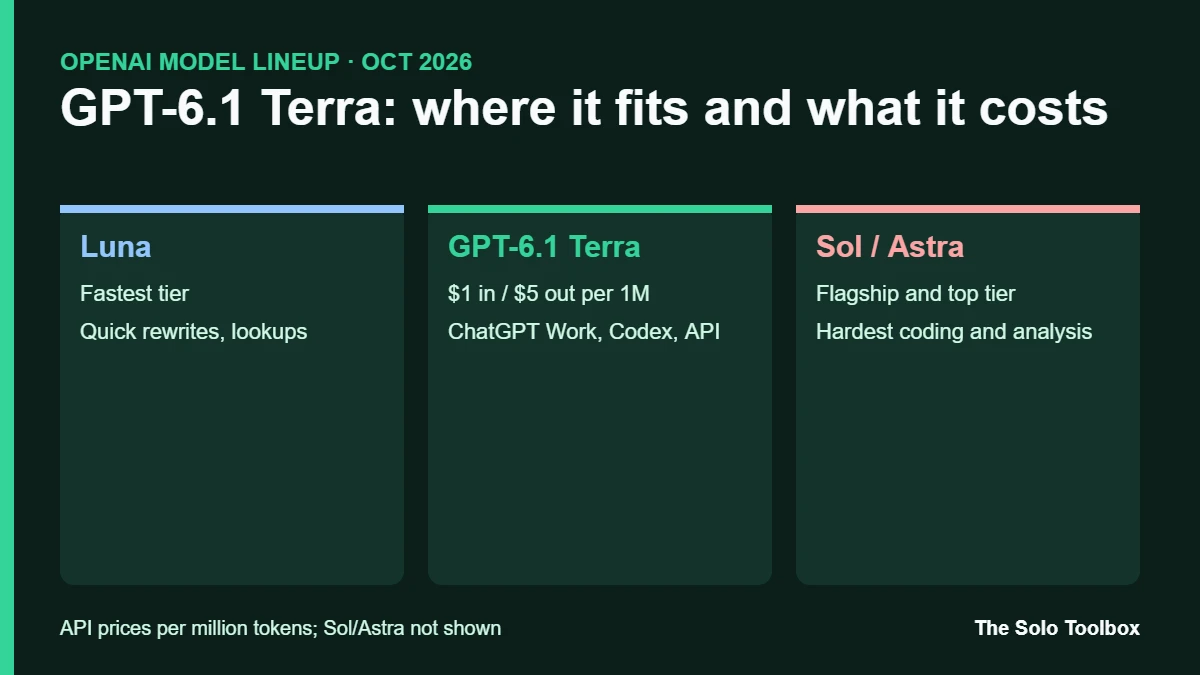
GPT-6.1 Terra is OpenAI’s new mid-tier model, released on October 26, 2026, for computer use, visual reasoning and writing. It’s rolling out to ChatGPT Plus, Pro, Business, Enterprise and Edu users inside ChatGPT Work and Codex, not regular chat, and developers can call it in the API as gpt-6.1-terra for $1 per million input tokens and $5 per million output tokens.
Below: where Terra sits in OpenAI’s lineup, which plans get it, what it costs, how to switch to it, and when Sol or Astra are still worth paying for. We checked everything against OpenAI’s announcement and release notes on October 27, 2026. Note that the benchmark figures are OpenAI’s own, so treat them as a vendor claim until independent tests catch up.
Before you start
- You’ll need: A paid ChatGPT plan for ChatGPT Work, a Codex install, or an OpenAI API key on a paid tier
- Time: A minute to switch models; the rollout may reach your account later in the day
- Watch out: Terra is not in the regular chat model list. Look for it in ChatGPT Work or Codex
What GPT-6.1 Terra is
OpenAI’s current lineup has four tiers. Luna is the fastest, Terra is the balanced middle option, Sol is the flagship for most demanding work, and GPT-6 Astra sits at the top. GPT-6.1 Terra replaces GPT-5.6 Terra, which was left alone when the GPT-6 Sol and Luna models arrived last month.
In practice, OpenAI pitches it for three jobs: reading what’s on screen and acting across apps (computer use), interpreting images such as charts and technical drawings, and writing that sounds less stiff. Examples in OpenAI’s materials include filling in forms, drafting proposals and editing video.
Who can use GPT-6.1 Terra
| Where | Who gets it | Notes |
|---|---|---|
| ChatGPT Work | Plus, Pro, Enterprise, Edu; rolling out to Business | Business access follows existing seat permissions |
| Codex | Plus, Pro, Enterprise, Edu, Business | Default reasoning effort is low in Codex |
| OpenAI API | Paid API tiers | Model ID gpt-6.1-terra; not on the API free tier |
| Regular ChatGPT chat | Not available | OpenAI’s release notes say Terra isn’t offered in Chat |
However, OpenAI’s announcement only names Plus, Pro, Enterprise and Edu. Business access comes from OpenAI’s post on X, and Free and Go aren’t mentioned at all. Because Free and Go users did get GPT-5.6 Terra inside ChatGPT Work in July, check your own model menu rather than assuming either way.
How to switch to GPT-6.1 Terra
In ChatGPT Work
- Open ChatGPT on the web or the mobile app and start a task in ChatGPT Work rather than a normal chat.
- Open the model menu for the task and choose GPT-6.1 Terra, then pick a reasoning level.
- If Terra isn’t listed, the rollout hasn’t reached your account yet. Sign out and back in later, or try the web app.
We couldn’t confirm the exact menu label OpenAI uses for every plan, so look for “Terra” in the list.
In Codex
- First, update Codex to the latest version.
- Type
/modeland choosegpt-6.1-terra. Since Codex 0.164.0 (October 22), you can pass the model name inline, for example/model gpt-6.1-terra. - Since Codex starts Terra at low reasoning effort, raise it for harder tasks.
In the API
Set the model to gpt-6.1-terra. Tool calls need the Responses API, and the API’s default reasoning effort is medium. Reported limits are a 1,050,000-token context window and 128,000 output tokens, with a June 1, 2026 knowledge cutoff.
What GPT-6.1 Terra costs
| Model | Input (per 1M tokens) | Cached input | Output (per 1M tokens) |
|---|---|---|---|
| GPT-6.1 Terra | $1 | $0.05 | $5 |
| GPT-6.1 Sol | $2 | Not checked | $10 |
| GPT-6 Astra | $10 | Not checked | $50 |
OpenAI says Terra’s standard API prices are 50% lower than both GPT-5.6 Terra and GPT-6.1 Sol, which matches the Sol row above. The Astra row comes from third-party pricing summaries, so confirm it on OpenAI’s pricing page before you budget around it. Inside ChatGPT Work and Codex, the same plan allowance also covers more Terra tasks than Sol or Astra tasks.
How it performs, according to OpenAI
- Factual errors: On OpenAI’s internal set of error-inducing prompts, the error rate at low reasoning effort fell from 53.6% (GPT-5.6 Terra) to 16.7%. At maximum effort it was 4.3%, close to Sol and Astra.
- Coding: On Terminal-Bench 4.0 at maximum effort, Terra solved 50.3% of tasks versus 21.5% for GPT-5.6 Terra. OpenAI still recommends Sol or Astra for the hardest coding work.
- Agent tasks: On Agents’ Last Exam, a set of professional computer-use tasks, Terra at medium effort scored 15 points higher than GPT-5.6 Terra and roughly matched GPT-6 Astra at about a tenth of the price per token.
- Speed: OpenAI also says Terra finishes those tasks more than three times faster than Astra or Sol.
On safety, OpenAI says Terra meets the “Critical” threshold for cybersecurity capability under its Preparedness Framework and keeps the protections it built for GPT-6 Astra. The other risk ratings are in the system card.
Terra, Sol or Luna: which to pick
- Pick Terra for everyday ChatGPT Work tasks: filling forms in a browser, turning screenshots or PDFs into tables, drafting client documents and routine code changes.
- Pick Sol or Astra for long, multi-file coding jobs, complex analysis or anything where one wrong step is expensive.
- Pick Luna when speed matters more than depth, such as quick rewrites or short lookups.
If you give Terra access to apps through ChatGPT Work, the usual cautions apply: review what it’s about to submit, and keep sensitive chats out of model training with our guide to stopping AI training on your chats. If Work tasks fail mid-run, our ChatGPT “Something went wrong” fix covers the common causes.
Also changed on October 26
In the same release notes, OpenAI disabled creating new custom GPTs in affected ChatGPT Enterprise and Edu workspaces (FedRAMP workspaces excepted). Existing GPTs keep working until their retirement dates, and OpenAI points admins to Plugin Creator for new workflows.
FAQ
Is GPT-6.1 Terra free?
OpenAI lists it for paid ChatGPT plans and paid API tiers. Free and Go access, on the other hand, wasn’t mentioned in the launch posts.
Why can’t I find Terra in ChatGPT?
Because it isn’t offered in regular chat, you won’t see it in the normal model picker. Instead, switch to ChatGPT Work or use Codex, and allow time for the rollout.
Is Terra better than GPT-6.1 Sol?
Not overall. Although it’s cheaper and faster, and OpenAI’s numbers put it close to Sol on several tests, OpenAI itself still recommends Sol or Astra for the most complex coding.
Test it before you switch your default
For example, run one task you already do weekly, such as turning a PDF invoice into a spreadsheet, on Terra and on your current model, and compare the output and the usage it consumes before switching your default.
Related guides
Sources
- OpenAI on X: GPT-6.1 Terra availability (Oct 26, 2026)
- OpenAI: Introducing GPT-6.1 Terra
- Releasebot: OpenAI release notes, October 2026
- 9to5Mac: OpenAI upgrades ChatGPT and Codex with GPT-6.1 Terra (Oct 26, 2026)
- FoneArena: GPT-6.1 Terra features and benchmarks
- Nerdschalk: GPT-6.1 Terra availability and limits
- Axios: ChatGPT Work and the Luna, Terra and Sol models (Jul 12, 2026)