WhatsApp View Once Text Messages: How They Work and Limits
The Solo Toolbox · Software Help for One-Person Businesses
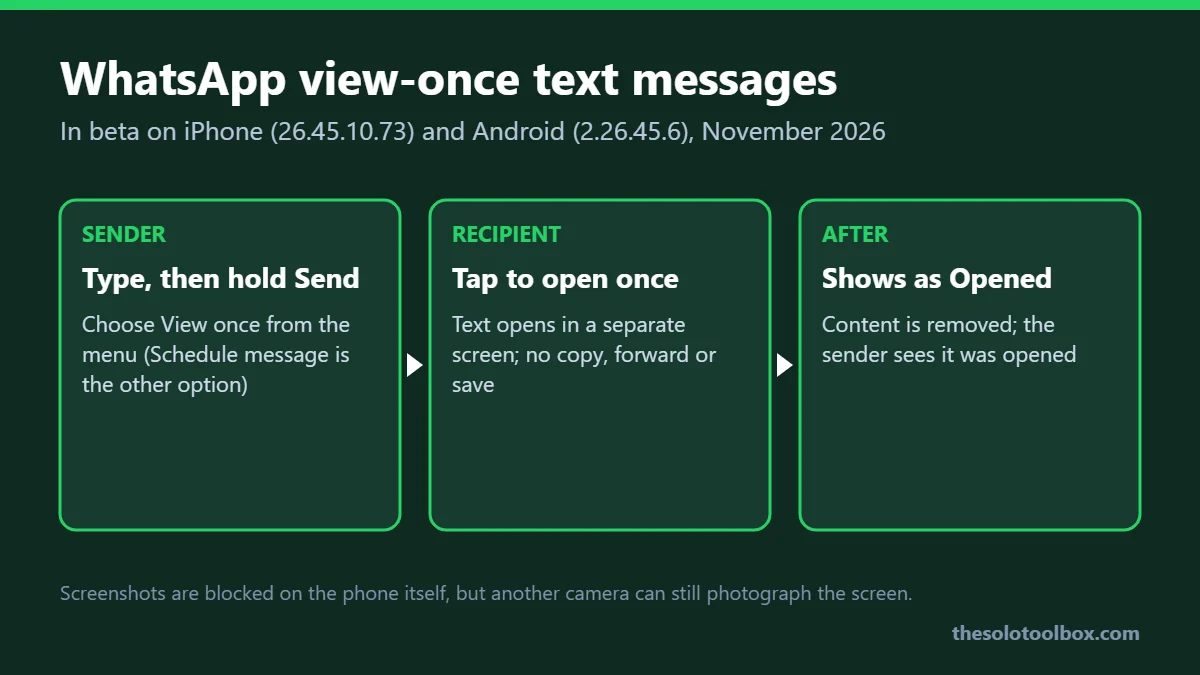
WhatsApp is testing view-once text messages: you type a message, press and hold the send button, and choose View once. The recipient can open it one time, can’t copy, forward or save it, and on iPhone can’t screenshot or screen-record it. As of November 23, 2026 it’s only in beta (WhatsApp for iOS beta 26.45.10.73 and Android beta 2.26.45.6), so most people won’t see the option yet.
Below: how sending and opening works, what the protection does and doesn’t cover, how it differs from disappearing messages, and how to get it early if you want to.
Before you start
- Applies to: WhatsApp beta testers on iPhone (TestFlight) and Android (Google Play beta). The regular App Store and Play Store versions don’t have it yet.
- Already available to everyone: view once for photos, videos and voice messages. This new option adds plain text.
- Check your WhatsApp version: Settings > Help > App info on Android, or Settings > Help on iPhone.
- How we checked this: on November 23, 2026 we read WABetaInfo’s report on the iOS beta, published that day, and its earlier Android beta coverage. WhatsApp and Meta haven’t announced the feature or a release date.
How to send a view-once text message on WhatsApp
If your account has the feature, WhatsApp shows a short notice above the chat bar explaining it. Then:
- Open a chat and type your message.
- Press and hold the send button instead of tapping it.
- In the menu that appears, choose View once. The other option in the same menu is for scheduling a message.
- The message sends straight away as a view-once message.
There’s no extra confirmation step, so check the text before you pick View once. WABetaInfo’s report covers one-to-one chats; it doesn’t say whether groups support it, and we couldn’t confirm that.
What the recipient sees
- The message arrives as a closed bubble. Tapping it opens the text on a separate screen that explains the privacy protections.
- Pressing and holding the message shows no action menu, so there’s no Copy, Forward, Reply or Star.
- Once they close that screen, the text is gone from the chat and replaced with an Opened label.
- You, as the sender, can see that it was opened.
What view-once text doesn’t protect against
The feature stops the easy ways of keeping a message. It doesn’t stop someone who’s determined:
- A second camera. The screenshot block only works on the recipient’s own phone. Anyone can photograph the screen with another device.
- Reading it aloud or retyping it. The recipient sees the full text, so they can repeat it.
- Android screenshots. WABetaInfo’s iOS report confirms the screenshot and screen-recording block on iPhone. We couldn’t confirm the Android beta behaves the same way.
Treat view once as a way to keep a message from sitting in someone’s chat history, not as a guarantee nobody keeps it. Signal made a similar point when it started blocking screenshots; our guide to Signal’s screenshot block explains the same limits.
View once vs disappearing messages
| View-once text | Disappearing messages | View-once photo, video or voice | |
|---|---|---|---|
| Removed when | After the recipient opens and closes it | After a timer (24 hours, 7 days or 90 days), read or not | After the recipient opens it |
| Applies to | One message you choose | Every new message in the chat | One media message you choose |
| Copy or forward | Blocked | Allowed before it disappears | Blocked |
| Screenshots | Blocked on iPhone | Allowed | Blocked |
| Available | Beta only (November 2026) | Everyone | Everyone |
Use disappearing messages when you want a whole conversation to clear itself over time. Use view once for a single message you don’t want left in the chat, such as a door code or a Wi-Fi password.
How to get WhatsApp view-once text messages now
WhatsApp says nothing about timing yet. WABetaInfo reports the feature is reaching some beta testers and will expand over the coming weeks. Features usually reach the regular app after the beta rollout, but there’s no promise of a date.
On Android
- Open the WhatsApp page in the Google Play Store.
- Scroll to Join the beta and tap Join. If the beta is full, the option won’t appear.
- Update WhatsApp from the Play Store once you’re accepted.
- Check Settings > Help > App info for a version of 2.26.45.6 or later.
On iPhone
The iOS beta runs through Apple’s TestFlight app, and WhatsApp’s TestFlight spots are often full. If you can’t get in, wait for the App Store release. Don’t install WhatsApp builds from other websites: unofficial versions can get your account banned and are a common way to spread malware.
Beta builds can be less stable. If you use WhatsApp for business, stay on the regular version and keep it current; our WhatsApp security update guide shows how to check you’re on a patched version.
FAQ
Can you screenshot a WhatsApp view-once text message?
Not on iPhone. WhatsApp blocks screenshots and screen recording of view-once text in the iOS beta. Someone can still photograph the screen with another phone.
Does the sender know when a view-once message is opened?
Yes. After the recipient opens and closes it, the sender sees an Opened label in the chat.
Why don’t I have view-once text messages on WhatsApp?
As of November 23, 2026 it’s only in WhatsApp beta (iOS 26.45.10.73 and Android 2.26.45.6) and rolling out to some testers. The regular app doesn’t have it yet.
Is view once the same as disappearing messages?
No. Disappearing messages delete every message in a chat after a set time. View once applies to a single message and removes it as soon as the recipient has opened it.
What to do next
If you need to send something sensitive today, send it as a view-once photo of the text, which works for everyone now, or turn on disappearing messages for that chat. Once the text option reaches your app, you’ll see the notice above the chat bar, and holding the send button will show View once. If you’re on iPhone, make sure your iOS version still meets WhatsApp’s minimum; see WhatsApp’s iOS 15.5 requirement.
Sources
- WABetaInfo: WhatsApp introduces view-once text messages on iOS (November 23, 2026)
- WABetaInfo: WhatsApp beta news, including the Android 2.26.45.6 beta report
- WhatsApp Help Center: About view once
Last checked: November 23, 2026. If something here is out of date, let us know.