Todoist Data Breach: What to Do If You Got the Email
The Solo Toolbox · Software Help for One-Person Businesses
Doist, the company behind Todoist, says an attacker who stole an internal development credential copied the email addresses and old password hashes of about 6% of Todoist users on November 23, 2026. A much smaller group also had API tokens, Slack tokens, credential-like task text or connected Outlook mail exposed. If you didn’t get an email from Todoist about it, Doist says you don’t need to do anything; if you did, the steps depend on which group you are in.
Below: what was taken, how to tell whether you’re affected, and the exact settings to change in Todoist and elsewhere.
Before you start
- Who this is for: anyone with a Todoist account, especially people who received a security email from no-reply@notify.todoist.com on or after November 24, 2026.
- Most urgent if: you created your Todoist password more than ten years ago and used the same password anywhere else.
- How we checked this: on November 25, 2026 we read Doist’s incident notice in the Todoist Help Center (published November 24, updated with an FAQ on November 25), Todoist’s help pages for passwords, two-factor authentication and API tokens, and TechCrunch’s report. We could not see a copy of the email Doist sent to affected users.
What happened
According to Doist’s timeline (all times UTC), the attacker first used a stolen development credential on November 22 at 14:04. That gave access to Doist’s code repositories, where the attacker changed automated workflows in three repositories to collect more credentials. Doist says no application code was changed.
On November 23 the attacker obtained an administrator credential for Doist’s employee sign-in system, changed one employee’s authentication settings and signed in to Doist’s cloud infrastructure. From 09:08 they had access to production databases, and between 12:45 and 12:51 they exported records containing email addresses and legacy password hashes. Later queries pulled tokens, searched for credential-like text and reached connected Outlook mailboxes.
Doist’s monitoring flagged an unexpected admin account at 17:01, and the attacker was cut off by 17:42. Doist disabled the Todoist for Outlook add-in on November 24 and began emailing affected users at 16:11 that day. CEO Amir Salihefendić apologized publicly on X.
What data was exposed
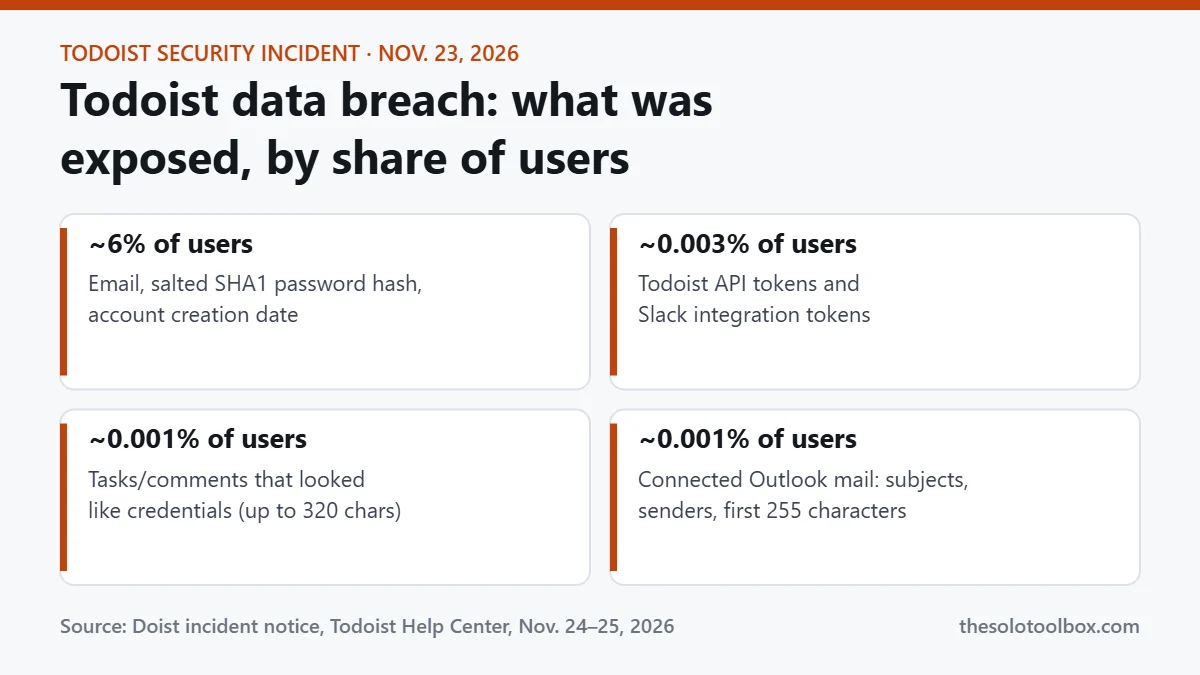
Doist splits affected users into four groups. Most people affected are only in the first one.
| Group | Share of users | What was exposed |
|---|---|---|
| Legacy password hashes | About 6% | Email address, salted SHA1 password hash, account creation date |
| Integration tokens | About 0.003% | Todoist API tokens and Slack integration tokens |
| Credential-like content | About 0.001% | Tasks, comments and attachment names that looked like passwords or keys (up to 320 characters each) |
| Connected Outlook mail | About 0.001% | Email subjects, senders, first 255 characters of messages, attachment names and links |
The password hashes belong to accounts whose password hadn’t changed in more than a decade. SHA1 is a fast hashing method, so weak or common passwords stored that way can be cracked quickly. Doist says it found no sign that the attacker signed in to those accounts, and it has now retired SHA1 hashing.
Doist says Google and Apple account passwords were not affected, the full task and comment database was not downloaded, and application code was not modified. Its notice doesn’t mention payment or billing data at all, so we can’t say either way.
How to tell if you’re affected
Search your inbox for mail from no-reply@notify.todoist.com sent on or after November 24, 2026. Doist says each affected user got an email describing what applied to their account. If you have no email, Doist’s advice is that no action is needed.
You may also notice the effects directly. For affected accounts Doist disabled passwords, revoked API tokens, disconnected third-party apps that use OAuth, and signed users out of active sessions. Being logged out of Todoist on every device this week is a sign your account was in one of the groups.
What to do, step by step
- Set a new Todoist password. If your password was disabled, reset it at app.todoist.com/auth/password. If you can still log in, change it on the web from your avatar: Settings > Account > Password > Change password. On Android it’s the gear icon, then Account > Change Password; on iPhone, Browse, the gear icon, then Account > Change Password.
- Change the same password everywhere else. If your old Todoist password was used on any other site, change it there first, starting with email and banking. A cracked SHA1 hash gives an attacker the plain password to try elsewhere.
- If you sign in with Google or Apple, Doist says users whose separate Todoist password was reset must set a new one before Google sign-in works again.
- Turn on two-factor authentication. On the web: avatar, Settings > Account, then switch on Two-factor authentication. On mobile: Browse, gear icon, Account. Todoist supports authenticator apps (six-digit codes) but not physical security keys. Save the recovery codes it shows you.
- Replace your API token if you use scripts or automations. Doist revoked exposed tokens. Get the current one under Settings > Integrations > Developer and paste it into anything that uses it, such as Zapier-style automations or your own scripts. Choosing Issue a new API token also logs you out on every device, which is useful if you want a clean start.
- Reconnect Slack and Outlook. Slack users can reconnect at todoist.com/slack/begin. Doist has released a new Outlook add-in; it may show as unverified until Microsoft finishes its review, and work or school admins may block it until then.
- Rotate any secrets you kept in tasks or comments. If you stored a password, API key or recovery code in Todoist, change it with the service it belongs to. Deleting the comment doesn’t help if the text was already copied.
Watch for follow-up phishing
Email addresses from a breach are often reused in phishing that quotes the incident. Doist says its only notification about this incident comes from no-reply@notify.todoist.com, and that it won’t ask you to send your password or install software in response to it. Ignore any message asking you to “confirm your account” through a link; go to todoist.com directly instead. If you see something suspicious, Doist has an incident contact form on its site.
If you already entered your password into a fake page, our guide to what to do first when your passwords are stolen walks through the order of changes. If the reused password protected your work email, also read what to do if your business email account is hacked.
Frequently asked questions
Were my tasks stolen?
Doist says the attacker ran targeted searches for credential-like text on one database shard and didn’t download the full task and comment database. About 0.001% of users had matching items returned.
Do I need to delete my Todoist account?
Doist hasn’t suggested it, and deleting the account wouldn’t undo data that was already copied. A new password, two-factor authentication and replacing any stored secrets do more.
Was my payment card exposed?
Doist’s notice doesn’t mention billing data. If you’re worried, check your card statement for charges you don’t recognize.
Why is a ten-year-old password a problem?
Doist stored older passwords with salted SHA1, which modern hardware can test very quickly. A strong, unique password is still hard to recover; a short or reused one isn’t.
What to do next
Open Todoist now and turn on two-factor authentication, even if you weren’t affected. It takes about two minutes with an authenticator app. Developers using leaked tokens elsewhere will find a similar checklist in our Together AI prompt leak guide.
Related guides
Sources
- Todoist Help Center: Security incident in November 2026 (published November 24, updated November 25, 2026)
- TechCrunch: Todoist confirms 6% of customers’ details were stolen in data breach (November 25, 2026)
- Amir Salihefendić on X: apology for the incident
- Todoist Help Center: Change your password
- Todoist Help Center: Set up two-factor authentication
- Todoist Help Center: Find your API token
- Todoist Help Center: Use Outlook mail with Todoist
Last checked: November 25, 2026. If something here is out of date, let us know.