Tesla FSD v15 Update: What’s New and Which Cars Get It
The Solo Toolbox · Software Help for One-Person Businesses
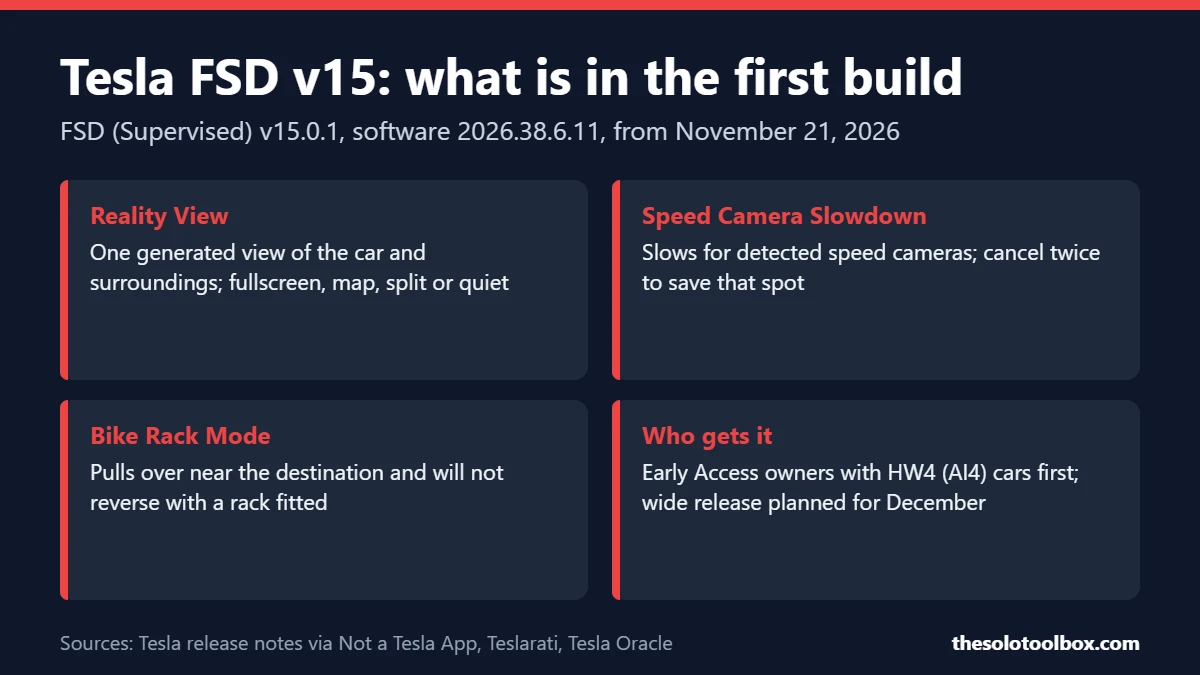
Tesla FSD v15 is rolling out now, but only to a small Early Access group with HW4 (AI4) cars. The first customer build is FSD (Supervised) v15.0.1 in software 2026.38.6.11, released from November 21, 2026, and it adds Reality View, Speed Camera Slowdown and Bike Rack Mode. Elon Musk says a wide release follows in December with the Holiday Update. Cars with Hardware 3 are not getting v15.
Below: what the release notes list, which cars qualify, how to be early in the queue, the settings you’ll use, and what Tesla hasn’t backed up yet.
Before you start
- You’ll need: a Tesla with HW4 (AI4) and an active FSD (Supervised) purchase or subscription. Tesla lists your car’s FSD computer under Controls > Software.
- Applies to: owners waiting for v15, and HW3 owners wondering whether it will reach their car.
- How we checked this: on November 22, 2026 we compared the v15.0.1 release notes published by Not a Tesla App, Teslarati and Tesla Oracle, read Gizmodo’s report on the launch, and checked menu paths against Tesla’s Model Y owner’s manual. We have not driven v15. Tesla has not published a baseline for its safety claim, and some features listed by third-party trackers are not in Tesla’s notes.
What is new in FSD v15
The three release-note copies we compared agree on these changes:
- New vision encoder. Shared by FSD, Robotaxi and Optimus and trained on internet video. Tesla says it improves the “critical intervention rate by 25x”.
- Tesla Reality View. Replaces the old set of on-screen signals with one end-to-end visualization that uses less compute. Teslarati’s copy calls it “Tesla Augmented Reality”; the other two say Reality View.
- Learned navigation. A model trained on fleet route preferences now handles the start and end of a trip. Teslarati reports that full-route handling comes in later v15 releases.
- Parking choice. FSD uses your own parking history and the map shows several parking options at the destination.
- Driver monitoring. Camera-based attention monitoring works in more cases with hats and sunglasses, and is less strict in higher-speed driving profiles.
- Detection. Better handling of road signs, small animals, debris, chains, potholes and deep standing water.
- Speed. Better speed choice per driver profile, in school zones, at speed limits and in bad weather.
- Autoshift. Now uses the same FSD-based gear predictions.
Reality View
Reality View draws a generated, real-time scene from a virtual camera above the car. You can show it fullscreen, on the map, in split view, or switch to a quiet mode. Upcoming turns appear inside the scene, and the turn-signal sound is quieter and fades after a few clicks. None of the sources gives a menu path for these view options, so look for them on the driving visualization itself once the update installs.
Speed Camera Slowdown
FSD (Supervised) can now slow down when it detects a speed camera. Press the accelerator or raise the speed profile to cancel. If you cancel twice at the same camera, the car saves the location and stops slowing there. To clear saved cameras, go to Controls > Service > Manage Saved Locations.
Bike Rack Mode
With a bike rack or similar hitch accessory fitted, you can engage FSD (Supervised), and it will pull over near the destination instead of reversing into a space. Autopark, Summon and the backup chimes and warnings are turned off in this mode.
Which cars get v15
| Car | FSD version | Status on November 22, 2026 |
|---|---|---|
| HW4 (AI4), Early Access member | v15.0.1 (2026.38.6.11) | Rolling out; TeslaFi tracked 5 cars on the build |
| HW4 (AI4), not in Early Access | v15 | Musk says wide release in December with the Holiday Update; no date |
| HW3 Model 3 and Model Y | v14.3 Lite | v15 not supported, according to Tesla Oracle and Not a Tesla App |
| HW3 Model S and Model X (Intel and AMD) | v14.3 Lite (from 2026.38.5.1) | No v15; fewer v14 Lite features than HW3 Model 3/Y |
Tesla’s Early Access Program is invite-only. Tesla Oracle describes the first group as experienced owners with strong Safety Scores and large social followings. None of the sources we read says whether the first wave is limited to the US.
How to get FSD v15 sooner
- On the touchscreen, tap Controls > Software.
- Under Software Update Preference, choose Advanced. Tesla’s manual describes Advanced as the early-adopter setting that gets more releases; Standard waits until other cars have installed them. Advanced does not enroll you in Early Access.
- Keep the car on Wi-Fi. A yellow download icon at the top of the screen means it is waiting for a connection.
- When the yellow clock icon appears, tap it and choose Install Now or Set For This Time. You can also start the install from the Tesla app.
- After the install, open Controls > Software > Release Notes to confirm the version reads 2026.38.6.11 or later with FSD v15.
There is no button that forces an update. Advanced only moves you earlier in a staged rollout, and the December wide release depends on Tesla’s own schedule.
What about HW3 owners?
HW3 cars stay on the distilled “Lite” branch. Tesla started FSD v14 Lite on HW3 Model 3 and Model Y in late June 2026 (firmware 2026.20.5.1), then brought v14.3 Lite to Intel-based Model S and Model X with 2026.38.5.1 in October. Not a Tesla App reported then that v14 Lite is the last major FSD branch for HW3 and that HW3 won’t get v15 or unsupervised FSD.
What Tesla has not proven
- The 25x figure has no baseline. Tesla hasn’t said which version it compares against or how it counts a “critical intervention”, so treat it as a company claim.
- Fixes Musk promised. He said v14 problems such as refusing HOV lanes and late lane changes “should be fixed in V15”. That is a promise, not a release note.
- Undocumented features. Not a Tesla App lists extras it found in 2026.38.6.11 that aren’t in Tesla’s notes, such as removal of the disengagement feedback prompt and a Calm Mode showing only speed, speed limit, next turn and arrival time. Expect these to vary by car.
v15 is still FSD (Supervised), a Level 2 system. You must watch the road and be ready to take over, and the camera-based monitoring will warn you if you don’t.
If you also drive with a phone-projection system, our guide to fixing Android Auto after One UI 9 covers the other in-car software problem people are hitting this month. For phone updates landing at the same time, see the Pixel November 2026 update.
Frequently asked questions
When will FSD v15 be released to everyone?
Musk says wide release comes in December 2026 with the Holiday Update. Tesla hasn’t given a date, and staged rollouts often take weeks to reach every car.
Does FSD v15 work on HW3?
No. Reports based on Tesla’s release information say v15 is for HW4 (AI4) cars only. HW3 cars run v14.3 Lite.
Does choosing Advanced updates put me in Early Access?
No. Tesla’s manual says the Advanced preference doesn’t enroll you in the Early Access Program. It only puts you earlier in the regular rollout.
Is FSD v15 unsupervised?
No. The customer build is FSD (Supervised) and still requires an attentive driver.
What to do next
If you have an HW4 car, switch Software Update Preference to Advanced and leave the car on Wi-Fi overnight. When v15 arrives, read the release notes before your first drive and try Reality View’s view modes while parked.
Sources
- Not a Tesla App: 2026.38.6.11 (FSD 15) release notes
- Teslarati: Tesla Full Self-Driving v15 rollout begins
- Tesla Oracle: Tesla FSD v15 (2026.38.6.11) rollout begins (November 22, 2026)
- Gizmodo: Musk touts video game-like update to Tesla FSD
- Tesla Model Y Owner’s Manual: Software Updates
- Not a Tesla App: Tesla rolls out FSD v14 Lite to legacy Model S/X (October 14, 2026)
- Electrek: Tesla FSD v14 Lite HW3 rollout (June 29, 2026)
Last checked: November 22, 2026. If something here is out of date, let us know.