GTA 6 Preload: Date, Time and How to Free Up 212 GB
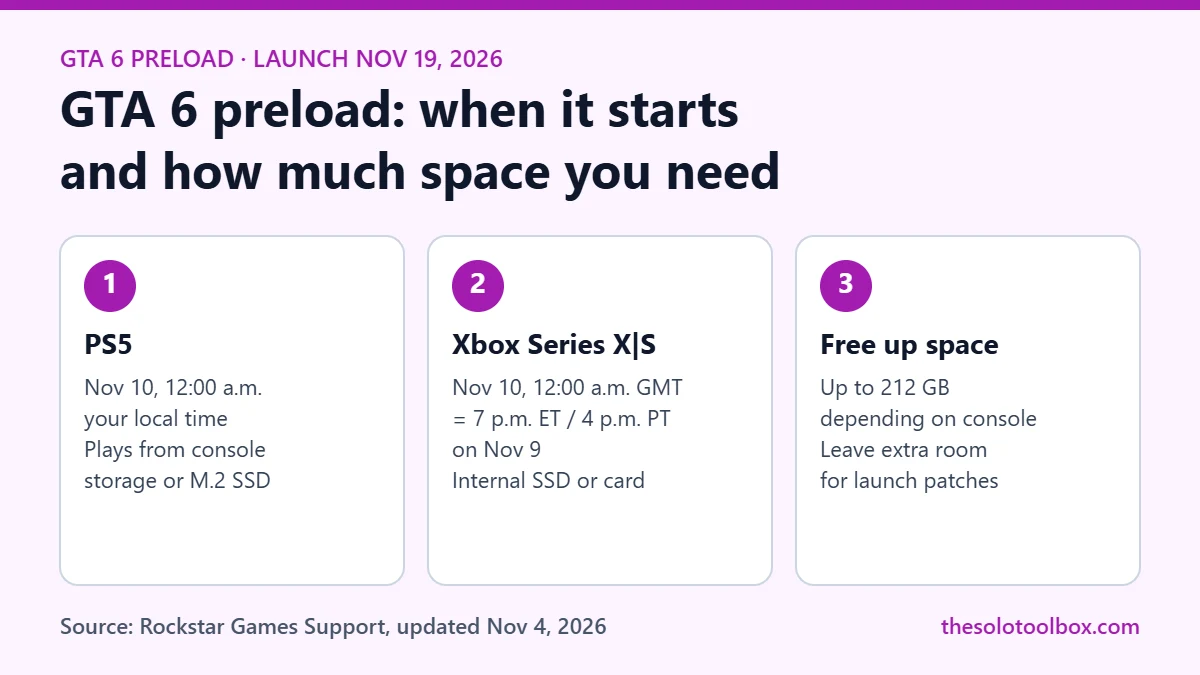
GTA 6 preloading opens on November 10, 2026. On PS5 it starts at midnight local time in your time zone. On Xbox Series X|S it starts globally at 12 a.m. GMT, which is 7 p.m. ET or 4 p.m. PT on November 9. Rockstar says the download is up to 212 GB depending on your console, so clear that space before the 10th. The game launches November 19.
Below: the preload times for each platform, how much room you need, what to do if you bought the boxed version, and the fastest ways to free space on PS5 and Xbox.
Before you start
- Who this is for: anyone with a digital or boxed pre-order of Grand Theft Auto VI on PS5 or Xbox Series X|S.
- What you need: at least 212 GB of free space on a drive that can play the game, plus some headroom for launch-day patches.
- Note: Rockstar moved preloading earlier. Guides published before November 3 list November 12, which is now the date boxed copies reach stores.
GTA 6 preload date and time by platform
Rockstar’s support article, last updated November 4, 2026, gives different start times for each console.
| Platform | Preload starts | In US time zones | Launch |
|---|---|---|---|
| PS5 | November 10, 12:00 a.m. local time | Midnight in your own time zone | November 19, 2026 |
| Xbox Series X|S | November 10, 12:00 a.m. GMT (one global time) | 7 p.m. ET / 4 p.m. PT on November 9 | November 19, 2026 |
Because PS5 uses local midnight, players in New Zealand can start first. Xbox players everywhere start at the same moment, so Xbox owners in the Americas get access on the evening of November 9.
Rockstar has only confirmed PS5 and Xbox Series X|S. There is no PC version or date announced.
How big is the GTA 6 download?
Rockstar confirmed on November 3 that the preload is “up to 212 GB” depending on the device. It has not published separate PS5, Xbox Series X and Xbox Series S figures, so plan for the full 212 GB.
For scale, Microsoft’s figures put usable space at about 802 GB on a 1 TB Xbox Series X and about 364 GB on a 512 GB Xbox Series S. On a 512 GB Series S, GTA 6 alone would take more than half the usable space. On any console, check the free space shown in system settings rather than relying on the advertised drive size.
Leave extra room beyond 212 GB. Large games usually receive patches at or after launch, and a console that is full to the last few gigabytes may not be able to install them.
Bought the boxed version? There is no disc
The physical edition contains a download code, not a game disc. Rockstar says boxed copies should be available from retailers starting November 12, and codes can be redeemed as soon as you have them, which lets you join the preload. If your copy arrives after November 10, redeem the code on arrival and the download starts then.
Two code rules to know before you buy a box:
- PlayStation codes are region-locked. They only work on accounts registered in the same region group (for example, US and Canada form one group, and the UK is its own). Buy from a retailer in your account’s country.
- Xbox codes are not region-locked, according to Rockstar.
Digital pre-orders and purchases made before November 20 include the Vintage Vice City Pack. A physical Ultimate Edition does not exist; boxed Standard Edition owners can buy the Ultimate Edition Upgrade digitally after redeeming their code.
How to free up space on PS5
Sony’s support page says to check free space at Settings > Storage from the home screen.
- Go to Settings > Storage and select Console Storage to see what is using space.
- Open Games and Apps and delete titles you are not playing. Your saved data stays on the console unless you delete it separately.
- Move PS5 games you want to keep to a USB extended storage drive. Sony notes you must move PS5 games back to console storage or an M.2 SSD before you can play them, so USB storage works as a holding area, not a place to run GTA 6.
- If you have an M.2 SSD installed in the expansion slot, PS5 games can be stored and played from it.
- Clear old screenshots and video clips in Media Gallery, which can add up on consoles used for a few years.
If you subscribe to PlayStation Plus, you can upload saves under Settings > Saved Data and Game/App Settings before deleting a game, so you can pick it up again later.
How to free up space on Xbox Series X|S
- Go to Settings > System > Storage devices to see free space on the internal drive and any connected drives.
- Open My games & apps, select See all, then Manage to review installed games by size and uninstall the ones you are not playing.
- Move games built for Xbox Series X|S to a USB drive only for storage. They have to run from the internal SSD or an official Storage Expansion Card.
- Older Xbox One and Xbox 360 games can run from a USB 3.1 drive, so moving those off the internal SSD frees room without losing access.
- Games from Game Pass or the cloud do not need to stay installed. Reinstall them later from your library.
Common preload questions
Will GTA 6 preload automatically?
That depends on your console’s settings and whether the pre-order is digital. With a digital pre-order, check that automatic downloads are allowed in your console’s system settings, then confirm the download has started in your game library on November 10.
Can I play as soon as the preload finishes?
No. The preload lets you download the game early. The game becomes playable on November 19. Rockstar has not published a single global release time.
Can I preload GTA 6 onto an external drive?
On Xbox Series X|S, the game needs to be on the internal SSD or a Storage Expansion Card to play. On PS5, a supported M.2 SSD works; USB extended storage can only hold PS5 games, not run them.
Is there a PC version of GTA 6?
Not yet announced. Rockstar lists only PS5 and Xbox Series X|S.
Related guides
- How to get Xbox Game Pass with T-Mobile T-Mix plans
- Steam stuck on “loading user data”? What happened and how to fix it
- Best Tech Deals Today: November 5, 2026
Next step: open your console’s storage screen today, note the free space, and clear what you need before November 10 so the preload can start on time.
Sources
How we checked: on November 5, 2026, we read Rockstar’s support article on GTA VI platforms, editions and pre-loading (updated November 4, 2026), Video Games Chronicle’s report on Rockstar’s November 3 pre-load announcement, and Sony’s PS5 storage support page. Xbox usable-storage figures come from Microsoft’s statements as reported by Windows Central. Rockstar has not published per-console download sizes or an exact global release time.
- Rockstar Games Support: Grand Theft Auto VI Platforms, Editions, and Versions
- VGC: Rockstar details Grand Theft Auto 6 pre-load date and time, and file size (November 3, 2026)
- PlayStation Support: How to manage storage space on your PS5 console
- Windows Central: Xbox Series X internal SSD has 802GB of usable storage