Steam stuck on “loading user data”? What happened and how to fix it
If Steam is stuck on Loading user data, the cause on October 26, 2026, was on Valve’s side, not your PC: thousands of players worldwide hit the same screen at once while Steam’s servers still showed as online. Reports returned to normal by about 11:00 a.m. ET. If you are still stuck, fully quit Steam, disconnect from the internet, reopen Steam, and reconnect once it reaches the login or offline screen.
Below: what happened during the October 26 problem, the fixes players reported working, the ones that did not help, and what to check if the screen comes back.
Before you start
- You’ll need: The Steam desktop app on Windows, macOS or Linux
- Time: 5 to 10 minutes
- Before you start: Do not clear your download cache or reinstall Steam yet. Several affected players had just cleared the cache, and neither step fixed the October 26 problem
What happened to Steam on October 26
Reports on Downdetector started climbing early on Monday, October 26, 2026. TechRadar logged the first wave at around 4:00 a.m. ET, and PC Gamer saw it accelerate from about 6:00 a.m. ET. By around 9:05 a.m. ET, Downdetector showed close to 500 reports in the US and about 450 in the UK, with Reddit users in Germany, the Netherlands, Spain, Japan and Russia describing the same thing.
The symptom was consistent: the Steam client opened, showed Loading user data, and never reached the library. Steam’s status dashboards stayed green the whole time, which points to a login or account-service bug rather than a full outage. Store pages and downloads kept working for people who were already signed in.
Report counts dropped after roughly 10:25 a.m. ET and were back at baseline by about 11:00 a.m. ET, when most players said they could sign in again. As of this writing, Valve has not published a cause or acknowledged the issue. It was not scheduled maintenance, which normally happens on Tuesdays in the US (Wednesday 00:00 UTC).
How to tell if it’s Steam or your PC
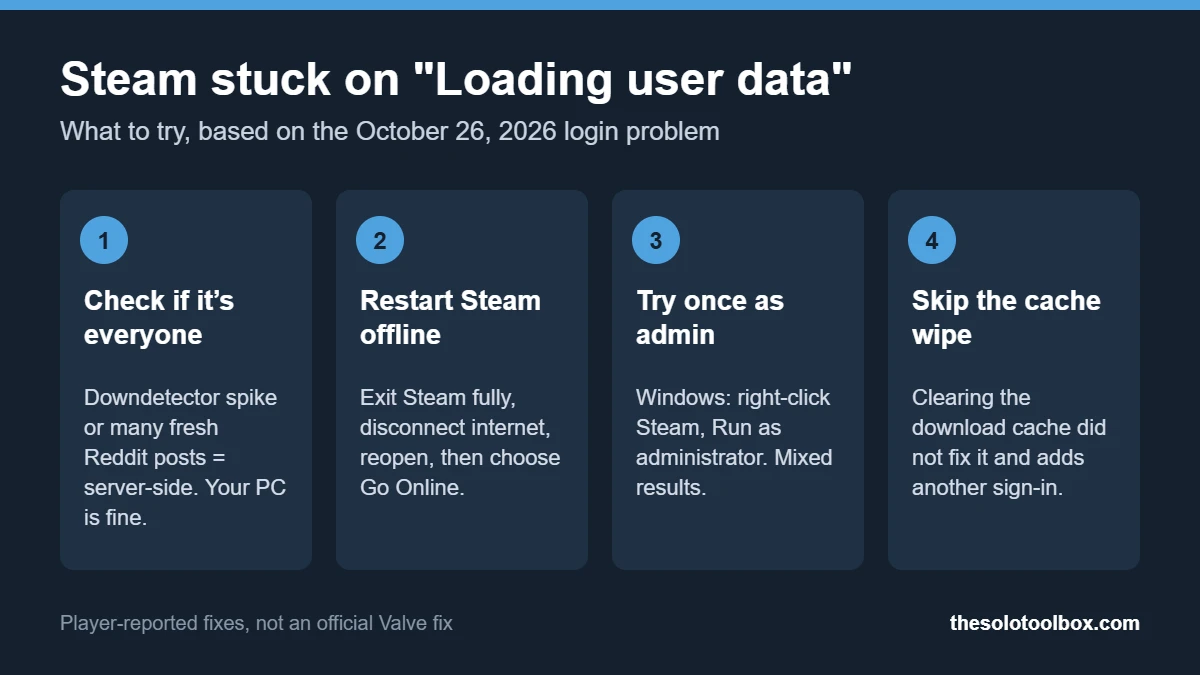
Check this before changing any settings. If thousands of people have the same problem at the same time, nothing on your computer will fix it.
- Open Downdetector’s Steam page and look for a sharp spike in the last hour.
- Search Reddit or X for “loading user data” sorted by newest. Dozens of posts within minutes means it’s server-side.
- Check a third-party status page such as SteamStat or SteamDB. A green status does not rule out a login bug, as October 26 showed.
- Try another device. If the Steam mobile app or the store website on a phone also can’t sign you in, the problem is not your PC.
Our guide on how to check if a website is down for everyone covers these tools in more detail.
Fixes that worked for some players
These came from affected players on Reddit and were collected by TechRadar and PC Gamer. Results were mixed; none is an official Valve fix. Try them in order.
1. Restart Steam while offline
- Quit Steam completely. On Windows, right-click the Steam icon in the system tray and select Exit Steam, then check Task Manager for any leftover Steam Client processes and end them.
- Disconnect from the internet: turn off Wi-Fi or unplug the Ethernet cable.
- Open Steam. It should skip the stuck screen and offer to start in offline mode.
- Once Steam is open, reconnect to the internet. In the client, open the Steam menu and select Go Online.
Offline mode only works if you have signed in on that PC before and chose to save your credentials. Games that need a server connection will not run until Steam is back online.
2. Run Steam as administrator (Windows)
A few players said that closing Steam on the loading screen and reopening it with right-click > Run as administrator got them past it. Others saw no change. Use this once as a test; you do not need to set Steam to always run as administrator.
3. Wait it out
PC Gamer’s own login finished after nearly five minutes. If the spinner is still moving and outage reports are high, leaving Steam on the screen for several minutes is a reasonable option, and it avoids making changes you will need to undo.
What didn’t help on October 26
| Step | Result reported | Why |
|---|---|---|
| Restarting the PC | Did not help most players | The problem was on Valve’s servers |
| Clearing the download cache | Did not help; several people had just done it | It signs you out and adds a login, which is the step that was failing |
| Changing the download region | Did not help | Download servers were not the issue |
| Reinstalling Steam | Not needed | Risks re-downloading or re-verifying games for no benefit |
If Steam gets stuck on loading user data again
The same screen also appears for local reasons, such as a corrupted client update or a firewall blocking Steam after an update. If there is no outage spike, work through these:
- Restart Steam and the PC once, then try again.
- Make sure your firewall or antivirus did not block steam.exe or steamwebhelper.exe after a recent update.
- Turn off any VPN or proxy and try again.
- Check the date and time on your PC. A wrong system clock can break secure sign-in.
- If you recently had Windows update problems, see our fix for games crashing after the Windows 11 update.
- Contact Steam Support at help.steampowered.com if none of these work, especially if you suspect someone changed your password.
FAQ
Is Steam down right now?
The October 26 login problem had cleared for most players by about 11:00 a.m. ET. For the current state, check Downdetector and recent posts on Reddit, since Steam’s own status pages did not reflect this issue.
Did Valve say what caused it?
Not as of October 26, 2026. Valve had not posted an explanation or acknowledged the problem when we checked.
Is my Steam account hacked if it says loading user data?
Not by itself. The screen appeared for thousands of accounts at once. If you see unknown purchases, a changed email or Steam Guard alerts you did not trigger, contact Steam Support.
Will I lose my games or save files?
No. The problem affected signing in to the client. Your library and Steam Cloud saves are stored on your account.
Next step
If Steam is working again, take a minute to confirm that Steam Guard is on under Steam > Settings > Security. Outages are often followed by phishing messages that claim you need to “verify” your account. And if you are browsing the store while you wait, our guide on spotting AI-generated games on Steam explains what the store page disclosure does and does not tell you.
Related guides
Sources
Checked on October 26, 2026, against live coverage from TechRadar and PC Gamer and Downdetector report timings. Valve had not published a statement, so the cause is unconfirmed, and the player-reported fixes have not been tested by us.
- TechRadar: Steam “loading user data” issue live coverage (October 26, 2026)
- PC Gamer: Steam is broken, but some users can’t log in (October 26, 2026)
- Steam Support